
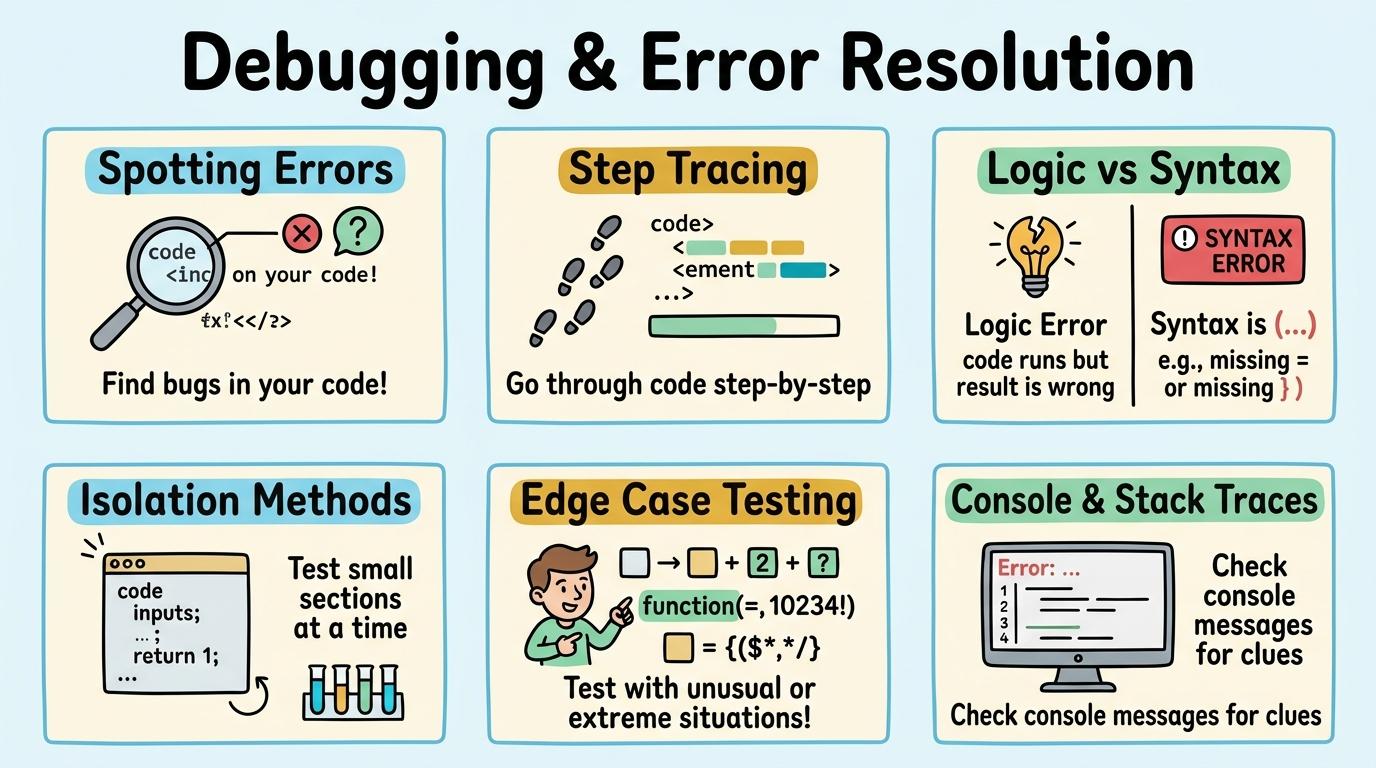
Learning objective
Debugging
Debugging & Error Resolution
1
2
3
4
5
6
Master systematic techniques to find, isolate, and fix logic, syntax, and runtime errors in programs.
Spotting Errors
Identify and fix simple errors in physical sequences and robot paths.
Let's Go!
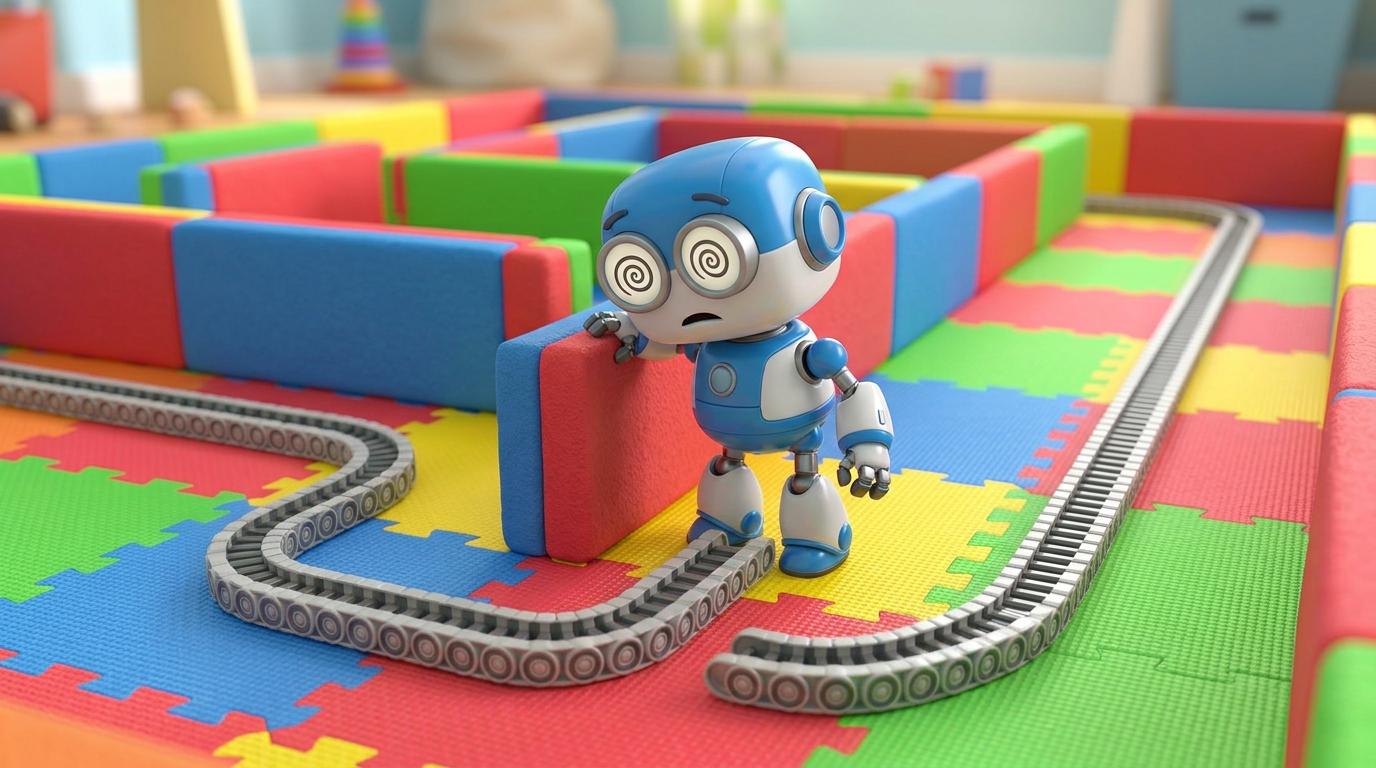
Routine: See Think Wonder
Look at this robot path where the robot hit a wall. What went wrong?
Teacher note: Facilitate the See Think Wonder routine for 2–3 minutes. Encourage students to connect the prompt to Form (Digital instructions must be precise for systems to work as expected.).
Learn
Compare a broken sequence where a sprite turns the wrong way with a corrected sequence. Debugging starts by observing where what the program actually does diverges from what you intended it to do. In computing, digital instructions must be precise for systems to work as expected. As you explore the interactive Split Screen Simulator below, focus on how to correct the erroneous step to ensure the sequence finishes successfully.
Volcanoes: Earth's Fiery Chimneys!
Melted subterranean rock called magma rises through vents. When it erupts onto the surface, it becomes glowing red lava!
🌋🔥
My Study Notes
Apply Simulator Skills • Try it yourself
Spot the Bug
🚀 Open a practice space
Or try locally: 🍓 Raspberry Pi Projects
🌟 Student Project GuideSuccess Criteria & WAGOLL (What A Good One Looks Like)
🎯 Task Success Criteria (Rubric)
Foundation
Notices when a physical robot or sprite stops at the wrong location.
Developing
Identifies which single step in a 3-step sequence caused the mistake.
Secure (Goal)
Corrects the erroneous step to ensure the sequence finishes successfully.
Mastery
Explains why the original step caused an error and demonstrates the fix.
👀 What A Good One Looks Like (WAGOLL)
Exemplar of 2
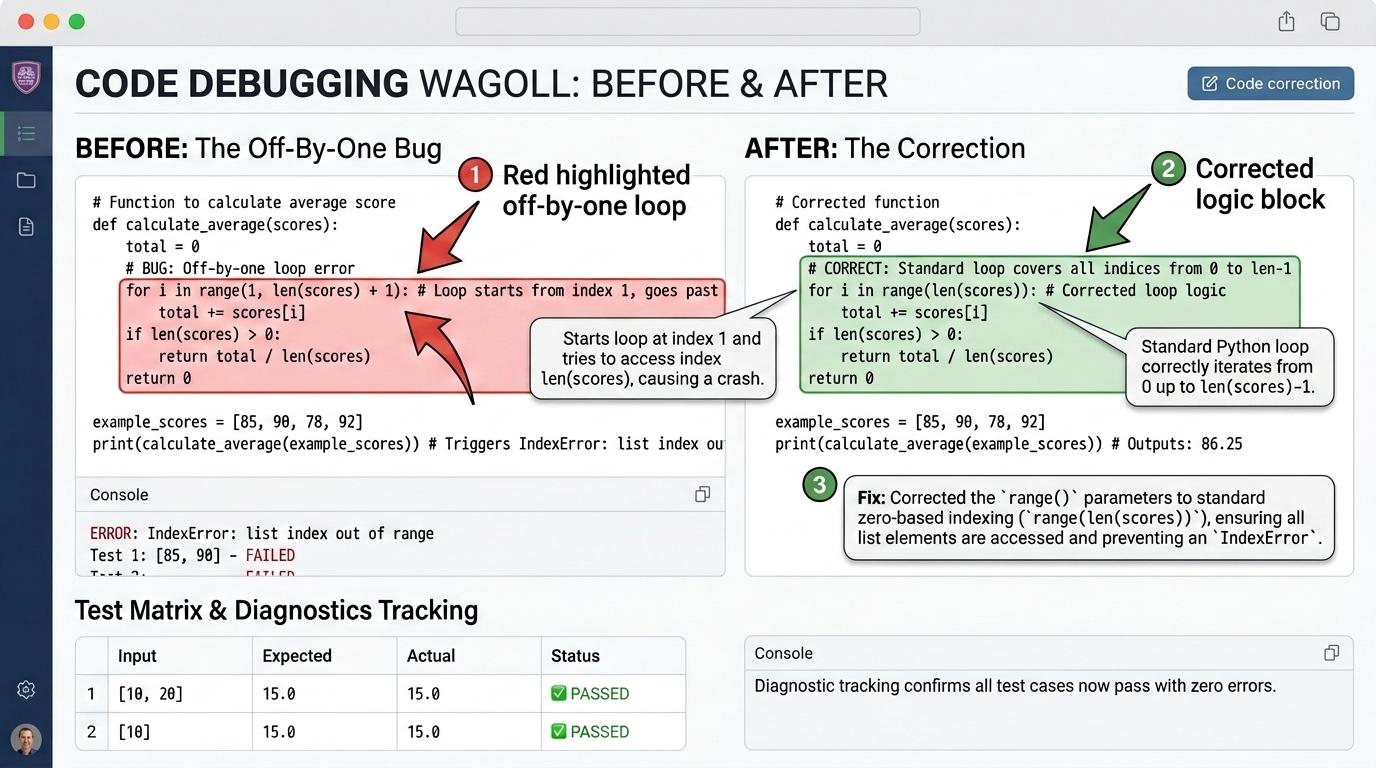 ⭐ Mastering Standard
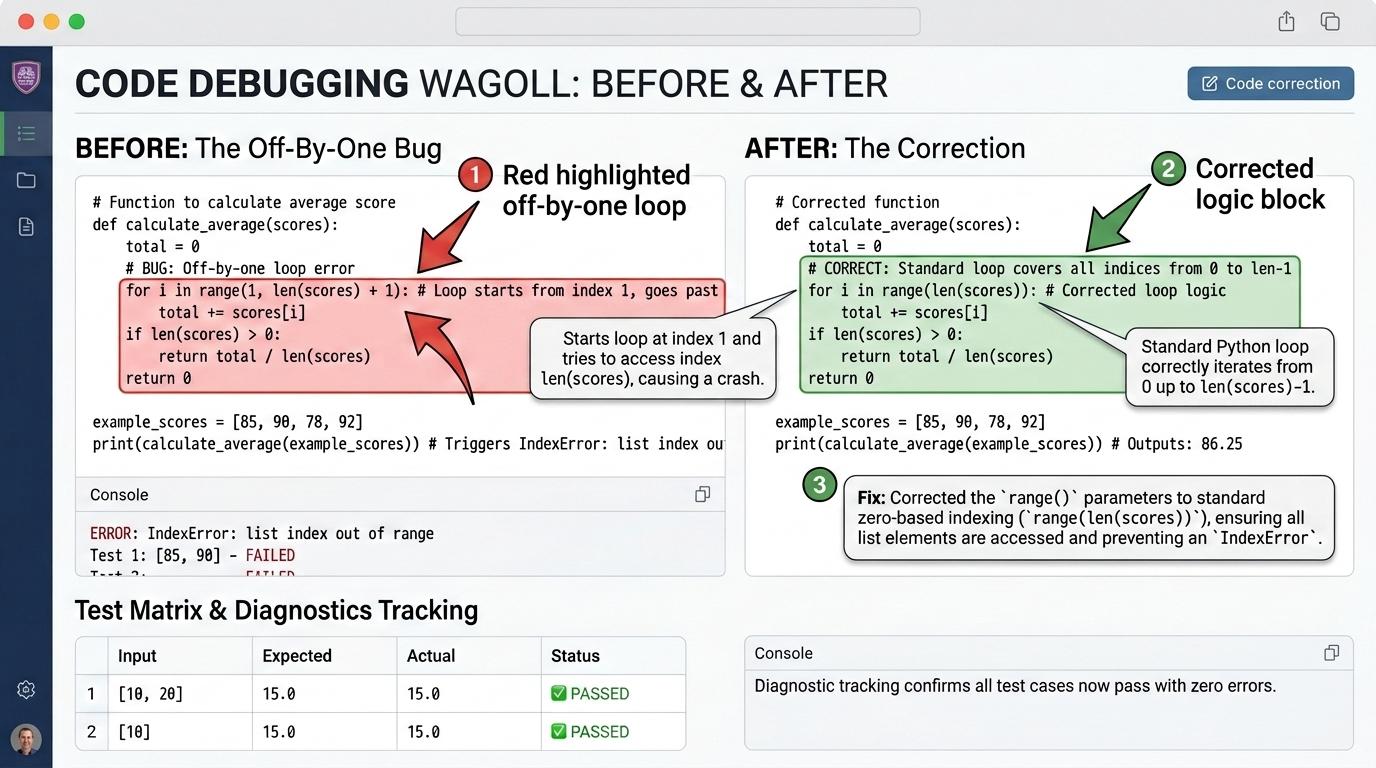 ⭐ Mastering Standard
📁
Save to Your Website Portfolio:
When you finish creating your project in your software, copy the share link or take a screenshot and publish it onto your student portfolio website!
Reflect
Learning check
Teacher setup, curriculum links and progress descriptors
Spark support
Routine: See Think Wonder
Teacher notes: Facilitate the See Think Wonder routine for 2–3 minutes. Encourage students to connect the prompt to Form (Digital instructions must be precise for systems to work as expected.).
Achievement pathway
- Foundation: Notices when a physical robot or sprite stops at the wrong location.
- Developing: Identifies which single step in a 3-step sequence caused the mistake.
- Secure: Corrects the erroneous step to ensure the sequence finishes successfully.
- Mastering: Explains why the original step caused an error and demonstrates the fix.
Curriculum links
Curriculum strand: algorithms-programming
Outcome: DBUG.01.B.1.1 — Identify and fix simple errors in physical sequences and robot paths.
PYP: Form · Digital instructions must be precise for systems to work as expected.
Learner profile: Inquirer
Competency tags
Gate support
Accessibility alternative: Students may verbally explain or point to the correct answer for "A robot was supposed to move forward twice and turn right, but turned left instead. What should you change?" with a teacher or teaching assistant.
Teacher override: allow
Locked level
Level 2: Step Tracing
Complete the previous learning check to unlock this next level.
Step Tracing
Predict program behavior by tracing execution step-by-step.
Learning objective
Trace code line-by-line or block-by-block to predict where a bug occurs.
Let's Go!
Routine: Zoom In
Zoom in on block #3 in this Scratch script. Why did the sprite jump unexpectedly?
Teacher note: Facilitate the Zoom In routine for 2–3 minutes. Encourage students to connect the prompt to Function (Tracing code step-by-step reveals where intent diverges from execution.).
Learn
Use a step-execution tool to run code one block at a time. Stepping slowly through an algorithm lets you watch each instruction execute in order and pinpoint the exact line where a bug occurs. In computing, tracing code step-by-step reveals where intent diverges from execution. As you explore the interactive Shortcut Simulator below, focus on how to trace a 5-block script manually and highlights the exact block containing the bug.
💡 Click or press keys on your physical keyboard:
📁 Source Document (Research Notes)
➔
📋 Destination Notebook (Clean Summary)
Apply Simulator Skills • Try it yourself
Trace the Code
🚀 Open a practice space
Or try locally: 🍓 Raspberry Pi Projects
🌟 Student Project GuideSuccess Criteria & WAGOLL (What A Good One Looks Like)
🎯 Task Success Criteria (Rubric)
Foundation
Follows along as code blocks highlight during execution.
Developing
Predicts where a character will land after each individual block runs.
Secure (Goal)
Traces a 5-block script manually and highlights the exact block containing the bug.
Mastery
Teaches a partner how to step through code block-by-block to find hidden bugs.
👀 What A Good One Looks Like (WAGOLL)
Exemplar of 2
⭐ Mastering Standard⭐ Mastering Standard📁
Save to Your Website Portfolio:
When you finish creating your project in your software, copy the share link or take a screenshot and publish it onto your student portfolio website!
Reflect
Learning check
Teacher setup, curriculum links and progress descriptors
Spark support
Routine: Zoom In
Teacher notes: Facilitate the Zoom In routine for 2–3 minutes. Encourage students to connect the prompt to Function (Tracing code step-by-step reveals where intent diverges from execution.).
Achievement pathway
- Foundation: Follows along as code blocks highlight during execution.
- Developing: Predicts where a character will land after each individual block runs.
- Secure: Traces a 5-block script manually and highlights the exact block containing the bug.
- Mastering: Teaches a partner how to step through code block-by-block to find hidden bugs.
Curriculum links
Curriculum strand: algorithms-programming
Outcome: DBUG.02.B.1.2 — Predict program behavior by tracing execution step-by-step.
PYP: Function · Tracing code step-by-step reveals where intent diverges from execution.
Learner profile: Communicator
Competency tags
Gate support
Accessibility alternative: Students may verbally explain or point to the correct answer for "A sprite needs to reach (100, 0). Line 1: x=0. Line 2: x=x+50. Line 3: x=x-50. Line 4: x=x+50. Which line caused the bug?" with a teacher or teaching assistant.
Teacher override: allow
Locked level
Level 3: Logic vs Syntax
Complete the previous learning check to unlock this next level.
Logic vs Syntax
Distinguish between syntax errors and logical errors in block programs.
Learning objective
Classify bugs as syntax errors (invalid structure) or logic errors (unexpected outcome).
Let's Go!
Routine: See Think Wonder
Code A won't snap together. Code B runs but score goes down when eating food. How are these bugs different?
Teacher note: Facilitate the See Think Wonder routine for 2–3 minutes. Encourage students to connect the prompt to Connection (Programs fail differently depending on whether rules were broken or logic was flawed.).
Learn
Compare a script with a broken snap connection to a script with a logic error like `score = score - 1`. Syntax and connection bugs stop blocks from running, whereas logic bugs run without crashing but produce the wrong result. In computing, programs fail differently depending on whether rules were broken or logic was flawed. As you explore the interactive Troubleshooting Simulator below, focus on how to categorize a list of 6 bugs as either syntax or logic errors and resolves both types.
🔌 Physical Rear Ports & Peripheral Cables
EDTECH PRO-VISION 24"
Technician Diagnostic Actions & Triage Tools
Select the correct diagnostic action below:Apply Simulator Skills • Try it yourself
Classify and Fix
🚀 Open a practice space
Or try locally: 🍓 Raspberry Pi Projects
🌟 Student Project GuideSuccess Criteria & WAGOLL (What A Good One Looks Like)
🎯 Task Success Criteria (Rubric)
Foundation
Recognizes when code fails to run versus when code runs but gives wrong output.
Developing
Distinguishes an unattached block (syntax) from a wrong math operator (logic).
Secure (Goal)
Categorizes a list of 6 bugs as either syntax or logic errors and resolves both types.
Mastery
Analyzes complex scripts and explains how syntax and logic errors interact.
👀 What A Good One Looks Like (WAGOLL)
Exemplar of 2
⭐ Mastering Standard⭐ Mastering Standard📁
Save to Your Website Portfolio:
When you finish creating your project in your software, copy the share link or take a screenshot and publish it onto your student portfolio website!
Reflect
Learning check
Teacher setup, curriculum links and progress descriptors
Spark support
Routine: See Think Wonder
Teacher notes: Facilitate the See Think Wonder routine for 2–3 minutes. Encourage students to connect the prompt to Connection (Programs fail differently depending on whether rules were broken or logic was flawed.).
Achievement pathway
- Foundation: Recognizes when code fails to run versus when code runs but gives wrong output.
- Developing: Distinguishes an unattached block (syntax) from a wrong math operator (logic).
- Secure: Categorizes a list of 6 bugs as either syntax or logic errors and resolves both types.
- Mastering: Analyzes complex scripts and explains how syntax and logic errors interact.
Curriculum links
Curriculum strand: algorithms-programming
Outcome: DBUG.03.B.1.3 — Distinguish between syntax errors and logical errors in block programs.
PYP: Connection · Programs fail differently depending on whether rules were broken or logic was flawed.
Learner profile: Thinker
Competency tags
Gate support
Accessibility alternative: Students may verbally explain or point to the correct answer for "A Scratch game runs without crashing, but the player gains points when hitting an obstacle instead of losing points. What type of bug is this?" with a teacher or teaching assistant.
Teacher override: allow
Locked level
Level 4: Isolation Methods
Complete the previous learning check to unlock this next level.
Isolation Methods
Apply systematic isolation techniques like disabling blocks and speech-bubble printouts.
Learning objective
Isolate problematic code sections using temporary block disconnection and variable say blocks.
Let's Go!
Routine: ShortcutSimulator
Practice disconnecting scripts and inserting `say (variable)` blocks to inspect live values.
Teacher note: Facilitate the ShortcutSimulator routine for 2–3 minutes. Encourage students to connect the prompt to Change (Isolating code components systematically exposes hidden errors.).
Learn
Debug a multi-sprite project by testing each sprite's script independently. Isolating modules and broadcast messages one at a time prevents you from getting overwhelmed when troubleshooting complex programs. In computing, isolating code components systematically exposes hidden errors. As you explore the interactive Folder Tree Simulator below, focus on how to use 'say variable' blocks and temporary script detachment to pinpoint the exact broken block.
Homework.docx
Puppy.jpg
Story_Chapter1.txt
Class_Anthem.mp3
Field_Trip.png
Apply Simulator Skills • Try it yourself
Isolate and Resolve
🚀 Open a practice space
Or try locally: 🍓 Raspberry Pi Projects
🌟 Student Project GuideSuccess Criteria & WAGOLL (What A Good One Looks Like)
🎯 Task Success Criteria (Rubric)
Foundation
Disconnects blocks randomly when trying to fix a bug.
Developing
Disconnects specific script sections systematically to test modules in isolation.
Secure (Goal)
Uses 'say variable' blocks and temporary script detachment to pinpoint the exact broken block.
Mastery
Develops a structured 4-step debugging protocol for team coding projects.
👀 What A Good One Looks Like (WAGOLL)
Exemplar of 2
⭐ Mastering Standard⭐ Mastering Standard📁
Save to Your Website Portfolio:
When you finish creating your project in your software, copy the share link or take a screenshot and publish it onto your student portfolio website!
Reflect
Learning check
Teacher setup, curriculum links and progress descriptors
Spark support
Routine: ShortcutSimulator
Teacher notes: Facilitate the ShortcutSimulator routine for 2–3 minutes. Encourage students to connect the prompt to Change (Isolating code components systematically exposes hidden errors.).
Achievement pathway
- Foundation: Disconnects blocks randomly when trying to fix a bug.
- Developing: Disconnects specific script sections systematically to test modules in isolation.
- Secure: Uses 'say variable' blocks and temporary script detachment to pinpoint the exact broken block.
- Mastering: Develops a structured 4-step debugging protocol for team coding projects.
Curriculum links
Curriculum strand: algorithms-programming
Outcome: DBUG.04.B.1.4 — Apply systematic isolation techniques like disabling blocks and speech-bubble printouts.
PYP: Change · Isolating code components systematically exposes hidden errors.
Learner profile: Principled
Competency tags
Gate support
Accessibility alternative: Students may verbally explain or point to the correct answer for "A score variable keeps resetting to 0 during a game with 5 different sprites. How should you locate which script is resetting it?" with a teacher or teaching assistant.
Teacher override: allow
Locked level
Level 5: Edge Case Testing
Complete the previous learning check to unlock this next level.
Edge Case Testing
Design test cases that include normal, boundary, and edge case inputs.
Learning objective
Create comprehensive test tables covering standard inputs, zero values, negative numbers, and rapid inputs.
Let's Go!
Routine: See Think Wonder
A quiz program works for age 10, but crashes when someone types '-5' or 'ten'. Why?
Teacher note: Facilitate the See Think Wonder routine for 2–3 minutes. Encourage students to connect the prompt to Perspective (Robust software requires rigorous testing against extreme and unexpected inputs.).
Learn
Learn how boundary values (0, negative numbers, maximum values, and empty inputs) stress-test code logic. Professional programmers test edge cases to make sure their programs never crash on unexpected user input. In computing, robust software requires rigorous testing against extreme and unexpected inputs. As you explore the interactive Block Coding Simulator below, focus on how to construct a complete test matrix with boundary inputs, unexpected characters, and concurrent events.
Script Workspace is Empty
Select blocks from the palette on the left to build your program stack.
AST StructureEmpty StackStack must initiate with an Event Hat block.
Execution FlowSequentialChecks linear vs iterative control branches.
Loop SafetySafeZero infinite loop hanging detected.
Clone Lifecycle0 ActiveClean garbage collection via delete-clone.
Block Tree Structure & GrammarValid Grammar
Assemble blocks in the Studio to inspect the syntax tree.
Runtime Trace Log & Performance60 FPS
| Step | Block Instruction | Sprite (X, Y) | Variables | Status |
|---|---|---|---|---|
| No script execution traces yet. Click 🚩 Go to record runtime data. | ||||
Apply Simulator Skills • Try it yourself
Build a Test Matrix
🚀 Open a practice space
Or try locally: 🍓 Raspberry Pi Projects
🌟 Student Project GuideSuccess Criteria & WAGOLL (What A Good One Looks Like)
🎯 Task Success Criteria (Rubric)
Foundation
Tests programs using only standard positive inputs.
Developing
Identifies obvious edge cases like zero or negative user input.
Secure (Goal)
Constructs a complete test matrix with boundary inputs, unexpected characters, and concurrent events.
Mastery
Evaluates third-party programs by conducting rigorous stress-testing and edge-case audits.
👀 What A Good One Looks Like (WAGOLL)
Exemplar of 2
⭐ Mastering Standard⭐ Mastering Standard📁
Save to Your Website Portfolio:
When you finish creating your project in your software, copy the share link or take a screenshot and publish it onto your student portfolio website!
Reflect
Learning check
Teacher setup, curriculum links and progress descriptors
Spark support
Routine: See Think Wonder
Teacher notes: Facilitate the See Think Wonder routine for 2–3 minutes. Encourage students to connect the prompt to Perspective (Robust software requires rigorous testing against extreme and unexpected inputs.).
Achievement pathway
- Foundation: Tests programs using only standard positive inputs.
- Developing: Identifies obvious edge cases like zero or negative user input.
- Secure: Constructs a complete test matrix with boundary inputs, unexpected characters, and concurrent events.
- Mastering: Evaluates third-party programs by conducting rigorous stress-testing and edge-case audits.
Curriculum links
Curriculum strand: algorithms-programming
Outcome: DBUG.05.B.1.5 — Design test cases that include normal, boundary, and edge case inputs.
PYP: Perspective · Robust software requires rigorous testing against extreme and unexpected inputs.
Learner profile: Knowledgeable
Competency tags
Gate support
Accessibility alternative: Students may verbally explain or point to the correct answer for "A game requires players to be at least 13 years old. Which test values best represent the boundary test?" with a teacher or teaching assistant.
Teacher override: allow
Locked level
Level 6: Console & Stack Traces
Complete the previous learning check to unlock this next level.
Console & Stack Traces
Interpret text console error logs, line numbers, and stack traces to fix complex programs.
Learning objective
Read error messages and stack traces to identify line numbers and error types in text-based or block code.
Let's Go!
Routine: Zoom In
Look closely at this Python error message: `IndexError: list index out of range on line 14`. What is it telling us?
Teacher note: Facilitate the Zoom In routine for 2–3 minutes. Encourage students to connect the prompt to Reflection (Developer diagnostics and error logs provide precise maps to software fixes.).
Learn
Deconstruct stack trace structures: Error Name, Description, File Name, and Line Number. Reading error messages systematically turns scary red console warnings into a direct map to fix your code. In computing, developer diagnostics and error logs provide precise maps to software fixes. As you explore the interactive Python Console Simulator below, focus on how to interpret stack traces, identifies exception types (e.g., IndexOutOfBounds, TypeError), and fixes runtime faults.
main.pyClean
1
Interactive Python REPL (v3.12.2)
Python 3.12.2 (tags/v3.12.2:5acc80f, Feb 6 2024, 01:22:40) [MSC v.1938 64 bit (AMD64)]
Type "help", "copyright", "credits" or "license" for more information.
>>> Ready to execute scripts.
AST Root NodeModuleAbstract Syntax Tree representation.
Symbol Scope0 IdentifiersGlobal variable memory allocations.
Linter & PEP 8CleanZero syntax or indentation warnings.
Complexity & LoopsO(1)Bounded iteration & recursion safety.
Python Abstract Syntax Tree (AST)Valid AST
Type Python code in the IDE to view real-time AST node tree parsing.
Runtime Variable Symbol TableStack Memory
| Identifier | Type | Value | Scope |
|---|---|---|---|
| No active variables in memory. Assign variables (e.g. score = 100) to inspect. | |||
Apply Simulator Skills • Try it yourself
Console Diagnostics
🚀 Open a practice space
Or try locally: 🍓 Raspberry Pi Projects
🌟 Student Project GuideSuccess Criteria & WAGOLL (What A Good One Looks Like)
🎯 Task Success Criteria (Rubric)
Foundation
Gives up when seeing a text error message or console log.
Developing
Reads the line number provided in an error message to locate the fault.
Secure (Goal)
Interprets stack traces, identifies exception types (e.g., IndexOutOfBounds, TypeError), and fixes runtime faults.
Mastery
Mentors peers in reading developer tools, network logs, and console outputs for full-stack debugging.
👀 What A Good One Looks Like (WAGOLL)
Exemplar of 2
⭐ Mastering Standard⭐ Mastering Standard📁
Save to Your Website Portfolio:
When you finish creating your project in your software, copy the share link or take a screenshot and publish it onto your student portfolio website!
Reflect
Learning check
Teacher setup, curriculum links and progress descriptors
Spark support
Routine: Zoom In
Teacher notes: Facilitate the Zoom In routine for 2–3 minutes. Encourage students to connect the prompt to Reflection (Developer diagnostics and error logs provide precise maps to software fixes.).
Achievement pathway
- Foundation: Gives up when seeing a text error message or console log.
- Developing: Reads the line number provided in an error message to locate the fault.
- Secure: Interprets stack traces, identifies exception types (e.g., IndexOutOfBounds, TypeError), and fixes runtime faults.
- Mastering: Mentors peers in reading developer tools, network logs, and console outputs for full-stack debugging.
Curriculum links
Curriculum strand: algorithms-programming
Outcome: DBUG.06.B.1.6 — Interpret text console error logs, line numbers, and stack traces to fix complex programs.
PYP: Reflection · Developer diagnostics and error logs provide precise maps to software fixes.
Learner profile: Reflective
Competency tags
Gate support
Accessibility alternative: Students may verbally explain or point to the correct answer for "A console outputs: `TypeError: unsupported operand type(s) for +: 'int' and 'str' on line 8`. How do you fix it?" with a teacher or teaching assistant.
Teacher override: allow