
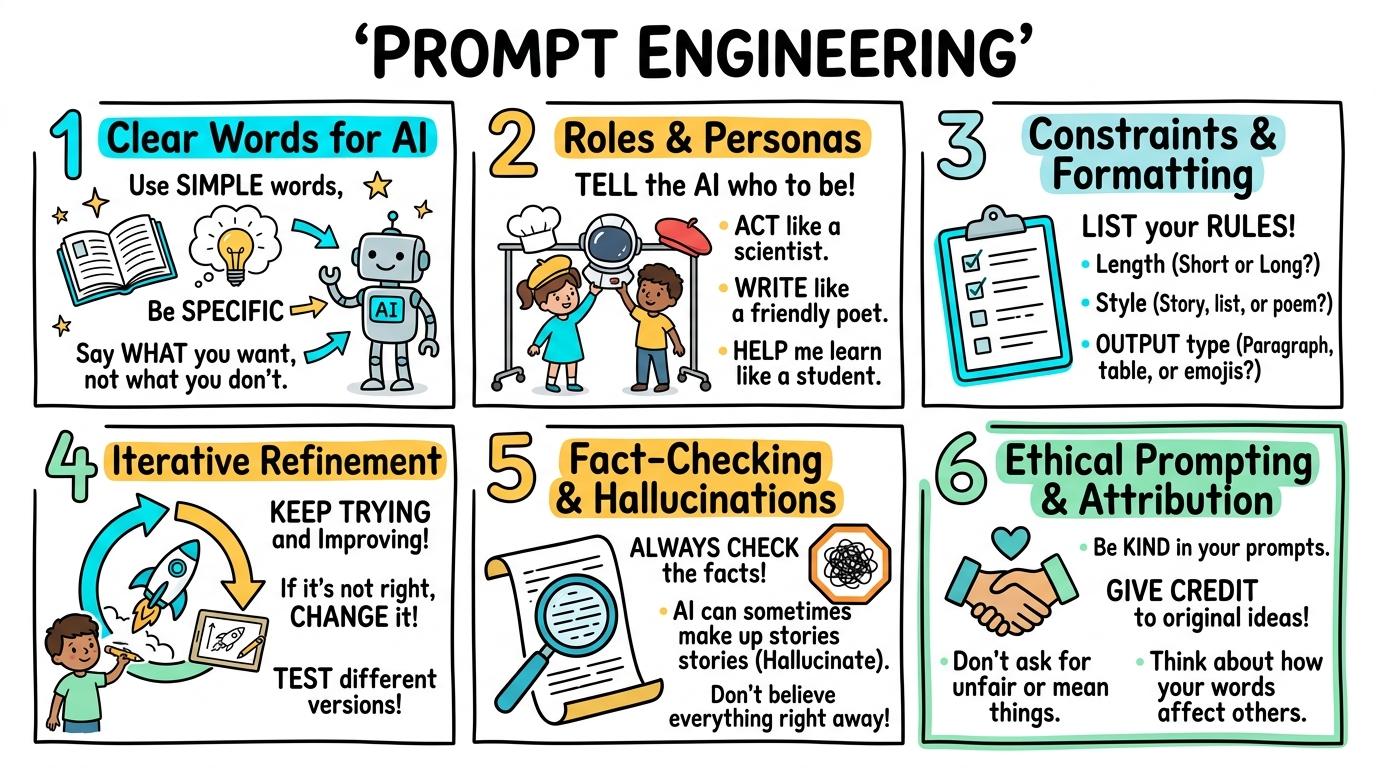
Learning objective
Prompt Engineering
Prompt Engineering & Generative Media
1
2
3
4
5
6
Mastering the art and science of communicating with AI models. Students learn to craft clear prompts, define roles and constraints, iterate on outputs, and critically evaluate AI-generated text, images, and media.
Clear Words for AI
Understand that AI needs specific descriptive words to generate matching images or text.
Let's Go!

Routine: See, Think, Wonder
Look at these two AI pictures of a cat. One was created with 'cat' and one with 'a sleepy orange tabby cat wearing a party hat'. What differences do you notice?
Teacher note: Facilitate the See, Think, Wonder routine for 2–3 minutes. Encourage students to connect the prompt to Form (Language choice shapes creative outputs in human and digital tools.).
Learn
AI models are not mind readers! They need clear, descriptive instructions. When you give an AI tool specific details—like subject, action, color, and setting—it understands your ideas much better. In computing, language choice shapes creative outputs in human and digital tools. As you explore the interactive Prompt Studio Simulator below, focus on how to construct 3-element prompts specifying subject, color, and setting to get accurate AI outputs.
Subject:
Color / Detail:
Setting / Style:
[Select chips or configure persona & constraints above to build your prompt]
AI Generation Canvas Ready
Assemble your prompt on the left and click "Synthesize AI Response"AI language models predict the next likely word—they do not possess consciousness or absolute truth. Click on the claims below to cross-check them against the Encyclopedia Britannica excerpt and flag the fabricated hallucination!
🤖 AI Output Claims:
📚 Encyclopedia Britannica Excerpt:
"Honeybees are social insects. They communicate direction and distance through the waggle dance. Honeybees breathe through external thoracic spiracles and drown rapidly when submerged in water. Worker bees forage over large distances for nectar."
Verified Independent Source #1: Encyclopedia Britannica
Verified Independent Source #2: Natural History Museum Guide
Select a claim above to verify its factual accuracy against the trusted sources...
Apply Simulator Skills • Try it yourself
Craft a Descriptive Prompt
🚀 Open a practice space
🌟 Student Project GuideSuccess Criteria & WAGOLL (What A Good One Looks Like)
🎯 Task Success Criteria (Rubric)
Foundation
Identifies that typing words into an AI box makes pictures appear.
Developing
Contrasts a 1-word prompt ('dog') with a detailed prompt ('a fluffy golden retriever in a park').
Secure (Goal)
Constructs 3-element prompts specifying subject, color, and setting to get accurate AI outputs.
Mastery
Explains why AI tools misunderstand vague prompts and coaches peers on adding descriptive detail.
👀 What A Good One Looks Like (WAGOLL)
Exemplar of 2
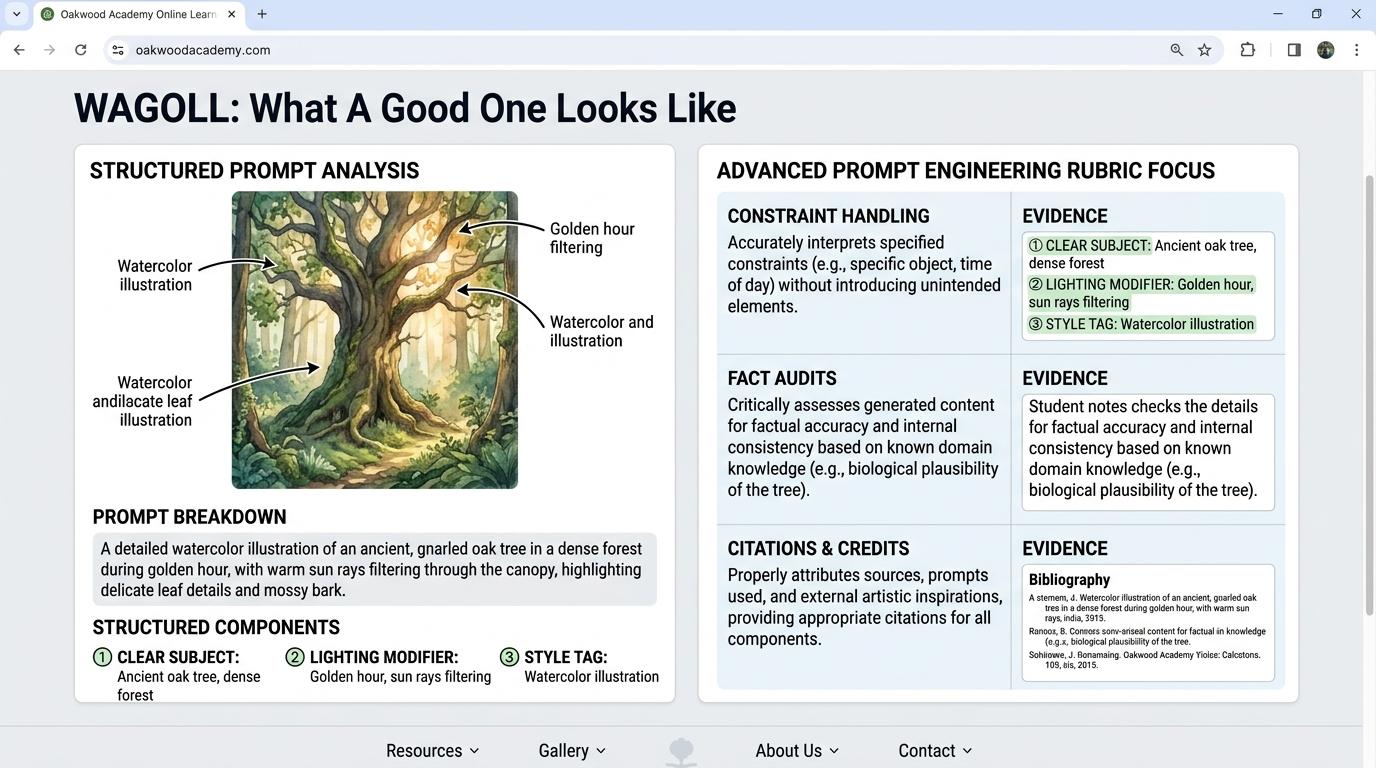 ⭐ Mastering Standard
 ⭐ Mastering Standard
📁
Save to Your Website Portfolio:
When you finish creating your project in your software, copy the share link or take a screenshot and publish it onto your student portfolio website!
Reflect
Learning check
Teacher setup, curriculum links and progress descriptors
Spark support
Routine: See, Think, Wonder
Teacher notes: Facilitate the See, Think, Wonder routine for 2–3 minutes. Encourage students to connect the prompt to Form (Language choice shapes creative outputs in human and digital tools.).
Achievement pathway
- Foundation: Identifies that typing words into an AI box makes pictures appear.
- Developing: Contrasts a 1-word prompt ('dog') with a detailed prompt ('a fluffy golden retriever in a park').
- Secure: Constructs 3-element prompts specifying subject, color, and setting to get accurate AI outputs.
- Mastering: Explains why AI tools misunderstand vague prompts and coaches peers on adding descriptive detail.
Curriculum links
Curriculum strand: Everyday Digital Skills & Computational Science
Outcome: AI.01.B.1.1 — Understand that AI needs specific descriptive words to generate matching images or text.
PYP: Form · Language choice shapes creative outputs in human and digital tools.
Learner profile: Communicator
Competency tags
Gate support
Accessibility alternative: Students may verbally explain or point to the correct answer for "Which prompt gives the AI generator the clearest instructions?" with a teacher or teaching assistant.
Teacher override: allow
Locked level
Level 2: Roles & Personas
Complete the previous learning check to unlock this next level.
Roles & Personas
Assign roles, personas, and target audiences to AI prompts to adapt tone and style.
Learning objective
Students will assign specific roles (e.g., 'Act as a friendly tour guide') to an AI assistant to tailor explanation styles.
Let's Go!
Routine: Zoom In
Compare an AI explanation of volcanoes written by 'a mad scientist' vs 'a gentle park ranger'. How does the tone change?
Teacher note: Facilitate the Zoom In routine for 2–3 minutes. Encourage students to connect the prompt to Perspective (Perspective influences how information is framed and communicated.).
Learn
You can tell an AI assistant WHO to pretend to be! Giving the AI a role (like 'Act as an astronaut') helps it choose the right words, enthusiasm, and detail level for your intended audience. In computing, perspective influences how information is framed and communicated. As you explore the interactive Prompt Studio Simulator below, focus on how to construct prompts specifying Role, Topic, Audience, and Tone (e.g., 'Act as a pirate explaining gravity to a 7-year-old').
Subject:
Color / Detail:
Setting / Style:
[Select chips or configure persona & constraints above to build your prompt]
AI Generation Canvas Ready
Assemble your prompt on the left and click "Synthesize AI Response"AI language models predict the next likely word—they do not possess consciousness or absolute truth. Click on the claims below to cross-check them against the Encyclopedia Britannica excerpt and flag the fabricated hallucination!
🤖 AI Output Claims:
📚 Encyclopedia Britannica Excerpt:
"Honeybees are social insects. They communicate direction and distance through the waggle dance. Honeybees breathe through external thoracic spiracles and drown rapidly when submerged in water. Worker bees forage over large distances for nectar."
Verified Independent Source #1: Encyclopedia Britannica
Verified Independent Source #2: Natural History Museum Guide
Select a claim above to verify its factual accuracy against the trusted sources...
Apply Simulator Skills • Try it yourself
Role-Play Prompt Challenge
🚀 Open a practice space
🌟 Student Project GuideSuccess Criteria & WAGOLL (What A Good One Looks Like)
🎯 Task Success Criteria (Rubric)
Foundation
Recognizes that an AI can write in different styles when asked.
Developing
Applies a basic role command ('Act as a teacher') to an AI prompt.
Secure (Goal)
Constructs prompts specifying Role, Topic, Audience, and Tone (e.g., 'Act as a pirate explaining gravity to a 7-year-old').
Mastery
Evaluates how different AI personas alter the vocabulary, depth, and engagement of the response.
👀 What A Good One Looks Like (WAGOLL)
Exemplar of 2
⭐ Mastering Standard⭐ Mastering Standard📁
Save to Your Website Portfolio:
When you finish creating your project in your software, copy the share link or take a screenshot and publish it onto your student portfolio website!
Reflect
Learning check
Teacher setup, curriculum links and progress descriptors
Spark support
Routine: Zoom In
Teacher notes: Facilitate the Zoom In routine for 2–3 minutes. Encourage students to connect the prompt to Perspective (Perspective influences how information is framed and communicated.).
Achievement pathway
- Foundation: Recognizes that an AI can write in different styles when asked.
- Developing: Applies a basic role command ('Act as a teacher') to an AI prompt.
- Secure: Constructs prompts specifying Role, Topic, Audience, and Tone (e.g., 'Act as a pirate explaining gravity to a 7-year-old').
- Mastering: Evaluates how different AI personas alter the vocabulary, depth, and engagement of the response.
Curriculum links
Curriculum strand: Everyday Digital Skills & Computational Science
Outcome: AI.01.B.1.2 — Assign roles, personas, and target audiences to AI prompts to adapt tone and style.
PYP: Perspective · Perspective influences how information is framed and communicated.
Learner profile: Open-minded
Competency tags
Gate support
Accessibility alternative: Students may verbally explain or point to the correct answer for "What key ingredient is missing from this prompt: 'Explain how magnets work'?" with a teacher or teaching assistant.
Teacher override: allow
Locked level
Level 3: Constraints & Formatting
Complete the previous learning check to unlock this next level.
Constraints & Formatting
Apply structural constraints (length, format, exclusions) to guide AI output layouts.
Learning objective
Students will include format rules (e.g., 'In 3 bullet points', 'Under 50 words') in prompts to control output structure.
Let's Go!
Routine: Think, Puzzle, Explore
What happens when an AI gives you 5 pages of text when you only needed a quick 3-bullet summary?
How can we prevent this?
Teacher note: Facilitate the Think, Puzzle, Explore routine for 2–3 minutes. Encourage students to connect the prompt to Function (Setting structured parameters optimizes technology performance.).
Learn
AI loves to talk! If you don't set boundaries, it might write far too much. By specifying exact constraints—like 'Format as a 3-column table' or 'Use exactly 4 bullet points and no jargon'—you get clean, organized results. In computing, setting structured parameters optimizes technology performance. As you explore the interactive Prompt Studio Simulator below, focus on how to combine format constraints: bullet lists, tables, negative constraints ('do not include...'), and word limits.
Subject:
Color / Detail:
Setting / Style:
[Select chips or configure persona & constraints above to build your prompt]
AI Generation Canvas Ready
Assemble your prompt on the left and click "Synthesize AI Response"AI language models predict the next likely word—they do not possess consciousness or absolute truth. Click on the claims below to cross-check them against the Encyclopedia Britannica excerpt and flag the fabricated hallucination!
🤖 AI Output Claims:
📚 Encyclopedia Britannica Excerpt:
"Honeybees are social insects. They communicate direction and distance through the waggle dance. Honeybees breathe through external thoracic spiracles and drown rapidly when submerged in water. Worker bees forage over large distances for nectar."
Verified Independent Source #1: Encyclopedia Britannica
Verified Independent Source #2: Natural History Museum Guide
Select a claim above to verify its factual accuracy against the trusted sources...
Apply Simulator Skills • Try it yourself
Set Output Constraints
🚀 Open a practice space
🌟 Student Project GuideSuccess Criteria & WAGOLL (What A Good One Looks Like)
🎯 Task Success Criteria (Rubric)
Foundation
Notices that AI responses can be very long or short.
Developing
Adds simple word count limits (e.g., 'in 20 words') to a prompt.
Secure (Goal)
Combines format constraints: bullet lists, tables, negative constraints ('do not include...'), and word limits.
Mastery
Designs reusable prompt templates with built-in formatting constraints for classroom study guides.
👀 What A Good One Looks Like (WAGOLL)
Exemplar of 2
⭐ Mastering Standard⭐ Mastering Standard📁
Save to Your Website Portfolio:
When you finish creating your project in your software, copy the share link or take a screenshot and publish it onto your student portfolio website!
Reflect
Learning check
Teacher setup, curriculum links and progress descriptors
Spark support
Routine: Think, Puzzle, Explore
Teacher notes: Facilitate the Think, Puzzle, Explore routine for 2–3 minutes. Encourage students to connect the prompt to Function (Setting structured parameters optimizes technology performance.).
Achievement pathway
- Foundation: Notices that AI responses can be very long or short.
- Developing: Adds simple word count limits (e.g., 'in 20 words') to a prompt.
- Secure: Combines format constraints: bullet lists, tables, negative constraints ('do not include...'), and word limits.
- Mastering: Designs reusable prompt templates with built-in formatting constraints for classroom study guides.
Curriculum links
Curriculum strand: Everyday Digital Skills & Computational Science
Outcome: AI.02.B.1.1 — Apply structural constraints (length, format, exclusions) to guide AI output layouts.
PYP: Function · Setting structured parameters optimizes technology performance.
Learner profile: Thinker
Competency tags
Gate support
Accessibility alternative: Students may verbally explain or point to the correct answer for "Which instruction forces the AI to output a clean, organized list rather than a long paragraph?" with a teacher or teaching assistant.
Teacher override: allow
Locked level
Level 4: Iterative Prompt Refinement
Complete the previous learning check to unlock this next level.
Iterative Prompt Refinement
Refine and iterate on prompts sequentially based on initial AI outputs.
Learning objective
Students will analyze an imperfect AI output and write follow-up corrective prompts to refine the result in stages.
Let's Go!
Routine: I used to think... Now I think...
I used to think a prompt was a one-shot attempt... Now I think prompting is a conversation! Why is iteration key?
Teacher note: Facilitate the I used to think... Now I think... routine for 2–3 minutes. Encourage students to connect the prompt to Change (Revision and feedback cycles improve creative and technological solutions.).
Learn
Prompting is a conversation, not a single button press! If the AI's first attempt misses the mark, don't start over from scratch. Reply with feedback like 'Make the tone more enthusiastic' or 'Simplify paragraph 2' to guide it. In computing, revision and feedback cycles improve creative and technological solutions. As you explore the interactive Prompt Studio Simulator below, focus on how to execute a 3-turn refinement conversation, adjusting details, tone, or corrections step-by-step.
Subject:
Color / Detail:
Setting / Style:
[Select chips or configure persona & constraints above to build your prompt]
AI Generation Canvas Ready
Assemble your prompt on the left and click "Synthesize AI Response"AI language models predict the next likely word—they do not possess consciousness or absolute truth. Click on the claims below to cross-check them against the Encyclopedia Britannica excerpt and flag the fabricated hallucination!
🤖 AI Output Claims:
📚 Encyclopedia Britannica Excerpt:
"Honeybees are social insects. They communicate direction and distance through the waggle dance. Honeybees breathe through external thoracic spiracles and drown rapidly when submerged in water. Worker bees forage over large distances for nectar."
Verified Independent Source #1: Encyclopedia Britannica
Verified Independent Source #2: Natural History Museum Guide
Select a claim above to verify its factual accuracy against the trusted sources...
Apply Simulator Skills • Try it yourself
3-Step Refinement Ladder
🚀 Open a practice space
🌟 Student Project GuideSuccess Criteria & WAGOLL (What A Good One Looks Like)
🎯 Task Success Criteria (Rubric)
Foundation
Understands that if the first AI answer isn't right, you can ask again.
Developing
Identifies what is wrong with an AI response and attempts a follow-up fix.
Secure (Goal)
Executes a 3-turn refinement conversation, adjusting details, tone, or corrections step-by-step.
Mastery
Teaches a framework for prompt debugging (Identify Error -> Narrow Scope -> Add Example -> Re-run).
👀 What A Good One Looks Like (WAGOLL)
Exemplar of 2
⭐ Mastering Standard⭐ Mastering Standard📁
Save to Your Website Portfolio:
When you finish creating your project in your software, copy the share link or take a screenshot and publish it onto your student portfolio website!
Reflect
Learning check
Teacher setup, curriculum links and progress descriptors
Spark support
Routine: I used to think... Now I think...
Teacher notes: Facilitate the I used to think... Now I think... routine for 2–3 minutes. Encourage students to connect the prompt to Change (Revision and feedback cycles improve creative and technological solutions.).
Achievement pathway
- Foundation: Understands that if the first AI answer isn't right, you can ask again.
- Developing: Identifies what is wrong with an AI response and attempts a follow-up fix.
- Secure: Executes a 3-turn refinement conversation, adjusting details, tone, or corrections step-by-step.
- Mastering: Teaches a framework for prompt debugging (Identify Error -> Narrow Scope -> Add Example -> Re-run).
Curriculum links
Curriculum strand: Everyday Digital Skills & Computational Science
Outcome: AI.02.B.1.2 — Refine and iterate on prompts sequentially based on initial AI outputs.
PYP: Change · Revision and feedback cycles improve creative and technological solutions.
Learner profile: Reflective
Competency tags
Gate support
Accessibility alternative: Students may verbally explain or point to the correct answer for "The AI wrote a story that is too scary for young children. What is the best follow-up prompt?" with a teacher or teaching assistant.
Teacher override: allow
Locked level
Level 5: Fact-Checking & Hallucinations
Complete the previous learning check to unlock this next level.
Fact-Checking & Hallucinations
Detect AI hallucinations and verify AI-generated claims using trusted primary sources.
Learning objective
Students will cross-reference AI-generated facts against verified encyclopedias or textbooks to identify AI 'hallucinations'.
Let's Go!
Routine: 3-2-1 Bridge
An AI confidently claims that 'Penguins fly to Australia every winter.' 3 reasons why AI sounds confident even when wrong?
Teacher note: Facilitate the 3-2-1 Bridge routine for 2–3 minutes. Encourage students to connect the prompt to Responsibility (Critical evaluation of information sources is essential in an automated world.).
Learn
AI language models predict the next likely word—they do NOT 'know' facts like humans do! Sometimes AI creates completely fake facts that sound totally convincing. This is called a 'hallucination'. NEVER trust AI facts without double-checking! In computing, critical evaluation of information sources is essential in an automated world. As you explore the interactive Prompt Studio Simulator below, focus on how to conducts a systematic fact-check of an AI summary using 2 independent trusted sources.
Subject:
Color / Detail:
Setting / Style:
[Select chips or configure persona & constraints above to build your prompt]
AI Generation Canvas Ready
Assemble your prompt on the left and click "Synthesize AI Response"AI language models predict the next likely word—they do not possess consciousness or absolute truth. Click on the claims below to cross-check them against the Encyclopedia Britannica excerpt and flag the fabricated hallucination!
🤖 AI Output Claims:
📚 Encyclopedia Britannica Excerpt:
"Honeybees are social insects. They communicate direction and distance through the waggle dance. Honeybees breathe through external thoracic spiracles and drown rapidly when submerged in water. Worker bees forage over large distances for nectar."
Verified Independent Source #1: Encyclopedia Britannica
Verified Independent Source #2: Natural History Museum Guide
Select a claim above to verify its factual accuracy against the trusted sources...
Apply Simulator Skills • Try it yourself
AI Hallucination Detective
🚀 Open a practice space
🌟 Student Project GuideSuccess Criteria & WAGOLL (What A Good One Looks Like)
🎯 Task Success Criteria (Rubric)
Foundation
States that AI can sometimes make mistakes or invent facts.
Developing
Identifies an obvious false statement generated in a test AI response.
Secure (Goal)
Conducts a systematic fact-check of an AI summary using 2 independent trusted sources.
Mastery
Explains why language models hallucinate (predicting words, not knowing truth) and creates a fact-checking guide for peers.
👀 What A Good One Looks Like (WAGOLL)
Exemplar of 2
⭐ Mastering Standard⭐ Mastering Standard📁
Save to Your Website Portfolio:
When you finish creating your project in your software, copy the share link or take a screenshot and publish it onto your student portfolio website!
Reflect
Learning check
Teacher setup, curriculum links and progress descriptors
Spark support
Routine: 3-2-1 Bridge
Teacher notes: Facilitate the 3-2-1 Bridge routine for 2–3 minutes. Encourage students to connect the prompt to Responsibility (Critical evaluation of information sources is essential in an automated world.).
Achievement pathway
- Foundation: States that AI can sometimes make mistakes or invent facts.
- Developing: Identifies an obvious false statement generated in a test AI response.
- Secure: Conducts a systematic fact-check of an AI summary using 2 independent trusted sources.
- Mastering: Explains why language models hallucinate (predicting words, not knowing truth) and creates a fact-checking guide for peers.
Curriculum links
Curriculum strand: Everyday Digital Skills & Computational Science
Outcome: AI.03.B.1.1 — Detect AI hallucinations and verify AI-generated claims using trusted primary sources.
PYP: Responsibility · Critical evaluation of information sources is essential in an automated world.
Learner profile: Inquirer
Competency tags
Gate support
Accessibility alternative: Students may verbally explain or point to the correct answer for "Why must you ALWAYS verify facts generated by an AI assistant before using them in a school project?" with a teacher or teaching assistant.
Teacher override: allow
Locked level
Level 6: Ethical Prompting & Attribution
Complete the previous learning check to unlock this next level.
Ethical Prompting & Attribution
Apply ethical AI usage guidelines, proper citation/attribution, and plagiarism awareness.
Learning objective
Students will formulate ethical AI use guidelines and properly cite AI tools used in research or creative projects.
Let's Go!
Routine: Step Inside
Imagine you spent 10 hours painting a picture, and someone entered an AI copy into an art contest. How would you feel?
Teacher note: Facilitate the Step Inside routine for 2–3 minutes. Encourage students to connect the prompt to Reflection (Ethical technology use requires transparency, honesty, and respect for intellectual property.).
Learn
Using AI responsibly means being honest about how you used it! Using AI to brainstorm ideas or check grammar is great—passing off AI-written essays or artwork as entirely your own work is plagiarism. Always attribute AI assistance clearly. In computing, ethical technology use requires transparency, honesty, and respect for intellectual property. As you explore the interactive Prompt Studio Simulator below, focus on how to create a project disclosure statement detailing how AI was used (e.g., for brainstorming, editing, or image creation).
Subject:
Color / Detail:
Setting / Style:
[Select chips or configure persona & constraints above to build your prompt]
AI Generation Canvas Ready
Assemble your prompt on the left and click "Synthesize AI Response"AI language models predict the next likely word—they do not possess consciousness or absolute truth. Click on the claims below to cross-check them against the Encyclopedia Britannica excerpt and flag the fabricated hallucination!
🤖 AI Output Claims:
📚 Encyclopedia Britannica Excerpt:
"Honeybees are social insects. They communicate direction and distance through the waggle dance. Honeybees breathe through external thoracic spiracles and drown rapidly when submerged in water. Worker bees forage over large distances for nectar."
Verified Independent Source #1: Encyclopedia Britannica
Verified Independent Source #2: Natural History Museum Guide
Select a claim above to verify its factual accuracy against the trusted sources...
Apply Simulator Skills • Try it yourself
Create an AI Disclosure Citation
🚀 Open a practice space
🌟 Student Project GuideSuccess Criteria & WAGOLL (What A Good One Looks Like)
🎯 Task Success Criteria (Rubric)
Foundation
Explains that passing off AI writing as your own work is dishonest.
Developing
Uses an AI attribution label (e.g., 'Image generated with Canva AI using prompt X').
Secure (Goal)
Creates a project disclosure statement detailing how AI was used (e.g., for brainstorming, editing, or image creation).
Mastery
Drafts a class AI Code of Ethics addressing privacy, fairness, artistic credit, and academic integrity.
👀 What A Good One Looks Like (WAGOLL)
Exemplar of 2
⭐ Mastering Standard⭐ Mastering Standard📁
Save to Your Website Portfolio:
When you finish creating your project in your software, copy the share link or take a screenshot and publish it onto your student portfolio website!
Reflect
Learning check
Teacher setup, curriculum links and progress descriptors
Spark support
Routine: Step Inside
Teacher notes: Facilitate the Step Inside routine for 2–3 minutes. Encourage students to connect the prompt to Reflection (Ethical technology use requires transparency, honesty, and respect for intellectual property.).
Achievement pathway
- Foundation: Explains that passing off AI writing as your own work is dishonest.
- Developing: Uses an AI attribution label (e.g., 'Image generated with Canva AI using prompt X').
- Secure: Creates a project disclosure statement detailing how AI was used (e.g., for brainstorming, editing, or image creation).
- Mastering: Drafts a class AI Code of Ethics addressing privacy, fairness, artistic credit, and academic integrity.
Curriculum links
Curriculum strand: Everyday Digital Skills & Computational Science
Outcome: AI.03.B.1.2 — Apply ethical AI usage guidelines, proper citation/attribution, and plagiarism awareness.
PYP: Reflection · Ethical technology use requires transparency, honesty, and respect for intellectual property.
Learner profile: Principled
Competency tags
Gate support
Accessibility alternative: Students may verbally explain or point to the correct answer for "Which of these is the correct, principled way to use AI for a school history poster?" with a teacher or teaching assistant.
Teacher override: allow