
Learning objective
Cybersecurity
Cybersecurity & System Defense
1
2
3
4
5
6
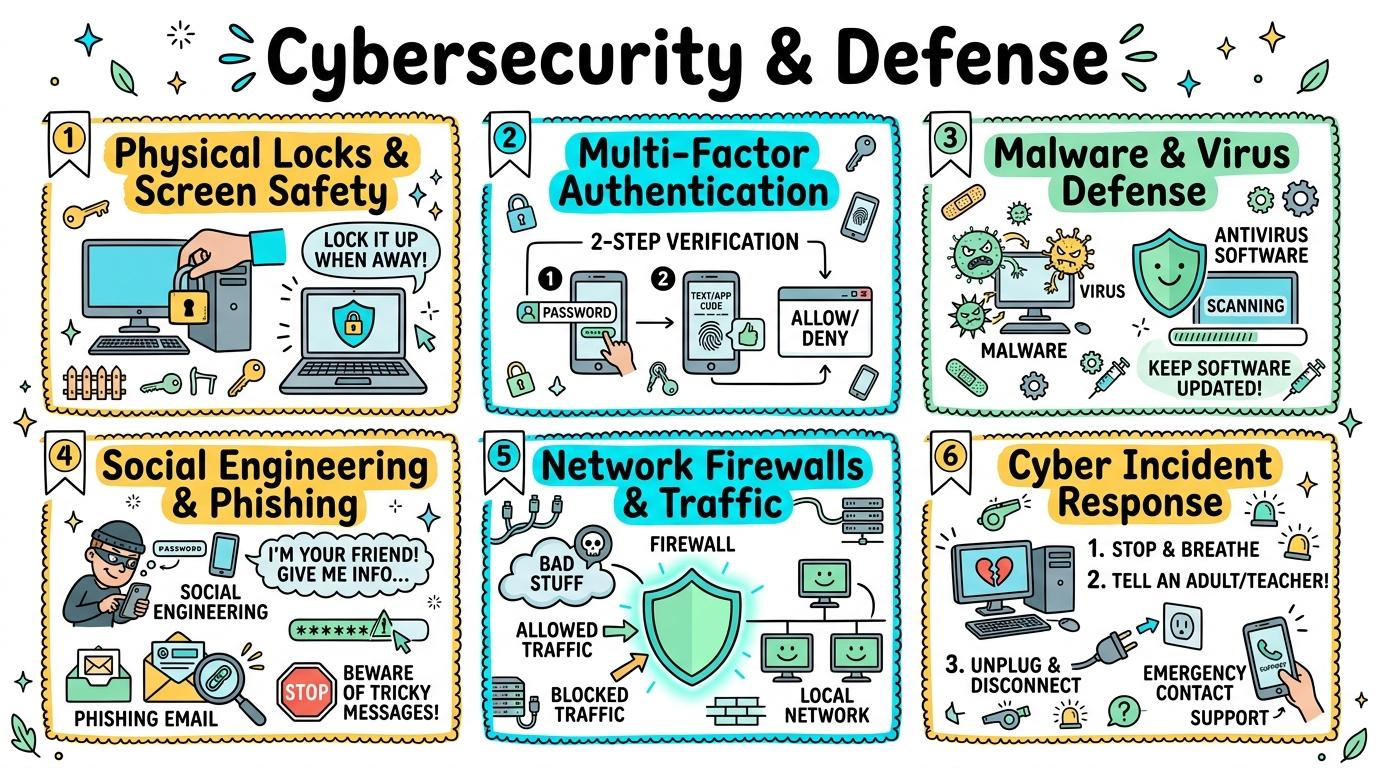
Protecting devices, networks, accounts, and identity from digital threats. Students build a defense-in-depth understanding ranging from physical security to firewalls, social engineering defense, and security operations.
Physical & Peripheral Security
Practice physical device security, screen locking, and USB security protocols.
Let's Go!
Routine: See, Think, Wonder
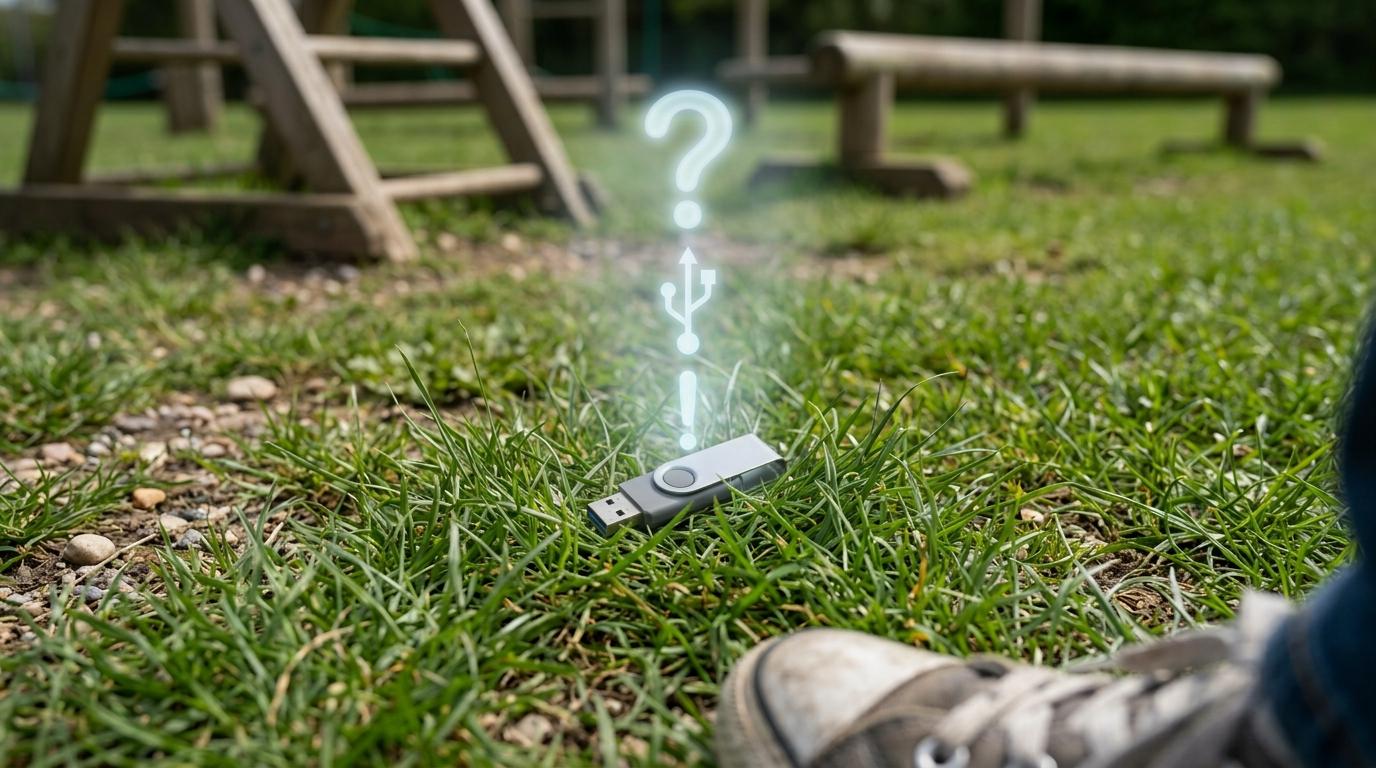
You find a shiny USB drive on the playground with 'Secret Homework' written on it. What should you do?
Teacher note: Facilitate the See, Think, Wonder routine for 2–3 minutes. Encourage students to connect the prompt to Form (Physical actions protect personal digital spaces.).
Learn
Cybersecurity starts in the physical world! Leaving your screen unlocked allows anyone to read your emails or delete files. Similarly, unknown USB flash drives can carry hidden malware viruses—never plug in a drive you found! In computing, physical actions protect personal digital spaces. As you explore the interactive Security Audit Simulator below, focus on how to explain why plugging unknown USB drives into a computer is dangerous (malware risk).
Cybersecurity & Scam Defense Audit Engine
Master Security Audits, Threat Analysis & Defense-in-Depth
LEVEL 1 • BRONZEOS6 • Free Gift Traps
Deceptive Reward Screen Detection
Review the incoming web element. Identify signs of fraudulent "Free Prize" lures before taking action.
🛡️ Security Inspector & Triage
THREAT LEVEL: UNRATED📋 NIST Cybersecurity Framework Mapping
CSF v2.0IDIdentifyAsset & Threat Identification
PRProtectSafeguards & MFA
DEDetectAnomalies & Phishing
RSRespondContainment Protocol
RCRecoverRestoration & Backups
📡 Live Telemetry & Threat Vector Indicators
LIVE TELEMETRY| Metric / Indicator | Observed Value | Risk Factor |
|---|---|---|
| TLS Certificate | Self-Signed / Untrusted | HIGH |
| Sender Domain Entropy | 0.89 (Spoofed DMARC) | CRITICAL |
| Urgency Emotion Vector | Active Countdown Detected | ELEVATED |
💻 SOC Incident Event Stream & Telemetry Log
[SOC-INIT] Defense telemetry daemon active. Port 443 TLS 1.3 inspector online.
[AUDIT-READY] Simulator initialized. Select a step to commence security audit.
Apply Simulator Skills • Try it yourself
Physical Device Lockdown
🚀 Open a practice space
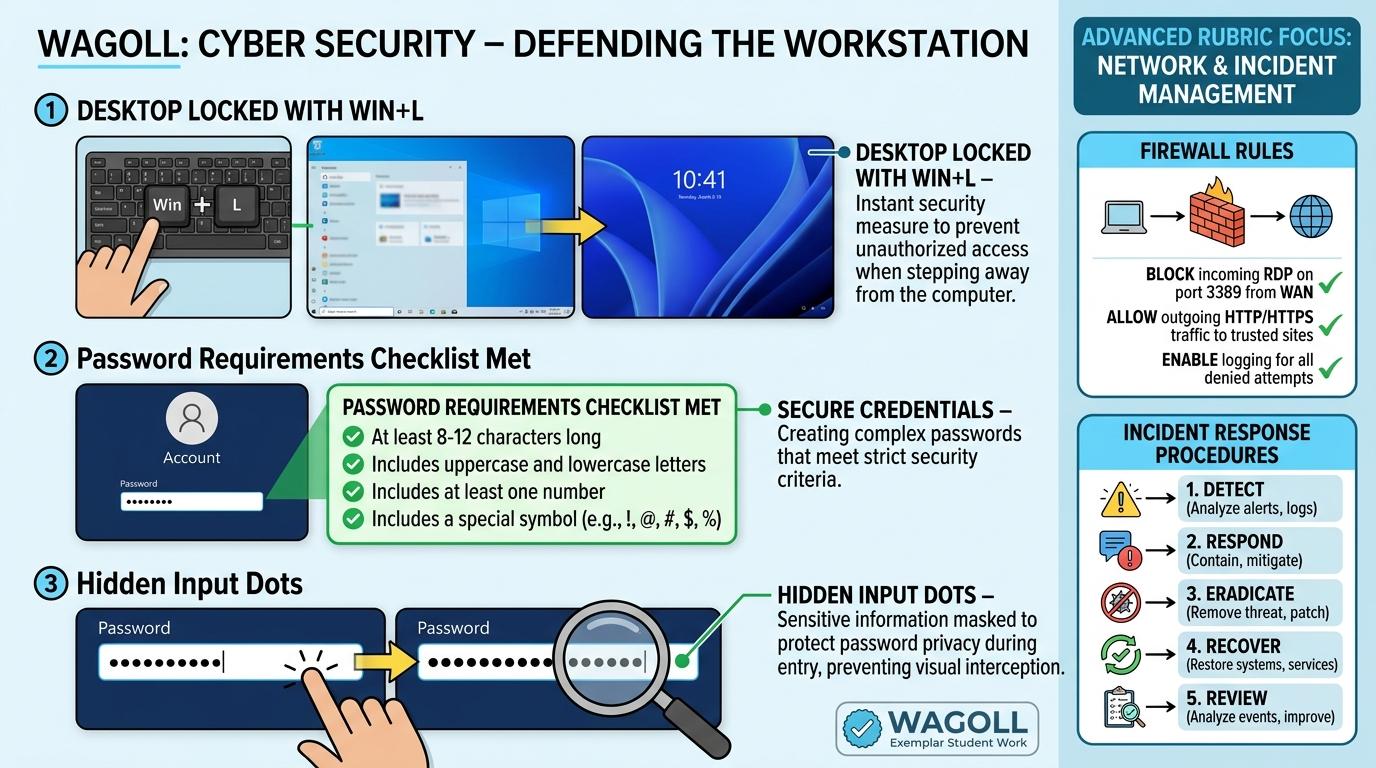
🌟 Student Project GuideSuccess Criteria & WAGOLL (What A Good One Looks Like)
🎯 Task Success Criteria (Rubric)
Foundation
Identifies that stepping away from an open computer lets others see private work.
Developing
Demonstrates locking the screen before leaving a computer desk.
Secure (Goal)
Explains why plugging unknown USB drives into a computer is dangerous (malware risk).
Mastery
Audits classroom physical device security and creates screen-locking reminder posters.
👀 What A Good One Looks Like (WAGOLL)
 ⭐ Mastering Standard
📁
Save to Your Website Portfolio:
When you finish creating your project in your software, copy the share link or take a screenshot and publish it onto your student portfolio website!
Reflect
Learning check
Teacher setup, curriculum links and progress descriptors
Spark support
Routine: See, Think, Wonder
Teacher notes: Facilitate the See, Think, Wonder routine for 2–3 minutes. Encourage students to connect the prompt to Form (Physical actions protect personal digital spaces.).
Achievement pathway
- Foundation: Identifies that stepping away from an open computer lets others see private work.
- Developing: Demonstrates locking the screen before leaving a computer desk.
- Secure: Explains why plugging unknown USB drives into a computer is dangerous (malware risk).
- Mastering: Audits classroom physical device security and creates screen-locking reminder posters.
Curriculum links
Curriculum strand: Everyday Digital Skills & Computational Science
Outcome: CB.01.B.1.1 — Practice physical device security, screen locking, and USB security protocols.
PYP: Form · Physical actions protect personal digital spaces.
Learner profile: Principled
Competency tags
Gate support
Accessibility alternative: Students may verbally explain or point to the correct answer for "What is the quickest keyboard shortcut to lock your Windows screen when walking away?" with a teacher or teaching assistant.
Teacher override: allow
Locked level
Level 2: Authentication & Multi-Factor (MFA)
Complete the previous learning check to unlock this next level.
Authentication & Multi-Factor (MFA)
Understand authentication factors (something you know, have, are) and multi-factor security.
Learning objective
Students will classify authentication types into 3 factors: Something You Know, Have, and Are.
Let's Go!
Routine: Parts, Purposes, Complexities
Why do castle gates have a moat AND a drawbridge AND guards?
How does this match computer security?
Teacher note: Facilitate the Parts, Purposes, Complexities routine for 2–3 minutes. Encourage students to connect the prompt to Function (Multi-layered verification systems strengthen identity protection.).
Learn
Relying on just a password isn't enough anymore! Multi-Factor Authentication (MFA) requires TWO different types of proof: 1) Something you KNOW (password), 2) Something you HAVE (phone/authenticator app), or 3) Something you ARE (fingerprint/face). In computing, multi-layered verification systems strengthen identity protection. As you explore the interactive Security Audit Simulator below, focus on how to explain why Multi-Factor Authentication (MFA) protects accounts even if a password is stolen.
Cybersecurity & Scam Defense Audit Engine
Master Security Audits, Threat Analysis & Defense-in-Depth
LEVEL 1 • BRONZEOS6 • Free Gift Traps
Deceptive Reward Screen Detection
Review the incoming web element. Identify signs of fraudulent "Free Prize" lures before taking action.
🛡️ Security Inspector & Triage
THREAT LEVEL: UNRATED📋 NIST Cybersecurity Framework Mapping
CSF v2.0IDIdentifyAsset & Threat Identification
PRProtectSafeguards & MFA
DEDetectAnomalies & Phishing
RSRespondContainment Protocol
RCRecoverRestoration & Backups
📡 Live Telemetry & Threat Vector Indicators
LIVE TELEMETRY| Metric / Indicator | Observed Value | Risk Factor |
|---|---|---|
| TLS Certificate | Self-Signed / Untrusted | HIGH |
| Sender Domain Entropy | 0.89 (Spoofed DMARC) | CRITICAL |
| Urgency Emotion Vector | Active Countdown Detected | ELEVATED |
💻 SOC Incident Event Stream & Telemetry Log
[SOC-INIT] Defense telemetry daemon active. Port 443 TLS 1.3 inspector online.
[AUDIT-READY] Simulator initialized. Select a step to commence security audit.
Apply Simulator Skills • Try it yourself
MFA Factor Sorting Game
🚀 Open a practice space
🌟 Student Project GuideSuccess Criteria & WAGOLL (What A Good One Looks Like)
🎯 Task Success Criteria (Rubric)
Foundation
States that passwords prove who you are to a computer.
Developing
Gives examples of password (know), security key (have), and fingerprint (are).
Secure (Goal)
Explains why Multi-Factor Authentication (MFA) protects accounts even if a password is stolen.
Mastery
Designs a 2-factor authentication flow for a simulated school bank or portal.
👀 What A Good One Looks Like (WAGOLL)
⭐ Mastering Standard📁
Save to Your Website Portfolio:
When you finish creating your project in your software, copy the share link or take a screenshot and publish it onto your student portfolio website!
Reflect
Learning check
Teacher setup, curriculum links and progress descriptors
Spark support
Routine: Parts, Purposes, Complexities
Teacher notes: Facilitate the Parts, Purposes, Complexities routine for 2–3 minutes. Encourage students to connect the prompt to Function (Multi-layered verification systems strengthen identity protection.).
Achievement pathway
- Foundation: States that passwords prove who you are to a computer.
- Developing: Gives examples of password (know), security key (have), and fingerprint (are).
- Secure: Explains why Multi-Factor Authentication (MFA) protects accounts even if a password is stolen.
- Mastering: Designs a 2-factor authentication flow for a simulated school bank or portal.
Curriculum links
Curriculum strand: Everyday Digital Skills & Computational Science
Outcome: CB.01.B.1.2 — Understand authentication factors (something you know, have, are) and multi-factor security.
PYP: Function · Multi-layered verification systems strengthen identity protection.
Learner profile: Knowledgeable
Competency tags
Gate support
Accessibility alternative: Students may verbally explain or point to the correct answer for "A fingerprint or facial scan is an example of which authentication factor?" with a teacher or teaching assistant.
Teacher override: allow
Locked level
Level 3: Malware & Virus Defense
Complete the previous learning check to unlock this next level.
Malware & Virus Defense
Identify types of malware (Viruses, Ransomware, Spyware) and how antivirus shields operate.
Learning objective
Students will identify common malware behaviors and explain how real-time antivirus scanners detect suspicious code.
Let's Go!
Routine: Zoom In
In ancient history, a wooden horse hid soldiers inside to bypass city gates. How does a 'Trojan Horse' computer program work?
Teacher note: Facilitate the Zoom In routine for 2–3 minutes. Encourage students to connect the prompt to Connection (Digital health requires proactive defense against malicious code.).
Learn
Malware (short for malicious software) includes different types of digital threats. Trojans disguise themselves as fun games, Spyware secretly watches your keystrokes, and Ransomware locks your files. Antivirus shields keep your device clean! In computing, digital health requires proactive defense against malicious code. As you explore the interactive Security Audit Simulator below, focus on how to explain how antivirus software uses malware signature databases and heuristic scans to block threats.
Cybersecurity & Scam Defense Audit Engine
Master Security Audits, Threat Analysis & Defense-in-Depth
LEVEL 1 • BRONZEOS6 • Free Gift Traps
Deceptive Reward Screen Detection
Review the incoming web element. Identify signs of fraudulent "Free Prize" lures before taking action.
🛡️ Security Inspector & Triage
THREAT LEVEL: UNRATED📋 NIST Cybersecurity Framework Mapping
CSF v2.0IDIdentifyAsset & Threat Identification
PRProtectSafeguards & MFA
DEDetectAnomalies & Phishing
RSRespondContainment Protocol
RCRecoverRestoration & Backups
📡 Live Telemetry & Threat Vector Indicators
LIVE TELEMETRY| Metric / Indicator | Observed Value | Risk Factor |
|---|---|---|
| TLS Certificate | Self-Signed / Untrusted | HIGH |
| Sender Domain Entropy | 0.89 (Spoofed DMARC) | CRITICAL |
| Urgency Emotion Vector | Active Countdown Detected | ELEVATED |
💻 SOC Incident Event Stream & Telemetry Log
[SOC-INIT] Defense telemetry daemon active. Port 443 TLS 1.3 inspector online.
[AUDIT-READY] Simulator initialized. Select a step to commence security audit.
Apply Simulator Skills • Try it yourself
Antivirus Scan Simulation
🚀 Open a practice space
🌟 Student Project GuideSuccess Criteria & WAGOLL (What A Good One Looks Like)
🎯 Task Success Criteria (Rubric)
Foundation
Defines computer viruses as bad software that hurts devices.
Developing
Distinguishes between Spyware (stealing data) and Ransomware (locking files for money).
Secure (Goal)
Explains how antivirus software uses malware signature databases and heuristic scans to block threats.
Mastery
Simulates an emergency malware isolation protocol (disconnecting network, running full scan, restoring backups).
👀 What A Good One Looks Like (WAGOLL)
⭐ Mastering Standard📁
Save to Your Website Portfolio:
When you finish creating your project in your software, copy the share link or take a screenshot and publish it onto your student portfolio website!
Reflect
Learning check
Teacher setup, curriculum links and progress descriptors
Spark support
Routine: Zoom In
Teacher notes: Facilitate the Zoom In routine for 2–3 minutes. Encourage students to connect the prompt to Connection (Digital health requires proactive defense against malicious code.).
Achievement pathway
- Foundation: Defines computer viruses as bad software that hurts devices.
- Developing: Distinguishes between Spyware (stealing data) and Ransomware (locking files for money).
- Secure: Explains how antivirus software uses malware signature databases and heuristic scans to block threats.
- Mastering: Simulates an emergency malware isolation protocol (disconnecting network, running full scan, restoring backups).
Curriculum links
Curriculum strand: Everyday Digital Skills & Computational Science
Outcome: CB.02.B.1.1 — Identify types of malware (Viruses, Ransomware, Spyware) and how antivirus shields operate.
PYP: Connection · Digital health requires proactive defense against malicious code.
Learner profile: Thinker
Competency tags
Gate support
Accessibility alternative: Students may verbally explain or point to the correct answer for "Which type of malware locks your personal files and demands payment to give them back?" with a teacher or teaching assistant.
Teacher override: allow
Locked level
Level 4: Social Engineering & Phishing
Complete the previous learning check to unlock this next level.
Social Engineering & Phishing
Analyze psychological manipulation tactics used in social engineering and email phishing.
Learning objective
Students will dissect email/message header clues (sender address, artificial urgency, bad links) to spot phishing scams.
Let's Go!
Routine: I used to think... Now I think...
I used to think hackers only use complex computer code... Now I think hackers target human emotions! Why?
Teacher note: Facilitate the I used to think... Now I think... routine for 2–3 minutes. Encourage students to connect the prompt to Perspective (Awareness of psychological tricks protects digital communities from deception.).
Learn
Social Engineering doesn't hack computers—it hacks PEOPLE! Attackers use artificial urgency ('Your account will be deleted in 10 minutes!') or excitement ('You won an iPad!') to trick you into clicking malicious links. Always slow down and check the link! In computing, awareness of psychological tricks protects digital communities from deception. As you explore the interactive Security Audit Simulator below, focus on how to list the 4 Red Flags of Social Engineering: Urgent Time Limit, Fear Threats, Free Giveaways, and Mismatched Links.
Cybersecurity & Scam Defense Audit Engine
Master Security Audits, Threat Analysis & Defense-in-Depth
LEVEL 1 • BRONZEOS6 • Free Gift Traps
Deceptive Reward Screen Detection
Review the incoming web element. Identify signs of fraudulent "Free Prize" lures before taking action.
🛡️ Security Inspector & Triage
THREAT LEVEL: UNRATED📋 NIST Cybersecurity Framework Mapping
CSF v2.0IDIdentifyAsset & Threat Identification
PRProtectSafeguards & MFA
DEDetectAnomalies & Phishing
RSRespondContainment Protocol
RCRecoverRestoration & Backups
📡 Live Telemetry & Threat Vector Indicators
LIVE TELEMETRY| Metric / Indicator | Observed Value | Risk Factor |
|---|---|---|
| TLS Certificate | Self-Signed / Untrusted | HIGH |
| Sender Domain Entropy | 0.89 (Spoofed DMARC) | CRITICAL |
| Urgency Emotion Vector | Active Countdown Detected | ELEVATED |
💻 SOC Incident Event Stream & Telemetry Log
[SOC-INIT] Defense telemetry daemon active. Port 443 TLS 1.3 inspector online.
[AUDIT-READY] Simulator initialized. Select a step to commence security audit.
Apply Simulator Skills • Try it yourself
Phishing Inbox Inspector
🚀 Open a practice space
🌟 Student Project GuideSuccess Criteria & WAGOLL (What A Good One Looks Like)
🎯 Task Success Criteria (Rubric)
Foundation
States that tricky emails can pretend to be from real companies.
Developing
Identifies fake sender domain addresses (e.g. `[email protected]`).
Secure (Goal)
Lists the 4 Red Flags of Social Engineering: Urgent Time Limit, Fear Threats, Free Giveaways, and Mismatched Links.
Mastery
Creates a simulated phishing awareness drill for school staff and students.
👀 What A Good One Looks Like (WAGOLL)
⭐ Mastering Standard📁
Save to Your Website Portfolio:
When you finish creating your project in your software, copy the share link or take a screenshot and publish it onto your student portfolio website!
Reflect
Learning check
Teacher setup, curriculum links and progress descriptors
Spark support
Routine: I used to think... Now I think...
Teacher notes: Facilitate the I used to think... Now I think... routine for 2–3 minutes. Encourage students to connect the prompt to Perspective (Awareness of psychological tricks protects digital communities from deception.).
Achievement pathway
- Foundation: States that tricky emails can pretend to be from real companies.
- Developing: Identifies fake sender domain addresses (e.g. `[email protected]`).
- Secure: Lists the 4 Red Flags of Social Engineering: Urgent Time Limit, Fear Threats, Free Giveaways, and Mismatched Links.
- Mastering: Creates a simulated phishing awareness drill for school staff and students.
Curriculum links
Curriculum strand: Everyday Digital Skills & Computational Science
Outcome: CB.02.B.1.2 — Analyze psychological manipulation tactics used in social engineering and email phishing.
PYP: Perspective · Awareness of psychological tricks protects digital communities from deception.
Learner profile: Reflective
Competency tags
Gate support
Accessibility alternative: Students may verbally explain or point to the correct answer for "An email claims to be from your bank saying 'URGENT: Click here in 5 minutes or your account is locked forever!'. What red flag is this?" with a teacher or teaching assistant.
Teacher override: allow
Locked level
Level 5: Network Defense & Firewalls
Complete the previous learning check to unlock this next level.
Network Defense & Firewalls
Understand network boundaries, IP addressing, port filtering, and firewall rules.
Learning objective
Students will demonstrate how a firewall inspects incoming and outgoing data packets based on security rules.
Let's Go!
Routine: Connect, Extend, Challenge
How is a firewall like a passport control officer at an international airport?
Teacher note: Facilitate the Connect, Extend, Challenge routine for 2–3 minutes. Encourage students to connect the prompt to Function (Controlled gateways regulate data flow between internal and external networks.).
Learn
A Firewall is a security guard standing between your home/school network and the big wild internet. It looks at every data 'packet' trying to enter or leave, checking its IP address and port number. If the packet breaks safety rules, the firewall BLOCKS it! In computing, controlled gateways regulate data flow between internal and external networks. As you explore the interactive Security Audit Simulator below, focus on how to construct firewall rules (ALLOW port 443 HTTPS, BLOCK unauthorized ports) in a network simulator.
Cybersecurity & Scam Defense Audit Engine
Master Security Audits, Threat Analysis & Defense-in-Depth
LEVEL 1 • BRONZEOS6 • Free Gift Traps
Deceptive Reward Screen Detection
Review the incoming web element. Identify signs of fraudulent "Free Prize" lures before taking action.
🛡️ Security Inspector & Triage
THREAT LEVEL: UNRATED📋 NIST Cybersecurity Framework Mapping
CSF v2.0IDIdentifyAsset & Threat Identification
PRProtectSafeguards & MFA
DEDetectAnomalies & Phishing
RSRespondContainment Protocol
RCRecoverRestoration & Backups
📡 Live Telemetry & Threat Vector Indicators
LIVE TELEMETRY| Metric / Indicator | Observed Value | Risk Factor |
|---|---|---|
| TLS Certificate | Self-Signed / Untrusted | HIGH |
| Sender Domain Entropy | 0.89 (Spoofed DMARC) | CRITICAL |
| Urgency Emotion Vector | Active Countdown Detected | ELEVATED |
💻 SOC Incident Event Stream & Telemetry Log
[SOC-INIT] Defense telemetry daemon active. Port 443 TLS 1.3 inspector online.
[AUDIT-READY] Simulator initialized. Select a step to commence security audit.
Apply Simulator Skills • Try it yourself
Configure Firewall Rules
🚀 Open a practice space
🌟 Student Project GuideSuccess Criteria & WAGOLL (What A Good One Looks Like)
🎯 Task Success Criteria (Rubric)
Foundation
Compares a firewall to a school security gatekeeper.
Developing
Identifies that data travels over the internet in tiny chunks called 'packets'.
Secure (Goal)
Constructs firewall rules (ALLOW port 443 HTTPS, BLOCK unauthorized ports) in a network simulator.
Mastery
Explains how VPNs encrypt network traffic across untrusted public Wi-Fi access points.
👀 What A Good One Looks Like (WAGOLL)
⭐ Mastering Standard📁
Save to Your Website Portfolio:
When you finish creating your project in your software, copy the share link or take a screenshot and publish it onto your student portfolio website!
Reflect
Learning check
Teacher setup, curriculum links and progress descriptors
Spark support
Routine: Connect, Extend, Challenge
Teacher notes: Facilitate the Connect, Extend, Challenge routine for 2–3 minutes. Encourage students to connect the prompt to Function (Controlled gateways regulate data flow between internal and external networks.).
Achievement pathway
- Foundation: Compares a firewall to a school security gatekeeper.
- Developing: Identifies that data travels over the internet in tiny chunks called 'packets'.
- Secure: Constructs firewall rules (ALLOW port 443 HTTPS, BLOCK unauthorized ports) in a network simulator.
- Mastering: Explains how VPNs encrypt network traffic across untrusted public Wi-Fi access points.
Curriculum links
Curriculum strand: Everyday Digital Skills & Computational Science
Outcome: CB.03.B.1.1 — Understand network boundaries, IP addressing, port filtering, and firewall rules.
PYP: Function · Controlled gateways regulate data flow between internal and external networks.
Learner profile: Knowledgeable
Competency tags
Gate support
Accessibility alternative: Students may verbally explain or point to the correct answer for "What is the primary job of a network Firewall?" with a teacher or teaching assistant.
Teacher override: allow
Locked level
Level 6: Cyber Incident Response & SOC
Complete the previous learning check to unlock this next level.
Cyber Incident Response & SOC
Formulate an incident response plan and conduct a Security Operations Center (SOC) audit.
Learning objective
Students will execute a 4-stage Cyber Incident Response Plan (Detect -> Contain -> Remediate -> Recover) for a simulated school security event.
Let's Go!
Routine: 3-2-1 Bridge
3 immediate steps during a cyber incident, 2 reasons data backups save schools, 1 key lesson for digital resilience.
Teacher note: Facilitate the 3-2-1 Bridge routine for 2–3 minutes. Encourage students to connect the prompt to Responsibility (Rapid incident response and collaboration minimize damage from cyber emergencies.).
Learn
When a cyber incident occurs, speed is everything! Security Operations Centers (SOC) follow 4 critical steps: 1) DETECT the breach, 2) CONTAIN it (disconnect from network), 3) REMEDIATE (remove malware & reset credentials), and 4) RECOVER (restore clean files from backups).
Cybersecurity & Scam Defense Audit Engine
Master Security Audits, Threat Analysis & Defense-in-Depth
LEVEL 1 • BRONZEOS6 • Free Gift Traps
Deceptive Reward Screen Detection
Review the incoming web element. Identify signs of fraudulent "Free Prize" lures before taking action.
🛡️ Security Inspector & Triage
THREAT LEVEL: UNRATED📋 NIST Cybersecurity Framework Mapping
CSF v2.0IDIdentifyAsset & Threat Identification
PRProtectSafeguards & MFA
DEDetectAnomalies & Phishing
RSRespondContainment Protocol
RCRecoverRestoration & Backups
📡 Live Telemetry & Threat Vector Indicators
LIVE TELEMETRY| Metric / Indicator | Observed Value | Risk Factor |
|---|---|---|
| TLS Certificate | Self-Signed / Untrusted | HIGH |
| Sender Domain Entropy | 0.89 (Spoofed DMARC) | CRITICAL |
| Urgency Emotion Vector | Active Countdown Detected | ELEVATED |
💻 SOC Incident Event Stream & Telemetry Log
[SOC-INIT] Defense telemetry daemon active. Port 443 TLS 1.3 inspector online.
[AUDIT-READY] Simulator initialized. Select a step to commence security audit.
Apply Simulator Skills • Try it yourself
Execute Incident Response Plan
🚀 Open a practice space
🌟 Student Project GuideSuccess Criteria & WAGOLL (What A Good One Looks Like)
🎯 Task Success Criteria (Rubric)
Foundation
Knows who to report a security problem to at school.
Developing
Explains why disconnecting a compromised device from Wi-Fi immediately stops malware from spreading.
Secure (Goal)
Drafts an Incident Response Flowchart detailing containment, evidence preservation, and password resets.
Mastery
Leads a simulated Security Operations Center (SOC) team drill responding to a ransomware attack.
👀 What A Good One Looks Like (WAGOLL)
⭐ Mastering Standard📁
Save to Your Website Portfolio:
When you finish creating your project in your software, copy the share link or take a screenshot and publish it onto your student portfolio website!
Reflect
Learning check
Teacher setup, curriculum links and progress descriptors
Spark support
Routine: 3-2-1 Bridge
Teacher notes: Facilitate the 3-2-1 Bridge routine for 2–3 minutes. Encourage students to connect the prompt to Responsibility (Rapid incident response and collaboration minimize damage from cyber emergencies.).
Achievement pathway
- Foundation: Knows who to report a security problem to at school.
- Developing: Explains why disconnecting a compromised device from Wi-Fi immediately stops malware from spreading.
- Secure: Drafts an Incident Response Flowchart detailing containment, evidence preservation, and password resets.
- Mastering: Leads a simulated Security Operations Center (SOC) team drill responding to a ransomware attack.
Curriculum links
Curriculum strand: Everyday Digital Skills & Computational Science
Outcome: CB.03.B.1.2 — Formulate an incident response plan and conduct a Security Operations Center (SOC) audit.
PYP: Responsibility · Rapid incident response and collaboration minimize damage from cyber emergencies.
Learner profile: Reflective
Competency tags
Gate support
Accessibility alternative: Students may verbally explain or point to the correct answer for "You notice your computer screen suddenly showing ransomware pop-ups locking files. What is your IMMEDIATE first action?" with a teacher or teaching assistant.
Teacher override: allow