
Learning objective
GIS Data Science
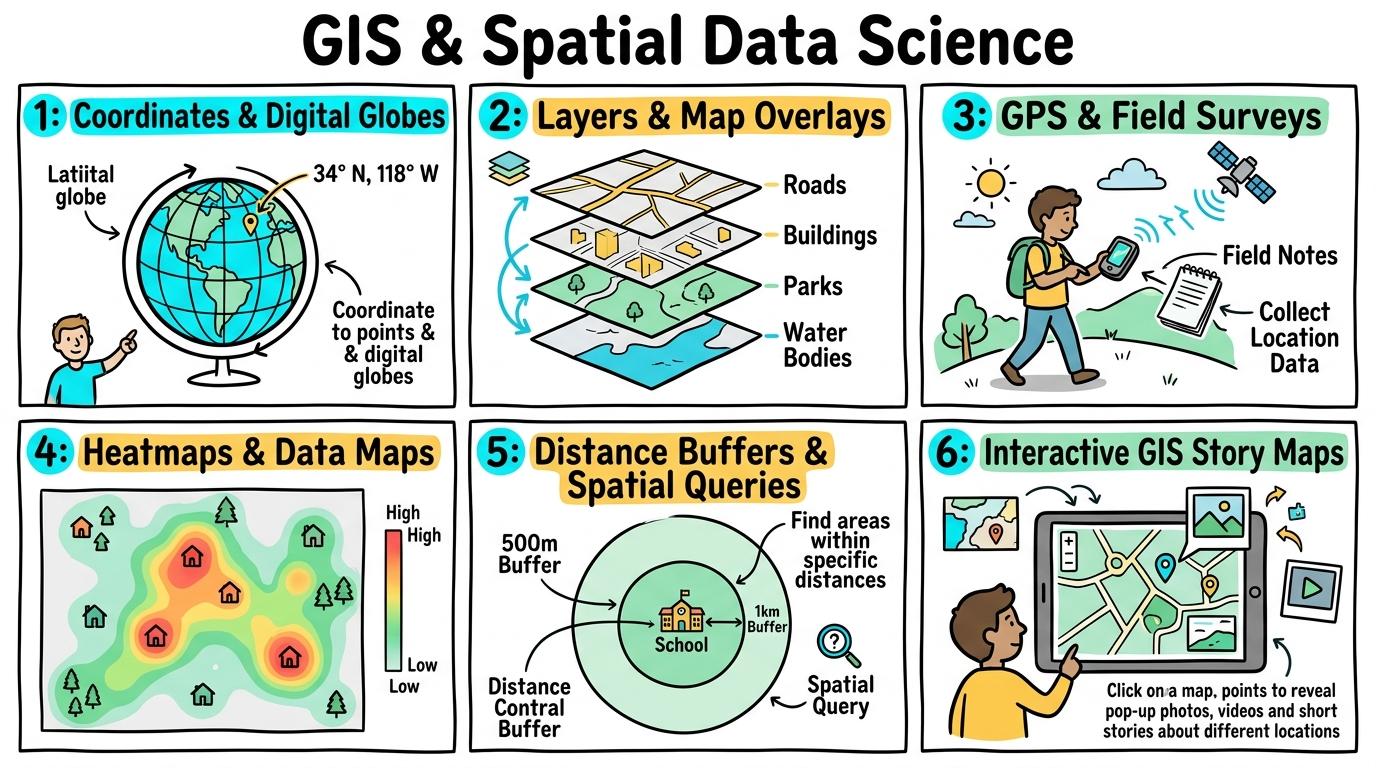
GIS & Spatial Data Science
1
2
3
4
5
6
Exploring spatial data, geographic information systems (GIS), coordinate mapping, and data layering. Students learn to gather, analyze, and visualize spatial datasets to solve real-world community and environmental challenges.
Coordinates & Digital Maps
Understand digital map coordinates (Latitude/Longitude), zoom scales, and spatial orientation.
Let's Go!

Routine: See, Think, Wonder
Look at a 3D digital globe spinning on screen. How do sailors and pilots find a tiny island in the middle of a huge ocean without roads?
Teacher note: Facilitate the See, Think, Wonder routine for 2–3 minutes. Encourage students to connect the prompt to Form (Coordinate systems allow us to pinpoint and navigate exact locations on Earth.).
Learn
Digital maps use a global grid system! Latitude lines run sideways around the Earth (like belts), and Longitude lines run top-to-bottom (pole to pole). By combining one Latitude and one Longitude number, you can pinpoint ANY spot on Earth! In computing, coordinate systems allow us to pinpoint and navigate exact locations on Earth. As you explore the interactive GISMap Simulator below, focus on how to enters exact coordinate pairs (e.g., `51.5074° N, 0.1278° W`) to locate world monuments.
📋 Spatial Feature Attribute Table
Relational database records linked to spatial point, line, and polygon geometries:
| FID | Feature Name | Type | Latitude | Longitude | Attributes / Condition |
|---|---|---|---|---|---|
| #001 | Heritage Oak | Point (Vector) | 51.5074° N | 0.1278° W | Canopy: 14m, Age: 95y |
| #002 | River Wey Basin | Polyline (Vector) | 51.2360° N | 0.5700° W | Flow: 4.8 m³/s, Waterway |
| #003 | Flood Risk Zone | Polygon (Vector) | 51.2400° N | 0.5650° W | Risk: 100-Year, Area: 1.4 km² |
| #004 | Central School Hub | Point (Vector) | 51.5000° N | 0.1200° W | Capacity: 650, Shelter |
💻 GeoJSON FeatureCollection Inspector
Raw structured spatial payload transmitted over geospatial APIs:
{
  "type": "FeatureCollection",
  "crs": {
    "type": "name",
    "properties": { "name": "urn:ogc:def:crs:OGC:1.3:CRS84" }
  },
  "features": [
    {
      "type": "Feature",
      "geometry": {
        "type": "Point",
        "coordinates": [-0.1278, 51.5074]
      },
      "properties": {
        "name": "Heritage Oak Tree",
        "category": "Ecology",
        "condition": "Optimal",
        "dbh_cm": 112
      }
    }
  ]
}
⚙️ PostGIS Spatial Query Terminal
gis_db=> SELECT name, ST_Distance(geom, ST_MakePoint(-0.1278, 51.5074)) FROM landmarks;
gis_db=> CREATE VIEW safe_walk_zone AS SELECT ST_Buffer(geom, 800) FROM schools;
CREATE VIEW: 800m buffer polygon generated (EPSG:4326 to EPSG:3857 reprojection)
🧭 Core GIS Spatial Principles
Raster vs Vector:Raster = continuous pixel grid (satellite/elevation); Vector = discrete geometry (points, lines, polygons).
Coordinates (WGS84):Latitude measures North/South of Equator (-90° to +90°); Longitude measures East/West of Prime Meridian (-180° to +180°).
Buffer Zones:Proximity zones calculated around features to model influence areas (e.g. noise contours, safe walk radiuses).
Apply Simulator Skills • Try it yourself
Coordinate Treasure Hunt
🚀 Open a practice space
🌟 Student Project GuideSuccess Criteria & WAGOLL (What A Good One Looks Like)
🎯 Task Success Criteria (Rubric)
Foundation
Punches in a landmark name in a digital map search bar to zoom in.
Developing
Explains that Latitude measures North/South and Longitude measures East/West.
Secure (Goal)
Enters exact coordinate pairs (e.g., `51.5074° N, 0.1278° W`) to locate world monuments.
Mastery
Calculates distance between coordinate points using digital measurement tools.
👀 What A Good One Looks Like (WAGOLL)
Exemplar of 2
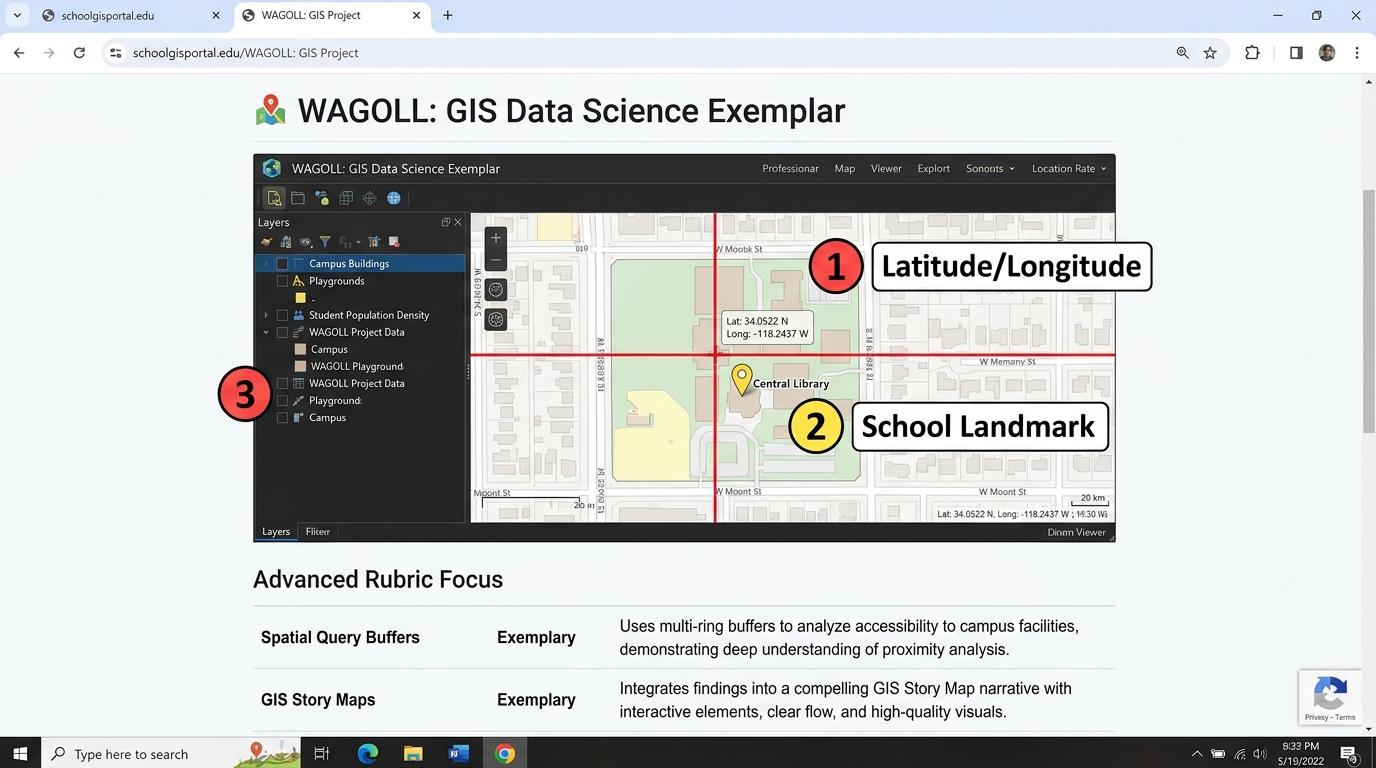 ⭐ Mastering Standard
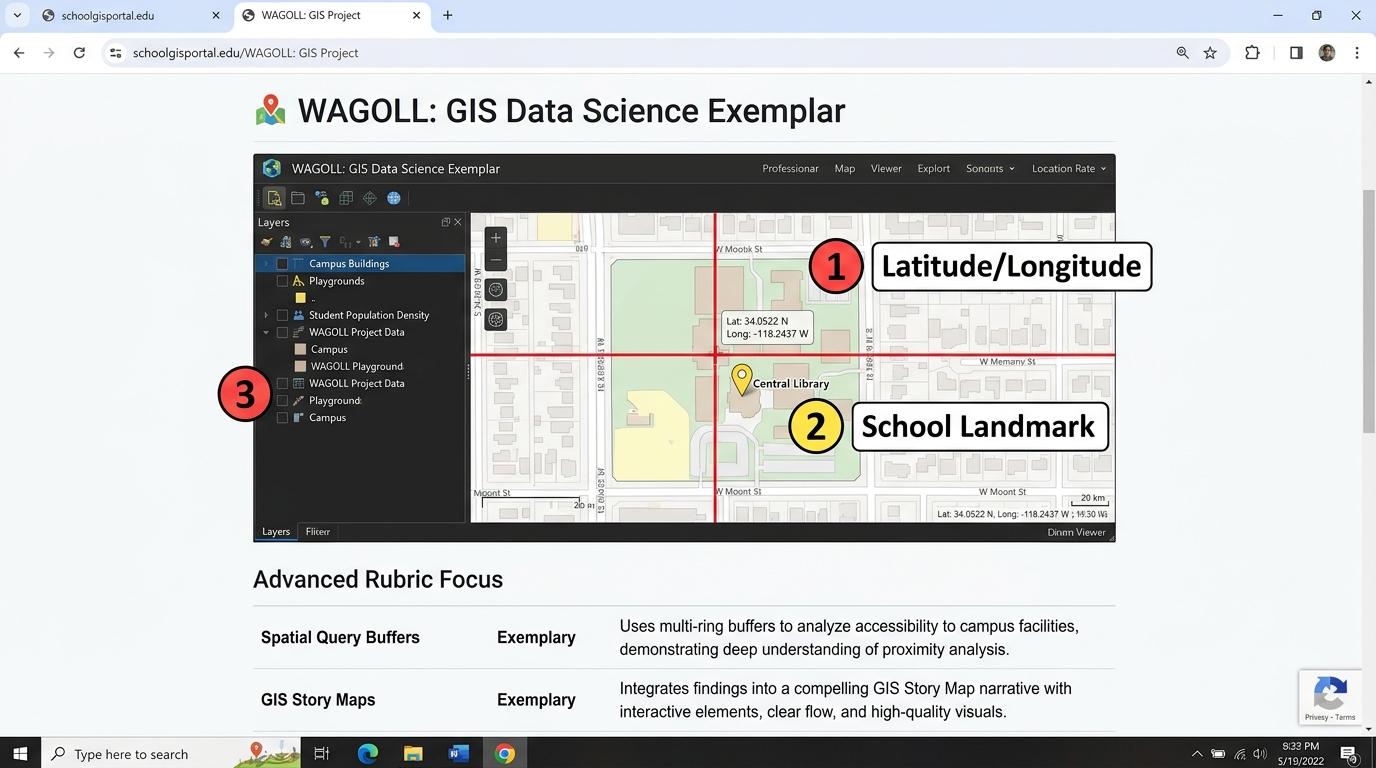 ⭐ Mastering Standard
📁
Save to Your Website Portfolio:
When you finish creating your project in your software, copy the share link or take a screenshot and publish it onto your student portfolio website!
Reflect
Learning check
Teacher setup, curriculum links and progress descriptors
Spark support
Routine: See, Think, Wonder
Teacher notes: Facilitate the See, Think, Wonder routine for 2–3 minutes. Encourage students to connect the prompt to Form (Coordinate systems allow us to pinpoint and navigate exact locations on Earth.).
Achievement pathway
- Foundation: Punches in a landmark name in a digital map search bar to zoom in.
- Developing: Explains that Latitude measures North/South and Longitude measures East/West.
- Secure: Enters exact coordinate pairs (e.g., `51.5074° N, 0.1278° W`) to locate world monuments.
- Mastering: Calculates distance between coordinate points using digital measurement tools.
Curriculum links
Curriculum strand: Everyday Digital Skills & Computational Science
Outcome: GS.01.B.1.1 — Understand digital map coordinates (Latitude/Longitude), zoom scales, and spatial orientation.
PYP: Form · Coordinate systems allow us to pinpoint and navigate exact locations on Earth.
Learner profile: Inquirer
Competency tags
Gate support
Accessibility alternative: Students may verbally explain or point to the correct answer for "Which coordinate measurement tells you how far North or South a place is from the Equator?" with a teacher or teaching assistant.
Teacher override: allow
Locked level
Level 2: Layers & Overlays
Complete the previous learning check to unlock this next level.
Layers & Overlays
Analyze digital map layers (satellite, elevation, roads, weather) to understand spatial relationships.
Learning objective
Students will toggle map layers (Roads, Satellite, Elevation, Population) to explain how physical geography affects human settlement.
Let's Go!
Routine: Zoom In
Imagine stacking 3 transparent plastic sheets: one with roads, one with rivers, and one with school locations. What do you see when you stack them?
Teacher note: Facilitate the Zoom In routine for 2–3 minutes. Encourage students to connect the prompt to Connection (Layering information reveals connections between environment and human activity.).
Learn
The power of GIS (Geographic Information Systems) comes from LAYERS! Instead of one crowded map, GIS separates information into layers—like roads, trees, rivers, and buildings. You can turn layers on and off to see hidden relationships. In computing, layering information reveals connections between environment and human activity. As you explore the interactive GISMap Simulator below, focus on how to overlays two data layers (e.g. River Basins + Flood Risk) to draw spatial conclusions.
📋 Spatial Feature Attribute Table
Relational database records linked to spatial point, line, and polygon geometries:
| FID | Feature Name | Type | Latitude | Longitude | Attributes / Condition |
|---|---|---|---|---|---|
| #001 | Heritage Oak | Point (Vector) | 51.5074° N | 0.1278° W | Canopy: 14m, Age: 95y |
| #002 | River Wey Basin | Polyline (Vector) | 51.2360° N | 0.5700° W | Flow: 4.8 m³/s, Waterway |
| #003 | Flood Risk Zone | Polygon (Vector) | 51.2400° N | 0.5650° W | Risk: 100-Year, Area: 1.4 km² |
| #004 | Central School Hub | Point (Vector) | 51.5000° N | 0.1200° W | Capacity: 650, Shelter |
💻 GeoJSON FeatureCollection Inspector
Raw structured spatial payload transmitted over geospatial APIs:
{
  "type": "FeatureCollection",
  "crs": {
    "type": "name",
    "properties": { "name": "urn:ogc:def:crs:OGC:1.3:CRS84" }
  },
  "features": [
    {
      "type": "Feature",
      "geometry": {
        "type": "Point",
        "coordinates": [-0.1278, 51.5074]
      },
      "properties": {
        "name": "Heritage Oak Tree",
        "category": "Ecology",
        "condition": "Optimal",
        "dbh_cm": 112
      }
    }
  ]
}
⚙️ PostGIS Spatial Query Terminal
gis_db=> SELECT name, ST_Distance(geom, ST_MakePoint(-0.1278, 51.5074)) FROM landmarks;
gis_db=> CREATE VIEW safe_walk_zone AS SELECT ST_Buffer(geom, 800) FROM schools;
CREATE VIEW: 800m buffer polygon generated (EPSG:4326 to EPSG:3857 reprojection)
🧭 Core GIS Spatial Principles
Raster vs Vector:Raster = continuous pixel grid (satellite/elevation); Vector = discrete geometry (points, lines, polygons).
Coordinates (WGS84):Latitude measures North/South of Equator (-90° to +90°); Longitude measures East/West of Prime Meridian (-180° to +180°).
Buffer Zones:Proximity zones calculated around features to model influence areas (e.g. noise contours, safe walk radiuses).
Apply Simulator Skills • Try it yourself
Stack the Map Layers
🚀 Open a practice space
🌟 Student Project GuideSuccess Criteria & WAGOLL (What A Good One Looks Like)
🎯 Task Success Criteria (Rubric)
Foundation
Toggles between 'Satellite view' and 'Map view' in a browser map.
Developing
Identifies what information each layer adds (e.g. Traffic layer vs Terrain layer).
Secure (Goal)
Overlays two data layers (e.g. River Basins + Flood Risk) to draw spatial conclusions.
Mastery
Explains how GIS software stacks multi-layer datasets (Raster images + Vector shapes + Attribute tables).
👀 What A Good One Looks Like (WAGOLL)
Exemplar of 2
⭐ Mastering Standard⭐ Mastering Standard📁
Save to Your Website Portfolio:
When you finish creating your project in your software, copy the share link or take a screenshot and publish it onto your student portfolio website!
Reflect
Learning check
Teacher setup, curriculum links and progress descriptors
Spark support
Routine: Zoom In
Teacher notes: Facilitate the Zoom In routine for 2–3 minutes. Encourage students to connect the prompt to Connection (Layering information reveals connections between environment and human activity.).
Achievement pathway
- Foundation: Toggles between 'Satellite view' and 'Map view' in a browser map.
- Developing: Identifies what information each layer adds (e.g. Traffic layer vs Terrain layer).
- Secure: Overlays two data layers (e.g. River Basins + Flood Risk) to draw spatial conclusions.
- Mastering: Explains how GIS software stacks multi-layer datasets (Raster images + Vector shapes + Attribute tables).
Curriculum links
Curriculum strand: Everyday Digital Skills & Computational Science
Outcome: GS.01.B.1.2 — Analyze digital map layers (satellite, elevation, roads, weather) to understand spatial relationships.
PYP: Connection · Layering information reveals connections between environment and human activity.
Learner profile: Thinker
Competency tags
Gate support
Accessibility alternative: Students may verbally explain or point to the correct answer for "In GIS mapping, what is a 'Layer'?" with a teacher or teaching assistant.
Teacher override: allow
Locked level
Level 3: Field Data Collection & GPS
Complete the previous learning check to unlock this next level.
Field Data Collection & GPS
Collect location-tagged field data using GPS devices or mobile survey forms.
Learning objective
Students will collect field data points (e.g. tree species, recycling bins) attached to GPS coordinates using a digital survey form.
Let's Go!
Routine: Parts, Purposes, Complexities
How does a smartphone know your exact physical position when you take a geo-tagged photo in the park?
Teacher note: Facilitate the Parts, Purposes, Complexities routine for 2–3 minutes. Encourage students to connect the prompt to Function (Gathering spatial field data informs local environmental action.).
Learn
Field data collection connects the real world to digital maps! Using GPS (Global Positioning System) satellites, survey apps automatically record your exact latitude, longitude, and elevation whenever you record an observation. In computing, gathering spatial field data informs local environmental action. As you explore the interactive GISMap Simulator below, focus on how to conducts a school grounds survey mapping 10 geo-tagged data points with custom attributes.
📋 Spatial Feature Attribute Table
Relational database records linked to spatial point, line, and polygon geometries:
| FID | Feature Name | Type | Latitude | Longitude | Attributes / Condition |
|---|---|---|---|---|---|
| #001 | Heritage Oak | Point (Vector) | 51.5074° N | 0.1278° W | Canopy: 14m, Age: 95y |
| #002 | River Wey Basin | Polyline (Vector) | 51.2360° N | 0.5700° W | Flow: 4.8 m³/s, Waterway |
| #003 | Flood Risk Zone | Polygon (Vector) | 51.2400° N | 0.5650° W | Risk: 100-Year, Area: 1.4 km² |
| #004 | Central School Hub | Point (Vector) | 51.5000° N | 0.1200° W | Capacity: 650, Shelter |
💻 GeoJSON FeatureCollection Inspector
Raw structured spatial payload transmitted over geospatial APIs:
{
  "type": "FeatureCollection",
  "crs": {
    "type": "name",
    "properties": { "name": "urn:ogc:def:crs:OGC:1.3:CRS84" }
  },
  "features": [
    {
      "type": "Feature",
      "geometry": {
        "type": "Point",
        "coordinates": [-0.1278, 51.5074]
      },
      "properties": {
        "name": "Heritage Oak Tree",
        "category": "Ecology",
        "condition": "Optimal",
        "dbh_cm": 112
      }
    }
  ]
}
⚙️ PostGIS Spatial Query Terminal
gis_db=> SELECT name, ST_Distance(geom, ST_MakePoint(-0.1278, 51.5074)) FROM landmarks;
gis_db=> CREATE VIEW safe_walk_zone AS SELECT ST_Buffer(geom, 800) FROM schools;
CREATE VIEW: 800m buffer polygon generated (EPSG:4326 to EPSG:3857 reprojection)
🧭 Core GIS Spatial Principles
Raster vs Vector:Raster = continuous pixel grid (satellite/elevation); Vector = discrete geometry (points, lines, polygons).
Coordinates (WGS84):Latitude measures North/South of Equator (-90° to +90°); Longitude measures East/West of Prime Meridian (-180° to +180°).
Buffer Zones:Proximity zones calculated around features to model influence areas (e.g. noise contours, safe walk radiuses).
Apply Simulator Skills • Try it yourself
Schoolyard Biodiversity Audit
🚀 Open a practice space
🌟 Student Project GuideSuccess Criteria & WAGOLL (What A Good One Looks Like)
🎯 Task Success Criteria (Rubric)
Foundation
Records a photo and location point on a school tablet.
Developing
Enters category attributes (e.g. 'Bin Type: Paper') into a digital GPS survey form.
Secure (Goal)
Conducts a school grounds survey mapping 10 geo-tagged data points with custom attributes.
Mastery
Designs a citizen science survey form with validation rules and GPS auto-capture.
👀 What A Good One Looks Like (WAGOLL)
Exemplar of 2
⭐ Mastering Standard⭐ Mastering Standard📁
Save to Your Website Portfolio:
When you finish creating your project in your software, copy the share link or take a screenshot and publish it onto your student portfolio website!
Reflect
Learning check
Teacher setup, curriculum links and progress descriptors
Spark support
Routine: Parts, Purposes, Complexities
Teacher notes: Facilitate the Parts, Purposes, Complexities routine for 2–3 minutes. Encourage students to connect the prompt to Function (Gathering spatial field data informs local environmental action.).
Achievement pathway
- Foundation: Records a photo and location point on a school tablet.
- Developing: Enters category attributes (e.g. 'Bin Type: Paper') into a digital GPS survey form.
- Secure: Conducts a school grounds survey mapping 10 geo-tagged data points with custom attributes.
- Mastering: Designs a citizen science survey form with validation rules and GPS auto-capture.
Curriculum links
Curriculum strand: Everyday Digital Skills & Computational Science
Outcome: GS.02.B.1.1 — Collect location-tagged field data using GPS devices or mobile survey forms.
PYP: Function · Gathering spatial field data informs local environmental action.
Learner profile: Inquirer
Competency tags
Gate support
Accessibility alternative: Students may verbally explain or point to the correct answer for "What satellite system allows mobile devices to pinpoint their location anywhere on Earth?" with a teacher or teaching assistant.
Teacher override: allow
Locked level
Level 4: Spatial Data Visualization
Complete the previous learning check to unlock this next level.
Spatial Data Visualization
Create heatmaps, choropleth maps, and pin clusters to visualize data patterns.
Learning objective
Students will convert raw location spreadsheets into interactive choropleth maps and point cluster maps.
Let's Go!
Routine: See, Think, Wonder
Look at a spreadsheet of 500 city temperature readings vs a colorful Heatmap of the same data. Which is easier to spot hot spots in?
Teacher note: Facilitate the See, Think, Wonder routine for 2–3 minutes. Encourage students to connect the prompt to Perspective (Visual map representations reveal spatial patterns that spreadsheets hide.).
Learn
Rows of numbers in a spreadsheet can be hard to understand. Spatial Visualization converts numerical data into color-coded maps! A Choropleth map uses shading intensity, while a Heatmap shows density hot spots. In computing, visual map representations reveal spatial patterns that spreadsheets hide. As you explore the interactive GISMap Simulator below, focus on how to configure map color gradients (Choropleth) to display country/regional data (e.g. population density or energy use).
📋 Spatial Feature Attribute Table
Relational database records linked to spatial point, line, and polygon geometries:
| FID | Feature Name | Type | Latitude | Longitude | Attributes / Condition |
|---|---|---|---|---|---|
| #001 | Heritage Oak | Point (Vector) | 51.5074° N | 0.1278° W | Canopy: 14m, Age: 95y |
| #002 | River Wey Basin | Polyline (Vector) | 51.2360° N | 0.5700° W | Flow: 4.8 m³/s, Waterway |
| #003 | Flood Risk Zone | Polygon (Vector) | 51.2400° N | 0.5650° W | Risk: 100-Year, Area: 1.4 km² |
| #004 | Central School Hub | Point (Vector) | 51.5000° N | 0.1200° W | Capacity: 650, Shelter |
💻 GeoJSON FeatureCollection Inspector
Raw structured spatial payload transmitted over geospatial APIs:
{
  "type": "FeatureCollection",
  "crs": {
    "type": "name",
    "properties": { "name": "urn:ogc:def:crs:OGC:1.3:CRS84" }
  },
  "features": [
    {
      "type": "Feature",
      "geometry": {
        "type": "Point",
        "coordinates": [-0.1278, 51.5074]
      },
      "properties": {
        "name": "Heritage Oak Tree",
        "category": "Ecology",
        "condition": "Optimal",
        "dbh_cm": 112
      }
    }
  ]
}
⚙️ PostGIS Spatial Query Terminal
gis_db=> SELECT name, ST_Distance(geom, ST_MakePoint(-0.1278, 51.5074)) FROM landmarks;
gis_db=> CREATE VIEW safe_walk_zone AS SELECT ST_Buffer(geom, 800) FROM schools;
CREATE VIEW: 800m buffer polygon generated (EPSG:4326 to EPSG:3857 reprojection)
🧭 Core GIS Spatial Principles
Raster vs Vector:Raster = continuous pixel grid (satellite/elevation); Vector = discrete geometry (points, lines, polygons).
Coordinates (WGS84):Latitude measures North/South of Equator (-90° to +90°); Longitude measures East/West of Prime Meridian (-180° to +180°).
Buffer Zones:Proximity zones calculated around features to model influence areas (e.g. noise contours, safe walk radiuses).
Apply Simulator Skills • Try it yourself
Map the Global Data
🚀 Open a practice space
🌟 Student Project GuideSuccess Criteria & WAGOLL (What A Good One Looks Like)
🎯 Task Success Criteria (Rubric)
Foundation
Notices that red areas on a heat map show high numbers and blue areas show low numbers.
Developing
Imports a 2-column CSV file (Location, Value) into a mapping tool.
Secure (Goal)
Configures map color gradients (Choropleth) to display country/regional data (e.g. population density or energy use).
Mastery
Evaluates how map projections and color scale choices can alter data interpretation.
👀 What A Good One Looks Like (WAGOLL)
Exemplar of 2
⭐ Mastering Standard⭐ Mastering Standard📁
Save to Your Website Portfolio:
When you finish creating your project in your software, copy the share link or take a screenshot and publish it onto your student portfolio website!
Reflect
Learning check
Teacher setup, curriculum links and progress descriptors
Spark support
Routine: See, Think, Wonder
Teacher notes: Facilitate the See, Think, Wonder routine for 2–3 minutes. Encourage students to connect the prompt to Perspective (Visual map representations reveal spatial patterns that spreadsheets hide.).
Achievement pathway
- Foundation: Notices that red areas on a heat map show high numbers and blue areas show low numbers.
- Developing: Imports a 2-column CSV file (Location, Value) into a mapping tool.
- Secure: Configures map color gradients (Choropleth) to display country/regional data (e.g. population density or energy use).
- Mastering: Evaluates how map projections and color scale choices can alter data interpretation.
Curriculum links
Curriculum strand: Everyday Digital Skills & Computational Science
Outcome: GS.02.B.1.2 — Create heatmaps, choropleth maps, and pin clusters to visualize data patterns.
PYP: Perspective · Visual map representations reveal spatial patterns that spreadsheets hide.
Learner profile: Communicator
Competency tags
Gate support
Accessibility alternative: Students may verbally explain or point to the correct answer for "A thematic map that uses different shades of color to represent statistical values in geographic areas is called a:" with a teacher or teaching assistant.
Teacher override: allow
Locked level
Level 5: Buffers & Spatial Querying
Complete the previous learning check to unlock this next level.
Buffers & Spatial Querying
Perform spatial queries, proximity buffering, and route optimization analysis.
Learning objective
Students will create buffer zones (e.g., '1 km around rivers') to identify features located within specific distance radiuses.
Let's Go!
Routine: What If...?
What if a factory is proposed near a nature reserve?
How can planners use a 2 km 'Buffer Zone' to protect wildlife?
Teacher note: Facilitate the What If...? routine for 2–3 minutes. Encourage students to connect the prompt to Change (Proximity analysis solves complex urban planning and environmental problems.).
Learn
GIS isn't just for looking at maps—it's a powerful problem solver! Spatial Analysis tools let you draw 'Buffer Zones' around features (like noise zones around airports) or calculate the fastest flow route across river basins. In computing, proximity analysis solves complex urban planning and environmental problems. As you explore the interactive GISMap Simulator below, focus on how to execute a spatial query: 'Find all parks within a 10-minute walk (800m) of primary schools'.
📋 Spatial Feature Attribute Table
Relational database records linked to spatial point, line, and polygon geometries:
| FID | Feature Name | Type | Latitude | Longitude | Attributes / Condition |
|---|---|---|---|---|---|
| #001 | Heritage Oak | Point (Vector) | 51.5074° N | 0.1278° W | Canopy: 14m, Age: 95y |
| #002 | River Wey Basin | Polyline (Vector) | 51.2360° N | 0.5700° W | Flow: 4.8 m³/s, Waterway |
| #003 | Flood Risk Zone | Polygon (Vector) | 51.2400° N | 0.5650° W | Risk: 100-Year, Area: 1.4 km² |
| #004 | Central School Hub | Point (Vector) | 51.5000° N | 0.1200° W | Capacity: 650, Shelter |
💻 GeoJSON FeatureCollection Inspector
Raw structured spatial payload transmitted over geospatial APIs:
{
  "type": "FeatureCollection",
  "crs": {
    "type": "name",
    "properties": { "name": "urn:ogc:def:crs:OGC:1.3:CRS84" }
  },
  "features": [
    {
      "type": "Feature",
      "geometry": {
        "type": "Point",
        "coordinates": [-0.1278, 51.5074]
      },
      "properties": {
        "name": "Heritage Oak Tree",
        "category": "Ecology",
        "condition": "Optimal",
        "dbh_cm": 112
      }
    }
  ]
}
⚙️ PostGIS Spatial Query Terminal
gis_db=> SELECT name, ST_Distance(geom, ST_MakePoint(-0.1278, 51.5074)) FROM landmarks;
gis_db=> CREATE VIEW safe_walk_zone AS SELECT ST_Buffer(geom, 800) FROM schools;
CREATE VIEW: 800m buffer polygon generated (EPSG:4326 to EPSG:3857 reprojection)
🧭 Core GIS Spatial Principles
Raster vs Vector:Raster = continuous pixel grid (satellite/elevation); Vector = discrete geometry (points, lines, polygons).
Coordinates (WGS84):Latitude measures North/South of Equator (-90° to +90°); Longitude measures East/West of Prime Meridian (-180° to +180°).
Buffer Zones:Proximity zones calculated around features to model influence areas (e.g. noise contours, safe walk radiuses).
Apply Simulator Skills • Try it yourself
Safe Walk Route Analysis
🚀 Open a practice space
🌟 Student Project GuideSuccess Criteria & WAGOLL (What A Good One Looks Like)
🎯 Task Success Criteria (Rubric)
Foundation
Uses a digital ruler tool to measure straight-line distance between two points.
Developing
Creates a 500-meter circular buffer around a point on a map.
Secure (Goal)
Executes a spatial query: 'Find all parks within a 10-minute walk (800m) of primary schools'.
Mastery
Models a river drainage basin route using Sam Learner's River Runner simulation to trace watershed flow.
👀 What A Good One Looks Like (WAGOLL)
Exemplar of 2
⭐ Mastering Standard⭐ Mastering Standard📁
Save to Your Website Portfolio:
When you finish creating your project in your software, copy the share link or take a screenshot and publish it onto your student portfolio website!
Reflect
Learning check
Teacher setup, curriculum links and progress descriptors
Spark support
Routine: What If...?
Teacher notes: Facilitate the What If...? routine for 2–3 minutes. Encourage students to connect the prompt to Change (Proximity analysis solves complex urban planning and environmental problems.).
Achievement pathway
- Foundation: Uses a digital ruler tool to measure straight-line distance between two points.
- Developing: Creates a 500-meter circular buffer around a point on a map.
- Secure: Executes a spatial query: 'Find all parks within a 10-minute walk (800m) of primary schools'.
- Mastering: Models a river drainage basin route using Sam Learner's River Runner simulation to trace watershed flow.
Curriculum links
Curriculum strand: Everyday Digital Skills & Computational Science
Outcome: GS.03.B.1.1 — Perform spatial queries, proximity buffering, and route optimization analysis.
PYP: Change · Proximity analysis solves complex urban planning and environmental problems.
Learner profile: Thinker
Competency tags
Gate support
Accessibility alternative: Students may verbally explain or point to the correct answer for "In GIS, drawing a zone of a specific distance (e.g. 1 kilometer) around a river or road is called creating a:" with a teacher or teaching assistant.
Teacher override: allow
Locked level
Level 6: GIS Story Maps & Action Projects
Complete the previous learning check to unlock this next level.
GIS Story Maps & Action Projects
Design an interactive GIS Story Map communicating data-driven community action solutions.
Learning objective
Students will publish a digital GIS Story Map combining interactive maps, multimedia, and data analysis to advocate for a community issue.
Let's Go!
Routine: 3-2-1 Bridge
3 spatial insights from your project, 2 maps included in your story, 1 community action step you propose.
Teacher note: Facilitate the 3-2-1 Bridge routine for 2–3 minutes. Encourage students to connect the prompt to Responsibility (Spatial story maps empower communities to take informed, data-driven action.).
Learn
A GIS Story Map combines the power of interactive maps with multimedia storytelling! Instead of a plain report, you guide your audience through interactive maps, photos, data charts, and text to inspire real-world community action. In computing, spatial story maps empower communities to take informed, data-driven action. As you explore the interactive GISMap Simulator below, focus on how to construct a complete GIS Story Map featuring interactive maps, charts, survey data, and action proposals.
📋 Spatial Feature Attribute Table
Relational database records linked to spatial point, line, and polygon geometries:
| FID | Feature Name | Type | Latitude | Longitude | Attributes / Condition |
|---|---|---|---|---|---|
| #001 | Heritage Oak | Point (Vector) | 51.5074° N | 0.1278° W | Canopy: 14m, Age: 95y |
| #002 | River Wey Basin | Polyline (Vector) | 51.2360° N | 0.5700° W | Flow: 4.8 m³/s, Waterway |
| #003 | Flood Risk Zone | Polygon (Vector) | 51.2400° N | 0.5650° W | Risk: 100-Year, Area: 1.4 km² |
| #004 | Central School Hub | Point (Vector) | 51.5000° N | 0.1200° W | Capacity: 650, Shelter |
💻 GeoJSON FeatureCollection Inspector
Raw structured spatial payload transmitted over geospatial APIs:
{
  "type": "FeatureCollection",
  "crs": {
    "type": "name",
    "properties": { "name": "urn:ogc:def:crs:OGC:1.3:CRS84" }
  },
  "features": [
    {
      "type": "Feature",
      "geometry": {
        "type": "Point",
        "coordinates": [-0.1278, 51.5074]
      },
      "properties": {
        "name": "Heritage Oak Tree",
        "category": "Ecology",
        "condition": "Optimal",
        "dbh_cm": 112
      }
    }
  ]
}
⚙️ PostGIS Spatial Query Terminal
gis_db=> SELECT name, ST_Distance(geom, ST_MakePoint(-0.1278, 51.5074)) FROM landmarks;
gis_db=> CREATE VIEW safe_walk_zone AS SELECT ST_Buffer(geom, 800) FROM schools;
CREATE VIEW: 800m buffer polygon generated (EPSG:4326 to EPSG:3857 reprojection)
🧭 Core GIS Spatial Principles
Raster vs Vector:Raster = continuous pixel grid (satellite/elevation); Vector = discrete geometry (points, lines, polygons).
Coordinates (WGS84):Latitude measures North/South of Equator (-90° to +90°); Longitude measures East/West of Prime Meridian (-180° to +180°).
Buffer Zones:Proximity zones calculated around features to model influence areas (e.g. noise contours, safe walk radiuses).
Apply Simulator Skills • Try it yourself
Publish a GIS Story Map
🚀 Open a practice space
🌟 Student Project GuideSuccess Criteria & WAGOLL (What A Good One Looks Like)
🎯 Task Success Criteria (Rubric)
Foundation
Adds a title and text caption to a custom digital map point.
Developing
Combines 3 map locations into a guided digital map tour with photos.
Secure (Goal)
Constructs a complete GIS Story Map featuring interactive maps, charts, survey data, and action proposals.
Mastery
Presents a GIS Story Map to school leadership advocating for local environmental or infrastructure improvements.
👀 What A Good One Looks Like (WAGOLL)
Exemplar of 2
⭐ Mastering Standard⭐ Mastering Standard📁
Save to Your Website Portfolio:
When you finish creating your project in your software, copy the share link or take a screenshot and publish it onto your student portfolio website!
Reflect
Learning check
Teacher setup, curriculum links and progress descriptors
Spark support
Routine: 3-2-1 Bridge
Teacher notes: Facilitate the 3-2-1 Bridge routine for 2–3 minutes. Encourage students to connect the prompt to Responsibility (Spatial story maps empower communities to take informed, data-driven action.).
Achievement pathway
- Foundation: Adds a title and text caption to a custom digital map point.
- Developing: Combines 3 map locations into a guided digital map tour with photos.
- Secure: Constructs a complete GIS Story Map featuring interactive maps, charts, survey data, and action proposals.
- Mastering: Presents a GIS Story Map to school leadership advocating for local environmental or infrastructure improvements.
Curriculum links
Curriculum strand: Everyday Digital Skills & Computational Science
Outcome: GS.03.B.1.2 — Design an interactive GIS Story Map communicating data-driven community action solutions.
PYP: Responsibility · Spatial story maps empower communities to take informed, data-driven action.
Learner profile: Reflective
Competency tags
Gate support
Accessibility alternative: Students may verbally explain or point to the correct answer for "What is a GIS Story Map?" with a teacher or teaching assistant.
Teacher override: allow