
Learning objective
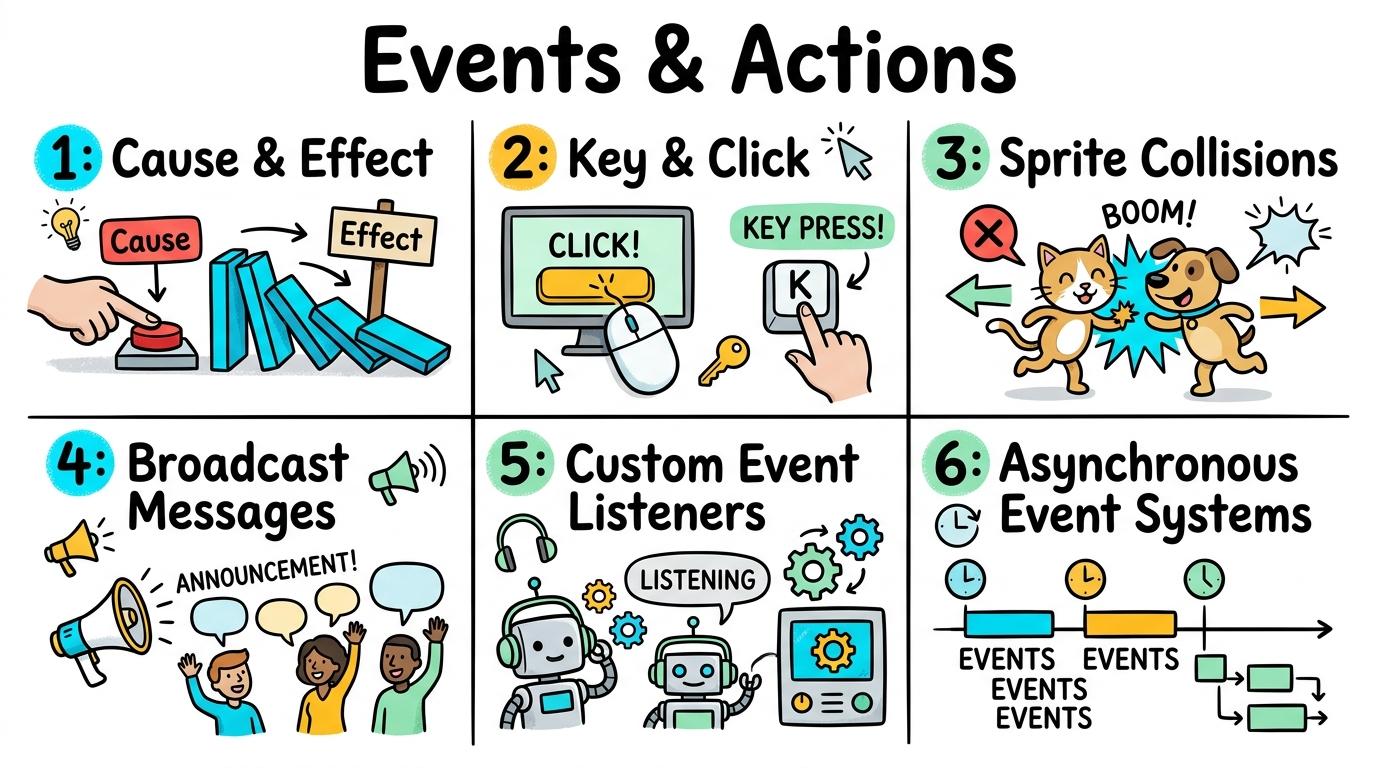
Events & Actions
Events & Actions
1
2
3
4
5
6
Explore how user interactions, key presses, sprite touches, and system signals trigger executable code blocks.
1: Cause & Effect
Recognise that user triggers cause digital actions
Let's Go!
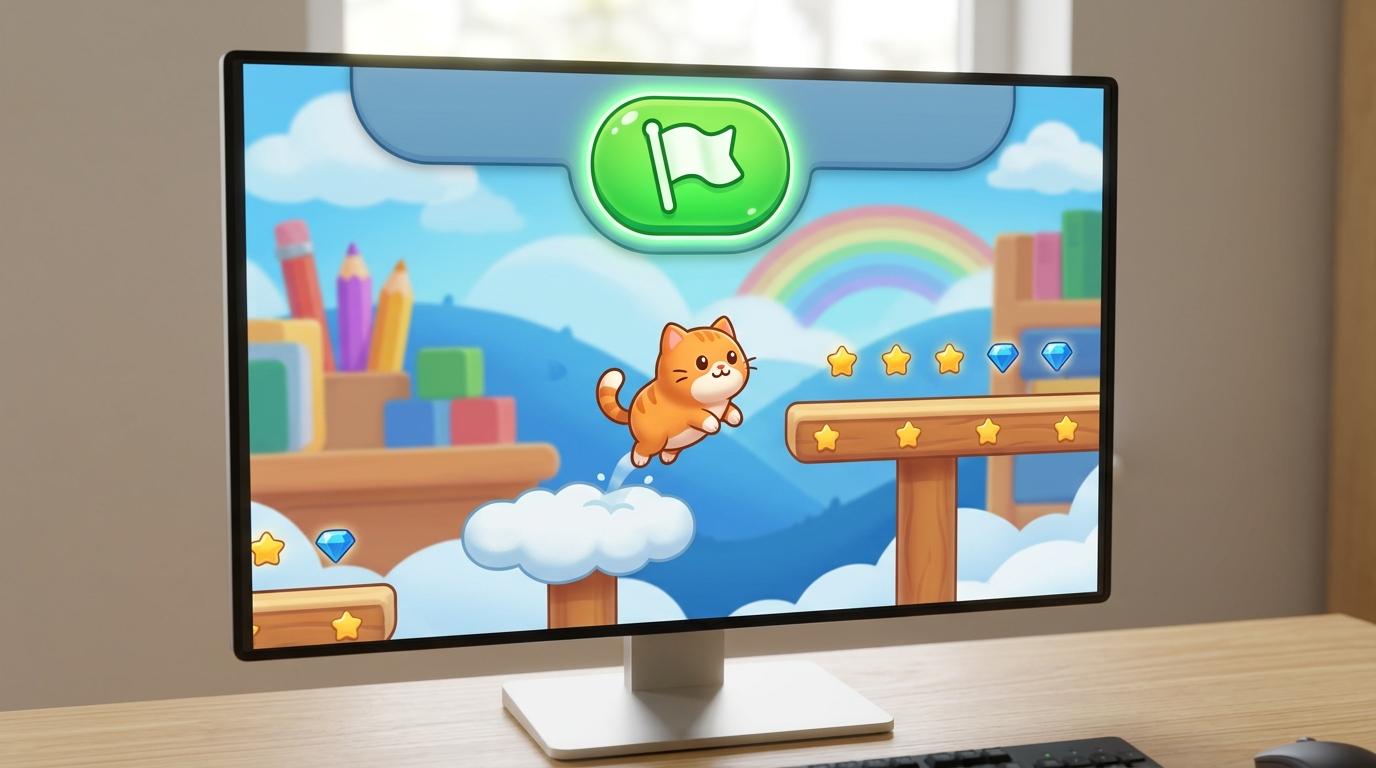
Routine: See-Think-Wonder
What happens on screen when you tap the green flag vs when you tap the sprite?
Teacher note: Facilitate the See-Think-Wonder routine for 2–3 minutes. Encourage students to connect the prompt to Form (Digital signals convert physical user actions into visible screen behavior.).
Learn
An EVENT is an action that happens (like tapping a key or clicking a sprite). An ACTION is what the computer does in response (like playing a sound or moving). In computing, digital signals convert physical user actions into visible screen behavior. As you explore the interactive Block Coding Simulator below, focus on how to create code sequences that execute when triggered by specific user clicks.
Script Workspace is Empty
Select blocks from the palette on the left to build your program stack.
AST StructureEmpty StackStack must initiate with an Event Hat block.
Execution FlowSequentialChecks linear vs iterative control branches.
Loop SafetySafeZero infinite loop hanging detected.
Clone Lifecycle0 ActiveClean garbage collection via delete-clone.
Block Tree Structure & GrammarValid Grammar
Assemble blocks in the Studio to inspect the syntax tree.
Runtime Trace Log & Performance60 FPS
| Step | Block Instruction | Sprite (X, Y) | Variables | Status |
|---|---|---|---|---|
| No script execution traces yet. Click 🚩 Go to record runtime data. | ||||
Apply Simulator Skills • Try it yourself
Task Checklist
🚀 Open a practice space
Or try locally: 🍓 Raspberry Pi Projects
🌟 Student Project GuideSuccess Criteria & WAGOLL (What A Good One Looks Like)
🎯 Task Success Criteria (Rubric)
Foundation
Recognises that clicking a button makes a sprite move.
Developing
Identifies 'when green flag clicked' and 'when sprite clicked' as code triggers.
Secure (Goal)
Creates code sequences that execute when triggered by specific user clicks.
Mastery
Explains the cause-and-effect relationship between event triggers and digital actions.
👀 What A Good One Looks Like (WAGOLL)
Exemplar of 2
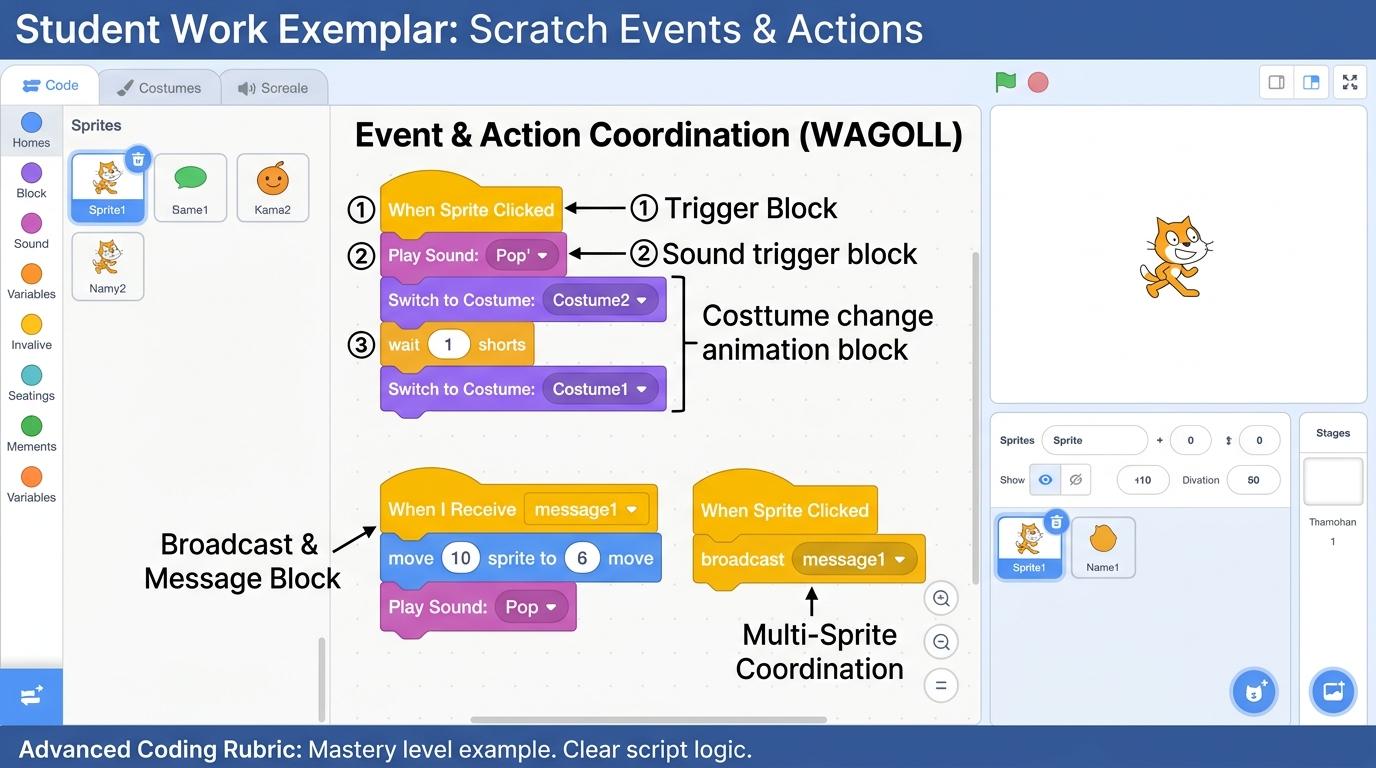 ⭐ Mastering Standard
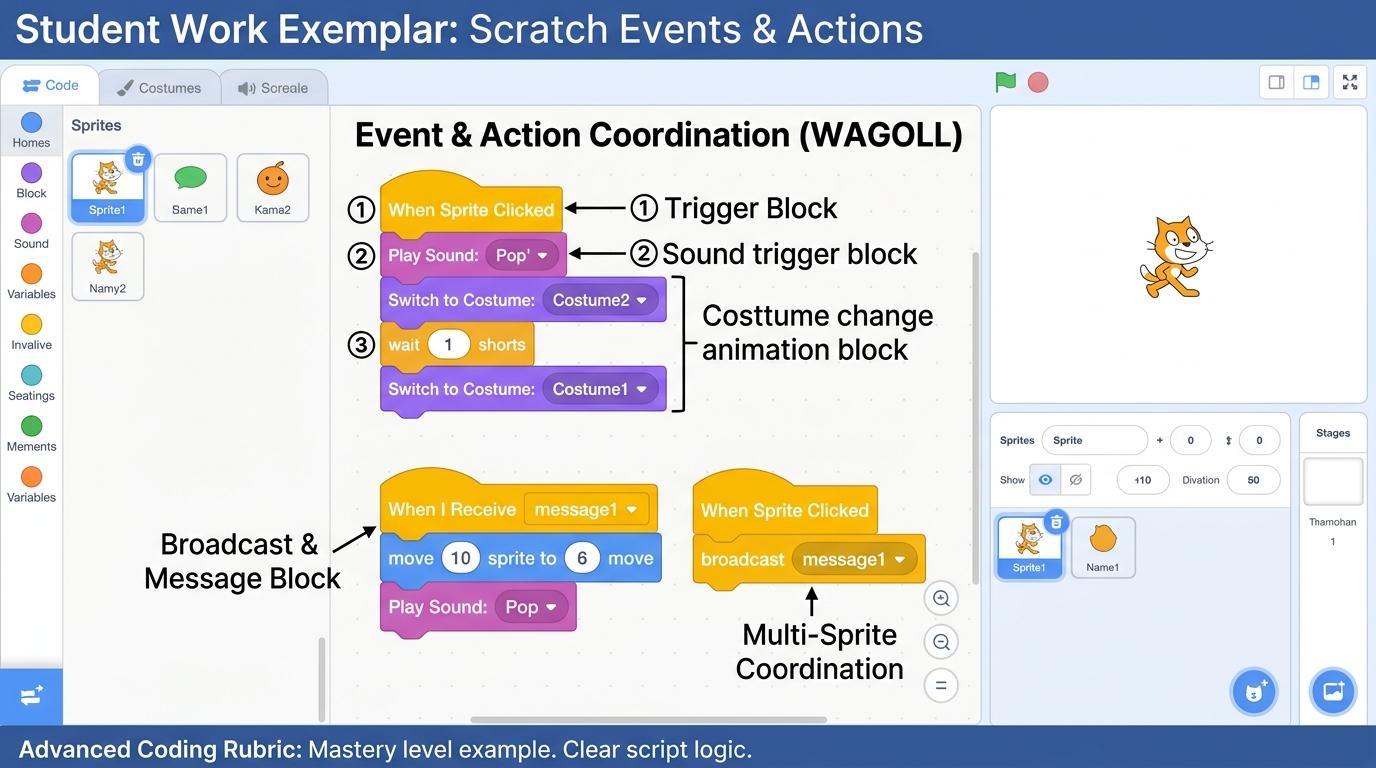 ⭐ Mastering Standard
📁
Save to Your Website Portfolio:
When you finish creating your project in your software, copy the share link or take a screenshot and publish it onto your student portfolio website!
Reflect
Learning check
Teacher setup, curriculum links and progress descriptors
Spark support
Routine: See-Think-Wonder
Teacher notes: Facilitate the See-Think-Wonder routine for 2–3 minutes. Encourage students to connect the prompt to Form (Digital signals convert physical user actions into visible screen behavior.).
Achievement pathway
- Foundation: Recognises that clicking a button makes a sprite move.
- Developing: Identifies 'when green flag clicked' and 'when sprite clicked' as code triggers.
- Secure: Creates code sequences that execute when triggered by specific user clicks.
- Mastering: Explains the cause-and-effect relationship between event triggers and digital actions.
Curriculum links
Curriculum strand: Events & Actions
Outcome: EVNT.01.B.1.1 — Recognise that user triggers cause digital actions
PYP: Form · Digital signals convert physical user actions into visible screen behavior.
Learner profile: Inquirer
Competency tags
Gate support
Accessibility alternative: Students may verbally explain or point to the correct answer for "Which block starts a script when you tap the green flag?" with a teacher or teaching assistant.
Teacher override: allow
Locked level
Level 2: 2: Key & Click
Complete the previous learning check to unlock this next level.
2: Key & Click
Program distinct responses for keyboard arrow keys and mouse clicks
Learning objective
Program separate event scripts triggered by specific arrow key presses and mouse clicks.
Let's Go!
Routine: Think-Pair-Share
How does a game controller know which button you pressed?
Teacher note: Facilitate the Think-Pair-Share routine for 2–3 minutes. Encourage students to connect the prompt to Function (Input devices generate distinct event codes to control digital systems.).
Learn
Different keys generate different event signals. By creating separate scripts for 'Up Arrow', 'Down Arrow', 'Left Arrow', and 'Right Arrow', you give your sprite full 2D movement! In computing, input devices generate distinct event codes to control digital systems. As you explore the interactive Block Coding Simulator below, focus on how to build a complete 4-way arrow key navigation system for a character sprite.
Script Workspace is Empty
Select blocks from the palette on the left to build your program stack.
AST StructureEmpty StackStack must initiate with an Event Hat block.
Execution FlowSequentialChecks linear vs iterative control branches.
Loop SafetySafeZero infinite loop hanging detected.
Clone Lifecycle0 ActiveClean garbage collection via delete-clone.
Block Tree Structure & GrammarValid Grammar
Assemble blocks in the Studio to inspect the syntax tree.
Runtime Trace Log & Performance60 FPS
| Step | Block Instruction | Sprite (X, Y) | Variables | Status |
|---|---|---|---|---|
| No script execution traces yet. Click 🚩 Go to record runtime data. | ||||
Apply Simulator Skills • Try it yourself
Task Checklist
🚀 Open a practice space
Or try locally: 🍓 Raspberry Pi Projects
🌟 Student Project GuideSuccess Criteria & WAGOLL (What A Good One Looks Like)
🎯 Task Success Criteria (Rubric)
Foundation
Presses arrow keys to move sprites using pre-made scripts.
Developing
Attaches directional movement blocks to specific arrow key event hats.
Secure (Goal)
Builds a complete 4-way arrow key navigation system for a character sprite.
Mastery
Evaluates responsiveness and control ergonomics of key press event triggers.
👀 What A Good One Looks Like (WAGOLL)
Exemplar of 2
⭐ Mastering Standard⭐ Mastering Standard📁
Save to Your Website Portfolio:
When you finish creating your project in your software, copy the share link or take a screenshot and publish it onto your student portfolio website!
Reflect
Learning check
Teacher setup, curriculum links and progress descriptors
Spark support
Routine: Think-Pair-Share
Teacher notes: Facilitate the Think-Pair-Share routine for 2–3 minutes. Encourage students to connect the prompt to Function (Input devices generate distinct event codes to control digital systems.).
Achievement pathway
- Foundation: Presses arrow keys to move sprites using pre-made scripts.
- Developing: Attaches directional movement blocks to specific arrow key event hats.
- Secure: Builds a complete 4-way arrow key navigation system for a character sprite.
- Mastering: Evaluates responsiveness and control ergonomics of key press event triggers.
Curriculum links
Curriculum strand: Events & Actions
Outcome: EVNT.02.B.1.2 — Program distinct responses for keyboard arrow keys and mouse clicks
PYP: Function · Input devices generate distinct event codes to control digital systems.
Learner profile: Communicator
Competency tags
Gate support
Accessibility alternative: Students may verbally explain or point to the correct answer for "If you want your sprite to move left when the Left Arrow is pressed, which x change value should you use?" with a teacher or teaching assistant.
Teacher override: allow
Locked level
Level 3: 3: Sprite Collisions
Complete the previous learning check to unlock this next level.
3: Sprite Collisions
Detect sprite collision events to trigger game interactions
Learning objective
Program collision event scripts using 'touching sprite' and 'touching color' sensing blocks.
Let's Go!
Routine: I Used to Think... Now I Think...
How does a game know when a ball hits a paddle or wall?
Teacher note: Facilitate the I Used to Think... Now I Think... routine for 2–3 minutes. Encourage students to connect the prompt to Connection (Collisions between digital elements trigger dynamic system changes.).
Learn
Collision detection constantly checks if two sprites or colors overlap. When a collision occurs, it fires an action like playing a sound, adding points, or hiding the sprite! In computing, collisions between digital elements trigger dynamic system changes. As you explore the interactive Block Coding Simulator below, focus on how to design collision mechanics like collecting items or resetting player position on obstacle touch.
Script Workspace is Empty
Select blocks from the palette on the left to build your program stack.
AST StructureEmpty StackStack must initiate with an Event Hat block.
Execution FlowSequentialChecks linear vs iterative control branches.
Loop SafetySafeZero infinite loop hanging detected.
Clone Lifecycle0 ActiveClean garbage collection via delete-clone.
Block Tree Structure & GrammarValid Grammar
Assemble blocks in the Studio to inspect the syntax tree.
Runtime Trace Log & Performance60 FPS
| Step | Block Instruction | Sprite (X, Y) | Variables | Status |
|---|---|---|---|---|
| No script execution traces yet. Click 🚩 Go to record runtime data. | ||||
Apply Simulator Skills • Try it yourself
Task Checklist
🚀 Open a practice space
Or try locally: 🍓 Raspberry Pi Projects
🌟 Student Project GuideSuccess Criteria & WAGOLL (What A Good One Looks Like)
🎯 Task Success Criteria (Rubric)
Foundation
Observes sprites reacting when they touch each other.
Developing
Uses 'if touching sprite then' blocks inside a forever loop to detect collisions.
Secure (Goal)
Designs collision mechanics like collecting items or resetting player position on obstacle touch.
Mastery
Optimizes collision detection responsiveness and prevents multi-trigger glitches.
👀 What A Good One Looks Like (WAGOLL)
Exemplar of 2
⭐ Mastering Standard⭐ Mastering Standard📁
Save to Your Website Portfolio:
When you finish creating your project in your software, copy the share link or take a screenshot and publish it onto your student portfolio website!
Reflect
Learning check
Teacher setup, curriculum links and progress descriptors
Spark support
Routine: I Used to Think... Now I Think...
Teacher notes: Facilitate the I Used to Think... Now I Think... routine for 2–3 minutes. Encourage students to connect the prompt to Connection (Collisions between digital elements trigger dynamic system changes.).
Achievement pathway
- Foundation: Observes sprites reacting when they touch each other.
- Developing: Uses 'if touching sprite then' blocks inside a forever loop to detect collisions.
- Secure: Designs collision mechanics like collecting items or resetting player position on obstacle touch.
- Mastering: Optimizes collision detection responsiveness and prevents multi-trigger glitches.
Curriculum links
Curriculum strand: Events & Actions
Outcome: EVNT.03.B.1.3 — Detect sprite collision events to trigger game interactions
PYP: Connection · Collisions between digital elements trigger dynamic system changes.
Learner profile: Thinker
Competency tags
Gate support
Accessibility alternative: Students may verbally explain or point to the correct answer for "What happens if you check 'if touching sprite' ONCE at startup without a forever loop?" with a teacher or teaching assistant.
Teacher override: allow
Locked level
Level 4: 4: Broadcast Messages
Complete the previous learning check to unlock this next level.
4: Broadcast Messages
Synchronize multi-sprite stories using broadcast signals
Learning objective
Coordinate multi-sprite dialogues, level changes, and game state transitions using broadcast messages.
Let's Go!
Routine: Connect-Extend-Challenge
How do walkie-talkies let people communicate across distances?
Teacher note: Facilitate the Connect-Extend-Challenge routine for 2–3 minutes. Encourage students to connect the prompt to Responsibility (Broadcast signals enable asynchronous coordination across independent software modules.).
Learn
Broadcasting is like making an announcement over a school loudspeaker. One sprite shouts 'broadcast Level 2', and any sprite listening for 'when I receive Level 2' instantly runs its code! In computing, broadcast signals enable asynchronous coordination across independent software modules. As you explore the interactive Block Coding Simulator below, focus on how to construct multi-scene animated stories and multi-level games using broadcast signals.
Script Workspace is Empty
Select blocks from the palette on the left to build your program stack.
AST StructureEmpty StackStack must initiate with an Event Hat block.
Execution FlowSequentialChecks linear vs iterative control branches.
Loop SafetySafeZero infinite loop hanging detected.
Clone Lifecycle0 ActiveClean garbage collection via delete-clone.
Block Tree Structure & GrammarValid Grammar
Assemble blocks in the Studio to inspect the syntax tree.
Runtime Trace Log & Performance60 FPS
| Step | Block Instruction | Sprite (X, Y) | Variables | Status |
|---|---|---|---|---|
| No script execution traces yet. Click 🚩 Go to record runtime data. | ||||
Apply Simulator Skills • Try it yourself
Task Checklist
🚀 Open a practice space
Or try locally: 🍓 Raspberry Pi Projects
🌟 Student Project GuideSuccess Criteria & WAGOLL (What A Good One Looks Like)
🎯 Task Success Criteria (Rubric)
Foundation
Recognises that one sprite can trigger actions in another sprite.
Developing
Uses 'broadcast message' and 'when I receive message' blocks to coordinate two sprites.
Secure (Goal)
Constructs multi-scene animated stories and multi-level games using broadcast signals.
Mastery
Architects clean message-passing structures to prevent message broadcast loops and race conditions.
👀 What A Good One Looks Like (WAGOLL)
Exemplar of 2
⭐ Mastering Standard⭐ Mastering Standard📁
Save to Your Website Portfolio:
When you finish creating your project in your software, copy the share link or take a screenshot and publish it onto your student portfolio website!
Reflect
Learning check
Teacher setup, curriculum links and progress descriptors
Spark support
Routine: Connect-Extend-Challenge
Teacher notes: Facilitate the Connect-Extend-Challenge routine for 2–3 minutes. Encourage students to connect the prompt to Responsibility (Broadcast signals enable asynchronous coordination across independent software modules.).
Achievement pathway
- Foundation: Recognises that one sprite can trigger actions in another sprite.
- Developing: Uses 'broadcast message' and 'when I receive message' blocks to coordinate two sprites.
- Secure: Constructs multi-scene animated stories and multi-level games using broadcast signals.
- Mastering: Architects clean message-passing structures to prevent message broadcast loops and race conditions.
Curriculum links
Curriculum strand: Events & Actions
Outcome: EVNT.04.B.1.4 — Synchronize multi-sprite stories using broadcast signals
PYP: Responsibility · Broadcast signals enable asynchronous coordination across independent software modules.
Learner profile: Principled
Competency tags
Gate support
Accessibility alternative: Students may verbally explain or point to the correct answer for "Which block sends a signal to all sprites and waits for their scripts to finish before moving on?" with a teacher or teaching assistant.
Teacher override: allow
Locked level
Level 5: 5: Custom Event Listeners
Complete the previous learning check to unlock this next level.
5: Custom Event Listeners
Construct custom value and threshold event triggers
Learning objective
Program custom event triggers that activate automatically when variables cross numerical thresholds.
Let's Go!
Routine: 3-2-1 Bridge
Name 3 real-life devices that wait for a number threshold before turning on (e.g., thermostat, alarm).
Teacher note: Facilitate the 3-2-1 Bridge routine for 2–3 minutes. Encourage students to connect the prompt to Perspective (System state thresholds trigger automated background monitoring routines.).
Learn
Custom event listeners monitor background system states (like timer countdowns, health points, or loudness). When the value crosses your target number, the event fires immediately! In computing, system state thresholds trigger automated background monitoring routines. As you explore the interactive Block Coding Simulator below, focus on how to program automated game-over and win-condition listeners based on variable thresholds.
Script Workspace is Empty
Select blocks from the palette on the left to build your program stack.
AST StructureEmpty StackStack must initiate with an Event Hat block.
Execution FlowSequentialChecks linear vs iterative control branches.
Loop SafetySafeZero infinite loop hanging detected.
Clone Lifecycle0 ActiveClean garbage collection via delete-clone.
Block Tree Structure & GrammarValid Grammar
Assemble blocks in the Studio to inspect the syntax tree.
Runtime Trace Log & Performance60 FPS
| Step | Block Instruction | Sprite (X, Y) | Variables | Status |
|---|---|---|---|---|
| No script execution traces yet. Click 🚩 Go to record runtime data. | ||||
Apply Simulator Skills • Try it yourself
Task Checklist
🚀 Open a practice space
Or try locally: 🍓 Raspberry Pi Projects
🌟 Student Project GuideSuccess Criteria & WAGOLL (What A Good One Looks Like)
🎯 Task Success Criteria (Rubric)
Foundation
Identifies basic variable changes on screen.
Developing
Uses 'when [timer > 10]' or 'when [score > 50]' event hat blocks.
Secure (Goal)
Programs automated game-over and win-condition listeners based on variable thresholds.
Mastery
Evaluates the performance impact of continuous event polling vs listener-driven architecture.
👀 What A Good One Looks Like (WAGOLL)
Exemplar of 2
⭐ Mastering Standard⭐ Mastering Standard📁
Save to Your Website Portfolio:
When you finish creating your project in your software, copy the share link or take a screenshot and publish it onto your student portfolio website!
Reflect
Learning check
Teacher setup, curriculum links and progress descriptors
Spark support
Routine: 3-2-1 Bridge
Teacher notes: Facilitate the 3-2-1 Bridge routine for 2–3 minutes. Encourage students to connect the prompt to Perspective (System state thresholds trigger automated background monitoring routines.).
Achievement pathway
- Foundation: Identifies basic variable changes on screen.
- Developing: Uses 'when [timer > 10]' or 'when [score > 50]' event hat blocks.
- Secure: Programs automated game-over and win-condition listeners based on variable thresholds.
- Mastering: Evaluates the performance impact of continuous event polling vs listener-driven architecture.
Curriculum links
Curriculum strand: Events & Actions
Outcome: EVNT.05.B.1.5 — Construct custom value and threshold event triggers
PYP: Perspective · System state thresholds trigger automated background monitoring routines.
Learner profile: Knowledgeable
Competency tags
Gate support
Accessibility alternative: Students may verbally explain or point to the correct answer for "Which block automatically triggers code the moment your score reaches 100?" with a teacher or teaching assistant.
Teacher override: allow
Locked level
Level 6: 6: Asynchronous Event Systems
Complete the previous learning check to unlock this next level.
6: Asynchronous Event Systems
Design non-blocking asynchronous event-driven software
Learning objective
Design and optimize complex event-driven projects handling multiple simultaneous user inputs without thread lockup.
Let's Go!
Routine: What If...?
What if a video game stopped responding to your controller every time background music played?
Teacher note: Facilitate the What If...? routine for 2–3 minutes. Encourage students to connect the prompt to Reflection (Asynchronous event architectures power concurrent, multi-threaded modern digital applications.).
Learn
Modern software is event-driven and asynchronous. Multiple events (clicks, network data, audio loops) happen concurrently. Decoupling event handlers ensures your user interface stays smooth and fast! In computing, asynchronous event architectures power concurrent, multi-threaded modern digital applications. As you explore the interactive Block Coding Simulator below, focus on how to build responsive multi-input applications with decoupled event controllers and state managers.
Script Workspace is Empty
Select blocks from the palette on the left to build your program stack.
AST StructureEmpty StackStack must initiate with an Event Hat block.
Execution FlowSequentialChecks linear vs iterative control branches.
Loop SafetySafeZero infinite loop hanging detected.
Clone Lifecycle0 ActiveClean garbage collection via delete-clone.
Block Tree Structure & GrammarValid Grammar
Assemble blocks in the Studio to inspect the syntax tree.
Runtime Trace Log & Performance60 FPS
| Step | Block Instruction | Sprite (X, Y) | Variables | Status |
|---|---|---|---|---|
| No script execution traces yet. Click 🚩 Go to record runtime data. | ||||
Apply Simulator Skills • Try it yourself
Task Checklist
🚀 Open a practice space
Or try locally: 🍓 Raspberry Pi Projects
🌟 Student Project GuideSuccess Criteria & WAGOLL (What A Good One Looks Like)
🎯 Task Success Criteria (Rubric)
Foundation
Understands that multiple scripts can run at the same time.
Developing
Identifies and resolves event race conditions and message interference.
Secure (Goal)
Builds responsive multi-input applications with decoupled event controllers and state managers.
Mastery
Critiques event-driven architecture efficiency and implements non-blocking execution patterns.
👀 What A Good One Looks Like (WAGOLL)
Exemplar of 2
⭐ Mastering Standard⭐ Mastering Standard📁
Save to Your Website Portfolio:
When you finish creating your project in your software, copy the share link or take a screenshot and publish it onto your student portfolio website!
Reflect
Learning check
Teacher setup, curriculum links and progress descriptors
Spark support
Routine: What If...?
Teacher notes: Facilitate the What If...? routine for 2–3 minutes. Encourage students to connect the prompt to Reflection (Asynchronous event architectures power concurrent, multi-threaded modern digital applications.).
Achievement pathway
- Foundation: Understands that multiple scripts can run at the same time.
- Developing: Identifies and resolves event race conditions and message interference.
- Secure: Builds responsive multi-input applications with decoupled event controllers and state managers.
- Mastering: Critiques event-driven architecture efficiency and implements non-blocking execution patterns.
Curriculum links
Curriculum strand: Events & Actions
Outcome: EVNT.06.B.1.6 — Design non-blocking asynchronous event-driven software
PYP: Reflection · Asynchronous event architectures power concurrent, multi-threaded modern digital applications.
Learner profile: Reflective
Competency tags
Gate support
Accessibility alternative: Students may verbally explain or point to the correct answer for "What is the primary advantage of asynchronous event-driven programming?" with a teacher or teaching assistant.
Teacher override: allow