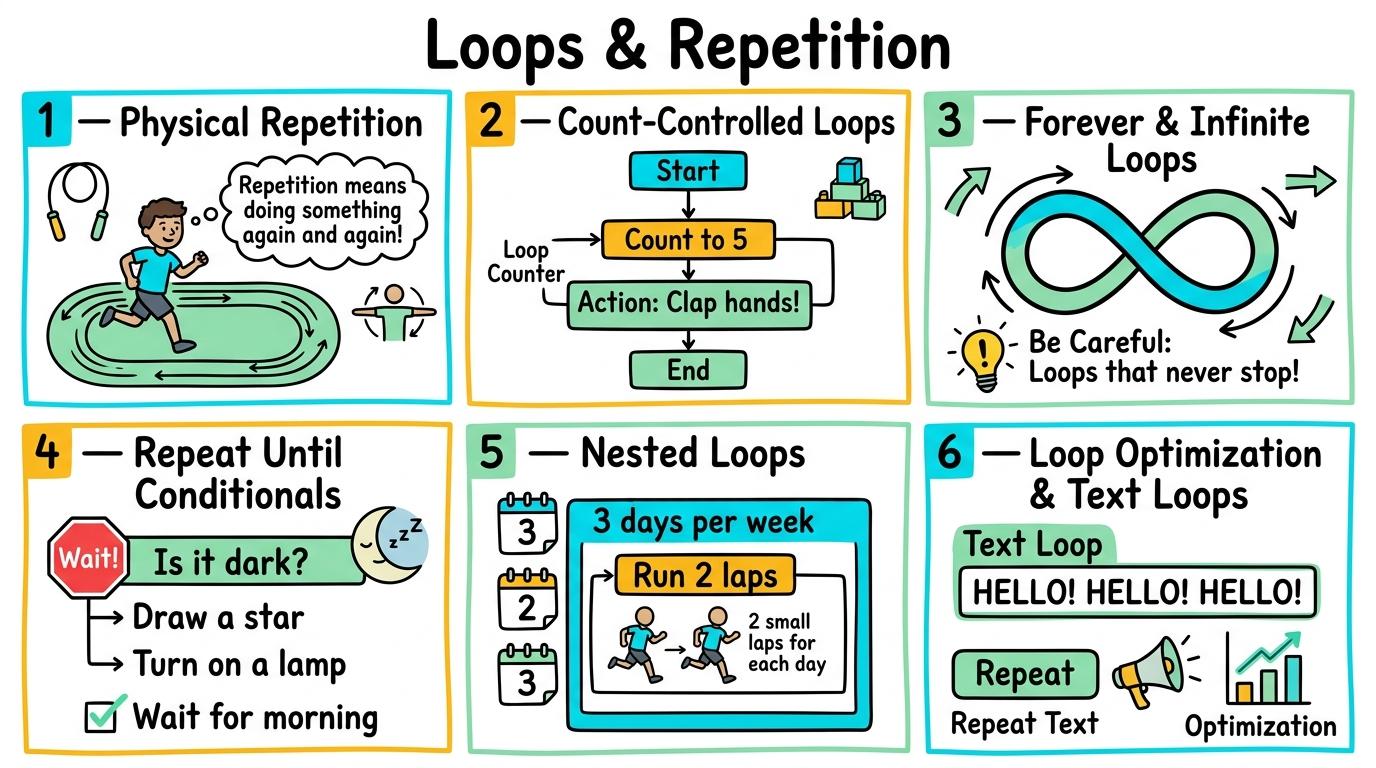
Congratulations on mastering Levels 1 to 6! Here is your one-page visual synthesis of every key concept learned:
▶View All 6 Level Key Concepts & Standards6 Levels Summarised
📌
Level 1🚀
Y1 — Physical Repetition
Identify repeating patterns in everyday actions and physical routines.
Key Takeaway:A loop is an instruction that tells us to repeat an action.
#unplugged#loops#repetition
✓ Mastered
📌
Level 2🛡️
Y2 — Count-Controlled Loops
Use repeat blocks with fixed counts in visual block programs.
Key Takeaway:In block coding, a 'repeat [N]' block wraps around other blocks like a sandwich.
#block-coding#repeat-block#count-loops
✓ Mastered
📌
Level 3🔑
Y3 — Forever & Infinite Loops
Construct infinite repetition loops for continuous background animations and game monitoring.
Key Takeaway:A 'forever' loop runs continuously until the program is stopped manually.
#forever-loop#infinite-loop#background-script
✓ Mastered
📌
Level 4💻
Y4 — Repeat Until Conditionals
Implement conditional loops that repeat actions until a specific sensing condition is met.
Key Takeaway:A 'repeat until [condition]' loop evaluates its condition before every iteration.
#repeat-until#conditional-loops#sensing
✓ Mastered
📌
Level 5🔐
Y5 — Nested Loops
Place loops inside other loops to construct multi-dimensional grids, patterns, and nested iterations.
Key Takeaway:Nested loops occur when one loop (the inner loop) is placed entirely inside another loop (the outer loop).
#nested-loops#2D-grids#pattern-generation
✓ Mastered
📌
Level 6🏆
Y6 — Loop Optimization & Text Loops
Transition loop concepts into text-based languages (for/while) and analyze computational loop efficiency.
Key Takeaway:In text coding like Python, `for i in range(10):` runs a loop a fixed number of times, while `while condition:` repeats as long as a condition remains True.
#for-loop#while-loop#python
✓ Mastered
✨
SECRET MASTERY UNLOCK
Stage Mastery Quest Challenge
You've unlocked the secret final review dungeon! Can you solve every checkpoint gate and escape the maze?
🕹️🔁 Loop Specialist
Loops & Repetition
Hearts❤️❤️❤️
StageL1: Remember
XP Score0 PTS
1Y1 — Physical Repetition
2Y2 — Count-Controlled Loops
3Y3 — Forever & Infinite Loops
4Y4 — Repeat Until Conditionals
5Y5 — Nested Loops
6Y6 — Loop Optimization & Text Loops
Chapter 1: The Incident
🧙♂️
Loading narrative situation...
What is your next action?
🚨 Roadblock Encountered! -1 Heart! Hint: Check the core standard.
TERMINAL://EDTECH-ROOT/NODE-EXEC● LIVE LINK
// SYSTEM DIAGNOSTIC INITIALIZED...
>Select verification command:
🚨 SYNTAX CRASH! -1 Heart & Buffer Overflow!
⌨️ Arrows/WASD to Move & Jump • Land on Question Beacon to Elevate!
⌨️ Left/Right to Steer • Space to Fire Tractor Beam at Correct Capsule!
⌨️ Space to Launch Spark • A/D or Left/Right to Trigger Flipper Gates!
Level 1 Checkpoint⌨️ Press [1]–[3]
Question Prompt goes here?
🚨 INCORRECT CHOICE! -100 PTS & -1 Heart!
💡 Mastery Insight Verified (+200 PTS):
🏆✨
STRAND MASTERY ACHIEVED!
You conquered all 6 levels and demonstrated digital mastery!
Final XP Score: 0 PTS
🔑SECRET AREA BOSS KEY DISCOVERED!
Use this secret PIN to unlock the CodeQuest: Citadel of Algorithms in the Area Capstone Vault:
Congratulations on completing all 6 levels of Loops & Repetition! To unlock the CodeQuest: Citadel of Algorithms, you must collect all 11 Key Shards across the Coding & Computational Thinking strands. Here is your cipher fragment for Slot #7:
KEY SHARD #7
0
Slot 7 of 11
🧩 Coding & Computational Thinking Key Ring Tracker:Slot #7 Active
Identify repeating patterns in everyday actions and physical routines.
Learning objective
Identify repeating physical actions and count repetition cycles in routines.
Let's Go!
Routine: Think-Pair-Share
Clap your hands three times, stomp twice, then repeat! How many times did we repeat the pattern?
Teacher note: Facilitate the Think-Pair-Share routine for 2–3 minutes. Encourage students to connect the prompt to Form (Repeating actions allow humans and machines to perform routines efficiently.).
Learn
A loop is an instruction that tells us to repeat an action. Instead of saying 'clap, clap, clap', we can say 'repeat 3 times: clap'. This makes instructions shorter and easier to follow! In computing, repeating actions allow humans and machines to perform routines efficiently. As you explore the interactive Block Coding Simulator below, focus on how to identify repeating loops in physical routines and state the repeat count.
🌟 Student Project GuideSuccess Criteria & WAGOLL (What A Good One Looks Like)▾
🎯 Task Success Criteria (Rubric)
Foundation
Recognise when an action is repeated.
Developing
Count how many times an action repeats in a simple dance or clapping pattern.
Secure (Goal)
Identify repeating loops in physical routines and state the repeat count.
Mastery
Create original physical repetition routines and explain why repeating beats saves instruction steps.
👀 What A Good One Looks Like (WAGOLL)
Exemplar 1 of 2
⭐ Mastering Standard
Loops & Repetition Exemplar: Demonstration of mastering quality standards for Y1 — Physical Repetition.
⭐ Mastering Standard
Loops & Repetition Exemplar: Demonstration of mastering quality standards for Y1 — Physical Repetition.
📁
Save to Your Website Portfolio:
When you finish creating your project in your software, copy the share link or take a screenshot and publish it onto your student portfolio website!
Reflect
🎯
Self-Assessment & Reflection
Why is it easier to say 'repeat 4 times' instead of saying the action 4 times?
🟢Secure Level
Identify repeating loops in physical routines and state the repeat count.
Learning check
Learning Check
What does a loop do in a sequence of instructions?
Hint 1: Think about how y1 — physical repetition works: identify repeating patterns in everyday actions and physical routines.
Hint 2: Clue: You have mastered this step in Loops & Repetition.
Answer correctly to unlock the next level.
Great job! You have mastered this step in Loops & Repetition.Not quite right. Review the learn section and try again.
Teacher setup, curriculum links and progress descriptors
Spark support
Routine: Think-Pair-Share
Teacher notes: Facilitate the Think-Pair-Share routine for 2–3 minutes. Encourage students to connect the prompt to Form (Repeating actions allow humans and machines to perform routines efficiently.).
Achievement pathway
Foundation: Recognise when an action is repeated.
Developing: Count how many times an action repeats in a simple dance or clapping pattern.
Secure: Identify repeating loops in physical routines and state the repeat count.
Mastering: Create original physical repetition routines and explain why repeating beats saves instruction steps.
Curriculum links
Curriculum strand: coding/loops-repetition
Outcome: LOOP.01.B.1.1 — Identify repeating patterns in everyday actions and physical routines.
PYP: Form · Repeating actions allow humans and machines to perform routines efficiently.
Learner profile: Inquirer
Competency tags
unplugged
loops
repetition
patterns
Gate support
Accessibility alternative: Students may verbally explain or point to the correct answer for "What does a loop do in a sequence of instructions?" with a teacher or teaching assistant.
Complete the previous learning check to unlock this next level.
Level 2
Y2 — Count-Controlled Loops
Use repeat blocks with fixed counts in visual block programs.
Learning objective
Program a sprite to execute actions using a count-controlled repeat block.
Let's Go!
Routine: Think-Pair-Share
Watch this sprite walk across the stage step-by-step. How can we make the code shorter using a repeat loop?
Teacher note: Facilitate the Think-Pair-Share routine for 2–3 minutes. Encourage students to connect the prompt to Function (Count-controlled loops execute precise repetitions in digital algorithms.).
Learn
In block coding, a 'repeat [N]' block wraps around other blocks like a sandwich. Any blocks inside the repeat loop will execute N times before moving to the next block below. In computing, count-controlled loops execute precise repetitions in digital algorithms. As you explore the interactive Audio Soundboard Simulator below, focus on how to use count-controlled repeat loops to draw regular geometric shapes or repeat multi-block movement scripts.
🌟 Student Project GuideSuccess Criteria & WAGOLL (What A Good One Looks Like)▾
🎯 Task Success Criteria (Rubric)
Foundation
Place a repeat block around a single movement block.
Developing
Set a repeat count number to move a sprite across a grid.
Secure (Goal)
Use count-controlled repeat loops to draw regular geometric shapes or repeat multi-block movement scripts.
Mastery
Compare a script written with loops to one written linearly without loops, explaining code efficiency.
👀 What A Good One Looks Like (WAGOLL)
Exemplar 1 of 2
⭐ Mastering Standard
Loops & Repetition Exemplar: Demonstration of mastering quality standards for Y2 — Count-Controlled Loops.
⭐ Mastering Standard
Loops & Repetition Exemplar: Demonstration of mastering quality standards for Y2 — Count-Controlled Loops.
📁
Save to Your Website Portfolio:
When you finish creating your project in your software, copy the share link or take a screenshot and publish it onto your student portfolio website!
Reflect
🎯
Self-Assessment & Reflection
How many blocks did you save by using a repeat block instead of repeating code line by line?
🟢Secure Level
Use count-controlled repeat loops to draw regular geometric shapes or repeat multi-block movement scripts.
Learning check
Learning Check
If a repeat block is set to 5 and contains 'move 10 steps', how many steps will the sprite move in total?
Hint 1: Think about how y2 — count-controlled loops works: use repeat blocks with fixed counts in visual block programs.
Hint 2: Clue: You have mastered this step in Loops & Repetition.
Answer correctly to unlock the next level.
Great job! You have mastered this step in Loops & Repetition.Not quite right. Review the learn section and try again.
Teacher setup, curriculum links and progress descriptors
Spark support
Routine: Think-Pair-Share
Teacher notes: Facilitate the Think-Pair-Share routine for 2–3 minutes. Encourage students to connect the prompt to Function (Count-controlled loops execute precise repetitions in digital algorithms.).
Achievement pathway
Foundation: Place a repeat block around a single movement block.
Developing: Set a repeat count number to move a sprite across a grid.
Secure: Use count-controlled repeat loops to draw regular geometric shapes or repeat multi-block movement scripts.
Mastering: Compare a script written with loops to one written linearly without loops, explaining code efficiency.
Curriculum links
Curriculum strand: coding/loops-repetition
Outcome: LOOP.02.B.1.2 — Use repeat blocks with fixed counts in visual block programs.
PYP: Function · Count-controlled loops execute precise repetitions in digital algorithms.
Learner profile: Communicator
Competency tags
block-coding
repeat-block
count-loops
ScratchJr
Gate support
Accessibility alternative: Students may verbally explain or point to the correct answer for "If a repeat block is set to 5 and contains 'move 10 steps', how many steps will the sprite move in total?" with a teacher or teaching assistant.
Complete the previous learning check to unlock this next level.
Level 3
Y3 — Forever & Infinite Loops
Construct infinite repetition loops for continuous background animations and game monitoring.
Learning objective
Utilize 'forever' loops to maintain continuous sprite animations and ongoing condition checking.
Let's Go!
Routine: Think-Pair-Share
How do non-player characters in video games keep moving or dancing continuously without stopping?
Teacher note: Facilitate the Think-Pair-Share routine for 2–3 minutes. Encourage students to connect the prompt to Change (Infinite loops allow programs to run background tasks continuously.).
Learn
A 'forever' loop runs continuously until the program is stopped manually. It is used for ongoing tasks like costume animations, background scrolling, or constantly checking if a key is pressed. In computing, infinite loops allow programs to run background tasks continuously. As you explore the interactive Animation Simulator below, focus on how to construct forever loops that continuously monitor game conditions or animate backgrounds.
🌟 Student Project GuideSuccess Criteria & WAGOLL (What A Good One Looks Like)▾
🎯 Task Success Criteria (Rubric)
Foundation
Identify a forever block in the block palette.
Developing
Wrap a costume-switching script inside a forever loop to create walking animations.
Secure (Goal)
Construct forever loops that continuously monitor game conditions or animate backgrounds.
Mastery
Explain when to use a forever loop versus a count-controlled loop in game design.
👀 What A Good One Looks Like (WAGOLL)
Exemplar 1 of 2
⭐ Mastering Standard
Loops & Repetition Exemplar: Demonstration of mastering quality standards for Y3 — Forever & Infinite Loops.
⭐ Mastering Standard
Loops & Repetition Exemplar: Demonstration of mastering quality standards for Y3 — Forever & Infinite Loops.
📁
Save to Your Website Portfolio:
When you finish creating your project in your software, copy the share link or take a screenshot and publish it onto your student portfolio website!
Reflect
🎯
Self-Assessment & Reflection
What happens if you put a block *below* a forever loop? Why does it never run?
🟢Secure Level
Construct forever loops that continuously monitor game conditions or animate backgrounds.
Learning check
Learning Check
Which type of loop never stops repeating until the red stop button is clicked?
Hint 1: Think about how y3 — forever & infinite loops works: construct infinite repetition loops for continuous background animations and game monitoring.
Hint 2: Clue: You have mastered this step in Loops & Repetition.
Answer correctly to unlock the next level.
Great job! You have mastered this step in Loops & Repetition.Not quite right. Review the learn section and try again.
Teacher setup, curriculum links and progress descriptors
Spark support
Routine: Think-Pair-Share
Teacher notes: Facilitate the Think-Pair-Share routine for 2–3 minutes. Encourage students to connect the prompt to Change (Infinite loops allow programs to run background tasks continuously.).
Achievement pathway
Foundation: Identify a forever block in the block palette.
Developing: Wrap a costume-switching script inside a forever loop to create walking animations.
Secure: Construct forever loops that continuously monitor game conditions or animate backgrounds.
Mastering: Explain when to use a forever loop versus a count-controlled loop in game design.
Curriculum links
Curriculum strand: coding/loops-repetition
Outcome: LOOP.03.B.1.3 — Construct infinite repetition loops for continuous background animations and game monitoring.
PYP: Change · Infinite loops allow programs to run background tasks continuously.
Learner profile: Thinker
Competency tags
forever-loop
infinite-loop
background-script
Scratch
Gate support
Accessibility alternative: Students may verbally explain or point to the correct answer for "Which type of loop never stops repeating until the red stop button is clicked?" with a teacher or teaching assistant.
Complete the previous learning check to unlock this next level.
Level 4
Y4 — Repeat Until Conditionals
Implement conditional loops that repeat actions until a specific sensing condition is met.
Learning objective
Build scripts using 'repeat until' loops governed by touch or sensing conditions.
Let's Go!
Routine: Think-Pair-Share
How can we code a robot to keep driving forward UNTIL it detects a wall in front of it?
Teacher note: Facilitate the Think-Pair-Share routine for 2–3 minutes. Encourage students to connect the prompt to Connection (Conditional loops enable dynamic algorithmic responses based on real-time environmental data.).
Learn
A 'repeat until [condition]' loop evaluates its condition before every iteration. It repeats the enclosed actions continuously until the condition evaluates to true, then stops looping and moves to the next block. In computing, conditional loops enable dynamic algorithmic responses based on real-time environmental data. As you explore the interactive Spreadsheet Simulator below, focus on how to program game sprites to move continuously until hitting an obstacle or reaching a target.
Interactive Simulator Sandbox
📊
Spreadsheet StudioStep 4 • Bronze Tier
|
A1fx
A
B
C
1
Item
Amount
2
Apples
5
3
Bananas
3
4
Carrots
2
5
Total
Challenge: Click cell B5 to inspect how the AutoSum formula adds up column B!
🌟 Student Project GuideSuccess Criteria & WAGOLL (What A Good One Looks Like)▾
🎯 Task Success Criteria (Rubric)
Foundation
Identify the sensing condition slot in a repeat-until block.
Developing
Combine a touching-color or touching-mouse sensor with a repeat-until loop.
Secure (Goal)
Program game sprites to move continuously until hitting an obstacle or reaching a target.
Mastery
Debug scripts where repeat-until conditions never become true (preventing infinite hanging).
👀 What A Good One Looks Like (WAGOLL)
Exemplar 1 of 2
⭐ Mastering Standard
Loops & Repetition Exemplar: Demonstration of mastering quality standards for Y4 — Repeat Until Conditionals.
⭐ Mastering Standard
Loops & Repetition Exemplar: Demonstration of mastering quality standards for Y4 — Repeat Until Conditionals.
📁
Save to Your Website Portfolio:
When you finish creating your project in your software, copy the share link or take a screenshot and publish it onto your student portfolio website!
Reflect
🎯
Self-Assessment & Reflection
Why is 'repeat until touching wall' better than 'repeat 20 times' when driving toward an unknown distance?
🟢Secure Level
Program game sprites to move continuously until hitting an obstacle or reaching a target.
Learning check
Learning Check
When does a 'repeat until [touching edge]' loop stop repeating its inner blocks?
Hint 1: Think about how y4 — repeat until conditionals works: implement conditional loops that repeat actions until a specific sensing condition is met.
Hint 2: Clue: You have mastered this step in Loops & Repetition.
Answer correctly to unlock the next level.
Great job! You have mastered this step in Loops & Repetition.Not quite right. Review the learn section and try again.
Teacher setup, curriculum links and progress descriptors
Spark support
Routine: Think-Pair-Share
Teacher notes: Facilitate the Think-Pair-Share routine for 2–3 minutes. Encourage students to connect the prompt to Connection (Conditional loops enable dynamic algorithmic responses based on real-time environmental data.).
Achievement pathway
Foundation: Identify the sensing condition slot in a repeat-until block.
Developing: Combine a touching-color or touching-mouse sensor with a repeat-until loop.
Secure: Program game sprites to move continuously until hitting an obstacle or reaching a target.
Mastering: Debug scripts where repeat-until conditions never become true (preventing infinite hanging).
Curriculum links
Curriculum strand: coding/loops-repetition
Outcome: LOOP.04.B.1.4 — Implement conditional loops that repeat actions until a specific sensing condition is met.
PYP: Connection · Conditional loops enable dynamic algorithmic responses based on real-time environmental data.
Learner profile: Principled
Competency tags
repeat-until
conditional-loops
sensing
game-mechanics
Gate support
Accessibility alternative: Students may verbally explain or point to the correct answer for "When does a 'repeat until [touching edge]' loop stop repeating its inner blocks?" with a teacher or teaching assistant.
Complete the previous learning check to unlock this next level.
Level 5
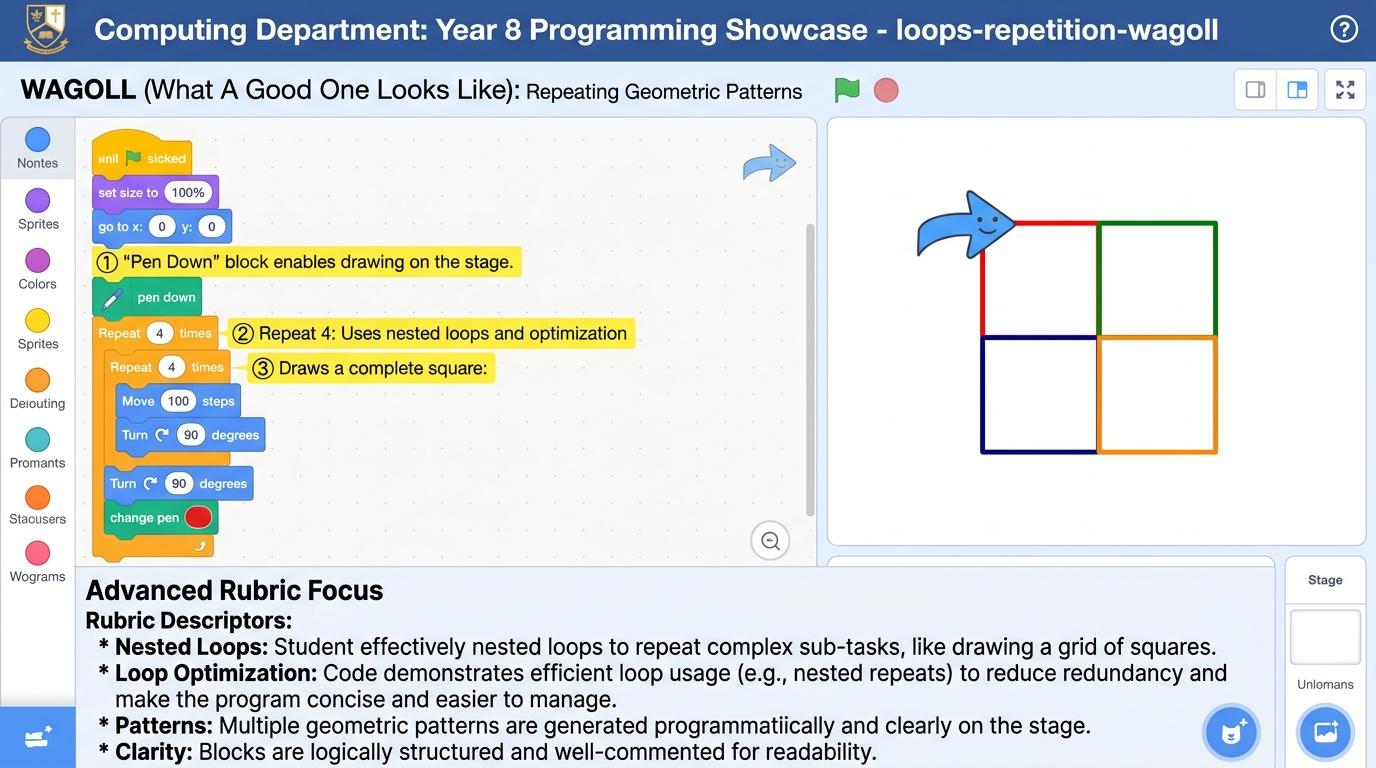
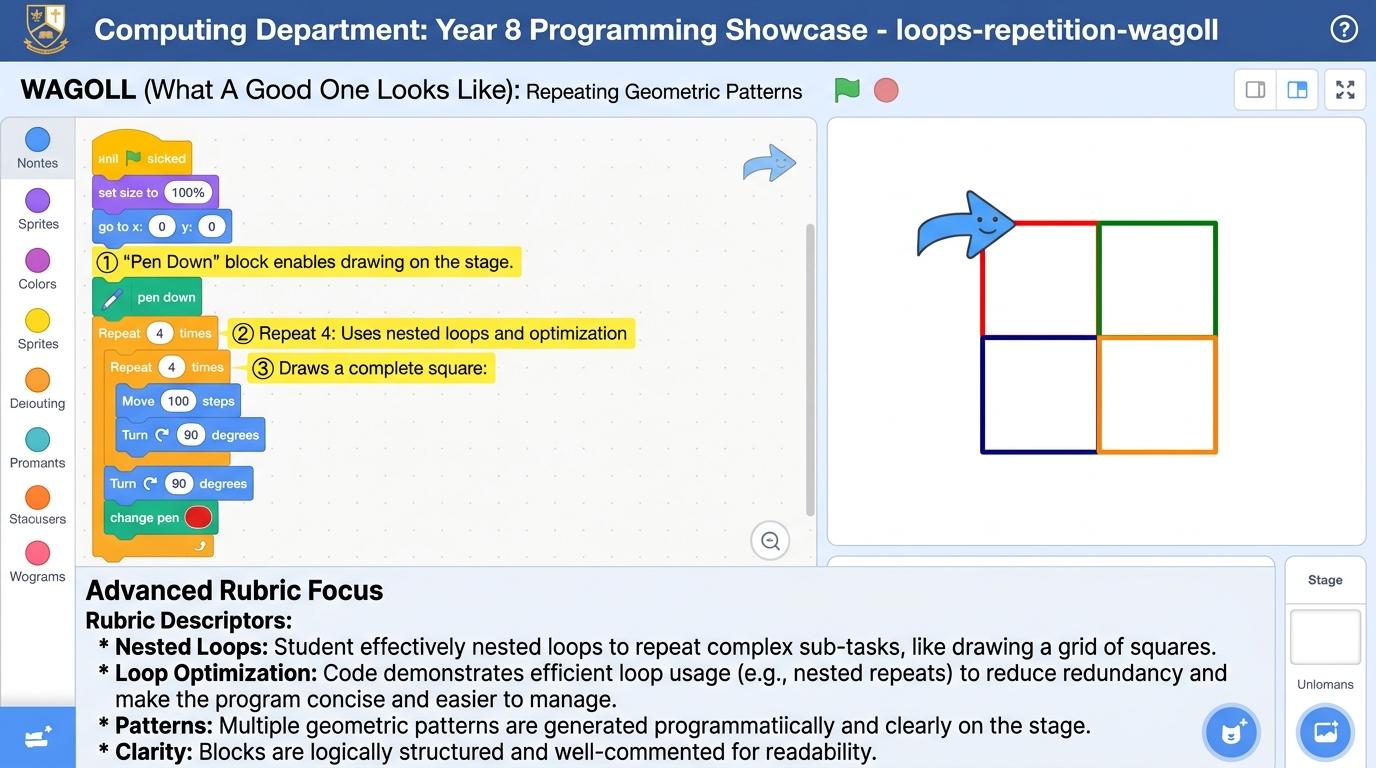
Y5 — Nested Loops
Place loops inside other loops to construct multi-dimensional grids, patterns, and nested iterations.
Learning objective
Design algorithms with nested loops to create 2D grid layouts and complex geometric patterns.
Let's Go!
Routine: Think-Pair-Share
To draw one square we repeat 4 times. How would we code drawing a row of 5 squares?
Teacher note: Facilitate the Think-Pair-Share routine for 2–3 minutes. Encourage students to connect the prompt to Perspective (Nested loops enable the automated generation of complex multi-dimensional patterns and structures.).
Learn
Nested loops occur when one loop (the inner loop) is placed entirely inside another loop (the outer loop). For every single pass of the outer loop, the inner loop completes all of its iterations. In computing, nested loops enable the automated generation of complex multi-dimensional patterns and structures. As you explore the interactive Python Console Simulator below, focus on how to use nested loops with pen blocks to draw complex tiled patterns or generate 2D grid coordinates.
🌟 Student Project GuideSuccess Criteria & WAGOLL (What A Good One Looks Like)▾
🎯 Task Success Criteria (Rubric)
Foundation
Recognize an inner loop placed inside an outer loop.
Developing
Calculate the total number of iterations in a nested loop (outer count x inner count).
Secure (Goal)
Use nested loops with pen blocks to draw complex tiled patterns or generate 2D grid coordinates.
Mastery
Optimize nested loop algorithms to avoid performance lag in complex graphical applications.
👀 What A Good One Looks Like (WAGOLL)
Exemplar 1 of 2
⭐ Mastering Standard
Loops & Repetition Exemplar: Demonstration of mastering quality standards for Y5 — Nested Loops.
⭐ Mastering Standard
Loops & Repetition Exemplar: Demonstration of mastering quality standards for Y5 — Nested Loops.
📁
Save to Your Website Portfolio:
When you finish creating your project in your software, copy the share link or take a screenshot and publish it onto your student portfolio website!
Reflect
🎯
Self-Assessment & Reflection
If the outer loop runs 3 times and the inner loop runs 4 times, how many total times does the inner action run?
🟢Secure Level
Use nested loops with pen blocks to draw complex tiled patterns or generate 2D grid coordinates.
Learning check
Learning Check
If an outer loop runs 5 times and contains an inner loop that runs 4 times, how many total times do the blocks inside the inner loop run?
Hint 1: Think about how y5 — nested loops works: place loops inside other loops to construct multi-dimensional grids, patterns, and nested iterations.
Hint 2: Clue: You have mastered this step in Loops & Repetition.
Answer correctly to unlock the next level.
Great job! You have mastered this step in Loops & Repetition.Not quite right. Review the learn section and try again.
Teacher setup, curriculum links and progress descriptors
Spark support
Routine: Think-Pair-Share
Teacher notes: Facilitate the Think-Pair-Share routine for 2–3 minutes. Encourage students to connect the prompt to Perspective (Nested loops enable the automated generation of complex multi-dimensional patterns and structures.).
Achievement pathway
Foundation: Recognize an inner loop placed inside an outer loop.
Developing: Calculate the total number of iterations in a nested loop (outer count x inner count).
Secure: Use nested loops with pen blocks to draw complex tiled patterns or generate 2D grid coordinates.
Mastering: Optimize nested loop algorithms to avoid performance lag in complex graphical applications.
Curriculum links
Curriculum strand: coding/loops-repetition
Outcome: LOOP.05.B.1.5 — Place loops inside other loops to construct multi-dimensional grids, patterns, and nested iterations.
PYP: Perspective · Nested loops enable the automated generation of complex multi-dimensional patterns and structures.
Learner profile: Knowledgeable
Competency tags
nested-loops
2D-grids
pattern-generation
iteration
Gate support
Accessibility alternative: Students may verbally explain or point to the correct answer for "If an outer loop runs 5 times and contains an inner loop that runs 4 times, how many total times do the blocks inside the inner loop run?" with a teacher or teaching assistant.
Complete the previous learning check to unlock this next level.
Level 6
Y6 — Loop Optimization & Text Loops
Transition loop concepts into text-based languages (for/while) and analyze computational loop efficiency.
Learning objective
Write text-based 'for' and 'while' loops in Python and analyze algorithmic loop complexity.
Let's Go!
Routine: Think-Pair-Share
How do professional Python programmers write loops without visual blocks?
Teacher note: Facilitate the Think-Pair-Share routine for 2–3 minutes. Encourage students to connect the prompt to Reflection (Loop optimization and iteration structures are fundamental to efficient software execution.).
Learn
In text coding like Python, `for i in range(10):` runs a loop a fixed number of times, while `while condition:` repeats as long as a condition remains True. Proper indentation defines the code inside the loop body. In computing, loop optimization and iteration structures are fundamental to efficient software execution. As you explore the interactive Microcontroller Simulator below, focus on how to construct text-based while loops with counter variables and condition updates.
Hint 1: Think about how y6 — loop optimization & text loops works: transition loop concepts into text-based languages (for/while) and analyze computational loop efficiency.
Hint 2: Clue: You have mastered this step in Loops & Repetition.
Answer correctly to complete this strand.
Great job! You have mastered this step in Loops & Repetition.Not quite right. Review the learn section and try again.
Teacher setup, curriculum links and progress descriptors
Spark support
Routine: Think-Pair-Share
Teacher notes: Facilitate the Think-Pair-Share routine for 2–3 minutes. Encourage students to connect the prompt to Reflection (Loop optimization and iteration structures are fundamental to efficient software execution.).
Achievement pathway
Foundation: Identify 'for' and 'while' keywords in simple Python code.
Developing: Translate a block repeat loop into a Python `for i in range(N):` statement.
Secure: Construct text-based while loops with counter variables and condition updates.
Mastering: Evaluate nested loop complexity O(n^2) and refactor inefficient loop structures to improve program execution speed.
Curriculum links
Curriculum strand: coding/loops-repetition
Outcome: LOOP.06.B.1.6 — Transition loop concepts into text-based languages (for/while) and analyze computational loop efficiency.
PYP: Reflection · Loop optimization and iteration structures are fundamental to efficient software execution.
Learner profile: Reflective
Competency tags
for-loop
while-loop
python
algorithm-efficiency
optimization
Gate support
Accessibility alternative: Students may verbally explain or point to the correct answer for "In Python text coding, how is the code inside a loop body identified?" with a teacher or teaching assistant.
We use local browser storage to save your learning progress and optional analytics cookies (Google Analytics 4 with IP masking and zero advertising signals) to help us improve our free computing lessons. Read our Cookie Policy and Privacy Policy.

 ⭐ Mastering Standard
 ⭐ Mastering Standard