
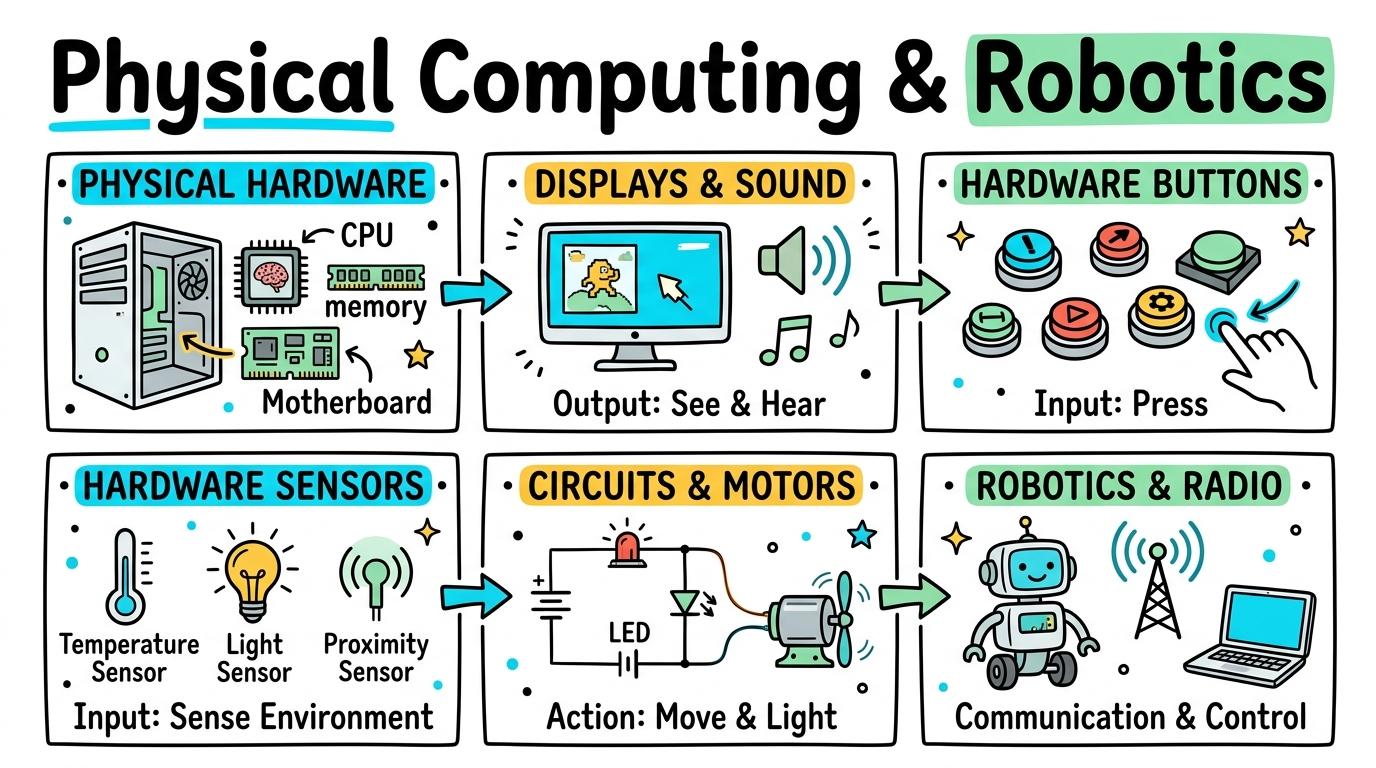
Learning objective
Physical Computing
Physical Computing & Robotics
1
2
3
4
5
6
Explore how software interacts with physical hardware, microcontrollers, sensors, actuators, and autonomous robotics to bridge digital logic with the real world.
Y1: Physical Hardware
Identify physical computing devices and distinguish physical hardware components from digital software instructions.
Let's Go!
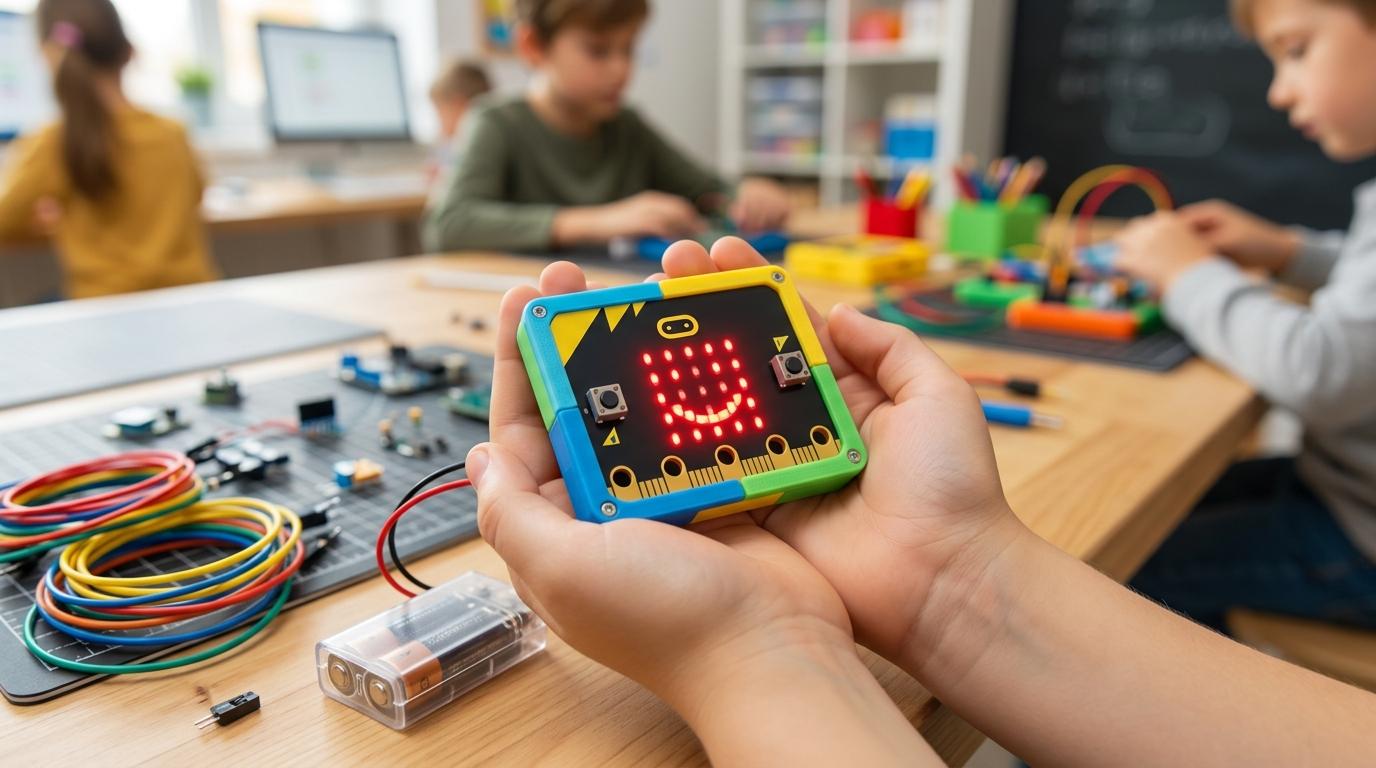
Routine: See-Think-Wonder
Look at this floor robot. What physical parts can you touch, and how does it know where to move?
Teacher note: Facilitate the See-Think-Wonder routine for 2–3 minutes. Encourage students to connect the prompt to Form (Digital instructions control physical machines in our everyday environment.).
Learn
Physical computing bridges the digital world and the physical world. Hardware includes the physical parts you can touch (buttons, wheels, lights), while software is the invisible code telling the hardware what to do. In computing, digital instructions control physical machines in our everyday environment. As you explore the interactive Microcontroller Simulator below, focus on how to explain that software instructions written by humans make physical hardware move and light up.
micro:bit
📡 RF
0
1
2
3V
GND
Buzzer:Silent
Actuator:Centered (90°)
Radio Packet:Ch: 1 (Idle)
GPIO Logic Voltage3.3 V LogicEdge pin logic level reference.
PWM Duty Cycle50.0% (1.5ms)Servo Pulse Width Modulation.
Circuit SafetySafe / NormalZero short circuits between 3V and GND.
RF 2.4GHz BandConnectedBroadcast packet telemetry stream.
Sensor Raw ADC & I2C Telemetry10-Bit ADC
| Sensor Input | Bus Type | Raw Digital | Converted Unit |
|---|---|---|---|
| ☀️ Photocell (Light) | Internal Matrix | 128 | 50% Lux |
| 🌡️ Thermistor (Temp) | I2C Subsystem | 490 | 24°C |
| 📳 Accelerometer (X,Y,Z) | LSM303AGR I2C | (0, 0, 1024) | 1.0g Flat |
| 🔌 GPIO Pin 0 | Edge Connector | 0 | 0.0V (Low) |
Oscilloscope Signal Waveform50 Hz PWM
CH1: GPIO Pin 0 (PWM Servo) | 20ms/div | 3.3V pk-pk
Apply Simulator Skills • Try it yourself
Hardware Explorer
🚀 Open a practice space
Or try locally: 🍓 Raspberry Pi micro:bit
🌟 Student Project GuideSuccess Criteria & WAGOLL (What A Good One Looks Like)
🎯 Task Success Criteria (Rubric)
Foundation
Recognizes a physical robot or hardware device in the classroom.
Developing
Distinguishes between pressing physical buttons on a device and watching the device react.
Secure (Goal)
Explains that software instructions written by humans make physical hardware move and light up.
Mastery
Demonstrates how physical buttons on a floor robot correspond to specific physical distance movements.
👀 What A Good One Looks Like (WAGOLL)
Exemplar of 2
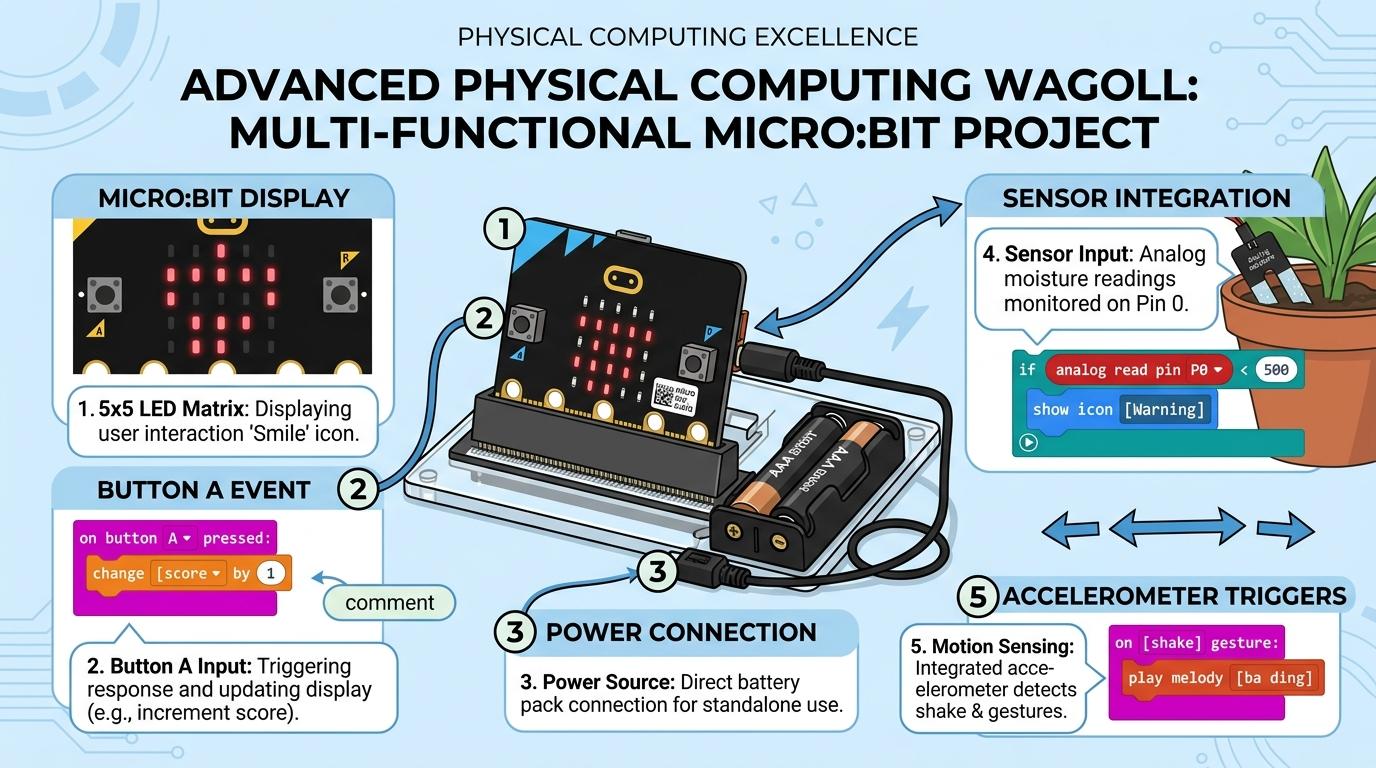 ⭐ Mastering Standard
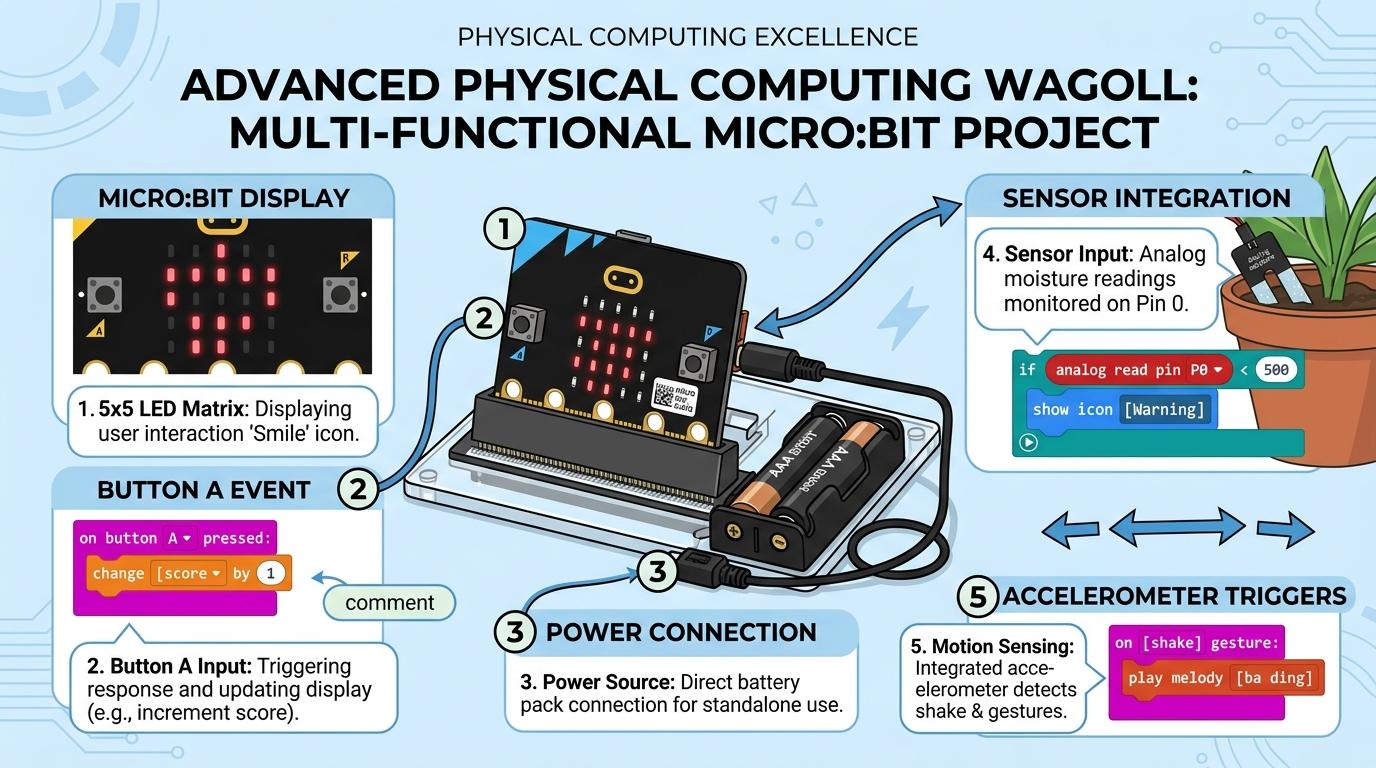 ⭐ Mastering Standard
📁
Save to Your Website Portfolio:
When you finish creating your project in your software, copy the share link or take a screenshot and publish it onto your student portfolio website!
Reflect
Learning check
Teacher setup, curriculum links and progress descriptors
Spark support
Routine: See-Think-Wonder
Teacher notes: Facilitate the See-Think-Wonder routine for 2–3 minutes. Encourage students to connect the prompt to Form (Digital instructions control physical machines in our everyday environment.).
Achievement pathway
- Foundation: Recognizes a physical robot or hardware device in the classroom.
- Developing: Distinguishes between pressing physical buttons on a device and watching the device react.
- Secure: Explains that software instructions written by humans make physical hardware move and light up.
- Mastering: Demonstrates how physical buttons on a floor robot correspond to specific physical distance movements.
Curriculum links
Curriculum strand: physical-computing
Outcome: PHYS.01.B.1.1 — Identify physical computing devices and distinguish physical hardware components from digital software instructions.
PYP: Form · Digital instructions control physical machines in our everyday environment.
Learner profile: Inquirer
Competency tags
Gate support
Accessibility alternative: Students may verbally explain or point to the correct answer for "What is physical hardware in computing?" with a teacher or teaching assistant.
Teacher override: allow
Locked level
Level 2: Y2: Displays & Sound
Complete the previous learning check to unlock this next level.
Y2: Displays & Sound
Program microcontroller outputs including LED matrix grids and physical sound buzzers.
Learning objective
Students will write code to control physical microcontroller outputs, displaying custom icons on an LED matrix and playing tones through a buzzer.
Let's Go!
Routine: Think-Pair-Share
How do traffic lights and electronic signs use physical lights to communicate messages?
Teacher note: Facilitate the Think-Pair-Share routine for 2–3 minutes. Encourage students to connect the prompt to Function (Physical devices communicate information through visual light displays and sound signals.).
Learn
Microcontrollers like the micro:bit have built-in physical outputs. An 5x5 LED matrix lights up individual pixels using code coordinates, while a piezoceramic speaker produces physical sound vibrations. In computing, physical devices communicate information through visual light displays and sound signals. As you explore the interactive Microcontroller Simulator below, focus on how to program code that sequences LED icons and plays musical notes on a physical buzzer.
micro:bit
📡 RF
0
1
2
3V
GND
Buzzer:Silent
Actuator:Centered (90°)
Radio Packet:Ch: 1 (Idle)
GPIO Logic Voltage3.3 V LogicEdge pin logic level reference.
PWM Duty Cycle50.0% (1.5ms)Servo Pulse Width Modulation.
Circuit SafetySafe / NormalZero short circuits between 3V and GND.
RF 2.4GHz BandConnectedBroadcast packet telemetry stream.
Sensor Raw ADC & I2C Telemetry10-Bit ADC
| Sensor Input | Bus Type | Raw Digital | Converted Unit |
|---|---|---|---|
| ☀️ Photocell (Light) | Internal Matrix | 128 | 50% Lux |
| 🌡️ Thermistor (Temp) | I2C Subsystem | 490 | 24°C |
| 📳 Accelerometer (X,Y,Z) | LSM303AGR I2C | (0, 0, 1024) | 1.0g Flat |
| 🔌 GPIO Pin 0 | Edge Connector | 0 | 0.0V (Low) |
Oscilloscope Signal Waveform50 Hz PWM
CH1: GPIO Pin 0 (PWM Servo) | 20ms/div | 3.3V pk-pk
Apply Simulator Skills • Try it yourself
LED & Sound Composer
🚀 Open a practice space
Or try locally: 🍓 Raspberry Pi micro:bit
🌟 Student Project GuideSuccess Criteria & WAGOLL (What A Good One Looks Like)
🎯 Task Success Criteria (Rubric)
Foundation
Loads a pre-made code block to show a static image on an LED screen.
Developing
Modifies LED plot coordinates to design custom physical light patterns.
Secure (Goal)
Programs code that sequences LED icons and plays musical notes on a physical buzzer.
Mastery
Creates an interactive physical name tag or animated LED display that changes pictures on loop.
👀 What A Good One Looks Like (WAGOLL)
Exemplar of 2
⭐ Mastering Standard⭐ Mastering Standard📁
Save to Your Website Portfolio:
When you finish creating your project in your software, copy the share link or take a screenshot and publish it onto your student portfolio website!
Reflect
Learning check
Teacher setup, curriculum links and progress descriptors
Spark support
Routine: Think-Pair-Share
Teacher notes: Facilitate the Think-Pair-Share routine for 2–3 minutes. Encourage students to connect the prompt to Function (Physical devices communicate information through visual light displays and sound signals.).
Achievement pathway
- Foundation: Loads a pre-made code block to show a static image on an LED screen.
- Developing: Modifies LED plot coordinates to design custom physical light patterns.
- Secure: Programs code that sequences LED icons and plays musical notes on a physical buzzer.
- Mastering: Creates an interactive physical name tag or animated LED display that changes pictures on loop.
Curriculum links
Curriculum strand: physical-computing
Outcome: PHYS.02.B.1.2 — Program microcontroller outputs including LED matrix grids and physical sound buzzers.
PYP: Function · Physical devices communicate information through visual light displays and sound signals.
Learner profile: Communicator
Competency tags
Gate support
Accessibility alternative: Students may verbally explain or point to the correct answer for "Which component on a microcontroller displays visual light patterns?" with a teacher or teaching assistant.
Teacher override: allow
Locked level
Level 3: Y3: Hardware Buttons
Complete the previous learning check to unlock this next level.
Y3: Hardware Buttons
Program physical button inputs and touch pins to trigger conditional hardware responses.
Learning objective
Students will write event-driven code that responds to physical button presses (Button A, Button B, A+B) and conductive touch pins.
Let's Go!
Routine: Chalk Talk
What happens inside a game controller when you press a button?
Teacher note: Facilitate the Chalk Talk routine for 2–3 minutes. Encourage students to connect the prompt to Connection (Human input interfaces turn physical touch into digital actions.).
Learn
Buttons and touch pins act as physical switches. When pressed, they complete an electrical circuit, sending a HIGH signal to the microcontroller processor, which triggers the corresponding event code. In computing, human input interfaces turn physical touch into digital actions. As you explore the interactive Microcontroller Simulator below, focus on how to construct conditional logic using Button A, Button B, and combined A+B inputs to control a digital counter.
micro:bit
📡 RF
0
1
2
3V
GND
Buzzer:Silent
Actuator:Centered (90°)
Radio Packet:Ch: 1 (Idle)
GPIO Logic Voltage3.3 V LogicEdge pin logic level reference.
PWM Duty Cycle50.0% (1.5ms)Servo Pulse Width Modulation.
Circuit SafetySafe / NormalZero short circuits between 3V and GND.
RF 2.4GHz BandConnectedBroadcast packet telemetry stream.
Sensor Raw ADC & I2C Telemetry10-Bit ADC
| Sensor Input | Bus Type | Raw Digital | Converted Unit |
|---|---|---|---|
| ☀️ Photocell (Light) | Internal Matrix | 128 | 50% Lux |
| 🌡️ Thermistor (Temp) | I2C Subsystem | 490 | 24°C |
| 📳 Accelerometer (X,Y,Z) | LSM303AGR I2C | (0, 0, 1024) | 1.0g Flat |
| 🔌 GPIO Pin 0 | Edge Connector | 0 | 0.0V (Low) |
Oscilloscope Signal Waveform50 Hz PWM
CH1: GPIO Pin 0 (PWM Servo) | 20ms/div | 3.3V pk-pk
Apply Simulator Skills • Try it yourself
Physical Game Controller
🚀 Open a practice space
Or try locally: 🍓 Raspberry Pi micro:bit
🌟 Student Project GuideSuccess Criteria & WAGOLL (What A Good One Looks Like)
🎯 Task Success Criteria (Rubric)
Foundation
Connects a physical button press event to a single output action.
Developing
Programs Button A and Button B to perform two distinct physical actions.
Secure (Goal)
Constructs conditional logic using Button A, Button B, and combined A+B inputs to control a digital counter.
Mastery
Builds an interactive physical controller (e.g., cardboard arcade button or Makey Makey circuit) that triggers code.
👀 What A Good One Looks Like (WAGOLL)
Exemplar of 2
⭐ Mastering Standard⭐ Mastering Standard📁
Save to Your Website Portfolio:
When you finish creating your project in your software, copy the share link or take a screenshot and publish it onto your student portfolio website!
Reflect
Learning check
Teacher setup, curriculum links and progress descriptors
Spark support
Routine: Chalk Talk
Teacher notes: Facilitate the Chalk Talk routine for 2–3 minutes. Encourage students to connect the prompt to Connection (Human input interfaces turn physical touch into digital actions.).
Achievement pathway
- Foundation: Connects a physical button press event to a single output action.
- Developing: Programs Button A and Button B to perform two distinct physical actions.
- Secure: Constructs conditional logic using Button A, Button B, and combined A+B inputs to control a digital counter.
- Mastering: Builds an interactive physical controller (e.g., cardboard arcade button or Makey Makey circuit) that triggers code.
Curriculum links
Curriculum strand: physical-computing
Outcome: PHYS.03.B.1.3 — Program physical button inputs and touch pins to trigger conditional hardware responses.
PYP: Connection · Human input interfaces turn physical touch into digital actions.
Learner profile: Thinker
Competency tags
Gate support
Accessibility alternative: Students may verbally explain or point to the correct answer for "What code block listens for a physical button press on a microcontroller?" with a teacher or teaching assistant.
Teacher override: allow
Locked level
Level 4: Y4: Hardware Sensors
Complete the previous learning check to unlock this next level.
Y4: Hardware Sensors
Utilize built-in hardware sensors (accelerometers, light sensors, compasses) to trigger physical software events.
Learning objective
Students will program microcontrollers using built-in motion sensors (accelerometers) and ambient light sensors to build physical measuring devices.
Let's Go!
Routine: Predict & Observe
How does a smartphone know when you rotate it sideways or shake it?
Teacher note: Facilitate the Predict & Observe routine for 2–3 minutes. Encourage students to connect the prompt to Responsibility (Physical sensors measure environmental phenomena and convert them into digital data.).
Learn
Hardware sensors measure physical properties. Accelerometers detect movement and gravity forces along X, Y, and Z axes, while light sensors detect ambient room brightness. In computing, physical sensors measure environmental phenomena and convert them into digital data. As you explore the interactive Microcontroller Simulator below, focus on how to program an IF-THEN conditional loop that measures ambient light level and turns on an LED nightlight when dark.
micro:bit
📡 RF
0
1
2
3V
GND
Buzzer:Silent
Actuator:Centered (90°)
Radio Packet:Ch: 1 (Idle)
GPIO Logic Voltage3.3 V LogicEdge pin logic level reference.
PWM Duty Cycle50.0% (1.5ms)Servo Pulse Width Modulation.
Circuit SafetySafe / NormalZero short circuits between 3V and GND.
RF 2.4GHz BandConnectedBroadcast packet telemetry stream.
Sensor Raw ADC & I2C Telemetry10-Bit ADC
| Sensor Input | Bus Type | Raw Digital | Converted Unit |
|---|---|---|---|
| ☀️ Photocell (Light) | Internal Matrix | 128 | 50% Lux |
| 🌡️ Thermistor (Temp) | I2C Subsystem | 490 | 24°C |
| 📳 Accelerometer (X,Y,Z) | LSM303AGR I2C | (0, 0, 1024) | 1.0g Flat |
| 🔌 GPIO Pin 0 | Edge Connector | 0 | 0.0V (Low) |
Oscilloscope Signal Waveform50 Hz PWM
CH1: GPIO Pin 0 (PWM Servo) | 20ms/div | 3.3V pk-pk
Apply Simulator Skills • Try it yourself
Smart Sensor Alarm
🚀 Open a practice space
Or try locally: 🍓 Raspberry Pi micro:bit
🌟 Student Project GuideSuccess Criteria & WAGOLL (What A Good One Looks Like)
🎯 Task Success Criteria (Rubric)
Foundation
Reads values from an accelerometer or shake gesture block.
Developing
Uses shake gestures to generate random dice numbers on an LED screen.
Secure (Goal)
Programs an IF-THEN conditional loop that measures ambient light level and turns on an LED nightlight when dark.
Mastery
Designs a multi-sensor physical device (e.g. digital compass or spirit level) using tilt angle data.
👀 What A Good One Looks Like (WAGOLL)
Exemplar of 2
⭐ Mastering Standard⭐ Mastering Standard📁
Save to Your Website Portfolio:
When you finish creating your project in your software, copy the share link or take a screenshot and publish it onto your student portfolio website!
Reflect
Learning check
Teacher setup, curriculum links and progress descriptors
Spark support
Routine: Predict & Observe
Teacher notes: Facilitate the Predict & Observe routine for 2–3 minutes. Encourage students to connect the prompt to Responsibility (Physical sensors measure environmental phenomena and convert them into digital data.).
Achievement pathway
- Foundation: Reads values from an accelerometer or shake gesture block.
- Developing: Uses shake gestures to generate random dice numbers on an LED screen.
- Secure: Programs an IF-THEN conditional loop that measures ambient light level and turns on an LED nightlight when dark.
- Mastering: Designs a multi-sensor physical device (e.g. digital compass or spirit level) using tilt angle data.
Curriculum links
Curriculum strand: physical-computing
Outcome: PHYS.04.B.1.4 — Utilize built-in hardware sensors (accelerometers, light sensors, compasses) to trigger physical software events.
PYP: Responsibility · Physical sensors measure environmental phenomena and convert them into digital data.
Learner profile: Principled
Competency tags
Gate support
Accessibility alternative: Students may verbally explain or point to the correct answer for "Which hardware sensor detects shaking, tilt, and acceleration?" with a teacher or teaching assistant.
Teacher override: allow
Locked level
Level 5: Y5: Circuits & Motors
Complete the previous learning check to unlock this next level.
Y5: Circuits & Motors
Construct physical electronic circuits using alligator clips, external LEDs, sensors, and servo motors.
Learning objective
Students will build external electrical circuits using alligator clips to drive external LEDs, buzzers, and position-controlled servo motors.
Let's Go!
Routine: Connect-Extend-Challenge
How do automated parking garage barriers move up and down when a car approaches?
Teacher note: Facilitate the Connect-Extend-Challenge routine for 2–3 minutes. Encourage students to connect the prompt to Perspective (Actuators and external circuits allow software to exert physical force and control automated systems.).
Learn
Motors and actuators convert electrical energy into physical movement. Servo motors allow precise angular position control (0° to 180°) using Pulse Width Modulation (PWM) signals sent via GPIO pins. In computing, actuators and external circuits allow software to exert physical force and control automated systems. As you explore the interactive Microcontroller Simulator below, focus on how to program a 180-degree servo motor to rotate to specific angles based on sensor inputs.
micro:bit
📡 RF
0
1
2
3V
GND
Buzzer:Silent
Actuator:Centered (90°)
Radio Packet:Ch: 1 (Idle)
GPIO Logic Voltage3.3 V LogicEdge pin logic level reference.
PWM Duty Cycle50.0% (1.5ms)Servo Pulse Width Modulation.
Circuit SafetySafe / NormalZero short circuits between 3V and GND.
RF 2.4GHz BandConnectedBroadcast packet telemetry stream.
Sensor Raw ADC & I2C Telemetry10-Bit ADC
| Sensor Input | Bus Type | Raw Digital | Converted Unit |
|---|---|---|---|
| ☀️ Photocell (Light) | Internal Matrix | 128 | 50% Lux |
| 🌡️ Thermistor (Temp) | I2C Subsystem | 490 | 24°C |
| 📳 Accelerometer (X,Y,Z) | LSM303AGR I2C | (0, 0, 1024) | 1.0g Flat |
| 🔌 GPIO Pin 0 | Edge Connector | 0 | 0.0V (Low) |
Oscilloscope Signal Waveform50 Hz PWM
CH1: GPIO Pin 0 (PWM Servo) | 20ms/div | 3.3V pk-pk
Apply Simulator Skills • Try it yourself
Robotic Barrier Engineer
🚀 Open a practice space
Or try locally: 🍓 Raspberry Pi micro:bit
🌟 Student Project GuideSuccess Criteria & WAGOLL (What A Good One Looks Like)
🎯 Task Success Criteria (Rubric)
Foundation
Connects alligator clips to pin 0 and GND to complete a simple physical circuit.
Developing
Controls external LED brightness or blinking rate using pulse-width modulation or digital pin outputs.
Secure (Goal)
Programs a 180-degree servo motor to rotate to specific angles based on sensor inputs.
Mastery
Engineers an automated physical system (e.g. robotic barrier gate or automatic plant waterer) combining motors and sensors.
👀 What A Good One Looks Like (WAGOLL)
Exemplar of 2
⭐ Mastering Standard⭐ Mastering Standard📁
Save to Your Website Portfolio:
When you finish creating your project in your software, copy the share link or take a screenshot and publish it onto your student portfolio website!
Reflect
Learning check
Teacher setup, curriculum links and progress descriptors
Spark support
Routine: Connect-Extend-Challenge
Teacher notes: Facilitate the Connect-Extend-Challenge routine for 2–3 minutes. Encourage students to connect the prompt to Perspective (Actuators and external circuits allow software to exert physical force and control automated systems.).
Achievement pathway
- Foundation: Connects alligator clips to pin 0 and GND to complete a simple physical circuit.
- Developing: Controls external LED brightness or blinking rate using pulse-width modulation or digital pin outputs.
- Secure: Programs a 180-degree servo motor to rotate to specific angles based on sensor inputs.
- Mastering: Engineers an automated physical system (e.g. robotic barrier gate or automatic plant waterer) combining motors and sensors.
Curriculum links
Curriculum strand: physical-computing
Outcome: PHYS.05.B.1.5 — Construct physical electronic circuits using alligator clips, external LEDs, sensors, and servo motors.
PYP: Perspective · Actuators and external circuits allow software to exert physical force and control automated systems.
Learner profile: Knowledgeable
Competency tags
Gate support
Accessibility alternative: Students may verbally explain or point to the correct answer for "Which physical component rotates to precise angle positions (0° to 180°)?" with a teacher or teaching assistant.
Teacher override: allow
Locked level
Level 6: Y6: Robotics & Radio
Complete the previous learning check to unlock this next level.
Y6: Robotics & Radio
Program autonomous mobile robots with multi-sensor feedback loops and wireless radio telemetry communication.
Learning objective
Students will program autonomous mobile buggies using dual motors, ultrasonic distance sensors, infrared line-trackers, and radio packet communication.
Let's Go!
Routine: 4 Cs (Connections, Concepts, Changes, Challenges)
How do Mars rovers or self-driving delivery robots navigate obstacles without a human driver holding a remote?
Teacher note: Facilitate the 4 Cs (Connections, Concepts, Changes, Challenges) routine for 2–3 minutes. Encourage students to connect the prompt to Reflection (Autonomous robotic systems combine multi-sensor feedback loops and wireless communication to navigate complex environments.).
Learn
Autonomous robots rely on closed-loop feedback control. They constantly read sensor values (ultrasonic sonar distance, IR reflectance), evaluate code logic inside high-speed loops, adjust motor speeds instantly, and transmit telemetry via wireless radio frequencies.
micro:bit
📡 RF
0
1
2
3V
GND
Buzzer:Silent
Actuator:Centered (90°)
Radio Packet:Ch: 1 (Idle)
GPIO Logic Voltage3.3 V LogicEdge pin logic level reference.
PWM Duty Cycle50.0% (1.5ms)Servo Pulse Width Modulation.
Circuit SafetySafe / NormalZero short circuits between 3V and GND.
RF 2.4GHz BandConnectedBroadcast packet telemetry stream.
Sensor Raw ADC & I2C Telemetry10-Bit ADC
| Sensor Input | Bus Type | Raw Digital | Converted Unit |
|---|---|---|---|
| ☀️ Photocell (Light) | Internal Matrix | 128 | 50% Lux |
| 🌡️ Thermistor (Temp) | I2C Subsystem | 490 | 24°C |
| 📳 Accelerometer (X,Y,Z) | LSM303AGR I2C | (0, 0, 1024) | 1.0g Flat |
| 🔌 GPIO Pin 0 | Edge Connector | 0 | 0.0V (Low) |
Oscilloscope Signal Waveform50 Hz PWM
CH1: GPIO Pin 0 (PWM Servo) | 20ms/div | 3.3V pk-pk
Apply Simulator Skills • Try it yourself
Autonomous Rover Developer
🚀 Open a practice space
Or try locally: 🍓 Raspberry Pi micro:bit
🌟 Student Project GuideSuccess Criteria & WAGOLL (What A Good One Looks Like)
🎯 Task Success Criteria (Rubric)
Foundation
Programs basic motor movement commands (forward, turn, stop) on a wheeled robotic chassis.
Developing
Integrates ultrasonic distance sensors to stop the robot before colliding with physical obstacles.
Secure (Goal)
Constructs a closed-loop feedback program for line following using dual IR reflectance sensors.
Mastery
Builds a wireless multi-device network where one remote controller micro:bit sends radio signals to steer a robotic car.
👀 What A Good One Looks Like (WAGOLL)
Exemplar of 2
⭐ Mastering Standard⭐ Mastering Standard📁
Save to Your Website Portfolio:
When you finish creating your project in your software, copy the share link or take a screenshot and publish it onto your student portfolio website!
Reflect
Learning check
Teacher setup, curriculum links and progress descriptors
Spark support
Routine: 4 Cs (Connections, Concepts, Changes, Challenges)
Teacher notes: Facilitate the 4 Cs (Connections, Concepts, Changes, Challenges) routine for 2–3 minutes. Encourage students to connect the prompt to Reflection (Autonomous robotic systems combine multi-sensor feedback loops and wireless communication to navigate complex environments.).
Achievement pathway
- Foundation: Programs basic motor movement commands (forward, turn, stop) on a wheeled robotic chassis.
- Developing: Integrates ultrasonic distance sensors to stop the robot before colliding with physical obstacles.
- Secure: Constructs a closed-loop feedback program for line following using dual IR reflectance sensors.
- Mastering: Builds a wireless multi-device network where one remote controller micro:bit sends radio signals to steer a robotic car.
Curriculum links
Curriculum strand: physical-computing
Outcome: PHYS.06.B.1.6 — Program autonomous mobile robots with multi-sensor feedback loops and wireless radio telemetry communication.
PYP: Reflection · Autonomous robotic systems combine multi-sensor feedback loops and wireless communication to navigate complex environments.
Learner profile: Reflective
Competency tags
Gate support
Accessibility alternative: Students may verbally explain or point to the correct answer for "Which technology allows two microcontrollers to send message packets to each other wirelessly?" with a teacher or teaching assistant.
Teacher override: allow