Understanding how computers store, modify, and track changing information using named variables, data types, lists, and complex data structures across programming projects.
Congratulations on mastering Levels 1 to 6! Here is your one-page visual synthesis of every key concept learned:
▶View All 6 Level Key Concepts & Standards6 Levels Summarised
📌
Level 1🚀
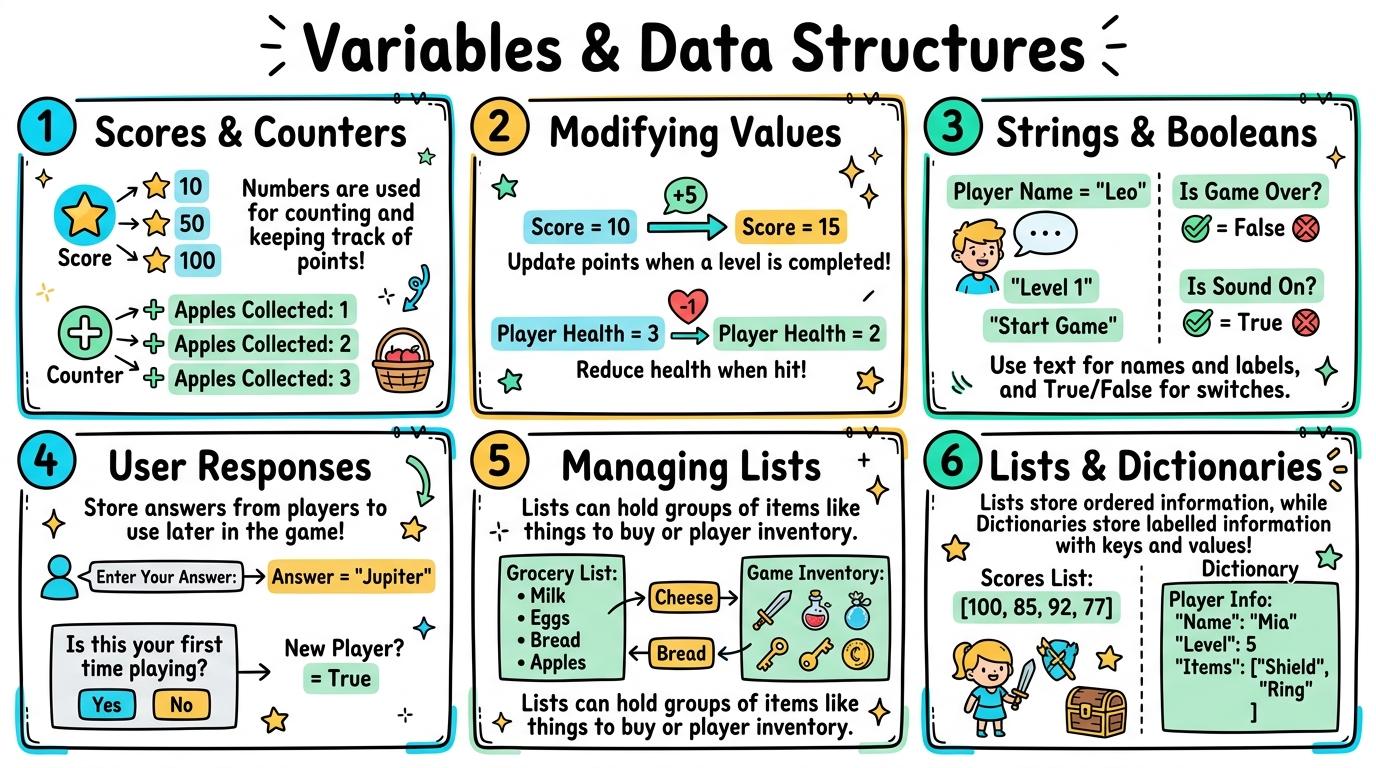
Scores & Counters
Understand that computers use named containers to remember and update changing values, such as game scores or counters.
Key Takeaway:A variable is like a labelled box in computer memory.
#Variables#Memory#Score Counter
✓ Mastered
📌
Level 2🛡️
Modifying Values
Program variable updates using mathematical operations (+1, -1) to track dynamic game scores and timer countdowns.
Key Takeaway:To update a variable, we use math blocks.
#Variable Increment#Timers#Math Operations
✓ Mastered
📌
Level 3🔑
Strings & Booleans
Distinguish between different data types (integers, floats, text strings, and true/false Booleans) and apply them in block code.
Key Takeaway:Computers store different kinds of data: Integers are whole numbers (0, 5, -12).
#Integers#Floats#Strings
✓ Mastered
📌
Level 4💻
User Responses
Store user responses from interactive prompts into variables and join text strings dynamically to personalize program outputs.
Key Takeaway:When you use an "ask [What is your name?] and wait" block, the computer stores the user's answer in a temporary variable called `answer`.
#User Input#String Joining#Concatenation
✓ Mastered
📌
Level 5🔐
Managing Lists
Create, populate, and manipulate ordered lists (arrays) to store multiple items, access elements by index, and iterate through collections.
Key Takeaway:A list (or array) is a single container that holds multiple items in order.
#Lists#Arrays#Indexing
✓ Mastered
📌
Level 6🏆
Lists & Dictionaries
Design complex data structures (key-value dictionaries, 2D arrays) and implement list operations (sorting, searching, appending) in text code.
Key Takeaway:In text languages like Python, we use lists `[val1, val2]` for ordered sequences and dictionaries `{"key": "value"}` for named attributes.
#Python Lists#Dictionaries#2D Arrays
✓ Mastered
✨
SECRET MASTERY UNLOCK
Stage Mastery Quest Challenge
You've unlocked the secret final review dungeon! Can you solve every checkpoint gate and escape the maze?
🕹️💎 Memory Inspector
Variables & Data Structures
Hearts❤️❤️❤️
StageL1: Remember
XP Score0 PTS
1Scores & Counters
2Modifying Values
3Strings & Booleans
4User Responses
5Managing Lists
6Lists & Dictionaries
Chapter 1: The Incident
🧙♂️
Loading narrative situation...
What is your next action?
🚨 Roadblock Encountered! -1 Heart! Hint: Check the core standard.
TERMINAL://EDTECH-ROOT/NODE-EXEC● LIVE LINK
// SYSTEM DIAGNOSTIC INITIALIZED...
>Select verification command:
🚨 SYNTAX CRASH! -1 Heart & Buffer Overflow!
⌨️ Arrows/WASD to Move & Jump • Land on Question Beacon to Elevate!
⌨️ Left/Right to Steer • Space to Fire Tractor Beam at Correct Capsule!
⌨️ Space to Launch Spark • A/D or Left/Right to Trigger Flipper Gates!
Level 1 Checkpoint⌨️ Press [1]–[3]
Question Prompt goes here?
🚨 INCORRECT CHOICE! -100 PTS & -1 Heart!
💡 Mastery Insight Verified (+200 PTS):
🏆✨
STRAND MASTERY ACHIEVED!
You conquered all 6 levels and demonstrated digital mastery!
Final XP Score: 0 PTS
🔑SECRET AREA BOSS KEY DISCOVERED!
Use this secret PIN to unlock the CodeQuest: Citadel of Algorithms in the Area Capstone Vault:
Congratulations on completing all 6 levels of Variables & Data Structures! To unlock the CodeQuest: Citadel of Algorithms, you must collect all 11 Key Shards across the Coding & Computational Thinking strands. Here is your cipher fragment for Slot #11:
KEY SHARD #11
1
Slot 11 of 11
🧩 Coding & Computational Thinking Key Ring Tracker:Slot #11 Active
Understand that computers use named containers to remember and update changing values, such as game scores or counters.
Learning objective
Students will understand that a variable is a named storage box in computer memory that holds values that can change during program execution.
Let's Go!
Routine: See-Think-Wonder
Look at a game score counter changing from 0 to 10. How does the computer remember what your score is while you play?
Teacher note: Facilitate the See-Think-Wonder routine for 2–3 minutes. Encourage students to connect the prompt to Form (Digital games and programs rely on memory containers to keep track of changing information.).
Learn
A variable is like a labelled box in computer memory. You give the box a name (like "score" or "lives") and put a value inside. Whenever something happens in your game, the computer opens the box, reads the number, or puts a new number inside. In computing, digital games and programs rely on memory containers to keep track of changing information. As you explore the interactive Block Coding Simulator below, focus on how to create and names a variable in block code to store a game score or counter.
🌟 Student Project GuideSuccess Criteria & WAGOLL (What A Good One Looks Like)▾
🎯 Task Success Criteria (Rubric)
Foundation
Can identify a box or container holding a value like a score token.
Developing
Explains that a variable holds a specific piece of information that can change.
Secure (Goal)
Creates and names a variable in block code to store a game score or counter.
Mastery
Explains how computer memory stores named variables and retrieves them by name.
👀 What A Good One Looks Like (WAGOLL)
Exemplar 1 of 2
⭐ Mastering Standard
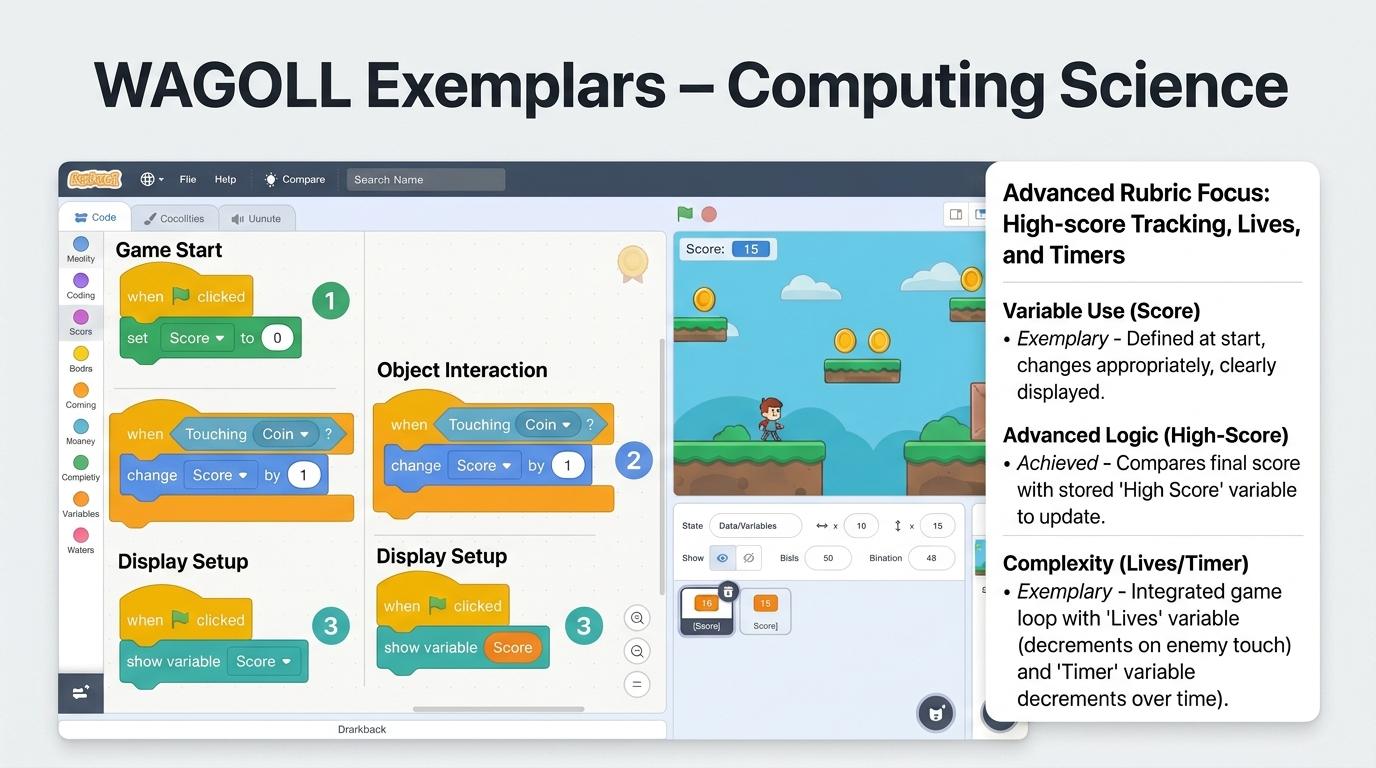
Variables & Data Exemplar: Demonstration of mastering quality standards for Scores & Counters.
⭐ Mastering Standard
Variables & Data Exemplar: Demonstration of mastering quality standards for Scores & Counters.
📁
Save to Your Website Portfolio:
When you finish creating your project in your software, copy the share link or take a screenshot and publish it onto your student portfolio website!
Reflect
🎯
Self-Assessment & Reflection
Why is it important to give variables clear, descriptive names like "player_score" instead of just "x"?
🟢Secure Level
Creates and names a variable in block code to store a game score or counter.
Learning check
Learning Check
What is a variable in programming?
Select the best answer:
Hint 1: Variables are named containers used to hold changing values in computer memory.
Hint 2: Clue: A variable is a named memory container for dynamic data.
Answer correctly to unlock the next level.
Great job! A variable is a named memory container for dynamic data.Remember: variables are named containers used to hold changing values in computer memory.
Teacher setup, curriculum links and progress descriptors
Spark support
Routine: See-Think-Wonder
Teacher notes: Facilitate the See-Think-Wonder routine for 2–3 minutes. Encourage students to connect the prompt to Form (Digital games and programs rely on memory containers to keep track of changing information.).
Achievement pathway
Foundation: Can identify a box or container holding a value like a score token.
Developing: Explains that a variable holds a specific piece of information that can change.
Secure: Creates and names a variable in block code to store a game score or counter.
Mastering: Explains how computer memory stores named variables and retrieves them by name.
Curriculum links
Curriculum strand: Algorithms and Programming
Outcome: VARD.01.B.1.1 — Understand that computers use named containers to remember and update changing values, such as game scores or counters.
PYP: Form · Digital games and programs rely on memory containers to keep track of changing information.
Learner profile: Inquirer
Competency tags
Variables
Memory
Score Counter
Unplugged
Gate support
Accessibility alternative: Students may verbally explain or point to the correct answer for "What is a variable in programming?" with a teacher or teaching assistant.
Complete the previous learning check to unlock this next level.
Level 2
Modifying Values
Program variable updates using mathematical operations (+1, -1) to track dynamic game scores and timer countdowns.
Learning objective
Students will program scripts to increase, decrease, and modify variable values dynamically in response to game events.
Let's Go!
Routine: Think-Pair-Share
When a player catches a star in a game, what block should run to add 5 points to their total score?
Teacher note: Facilitate the Think-Pair-Share routine for 2–3 minutes. Encourage students to connect the prompt to Function (Interactive programs update stored values in response to user actions and game events.).
Learn
To update a variable, we use math blocks. "Change score by 1" adds 1 to whatever is currently in the box. "Change lives by -1" subtracts 1. We can also set a timer variable to decrease every 1 second inside a repeat loop. In computing, interactive programs update stored values in response to user actions and game events. As you explore the interactive Python Console Simulator below, focus on how to program automatic variable increments for score tracking and countdown timers.
🌟 Student Project GuideSuccess Criteria & WAGOLL (What A Good One Looks Like)▾
🎯 Task Success Criteria (Rubric)
Foundation
Can manually change the value inside a variable block.
Developing
Uses a "change variable by 1" block when a sprite is clicked.
Secure (Goal)
Programs automatic variable increments for score tracking and countdown timers.
Mastery
Combines multiple variables (score, lives, level) that interact based on game rules.
👀 What A Good One Looks Like (WAGOLL)
Exemplar 1 of 2
⭐ Mastering Standard
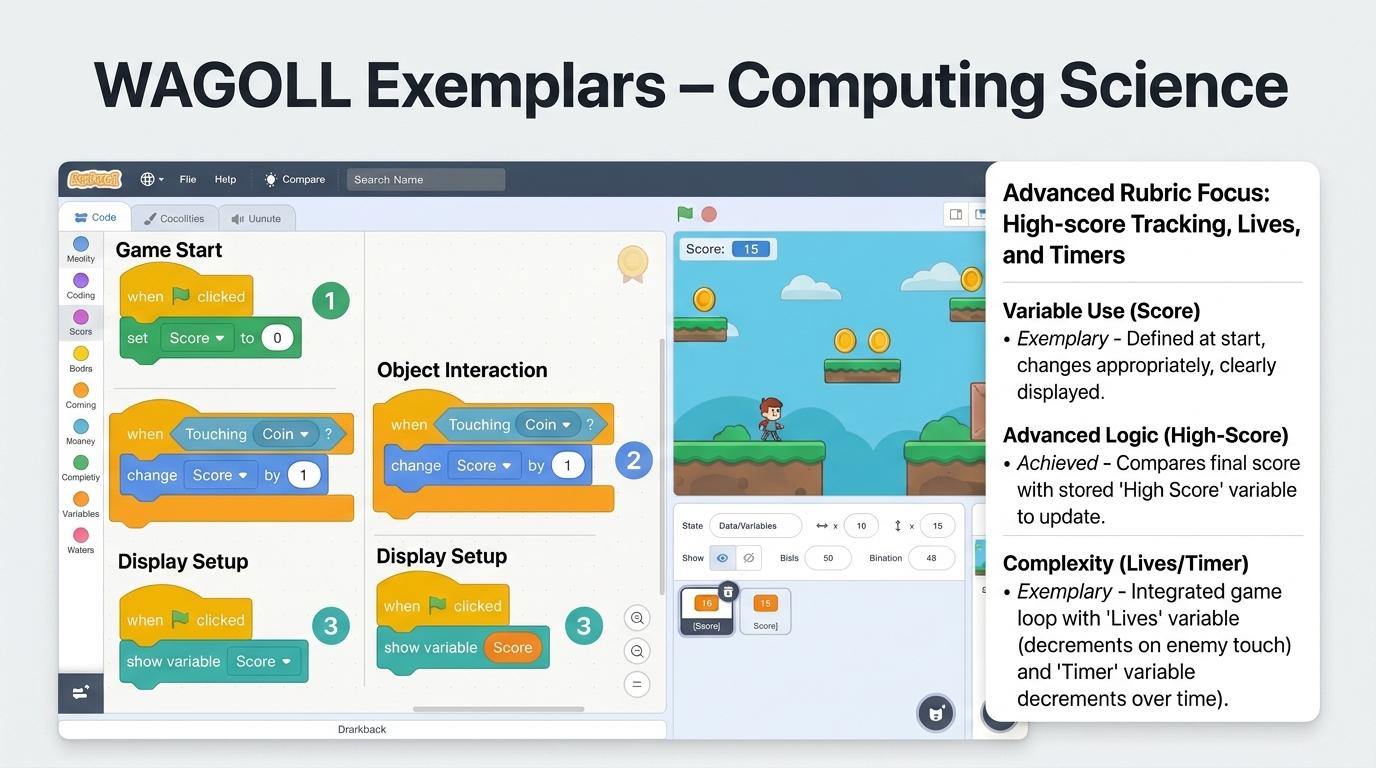
Variables & Data Exemplar: Demonstration of mastering quality standards for Modifying Values.
⭐ Mastering Standard
Variables & Data Exemplar: Demonstration of mastering quality standards for Modifying Values.
📁
Save to Your Website Portfolio:
When you finish creating your project in your software, copy the share link or take a screenshot and publish it onto your student portfolio website!
Reflect
🎯
Self-Assessment & Reflection
How did you prevent the score from increasing continuously while touching a target?
🟢Secure Level
Programs automatic variable increments for score tracking and countdown timers.
Learning check
Learning Check
If score = 5, what is score after running "change score by 3"?
Select the best answer:
Hint 1: Changing a variable by 3 adds 3 to its existing value of 5.
Hint 2: Look for the option that best matches: Students will program scripts to increase, decrease, and modify variable values dynamically in response to game events.
Answer correctly to unlock the next level.
Correct! 5 + 3 = 8.Changing a variable by 3 adds 3 to its existing value of 5.
Teacher setup, curriculum links and progress descriptors
Spark support
Routine: Think-Pair-Share
Teacher notes: Facilitate the Think-Pair-Share routine for 2–3 minutes. Encourage students to connect the prompt to Function (Interactive programs update stored values in response to user actions and game events.).
Achievement pathway
Foundation: Can manually change the value inside a variable block.
Developing: Uses a "change variable by 1" block when a sprite is clicked.
Secure: Programs automatic variable increments for score tracking and countdown timers.
Mastering: Combines multiple variables (score, lives, level) that interact based on game rules.
Curriculum links
Curriculum strand: Algorithms and Programming
Outcome: VARD.02.B.1.2 — Program variable updates using mathematical operations (+1, -1) to track dynamic game scores and timer countdowns.
PYP: Function · Interactive programs update stored values in response to user actions and game events.
Learner profile: Communicator
Competency tags
Variable Increment
Timers
Math Operations
Block Coding
Gate support
Accessibility alternative: Students may verbally explain or point to the correct answer for "If score = 5, what is score after running "change score by 3"?" with a teacher or teaching assistant.
Complete the previous learning check to unlock this next level.
Level 3
Strings & Booleans
Distinguish between different data types (integers, floats, text strings, and true/false Booleans) and apply them in block code.
Learning objective
Students will identify and convert between core computer data types: integers, decimals (floats), text strings, and Boolean true/false values.
Let's Go!
Routine: Sort & Classify
Group these items: 42, "Dragon", True, 3.14, "Game Over", False. What makes each group different?
Teacher note: Facilitate the Sort & Classify routine for 2–3 minutes. Encourage students to connect the prompt to Change (Computers categorize information into specific data types to process numbers, text, and logical decisions correctly.).
Learn
Computers store different kinds of data: Integers are whole numbers (0, 5, -12). Floats are decimal numbers (3.5, 99.9). Strings are text inside quotes ("Alex", "Winner!"). Booleans are simple logical flags that are either True or False. In computing, computers categorize information into specific data types to process numbers, text, and logical decisions correctly. As you explore the interactive Spreadsheet Simulator below, focus on how to select appropriate data types for variables (e.g. integer for score, string for player name, Boolean for game_over).
Interactive Simulator Sandbox
📊
Spreadsheet StudioStep 3 • Bronze Tier
|
A1fx
A
B
C
1
Item
Amount
2
Apples
5
3
Bananas
3
4
Carrots
2
5
Total
Challenge: Click cell B5 to inspect how the AutoSum formula adds up column B!
📊
Data Visualization Chart
Apply Simulator Skills • Try it yourself
Data Type Sorting Challenge
🔄Direct Simulator Transfer: Step 3 Tasks 7, 8 & 9
Now that you've practiced the virtual mechanics in the simulator above, apply those exact skills in your real computer environment:
🎉
Simulator Tasks 7–9 Mastered!Step 3 Verified
Great job mastering the interactive simulation! Now complete the real-world transfer checklist below and save your work into your digital portfolio.
🌟 Student Project GuideSuccess Criteria & WAGOLL (What A Good One Looks Like)▾
🎯 Task Success Criteria (Rubric)
Foundation
Recognizes the difference between a number (10) and text ("Hello").
Developing
Identifies true/false values as Booleans used in conditional blocks.
Secure (Goal)
Selects appropriate data types for variables (e.g. integer for score, string for player name, Boolean for game_over).
Mastery
Explains why adding two text strings ("5"+"5"="55") differs from adding two numbers (5+5=10).
👀 What A Good One Looks Like (WAGOLL)
Exemplar 1 of 2
⭐ Mastering Standard
Variables & Data Exemplar: Demonstration of mastering quality standards for Strings & Booleans.
⭐ Mastering Standard
Variables & Data Exemplar: Demonstration of mastering quality standards for Strings & Booleans.
📁
Save to Your Website Portfolio:
When you finish creating your project in your software, copy the share link or take a screenshot and publish it onto your student portfolio website!
Reflect
🎯
Self-Assessment & Reflection
Why would a game developer use a Boolean variable like "is_unlocked" instead of a number?
🟢Secure Level
Selects appropriate data types for variables (e.g. integer for score, string for player name, Boolean for game_over).
Learning check
Learning Check
Which data type represents a True or False value?
Select the best answer:
Hint 1: Booleans are logical flags that can only be True or False.
Hint 2: Clue: Booleans store True or False values.
Answer correctly to unlock the next level.
Spot on! Booleans store True or False values.Booleans are logical flags that can only be True or False.
Teacher setup, curriculum links and progress descriptors
Spark support
Routine: Sort & Classify
Teacher notes: Facilitate the Sort & Classify routine for 2–3 minutes. Encourage students to connect the prompt to Change (Computers categorize information into specific data types to process numbers, text, and logical decisions correctly.).
Achievement pathway
Foundation: Recognizes the difference between a number (10) and text ("Hello").
Developing: Identifies true/false values as Booleans used in conditional blocks.
Secure: Selects appropriate data types for variables (e.g. integer for score, string for player name, Boolean for game_over).
Mastering: Explains why adding two text strings ("5"+"5"="55") differs from adding two numbers (5+5=10).
Curriculum links
Curriculum strand: Algorithms and Programming
Outcome: VARD.03.B.1.3 — Distinguish between different data types (integers, floats, text strings, and true/false Booleans) and apply them in block code.
PYP: Change · Computers categorize information into specific data types to process numbers, text, and logical decisions correctly.
Learner profile: Thinker
Competency tags
Integers
Floats
Strings
Booleans
Data Types
Gate support
Accessibility alternative: Students may verbally explain or point to the correct answer for "Which data type represents a True or False value?" with a teacher or teaching assistant.
Complete the previous learning check to unlock this next level.
Level 4
User Responses
Store user responses from interactive prompts into variables and join text strings dynamically to personalize program outputs.
Learning objective
Students will capture user responses using input prompts, store inputs in variables, and join strings to generate personalized messages.
Let's Go!
Routine: See-Think-Wonder
When a game asks "What is your name? " and later says "Welcome, Maya!", how did the computer remember your name?
Teacher note: Facilitate the See-Think-Wonder routine for 2–3 minutes. Encourage students to connect the prompt to Connection (Interactive systems capture user input to create customized, adaptive digital experiences.).
Learn
When you use an "ask [What is your name?] and wait" block, the computer stores the user's answer in a temporary variable called `answer`. We immediately copy `answer` into a custom variable like `player_name`, then use "join" blocks to build personalized phrases like "Hello " + `player_name` + "!"
🌟 Student Project GuideSuccess Criteria & WAGOLL (What A Good One Looks Like)▾
🎯 Task Success Criteria (Rubric)
Foundation
Uses an ask block to get user input.
Developing
Stores the answer reporter block into a named variable.
Secure (Goal)
Uses string joining (join/concatenation) blocks to combine user input with custom text (e.g., "Welcome " + name).
Mastery
Validates user input variables before proceeding with program execution.
👀 What A Good One Looks Like (WAGOLL)
Exemplar 1 of 2
⭐ Mastering Standard
Variables & Data Exemplar: Demonstration of mastering quality standards for User Responses.
⭐ Mastering Standard
Variables & Data Exemplar: Demonstration of mastering quality standards for User Responses.
📁
Save to Your Website Portfolio:
When you finish creating your project in your software, copy the share link or take a screenshot and publish it onto your student portfolio website!
Reflect
🎯
Self-Assessment & Reflection
How does storing user inputs in variables make software feel more personal and interactive?
🟢Secure Level
Uses string joining (join/concatenation) blocks to combine user input with custom text (e.g., "Welcome " + name).
Learning check
Learning Check
What block operation combines two text strings together?
Select the best answer:
Hint 1: String joining / concatenation connects multiple text strings into one sentence.
Hint 2: Clue: Joining (concatenation) connects text strings together.
Answer correctly to unlock the next level.
Correct! Joining (concatenation) connects text strings together.String joining / concatenation connects multiple text strings into one sentence.
Teacher setup, curriculum links and progress descriptors
Spark support
Routine: See-Think-Wonder
Teacher notes: Facilitate the See-Think-Wonder routine for 2–3 minutes. Encourage students to connect the prompt to Connection (Interactive systems capture user input to create customized, adaptive digital experiences.).
Achievement pathway
Foundation: Uses an ask block to get user input.
Developing: Stores the answer reporter block into a named variable.
Secure: Uses string joining (join/concatenation) blocks to combine user input with custom text (e.g., "Welcome " + name).
Mastering: Validates user input variables before proceeding with program execution.
Curriculum links
Curriculum strand: Algorithms and Programming
Outcome: VARD.04.B.1.4 — Store user responses from interactive prompts into variables and join text strings dynamically to personalize program outputs.
PYP: Connection · Interactive systems capture user input to create customized, adaptive digital experiences.
Learner profile: Principled
Competency tags
User Input
String Joining
Concatenation
Personalized Output
Gate support
Accessibility alternative: Students may verbally explain or point to the correct answer for "What block operation combines two text strings together?" with a teacher or teaching assistant.
Complete the previous learning check to unlock this next level.
Level 5
Managing Lists
Create, populate, and manipulate ordered lists (arrays) to store multiple items, access elements by index, and iterate through collections.
Learning objective
Students will create and manipulate ordered list variables (arrays) by adding, deleting, inserting, and accessing items by numerical index.
Let's Go!
Routine: Connect-Extend-Challenge
Instead of creating 10 separate variables for a player's inventory, how can one single list variable hold all 10 items?
Teacher note: Facilitate the Connect-Extend-Challenge routine for 2–3 minutes. Encourage students to connect the prompt to Perspective (Organizing multiple pieces of related data into ordered lists enables efficient automated searching and processing.).
Learn
A list (or array) is a single container that holds multiple items in order. Each item has an index number starting at 1 (or 0 in text code). You can add items to the end, insert items at a specific index, delete items, or search if a list contains a specific value.
🌟 Student Project GuideSuccess Criteria & WAGOLL (What A Good One Looks Like)▾
🎯 Task Success Criteria (Rubric)
Foundation
Creates a list variable and adds items manually.
Developing
Uses code blocks to append and delete items from a list.
Secure (Goal)
Retrieves specific list items using index numbers (e.g. item 1 of inventory).
Mastery
Iterates through an entire list using a repeat loop and index counter to process every item.
👀 What A Good One Looks Like (WAGOLL)
Exemplar 1 of 2
⭐ Mastering Standard
Variables & Data Exemplar: Demonstration of mastering quality standards for Managing Lists.
⭐ Mastering Standard
Variables & Data Exemplar: Demonstration of mastering quality standards for Managing Lists.
📁
Save to Your Website Portfolio:
When you finish creating your project in your software, copy the share link or take a screenshot and publish it onto your student portfolio website!
Reflect
🎯
Self-Assessment & Reflection
What happens if you try to access item 5 in a list that only has 3 items?
🟢Secure Level
Retrieves specific list items using index numbers (e.g. item 1 of inventory).
Learning check
Learning Check
In a list ["Apple", "Banana", "Cherry"], what item is at index 2?
Select the best answer:
Hint 1: Counting from index 1: 1=Apple, 2=Banana, 3=Cherry.
Hint 2: Clue: Item 2 is "Banana".
Answer correctly to unlock the next level.
Awesome! Item 2 is "Banana".Counting from index 1: 1=Apple, 2=Banana, 3=Cherry.
Teacher setup, curriculum links and progress descriptors
Spark support
Routine: Connect-Extend-Challenge
Teacher notes: Facilitate the Connect-Extend-Challenge routine for 2–3 minutes. Encourage students to connect the prompt to Perspective (Organizing multiple pieces of related data into ordered lists enables efficient automated searching and processing.).
Achievement pathway
Foundation: Creates a list variable and adds items manually.
Developing: Uses code blocks to append and delete items from a list.
Secure: Retrieves specific list items using index numbers (e.g. item 1 of inventory).
Mastering: Iterates through an entire list using a repeat loop and index counter to process every item.
Curriculum links
Curriculum strand: Algorithms and Programming
Outcome: VARD.05.B.1.5 — Create, populate, and manipulate ordered lists (arrays) to store multiple items, access elements by index, and iterate through collections.
PYP: Perspective · Organizing multiple pieces of related data into ordered lists enables efficient automated searching and processing.
Learner profile: Knowledgeable
Competency tags
Lists
Arrays
Indexing
Inventory
Data Processing
Gate support
Accessibility alternative: Students may verbally explain or point to the correct answer for "In a list ["Apple", "Banana", "Cherry"], what item is at index 2?" with a teacher or teaching assistant.
Complete the previous learning check to unlock this next level.
Level 6
Lists & Dictionaries
Design complex data structures (key-value dictionaries, 2D arrays) and implement list operations (sorting, searching, appending) in text code.
Learning objective
Students will write text code (Python) to define lists and key-value dictionaries, access nested data structures, and implement linear searching operations.
Let's Go!
Routine: Think-Pair-Share
How does a contact list on a phone store both a name AND a phone number for each person using key-value pairs?
Teacher note: Facilitate the Think-Pair-Share routine for 2–3 minutes. Encourage students to connect the prompt to Reflection (Structuring complex data into key-value pairs and 2D matrices allows software systems to model real-world data effectively.).
Learn
In text languages like Python, we use lists `[val1, val2]` for ordered sequences and dictionaries `{"key": "value"}` for named attributes. A dictionary allows you to look up values by name (e.g., `user["email"]`) rather than an index number. In computing, structuring complex data into key-value pairs and 2D matrices allows software systems to model real-world data effectively. As you explore the interactive Social Privacy Simulator below, focus on how to define Python dictionaries with key-value pairs `player = {"name": "Alex", "score": 100}`.
Interactive Simulator Sandbox
Social & Privacy Studio:Step 6 • Bronze Tier
🔒
Step 1 • Bronze (Level 1): Secret PII vs Public Information
Classify 6 items into 'Private PII' (secret) versus 'Safe to Share' (hobbies/favorites) to protect identity.
In Progress
🦊
@DigitalExplorer_Kid🌍 Public Account
Learning code, creating digital art & gaming! 🚀
14 posts48 followers52 following
Account Privacy Controls
Account Visibility:
Search Engine Indexing:
Tagging & Photo Mentions:
Secret PII vs Safe Interests Sorter
Classify each piece of information. Protect sensitive Personally Identifiable Information (PII):
🏠 Home Street Address & House Number
🎨 Favorite Color: Cosmic Blue
💳 Parent's Bank Card Number
🍕 Favorite Food: Margherita Pizza
Visual PII Leak Detective
This draft photo leaks 3 pieces of private data! Click each sensitive area to censor it before publishing:
📸 Birthday Photo Draft
Censored: 0 / 3
The Permanent Digital Trail
Analyze the statement and choose the true reality of digital content persistence:
Question: "If you post an upsetting photo and click 'Delete' 2 minutes later, is it completely gone from the world?"
Anonymous Avatar & Handle Generator
Choose an illustrated avatar and assemble a private handle without real names:
Pick Avatar:
Username Privacy Vulnerability Audit
Identify which usernames leak personal details and which is 100% safe:
@oliver_woodland_2016
@StarPioneer73
@lucas_apt4b_london
Bio & Friends Privacy Hardening
Audit your public profile bio. Remove sensitive security-question answers:
"Hi! I'm in Year 5 at Oakridge Primary. My dog Buster is my best friend! Born in July 2015 🐶"
Smart Sign-Up Form Audit
An educational quiz app asks for registration. Mark which fields should be filled vs left blank:
Username * (Required for account):
Home Street Address (Optional):
Parent Phone Number (Optional):
Deceptive Quiz Trap Detector
A viral quiz promises to calculate "Your Secret Pirate Name":
🏴☠️ What Is Your Pirate Captain Name?
Question 1: What was your mother's maiden name?
Question 2: What was the name of your first childhood pet?
Question 3: What city were you born in?
The Billboard Test Evaluation
Only approve the post that is 100% safe to display on a public billboard:
"We are flying to Spain for two weeks tomorrow morning! Our house will be empty!"
"Our science team finished our solar oven project! Here is our temperature chart."
Sensor Permission Auditor
Evaluate 3 app permission requests. Grant only what is functionally essential:
Hint 1: Dictionaries are defined using curly braces with key: value pairs like `{"name": "Alex"}`.
Hint 2: Clue: Perfect! Dictionaries use curly braces `{}` with `key: value` pairs.
Answer correctly to complete this strand.
Perfect! Dictionaries use curly braces `{}` with `key: value` pairs.Dictionaries are defined using curly braces with key: value pairs like `{"name": "Alex"}`.
Teacher setup, curriculum links and progress descriptors
Spark support
Routine: Think-Pair-Share
Teacher notes: Facilitate the Think-Pair-Share routine for 2–3 minutes. Encourage students to connect the prompt to Reflection (Structuring complex data into key-value pairs and 2D matrices allows software systems to model real-world data effectively.).
Achievement pathway
Foundation: Declares a Python list using square brackets `items = ["a", "b"]`.
Developing: Uses list methods like `.append()`, `.remove()`, and `len()`.
Mastering: Iterates through nested data structures (list of dictionaries) to search and filter complex datasets.
Curriculum links
Curriculum strand: Algorithms and Programming
Outcome: VARD.06.B.1.6 — Design complex data structures (key-value dictionaries, 2D arrays) and implement list operations (sorting, searching, appending) in text code.
PYP: Reflection · Structuring complex data into key-value pairs and 2D matrices allows software systems to model real-world data effectively.
Learner profile: Reflective
Competency tags
Python Lists
Dictionaries
2D Arrays
Data Structures
Searching
Gate support
Accessibility alternative: Students may verbally explain or point to the correct answer for "In Python, which syntax defines a dictionary key-value pair?" with a teacher or teaching assistant.
We use local browser storage to save your learning progress and optional analytics cookies (Google Analytics 4 with IP masking and zero advertising signals) to help us improve our free computing lessons. Read our Cookie Policy and Privacy Policy.


 ⭐ Mastering Standard
 ⭐ Mastering Standard
Classify 6 items into 'Private PII' (secret) versus 'Safe to Share' (hobbies/favorites) to protect identity.
Learning code, creating digital art & gaming! 🚀
Classify each piece of information. Protect sensitive Personally Identifiable Information (PII):
This draft photo leaks 3 pieces of private data! Click each sensitive area to censor it before publishing:
Analyze the statement and choose the true reality of digital content persistence:
Choose an illustrated avatar and assemble a private handle without real names:
Identify which usernames leak personal details and which is 100% safe:
Audit your public profile bio. Remove sensitive security-question answers:
"Hi! I'm in Year 5 at Oakridge Primary. My dog Buster is my best friend! Born in July 2015 🐶"
An educational quiz app asks for registration. Mark which fields should be filled vs left blank:
A viral quiz promises to calculate "Your Secret Pirate Name":
Only approve the post that is 100% safe to display on a public billboard:
"We are flying to Spain for two weeks tomorrow morning! Our house will be empty!"
"Our science team finished our solar oven project! Here is our temperature chart."
Evaluate 3 app permission requests. Grant only what is functionally essential:
Harden these 3 tablet settings to restrict background data collection:
When a website displays a Cookie Banner, what is the safest configuration?
You receive an urgent direct message from an account with your friend Liam's photo:
Audit connected apps on your social account. Revoke access from sketchy third parties:
Enable all 3 master security gates to achieve 100% Armor Rating:
Match each legal clause to its real-world plain English meaning:
What does COPPA / GDPR require from apps targeting children under 13?
Select 3 high-quality learning artifacts to publish in your academic portfolio:
Understand the two ways information is stored about you online: