
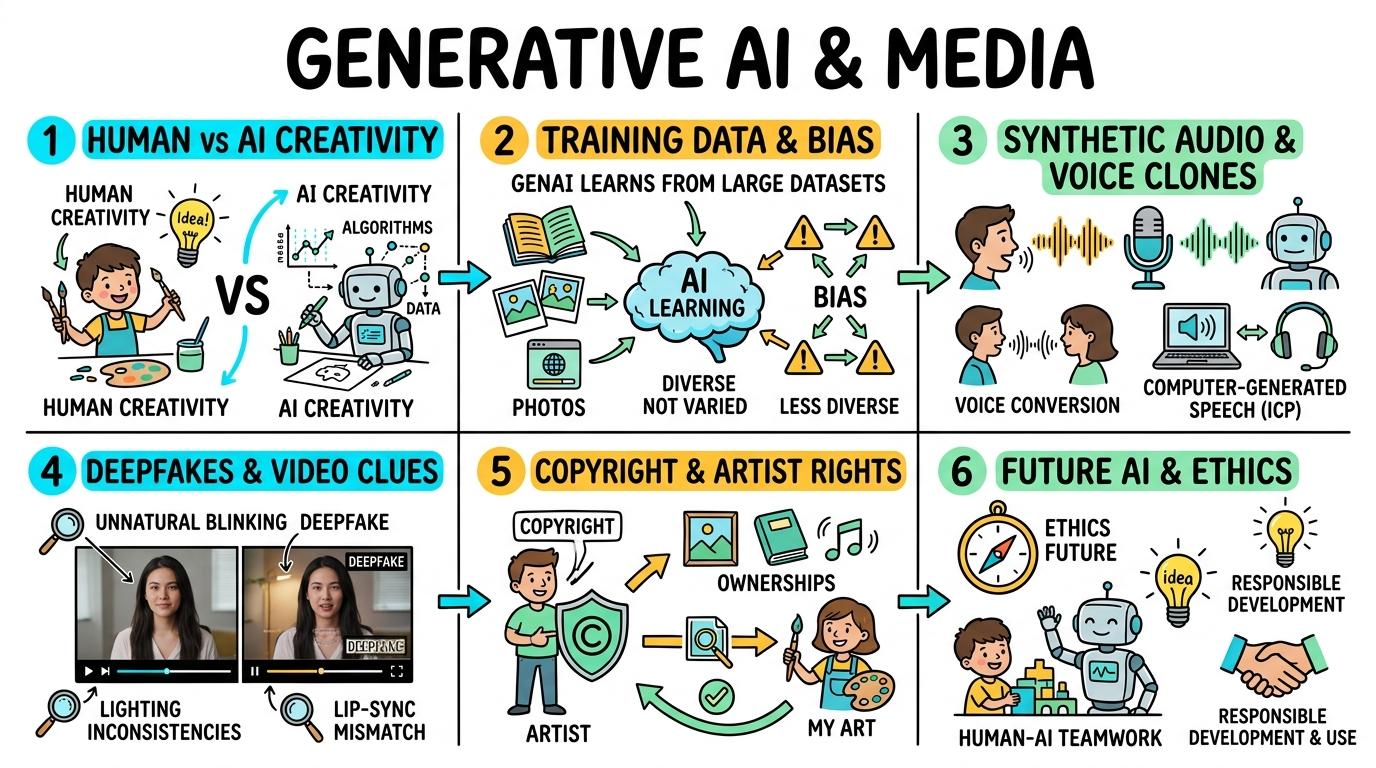
Learning objective
Generative AI
Generative AI & Synthetic Media
1
2
3
4
5
6
Understanding the mechanics, capabilities, limitations, and ethical impacts of Generative AI. Students explore how machine learning models generate text, images, audio, and synthetic media from massive training datasets.
AI vs Human Creativity
Distinguish between human-created media and AI-generated synthetic content.
Let's Go!

Routine: See, Think, Wonder
Look at these two portraits. One was painted by a human artist, one was generated by AI in 3 seconds. Can you spot the clues?
Teacher note: Facilitate the See, Think, Wonder routine for 2–3 minutes. Encourage students to connect the prompt to Form (Human imagination and artificial intelligence create expression in different ways.).
Learn
Generative AI tools don't have imagination or feelings! Instead, they have analyzed millions of pictures and text examples created by humans. When you ask for a picture, the AI combines learned patterns to assemble a brand new image. In computing, human imagination and artificial intelligence create expression in different ways. As you explore the interactive Generative AI Simulator below, focus on how to explain that AI generates content by recognizing patterns in training data, not by 'thinking' or 'feeling'.
🎛️ Generative Controls RackSelect components below to configure generation:
Synthesis & Inquiry Actions
Evaluate the output and choose the correct step:Apply Simulator Skills • Try it yourself
Human or AI Detective Game
🚀 Open a practice space
🌟 Student Project GuideSuccess Criteria & WAGOLL (What A Good One Looks Like)
🎯 Task Success Criteria (Rubric)
Foundation
Recognizes that computers can make pictures and text automatically.
Developing
Identifies visual artifacts (e.g., distorted fingers, strange background text) common in AI images.
Secure (Goal)
Explains that AI generates content by recognizing patterns in training data, not by 'thinking' or 'feeling'.
Mastery
Debates the difference between human emotional expression and AI statistical pattern generation.
👀 What A Good One Looks Like (WAGOLL)
Exemplar of 2
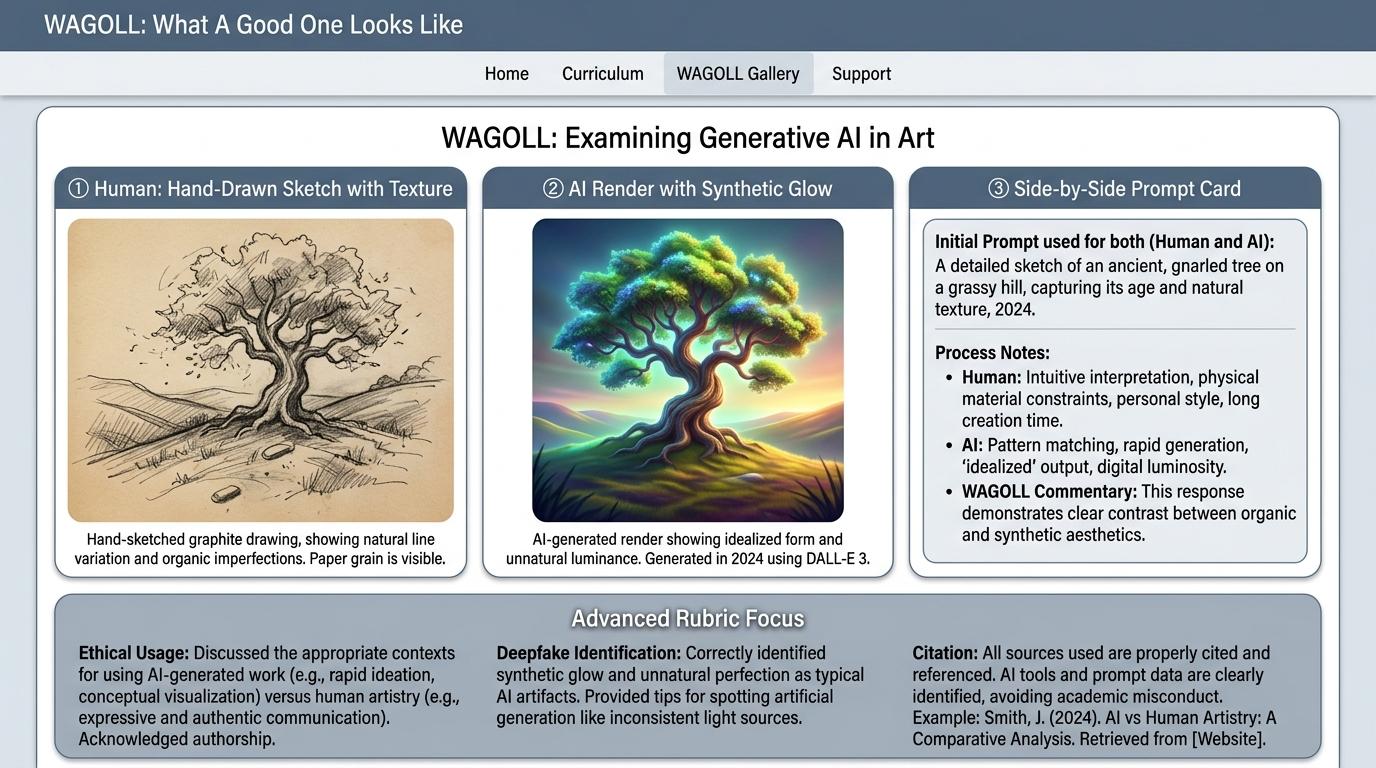 ⭐ Mastering Standard
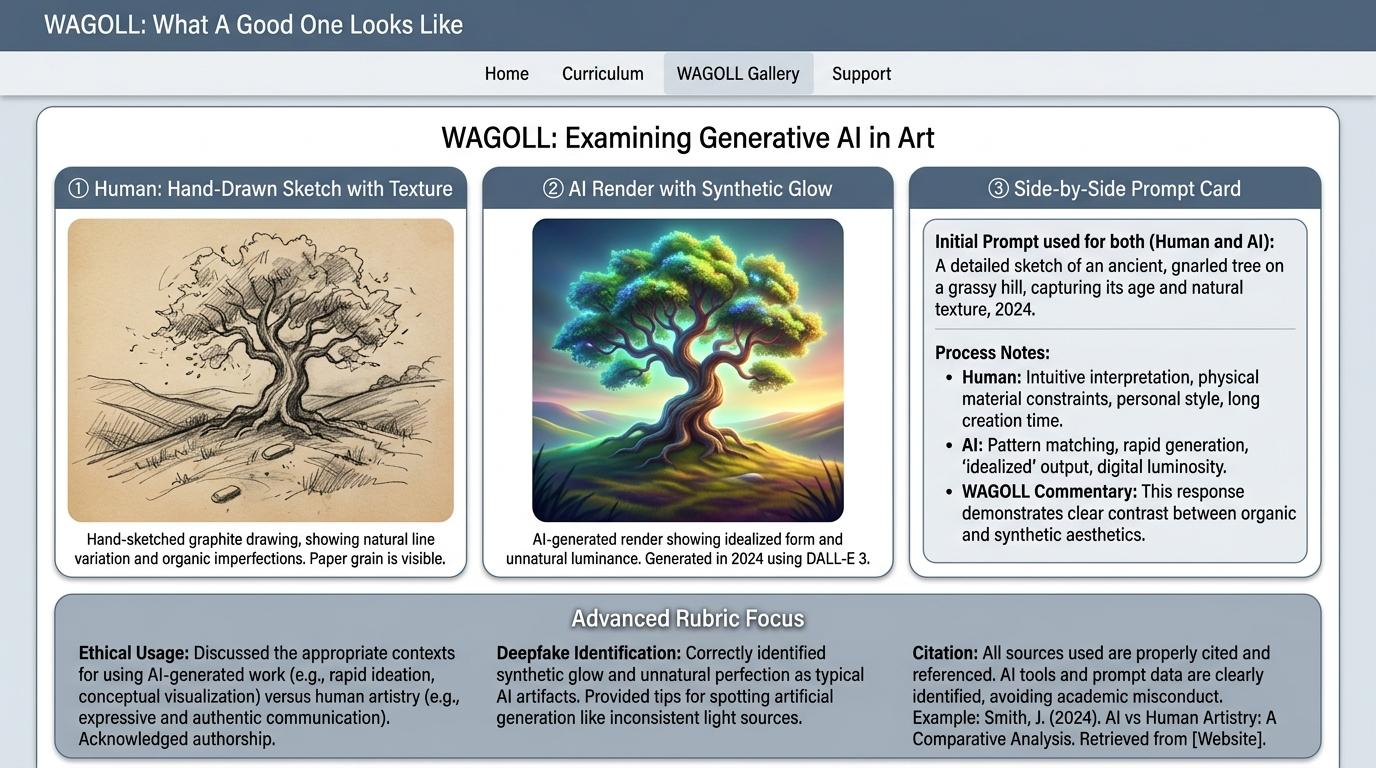 ⭐ Mastering Standard
📁
Save to Your Website Portfolio:
When you finish creating your project in your software, copy the share link or take a screenshot and publish it onto your student portfolio website!
Reflect
Learning check
Teacher setup, curriculum links and progress descriptors
Spark support
Routine: See, Think, Wonder
Teacher notes: Facilitate the See, Think, Wonder routine for 2–3 minutes. Encourage students to connect the prompt to Form (Human imagination and artificial intelligence create expression in different ways.).
Achievement pathway
- Foundation: Recognizes that computers can make pictures and text automatically.
- Developing: Identifies visual artifacts (e.g., distorted fingers, strange background text) common in AI images.
- Secure: Explains that AI generates content by recognizing patterns in training data, not by 'thinking' or 'feeling'.
- Mastering: Debates the difference between human emotional expression and AI statistical pattern generation.
Curriculum links
Curriculum strand: Everyday Digital Skills & Computational Science
Outcome: GA.01.B.1.1 — Distinguish between human-created media and AI-generated synthetic content.
PYP: Form · Human imagination and artificial intelligence create expression in different ways.
Learner profile: Inquirer
Competency tags
Gate support
Accessibility alternative: Students may verbally explain or point to the correct answer for "How does a Generative AI model create a picture of an elephant?" with a teacher or teaching assistant.
Teacher override: allow
Locked level
Level 2: Training Data & Bias
Complete the previous learning check to unlock this next level.
Training Data & Bias
Understand that AI models reflect the training data they were fed, including missing information or bias.
Learning objective
Students will demonstrate how biased or incomplete training data causes AI models to generate stereotypical or skewed results.
Let's Go!
Routine: Think, Puzzle, Explore
If we teach a robot dog using only pictures of cats, what will happen when it sees a real dog?
How does this apply to AI?
Teacher note: Facilitate the Think, Puzzle, Explore routine for 2–3 minutes. Encourage students to connect the prompt to Perspective (Diverse and fair data collection prevents unfair technology representation.).
Learn
AI is a reflection of its training data! If an AI model is trained mostly on photos from one country, it won't know about traditional clothes, houses, or food from other parts of the world. This is called AI Bias. In computing, diverse and fair data collection prevents unfair technology representation. As you explore the interactive Generative AI Simulator below, focus on how to explain 'Garbage In, Garbage Out': if training data lacks diverse cultures, the AI output will be biased.
🎛️ Generative Controls RackSelect components below to configure generation:
Synthesis & Inquiry Actions
Evaluate the output and choose the correct step:Apply Simulator Skills • Try it yourself
Audit AI Training Fairness
🚀 Open a practice space
🌟 Student Project GuideSuccess Criteria & WAGOLL (What A Good One Looks Like)
🎯 Task Success Criteria (Rubric)
Foundation
States that AI only knows what its creators teach it.
Developing
Observes that asking AI for 'a doctor' might repeatedly show similar pictures if the training data was limited.
Secure (Goal)
Explains 'Garbage In, Garbage Out': if training data lacks diverse cultures, the AI output will be biased.
Mastery
Proposes solutions to fix biased AI datasets by adding inclusive, globally representative training samples.
👀 What A Good One Looks Like (WAGOLL)
Exemplar of 2
⭐ Mastering Standard⭐ Mastering Standard📁
Save to Your Website Portfolio:
When you finish creating your project in your software, copy the share link or take a screenshot and publish it onto your student portfolio website!
Reflect
Learning check
Teacher setup, curriculum links and progress descriptors
Spark support
Routine: Think, Puzzle, Explore
Teacher notes: Facilitate the Think, Puzzle, Explore routine for 2–3 minutes. Encourage students to connect the prompt to Perspective (Diverse and fair data collection prevents unfair technology representation.).
Achievement pathway
- Foundation: States that AI only knows what its creators teach it.
- Developing: Observes that asking AI for 'a doctor' might repeatedly show similar pictures if the training data was limited.
- Secure: Explains 'Garbage In, Garbage Out': if training data lacks diverse cultures, the AI output will be biased.
- Mastering: Proposes solutions to fix biased AI datasets by adding inclusive, globally representative training samples.
Curriculum links
Curriculum strand: Everyday Digital Skills & Computational Science
Outcome: GA.01.B.1.2 — Understand that AI models reflect the training data they were fed, including missing information or bias.
PYP: Perspective · Diverse and fair data collection prevents unfair technology representation.
Learner profile: Open-minded
Competency tags
Gate support
Accessibility alternative: Students may verbally explain or point to the correct answer for "What causes an AI generator to show unfair stereotypes or ignore certain cultures?" with a teacher or teaching assistant.
Teacher override: allow
Locked level
Level 3: Generative Audio & Synthetic Voice
Complete the previous learning check to unlock this next level.
Generative Audio & Synthetic Voice
Explore AI voice cloning and music generation, recognizing synthetic audio features.
Learning objective
Students will experiment with text-to-speech and AI voice tools, evaluating artificial cadence vs. natural human speech.
Let's Go!
Routine: Zoom In
Listen to these two audio clips saying 'Happy Birthday'. One is a real person, one is an AI voice clone. What subtle clues do you hear?
Teacher note: Facilitate the Zoom In routine for 2–3 minutes. Encourage students to connect the prompt to Change (Digital audio tools alter how sound and voice are synthesized.).
Learn
Generative AI doesn't just create pictures—it can also generate realistic human speech and complete songs! While this is great for audiobooks and movie effects, we must be aware that AI can clone voices, so we can't believe every audio clip we hear. In computing, digital audio tools alter how sound and voice are synthesized. As you explore the interactive Generative AI Simulator below, focus on how to create a short podcast snippet combining human narration with AI background music generation.
🎛️ Generative Controls RackSelect components below to configure generation:
Synthesis & Inquiry Actions
Evaluate the output and choose the correct step:Apply Simulator Skills • Try it yourself
Synthesize a Story Narration
🚀 Open a practice space
🌟 Student Project GuideSuccess Criteria & WAGOLL (What A Good One Looks Like)
🎯 Task Success Criteria (Rubric)
Foundation
Identifies computer-generated voice reading text aloud.
Developing
Notices robotic pauses, pitch unnaturalness, or emotion gaps in synthetic voices.
Secure (Goal)
Creates a short podcast snippet combining human narration with AI background music generation.
Mastery
Explains the ethical risks of voice cloning scams and establishes safety rules for audio verification.
👀 What A Good One Looks Like (WAGOLL)
Exemplar of 2
⭐ Mastering Standard⭐ Mastering Standard📁
Save to Your Website Portfolio:
When you finish creating your project in your software, copy the share link or take a screenshot and publish it onto your student portfolio website!
Reflect
Learning check
Teacher setup, curriculum links and progress descriptors
Spark support
Routine: Zoom In
Teacher notes: Facilitate the Zoom In routine for 2–3 minutes. Encourage students to connect the prompt to Change (Digital audio tools alter how sound and voice are synthesized.).
Achievement pathway
- Foundation: Identifies computer-generated voice reading text aloud.
- Developing: Notices robotic pauses, pitch unnaturalness, or emotion gaps in synthetic voices.
- Secure: Creates a short podcast snippet combining human narration with AI background music generation.
- Mastering: Explains the ethical risks of voice cloning scams and establishes safety rules for audio verification.
Curriculum links
Curriculum strand: Everyday Digital Skills & Computational Science
Outcome: GA.02.B.1.1 — Explore AI voice cloning and music generation, recognizing synthetic audio features.
PYP: Change · Digital audio tools alter how sound and voice are synthesized.
Learner profile: Communicator
Competency tags
Gate support
Accessibility alternative: Students may verbally explain or point to the correct answer for "If you receive a strange phone message that sounds like a friend asking for money, what should you do?" with a teacher or teaching assistant.
Teacher override: allow
Locked level
Level 4: Deepfakes & Synthetic Video
Complete the previous learning check to unlock this next level.
Deepfakes & Synthetic Video
Identify deepfake video technology and evaluate strategies to detect video manipulation.
Learning objective
Students will analyze video clips to spot deepfake indicators (unnatural blinking, edge blurring, lip-sync misalignment).
Let's Go!
Routine: Connect, Extend, Challenge
How does 'seeing is believing' change now that computers can generate realistic videos of people saying things they never said?
Teacher note: Facilitate the Connect, Extend, Challenge routine for 2–3 minutes. Encourage students to connect the prompt to Connection (Critical media literacy protects society from digital deception.).
Learn
Deepfakes use AI neural networks to swap faces or animate static photos into realistic videos. While fun in movies, deepfakes can spread fake news. Always check if a video comes from a verified, trusted news organization! In computing, critical media literacy protects society from digital deception. As you explore the interactive Generative AI Simulator below, focus on how to list 4 physical detection criteria for deepfake videos (blinking frequency, skin smoothing, lighting inconsistency, lip movement).
🎛️ Generative Controls RackSelect components below to configure generation:
Synthesis & Inquiry Actions
Evaluate the output and choose the correct step:Apply Simulator Skills • Try it yourself
Deepfake Inspector Challenge
🚀 Open a practice space
🌟 Student Project GuideSuccess Criteria & WAGOLL (What A Good One Looks Like)
🎯 Task Success Criteria (Rubric)
Foundation
Understands that videos on screens can be modified or fake.
Developing
Identifies face-swapping effects in video apps.
Secure (Goal)
Lists 4 physical detection criteria for deepfake videos (blinking frequency, skin smoothing, lighting inconsistency, lip movement).
Mastery
Creates an educational media literacy guide teaching peers how to spot synthetic video hoaxes.
👀 What A Good One Looks Like (WAGOLL)
Exemplar of 2
⭐ Mastering Standard⭐ Mastering Standard📁
Save to Your Website Portfolio:
When you finish creating your project in your software, copy the share link or take a screenshot and publish it onto your student portfolio website!
Reflect
Learning check
Teacher setup, curriculum links and progress descriptors
Spark support
Routine: Connect, Extend, Challenge
Teacher notes: Facilitate the Connect, Extend, Challenge routine for 2–3 minutes. Encourage students to connect the prompt to Connection (Critical media literacy protects society from digital deception.).
Achievement pathway
- Foundation: Understands that videos on screens can be modified or fake.
- Developing: Identifies face-swapping effects in video apps.
- Secure: Lists 4 physical detection criteria for deepfake videos (blinking frequency, skin smoothing, lighting inconsistency, lip movement).
- Mastering: Creates an educational media literacy guide teaching peers how to spot synthetic video hoaxes.
Curriculum links
Curriculum strand: Everyday Digital Skills & Computational Science
Outcome: GA.02.B.1.2 — Identify deepfake video technology and evaluate strategies to detect video manipulation.
PYP: Connection · Critical media literacy protects society from digital deception.
Learner profile: Principled
Competency tags
Gate support
Accessibility alternative: Students may verbally explain or point to the correct answer for "Which of these is a common technical clue that a video might be an AI deepfake?" with a teacher or teaching assistant.
Teacher override: allow
Locked level
Level 5: Intellectual Property & Copyright
Complete the previous learning check to unlock this next level.
Intellectual Property & Copyright
Examine intellectual property rights, artist consent, and copyright in AI training models.
Learning objective
Students will debate the ethical implications of training AI models on artists' work without permission or compensation.
Let's Go!
Routine: Step Inside
Imagine you spent 5 years developing a unique drawing style, and an AI company trained a generator on your art without asking. What is fair?
Teacher note: Facilitate the Step Inside routine for 2–3 minutes. Encourage students to connect the prompt to Responsibility (Respecting creator rights fosters a fair creative ecosystem.).
Learn
AI models were built by scraping billions of images and text from the internet—often without asking the original artists, writers, or musicians! This has sparked a global debate about Copyright and Intellectual Property. Ethical AI companies now pay creators or get permission.
🎛️ Generative Controls RackSelect components below to configure generation:
Synthesis & Inquiry Actions
Evaluate the output and choose the correct step:Apply Simulator Skills • Try it yourself
Creative Rights Debate
🚀 Open a practice space
🌟 Student Project GuideSuccess Criteria & WAGOLL (What A Good One Looks Like)
🎯 Task Success Criteria (Rubric)
Foundation
Knows that artists own the pictures and books they create.
Developing
Explains why an artist might feel upset if an AI copies their unique painting style.
Secure (Goal)
Evaluates the balance between open AI innovation and respecting human creators' copyright.
Mastery
Drafts a fair-use model policy for school projects respecting human artists and AI tools.
👀 What A Good One Looks Like (WAGOLL)
Exemplar of 2
⭐ Mastering Standard⭐ Mastering Standard📁
Save to Your Website Portfolio:
When you finish creating your project in your software, copy the share link or take a screenshot and publish it onto your student portfolio website!
Reflect
Learning check
Teacher setup, curriculum links and progress descriptors
Spark support
Routine: Step Inside
Teacher notes: Facilitate the Step Inside routine for 2–3 minutes. Encourage students to connect the prompt to Responsibility (Respecting creator rights fosters a fair creative ecosystem.).
Achievement pathway
- Foundation: Knows that artists own the pictures and books they create.
- Developing: Explains why an artist might feel upset if an AI copies their unique painting style.
- Secure: Evaluates the balance between open AI innovation and respecting human creators' copyright.
- Mastering: Drafts a fair-use model policy for school projects respecting human artists and AI tools.
Curriculum links
Curriculum strand: Everyday Digital Skills & Computational Science
Outcome: GA.03.B.1.1 — Examine intellectual property rights, artist consent, and copyright in AI training models.
PYP: Responsibility · Respecting creator rights fosters a fair creative ecosystem.
Learner profile: Reflective
Competency tags
Gate support
Accessibility alternative: Students may verbally explain or point to the correct answer for "What is 'Intellectual Property'?" with a teacher or teaching assistant.
Teacher override: allow
Locked level
Level 6: Future Impact & AI Governance
Complete the previous learning check to unlock this next level.
Future Impact & AI Governance
Propose guidelines for responsible AI governance, energy sustainability, and human-AI collaboration.
Learning objective
Students will design an AI Policy Framework evaluating environmental energy costs, job shifts, and human safety rules.
Let's Go!
Routine: 3-2-1 Bridge
3 benefits of AI in medicine, 2 environmental concerns about data centers, 1 rule for keeping humans in control.
Teacher note: Facilitate the 3-2-1 Bridge routine for 2–3 minutes. Encourage students to connect the prompt to Reflection (Responsible stewardship guides how artificial intelligence shapes our shared future.).
Learn
AI is transforming medicine, science, and climate research! But big AI supercomputers consume huge amounts of energy and water. The future of AI requires 'Human-in-the-Loop' oversight—ensuring humans always make the final important decisions. In computing, responsible stewardship guides how artificial intelligence shapes our shared future. As you explore the interactive Generative AI Simulator below, focus on how to construct a balanced 'Human-in-the-Loop' model showing how humans and AI should work together in healthcare and education.
🎛️ Generative Controls RackSelect components below to configure generation:
Synthesis & Inquiry Actions
Evaluate the output and choose the correct step:Apply Simulator Skills • Try it yourself
Draft a Class AI Charter
🚀 Open a practice space
🌟 Student Project GuideSuccess Criteria & WAGOLL (What A Good One Looks Like)
🎯 Task Success Criteria (Rubric)
Foundation
States that humans must always stay in control of AI systems.
Developing
Identifies that running giant AI data centers uses a lot of electricity and water for cooling.
Secure (Goal)
Constructs a balanced 'Human-in-the-Loop' model showing how humans and AI should work together in healthcare and education.
Mastery
Presents a school AI Charter to the student council recommending sustainable, safe, and fair AI practices.
👀 What A Good One Looks Like (WAGOLL)
Exemplar of 2
⭐ Mastering Standard⭐ Mastering Standard📁
Save to Your Website Portfolio:
When you finish creating your project in your software, copy the share link or take a screenshot and publish it onto your student portfolio website!
Reflect
Learning check
Teacher setup, curriculum links and progress descriptors
Spark support
Routine: 3-2-1 Bridge
Teacher notes: Facilitate the 3-2-1 Bridge routine for 2–3 minutes. Encourage students to connect the prompt to Reflection (Responsible stewardship guides how artificial intelligence shapes our shared future.).
Achievement pathway
- Foundation: States that humans must always stay in control of AI systems.
- Developing: Identifies that running giant AI data centers uses a lot of electricity and water for cooling.
- Secure: Constructs a balanced 'Human-in-the-Loop' model showing how humans and AI should work together in healthcare and education.
- Mastering: Presents a school AI Charter to the student council recommending sustainable, safe, and fair AI practices.
Curriculum links
Curriculum strand: Everyday Digital Skills & Computational Science
Outcome: GA.03.B.1.2 — Propose guidelines for responsible AI governance, energy sustainability, and human-AI collaboration.
PYP: Reflection · Responsible stewardship guides how artificial intelligence shapes our shared future.
Learner profile: Principled
Competency tags
Gate support
Accessibility alternative: Students may verbally explain or point to the correct answer for "What does 'Human-in-the-Loop' mean in AI safety?" with a teacher or teaching assistant.
Teacher override: allow