Welcome to Data Handling! In this strand, you will learn how to collect, organize, visualize, and analyze information using pictograms, branching databases, charts, and digital logging tools to answer real-world questions.
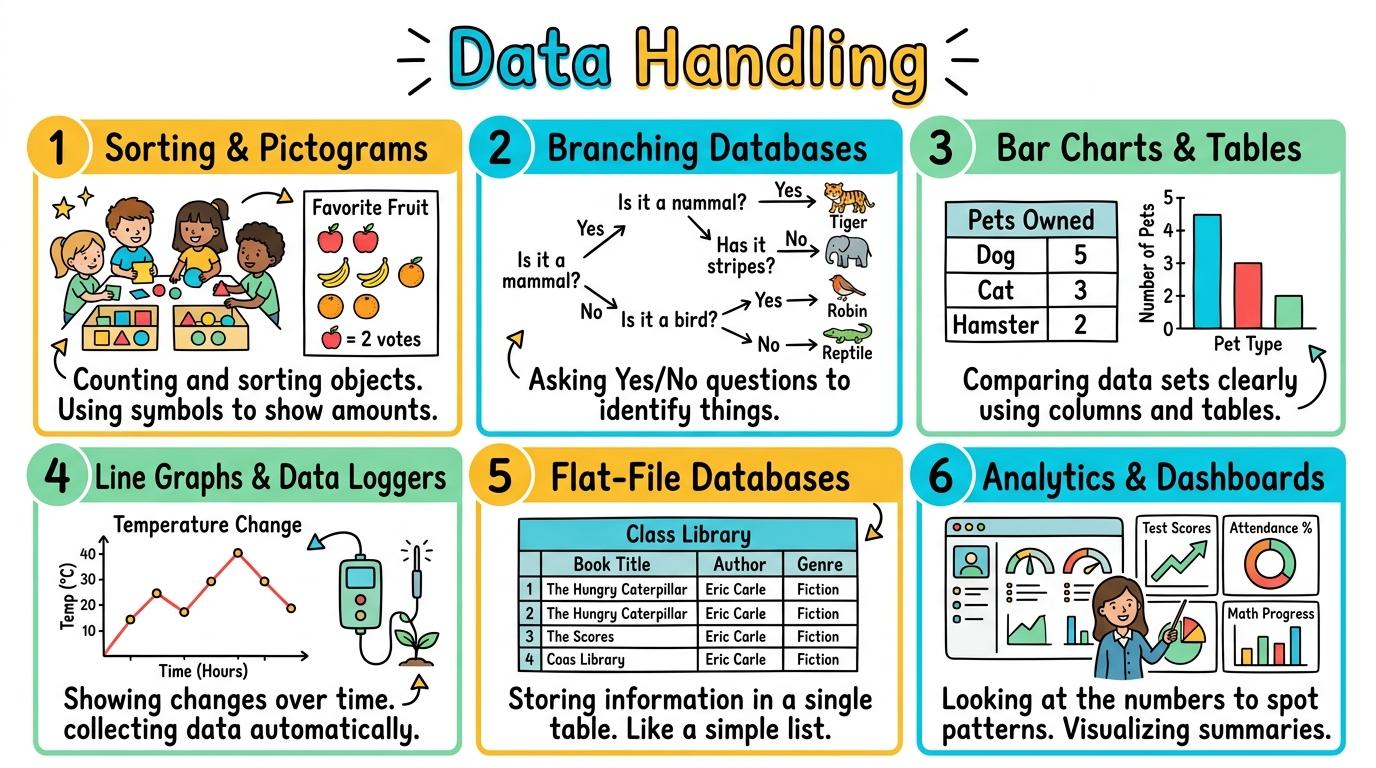
Congratulations on mastering Levels 1 to 6! Here is your one-page visual synthesis of every key concept learned:
▶View All 6 Level Key Concepts & Standards6 Levels Summarised
📌
Level 1🚀
Sorting & Pictograms
Sorting objects by attributes and creating pictograms.
Key Takeaway:Data is information we collect! By grouping items with shared attributes and drawing pictograms, we can visually compare amounts quickly.
#data-sorting#pictograms#attributes
✓ Mastered
📌
Level 2🛡️
Branching Databases
Binary classification and yes/no branching keys.
Key Takeaway:Branching databases divide items using clear yes/no questions.
#branching-databases#binary-trees#classification
✓ Mastered
📌
Level 3🔑
Bar Charts & Tables
Collecting data via tally charts and generating bar charts.
Key Takeaway:Bar charts turn rows of numbers into visual towers! Placing categories on the horizontal X-axis and quantities on the vertical Y-axis lets you compare results at a glance.
#bar-charts#tally-charts#axis-labels
✓ Mastered
📌
Level 4💻
Line Graphs & Data Loggers
Time-series continuous data and data logging sensors.
Key Takeaway:Unlike bar charts for discrete categories, line graphs show continuous change over time! Data loggers automatically record temperature, light, or sound levels every minute.
#line-graphs#data-loggers#temperature-sensors
✓ Mastered
📌
Level 5🔐
Flat-File Databases
Database fields, records, searching, and sorting.
Key Takeaway:A database is an organized collection of records! Each row is one full Record (e.
#flat-file-database#records#fields
✓ Mastered
📌
Level 6🏆
Analytics & Dashboards
Data cleaning, analysis, infographics, and evaluating data bias.
Key Takeaway:Big data analytics transforms raw survey and sensor data into actionable insights! By cleaning data, building interactive dashboards, and recognizing collection bias, we make informed, ethical decisions.
#data-analytics#data-cleaning#dashboards
✓ Mastered
✨
SECRET MASTERY UNLOCK
Stage Mastery Quest Challenge
You've unlocked the secret final review dungeon! Can you solve every checkpoint gate and escape the maze?
🕹️🗂️ Data Curator
Data Handling
Hearts❤️❤️❤️
StageL1: Remember
XP Score0 PTS
1Sorting & Pictograms
2Branching Databases
3Bar Charts & Tables
4Line Graphs & Data Loggers
5Flat-File Databases
6Analytics & Dashboards
Chapter 1: The Incident
🧙♂️
Loading narrative situation...
What is your next action?
🚨 Roadblock Encountered! -1 Heart! Hint: Check the core standard.
TERMINAL://EDTECH-ROOT/NODE-EXEC● LIVE LINK
// SYSTEM DIAGNOSTIC INITIALIZED...
>Select verification command:
🚨 SYNTAX CRASH! -1 Heart & Buffer Overflow!
⌨️ Arrows/WASD to Move & Jump • Land on Question Beacon to Elevate!
⌨️ Left/Right to Steer • Space to Fire Tractor Beam at Correct Capsule!
⌨️ Space to Launch Spark • A/D or Left/Right to Trigger Flipper Gates!
Level 1 Checkpoint⌨️ Press [1]–[3]
Question Prompt goes here?
🚨 INCORRECT CHOICE! -100 PTS & -1 Heart!
💡 Mastery Insight Verified (+200 PTS):
🏆✨
STRAND MASTERY ACHIEVED!
You conquered all 6 levels and demonstrated digital mastery!
Final XP Score: 0 PTS
🔑SECRET AREA BOSS KEY DISCOVERED!
Use this secret PIN to unlock the Data Detective Agency in the Area Capstone Vault:
Congratulations on completing all 6 levels of Data Handling! To unlock the Data Detective Agency, you must collect all 8 Key Shards across the Data, Spreadsheets & Science strands. Here is your cipher fragment for Slot #1:
KEY SHARD #1
3
Slot 1 of 8
🧩 Data, Spreadsheets & Science Key Ring Tracker:Slot #1 Active
Sorting objects by attributes and creating pictograms.
Learning objective
Learning About: Data Sorting. Learning To: Create pictograms. Learning To Be: Inquirer.
Let's Go!
Routine: See, Think, Wonder
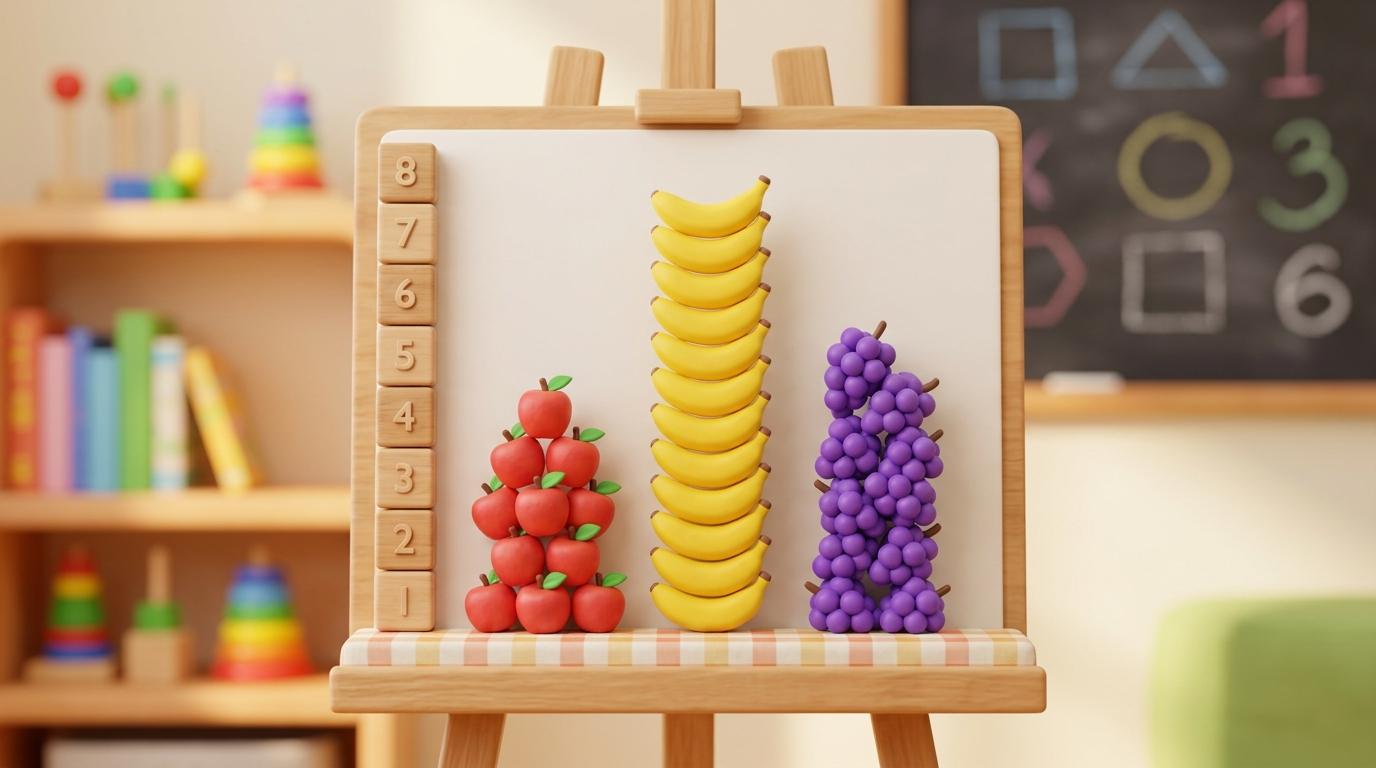
Look closely at this pictogram of favourite fruits. What do you see? What does it tell us?
Teacher note: Facilitate the See, Think, Wonder routine for 2–3 minutes. Encourage students to connect the prompt to Form (Organizing objects helps us make sense of our world.).
Learn
Data is information we collect! By grouping items with shared attributes and drawing pictograms, we can visually compare amounts quickly. In computing, organizing objects helps us make sense of our world. As you explore the interactive Spreadsheet Simulator below, focus on how to construct a simple digital pictogram where 1 picture = 1 item.
Interactive Simulator Sandbox
📊
Spreadsheet StudioStep 1 • Bronze Tier
|
A1fx
A
B
C
1
Item
Amount
2
Apples
5
3
Bananas
3
4
Carrots
2
5
Total
Challenge: Click cell B5 to inspect how the AutoSum formula adds up column B!
📊
Data Visualization Chart
Apply Simulator Skills • Try it yourself
Sort & Picture!
🔄Direct Simulator Transfer: Step 1 Tasks 1, 2 & 3
Now that you've practiced the virtual mechanics in the simulator above, apply those exact skills in your real computer environment:
🎉
Simulator Tasks 1–3 Mastered!Step 1 Verified
Great job mastering the interactive simulation! Now complete the real-world transfer checklist below and save your work into your digital portfolio.
🌟 Student Project GuideSuccess Criteria & WAGOLL (What A Good One Looks Like)▾
🎯 Task Success Criteria (Rubric)
Foundation
Sort physical or digital items by one property (e.g. colour).
Developing
Count items in groups and place them in row lists.
Secure (Goal)
Construct a simple digital pictogram where 1 picture = 1 item.
Mastery
Interpret pictograms to answer 'which has the most/least?'. Typing: 5 WPM.
👀 What A Good One Looks Like (WAGOLL)
Exemplar 1 of 2
⭐ Mastering Standard
Collecting & Visualising Data Exemplar: Demonstration of mastering quality standards for Sorting & Pictograms.
⭐ Mastering Standard
Collecting & Visualising Data Exemplar: Demonstration of mastering quality standards for Sorting & Pictograms.
📁
Save to Your Website Portfolio:
When you finish creating your project in your software, copy the share link or take a screenshot and publish it onto your student portfolio website!
Reflect
🎯
Self-Assessment & Reflection
How confident are you at reading data from a simple pictogram?
🟢Secure Level
Construct a simple digital pictogram where 1 picture = 1 item.
Learning check
Learning Check
In a pictogram where 1 apple icon = 1 student, how many students chose apples if there are 4 icons?
Select the matching icon or option below:
Hint 1: Count each apple icon again carefully.
Hint 2: Clue: 4 icons equal 4 students when each icon represents 1.
Answer correctly to unlock the next level.
Great job! 4 icons equal 4 students when each icon represents 1.Count each apple icon again carefully.
Teacher setup, curriculum links and progress descriptors
Spark support
Routine: See, Think, Wonder
Teacher notes: Facilitate the See, Think, Wonder routine for 2–3 minutes. Encourage students to connect the prompt to Form (Organizing objects helps us make sense of our world.).
Achievement pathway
Foundation: Sort physical or digital items by one property (e.g. colour).
Developing: Count items in groups and place them in row lists.
Secure: Construct a simple digital pictogram where 1 picture = 1 item.
Mastering: Interpret pictograms to answer 'which has the most/least?'. Typing: 5 WPM.
Curriculum links
Curriculum strand: MAT.01.C.1.4
Outcome: DH-O-01 — Sorting objects by attributes and creating pictograms.
PYP: Form · Organizing objects helps us make sense of our world.
Learner profile: Inquirer
Competency tags
data-sorting
pictograms
attributes
counting
Gate support
Accessibility alternative: Students may verbally explain or point to the correct answer for "In a pictogram where 1 apple icon = 1 student, how many students chose apples if there are 4 icons?" with a teacher or teaching assistant.
Complete the previous learning check to unlock this next level.
Level 2
Branching Databases
Binary classification and yes/no branching keys.
Learning objective
Learning About: Binary Keys. Learning To: Build decision trees. Learning To Be: Thinker.
Let's Go!
Routine: Zoom In
Look at this clue about an animal. Does it have feathers? Yes or No? What animal could it be?
Teacher note: Facilitate the Zoom In routine for 2–3 minutes. Encourage students to connect the prompt to Function (Classification systems help us organize and identify living things and objects.).
Learn
Branching databases divide items using clear yes/no questions. Each question splits the group into two smaller paths until every item is uniquely identified! In computing, classification systems help us organize and identify living things and objects. As you explore the interactive Diagram Builder Simulator below, focus on how to create a 3-level branching database using binary (yes/no) questions.
🌟 Student Project GuideSuccess Criteria & WAGOLL (What A Good One Looks Like)▾
🎯 Task Success Criteria (Rubric)
Foundation
Answer simple yes/no questions about an object's properties.
Developing
Follow a printed branching database key to identify an item.
Secure (Goal)
Create a 3-level branching database using binary (yes/no) questions.
Mastery
Test a branching key to ensure every item reaches a unique destination. Typing: 10 WPM.
👀 What A Good One Looks Like (WAGOLL)
Exemplar 1 of 2
⭐ Mastering Standard
Collecting & Visualising Data Exemplar: Demonstration of mastering quality standards for Branching Databases.
⭐ Mastering Standard
Collecting & Visualising Data Exemplar: Demonstration of mastering quality standards for Branching Databases.
📁
Save to Your Website Portfolio:
When you finish creating your project in your software, copy the share link or take a screenshot and publish it onto your student portfolio website!
Reflect
🎯
Self-Assessment & Reflection
Did your Yes/No questions successfully separate all four items?
🟢Secure Level
Create a 3-level branching database using binary (yes/no) questions.
Learning check
Learning Check
You want to split birds and fish in a branching database. Which Yes/No question works best?
Choose the best Yes/No question.
Hint 1: Think about which question strictly separates birds from fish.
Hint 2: Clue: 'Does it have feathers?' clearly separates birds from fish.
Answer correctly to unlock the next level.
Correct! 'Does it have feathers?' clearly separates birds from fish.Think about which question strictly separates birds from fish.
Teacher setup, curriculum links and progress descriptors
Spark support
Routine: Zoom In
Teacher notes: Facilitate the Zoom In routine for 2–3 minutes. Encourage students to connect the prompt to Function (Classification systems help us organize and identify living things and objects.).
Achievement pathway
Foundation: Answer simple yes/no questions about an object's properties.
Developing: Follow a printed branching database key to identify an item.
Secure: Create a 3-level branching database using binary (yes/no) questions.
Mastering: Test a branching key to ensure every item reaches a unique destination. Typing: 10 WPM.
Curriculum links
Curriculum strand: MAT.02.C.1.4
Outcome: DH-O-02 — Binary classification and yes/no branching keys.
PYP: Function · Classification systems help us organize and identify living things and objects.
Learner profile: Thinker
Competency tags
branching-databases
binary-trees
classification
yes-no-questions
Gate support
Accessibility alternative: Students may verbally explain or point to the correct answer for "You want to split birds and fish in a branching database. Which Yes/No question works best?" with a teacher or teaching assistant.
Complete the previous learning check to unlock this next level.
Level 3
Bar Charts & Tables
Collecting data via tally charts and generating bar charts.
Learning objective
Learning About: Data Visualization. Learning To: Plot bar charts. Learning To Be: Knowledgeable.
Let's Go!
Routine: Think, Puzzle, Explore
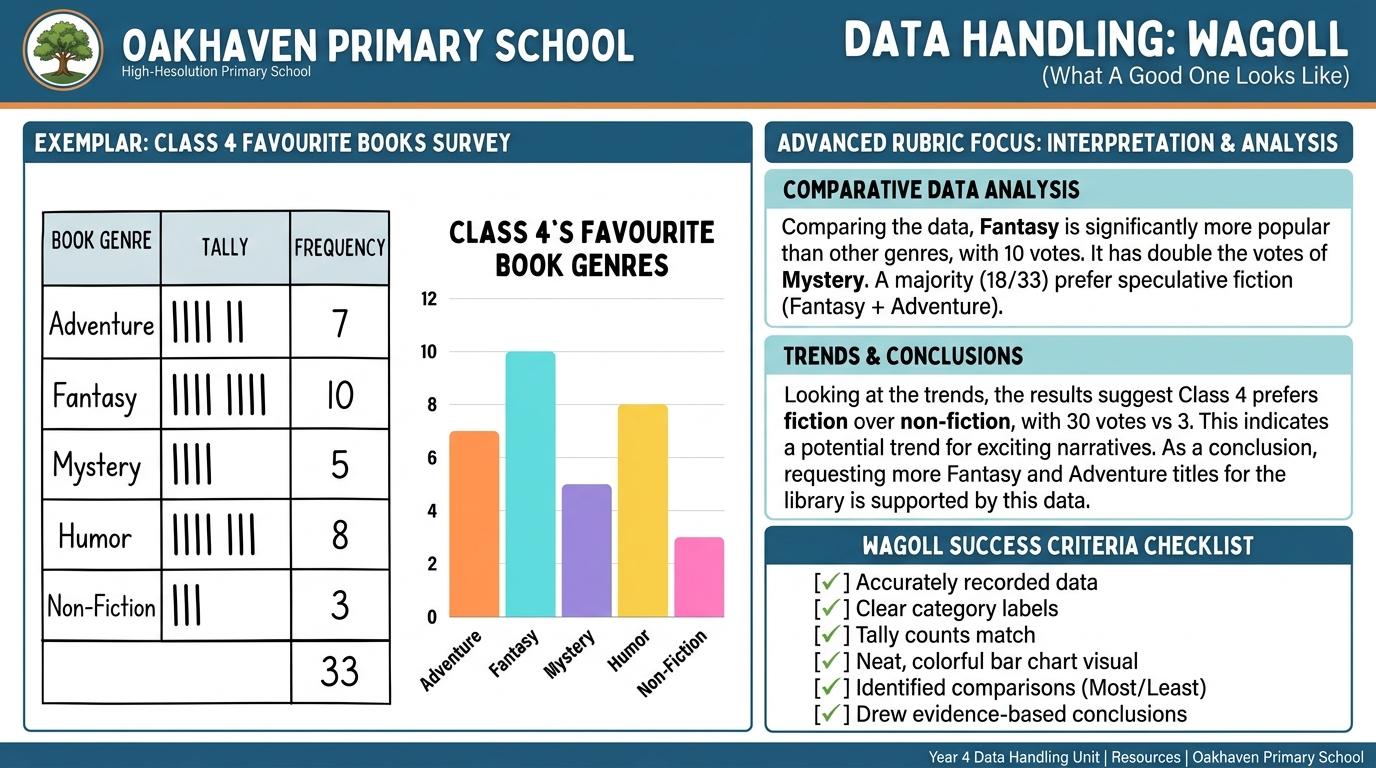
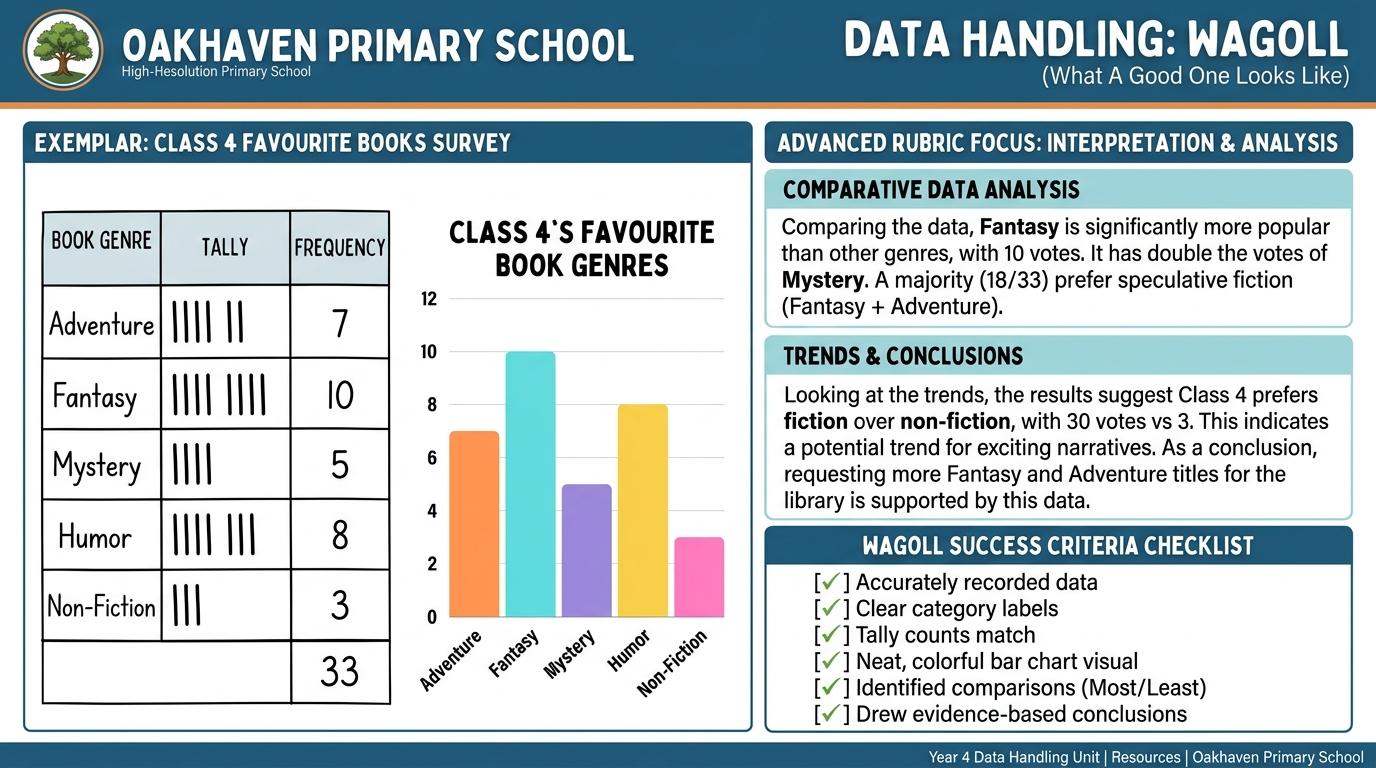
Look at this tally table and bar chart side-by-side. How does the bar chart make comparison faster?
Teacher note: Facilitate the Think, Puzzle, Explore routine for 2–3 minutes. Encourage students to connect the prompt to Connection (Visualizing numerical data reveals trends and patterns clearly.).
Learn
Bar charts turn rows of numbers into visual towers! Placing categories on the horizontal X-axis and quantities on the vertical Y-axis lets you compare results at a glance. In computing, visualizing numerical data reveals trends and patterns clearly. As you explore the interactive Spreadsheet Simulator below, focus on how to generate a digital bar chart with custom title and labeled X/Y axes.
Interactive Simulator Sandbox
📊
Spreadsheet StudioStep 3 • Bronze Tier
|
A1fx
A
B
C
1
Item
Amount
2
Apples
5
3
Bananas
3
4
Carrots
2
5
Total
Challenge: Click cell B5 to inspect how the AutoSum formula adds up column B!
📊
Data Visualization Chart
Apply Simulator Skills • Try it yourself
Tally & Chart!
🔄Direct Simulator Transfer: Step 3 Tasks 7, 8 & 9
Now that you've practiced the virtual mechanics in the simulator above, apply those exact skills in your real computer environment:
🎉
Simulator Tasks 7–9 Mastered!Step 3 Verified
Great job mastering the interactive simulation! Now complete the real-world transfer checklist below and save your work into your digital portfolio.
🌟 Student Project GuideSuccess Criteria & WAGOLL (What A Good One Looks Like)▾
🎯 Task Success Criteria (Rubric)
Foundation
Record tally marks in groups of 5 on a frequency table.
Developing
Input numerical data into a digital table with labeled headers.
Secure (Goal)
Generate a digital bar chart with custom title and labeled X/Y axes.
Mastery
Interpret bar chart scales (e.g. intervals of 2, 5, 10) to compare data points. Typing: 15 WPM.
👀 What A Good One Looks Like (WAGOLL)
Exemplar 1 of 2
⭐ Mastering Standard
Collecting & Visualising Data Exemplar: Demonstration of mastering quality standards for Bar Charts & Tables.
⭐ Mastering Standard
Collecting & Visualising Data Exemplar: Demonstration of mastering quality standards for Bar Charts & Tables.
📁
Save to Your Website Portfolio:
When you finish creating your project in your software, copy the share link or take a screenshot and publish it onto your student portfolio website!
Reflect
🎯
Self-Assessment & Reflection
How easy was it to read the highest value from your bar chart?
🟢Secure Level
Generate a digital bar chart with custom title and labeled X/Y axes.
Learning check
Learning Check
Where should category names (like Red, Blue, Green) be placed on a standard vertical bar chart?
Select the correct axis label.
Hint 1: Think about where the names of categories sit on a vertical chart.
Hint 2: Clue: Categories belong on the horizontal X-axis, while quantities go on the vertical Y-axis.
Answer correctly to unlock the next level.
Correct! Categories belong on the horizontal X-axis, while quantities go on the vertical Y-axis.Think about where the names of categories sit on a vertical chart.
Teacher setup, curriculum links and progress descriptors
Spark support
Routine: Think, Puzzle, Explore
Teacher notes: Facilitate the Think, Puzzle, Explore routine for 2–3 minutes. Encourage students to connect the prompt to Connection (Visualizing numerical data reveals trends and patterns clearly.).
Achievement pathway
Foundation: Record tally marks in groups of 5 on a frequency table.
Developing: Input numerical data into a digital table with labeled headers.
Secure: Generate a digital bar chart with custom title and labeled X/Y axes.
Mastering: Interpret bar chart scales (e.g. intervals of 2, 5, 10) to compare data points. Typing: 15 WPM.
Curriculum links
Curriculum strand: CM.02.B.1.1
Outcome: DH-O-03 — Collecting data via tally charts and generating bar charts.
PYP: Connection · Visualizing numerical data reveals trends and patterns clearly.
Learner profile: Knowledgeable
Competency tags
bar-charts
tally-charts
axis-labels
data-entry
Gate support
Accessibility alternative: Students may verbally explain or point to the correct answer for "Where should category names (like Red, Blue, Green) be placed on a standard vertical bar chart?" with a teacher or teaching assistant.
Complete the previous learning check to unlock this next level.
Level 4
Line Graphs & Data Loggers
Time-series continuous data and data logging sensors.
Learning objective
Learning About: Continuous Data. Learning To: Plot line graphs. Learning To Be: Inquirer.
Let's Go!
Routine: See, Think, Wonder
Look at this line graph tracking classroom temperature over 24 hours. Where does it dip lowest?
Teacher note: Facilitate the See, Think, Wonder routine for 2–3 minutes. Encourage students to connect the prompt to Change (Environmental sensors allow continuous monitoring of physical change.).
Learn
Unlike bar charts for discrete categories, line graphs show continuous change over time! Data loggers automatically record temperature, light, or sound levels every minute. In computing, environmental sensors allow continuous monitoring of physical change. As you explore the interactive Drawing Layers Simulator below, focus on how to record continuous readings over time and plot a digital line graph.
🌟 Student Project GuideSuccess Criteria & WAGOLL (What A Good One Looks Like)▾
🎯 Task Success Criteria (Rubric)
Foundation
Identify that line graphs show how data changes over time.
Developing
Connect temperature or light sensors to a digital data logger.
Secure (Goal)
Record continuous readings over time and plot a digital line graph.
Mastery
Identify peaks, troughs, and rates of change on a time-series graph. Typing: 20 WPM.
👀 What A Good One Looks Like (WAGOLL)
Exemplar 1 of 2
⭐ Mastering Standard
Collecting & Visualising Data Exemplar: Demonstration of mastering quality standards for Line Graphs & Data Loggers.
⭐ Mastering Standard
Collecting & Visualising Data Exemplar: Demonstration of mastering quality standards for Line Graphs & Data Loggers.
📁
Save to Your Website Portfolio:
When you finish creating your project in your software, copy the share link or take a screenshot and publish it onto your student portfolio website!
Reflect
🎯
Self-Assessment & Reflection
Can you easily identify when the temperature reached its highest point on your line graph?
🟢Secure Level
Record continuous readings over time and plot a digital line graph.
Learning check
Learning Check
You want to track how the temperature outside changes continuously from 8 AM to 3 PM. Which chart type is best?
Choose the correct graph type.
Hint 1: Think about which graph connects data points across time.
Hint 2: Clue: Line graphs are the best tool for showing continuous changes over time.
Answer correctly to unlock the next level.
Spot on! Line graphs are the best tool for showing continuous changes over time.Think about which graph connects data points across time.
Teacher setup, curriculum links and progress descriptors
Spark support
Routine: See, Think, Wonder
Teacher notes: Facilitate the See, Think, Wonder routine for 2–3 minutes. Encourage students to connect the prompt to Change (Environmental sensors allow continuous monitoring of physical change.).
Achievement pathway
Foundation: Identify that line graphs show how data changes over time.
Developing: Connect temperature or light sensors to a digital data logger.
Secure: Record continuous readings over time and plot a digital line graph.
Mastering: Identify peaks, troughs, and rates of change on a time-series graph. Typing: 20 WPM.
Curriculum links
Curriculum strand: CM.03.B.1.3
Outcome: DH-O-04 — Time-series continuous data and data logging sensors.
Accessibility alternative: Students may verbally explain or point to the correct answer for "You want to track how the temperature outside changes continuously from 8 AM to 3 PM. Which chart type is best?" with a teacher or teaching assistant.
Complete the previous learning check to unlock this next level.
Level 5
Flat-File Databases
Database fields, records, searching, and sorting.
Learning objective
Learning About: Structured Records. Learning To: Query databases. Learning To Be: Open-minded.
Let's Go!
Routine: I used to think...
I used to think a spreadsheet and a database were identical... Now I think...
Teacher note: Facilitate the I used to think... routine for 2–3 minutes. Encourage students to connect the prompt to Responsibility (Structured databases enable efficient searching, filtering, and analysis of complex records.).
Learn
A database is an organized collection of records! Each row is one full Record (e.g. a planet) and each column is a specific Field (e.g. Diameter or Moons). In computing, structured databases enable efficient searching, filtering, and analysis of complex records. As you explore the interactive Website Builder Simulator below, focus on how to sort records alphabetically or numerically and perform single-field searches.
Interactive Simulator Sandbox
Curriculum:Step 5 • Bronze Tier
🌐
Step 1 • Bronze (Level 1): What is a Website? - Website Feature Identification
Name at least one essential feature of a website (e.g. navigation menu or homepage) with support.
In Progress
🎉 SITE LIVEhttps://student-creators.edtechhub.org/sites/my-digital-portfolio
🏠 Page: Home4 blocks on this page
Eco-School Hub
Welcome to Our Digital Space!
Designed to share student ideas, projects, and community action with the world.
🌱📸Feature Project Banner Image
🎯 Purpose & Goals Empowering students to publish creative writing, artwork, and research studies for global peers.
👥 Target Audience Tailored for classmates, teachers, families, and partner schools worldwide.
🎨 Brand Identity & Palette
Apply cohesive styling across all pages so your website presents a unified personality.
Eco-School Hub
Consistent typography and harmonious contrast reflect confident digital authorship. ✨
📐 Wireframe Blueprint & Quality Audit
Before launching a live website, verify the structural wireframe blueprint, page hierarchy, and mobile responsive layout.
Collecting & Visualising Data Exemplar: Demonstration of mastering quality standards for Flat-File Databases.
⭐ Mastering Standard
Collecting & Visualising Data Exemplar: Demonstration of mastering quality standards for Flat-File Databases.
📁
Save to Your Website Portfolio:
When you finish creating your project in your software, copy the share link or take a screenshot and publish it onto your student portfolio website!
Reflect
🎯
Self-Assessment & Reflection
How confident do you feel using search filters to find specific records in a database?
🟢Secure Level
Sort records alphabetically or numerically and perform single-field searches.
Learning check
Learning Check
In a database containing information about students, what represents all the information about ONE single student?
Select the correct database term.
Hint 1: Columns are Fields, while full rows are Records.
Hint 2: Clue: Mastered! A row (Record) contains all attributes belonging to one single entity.
Answer correctly to unlock the next level.
Mastered! A row (Record) contains all attributes belonging to one single entity.Remember: Columns are Fields, while full rows are Records.
Teacher setup, curriculum links and progress descriptors
Spark support
Routine: I used to think...
Teacher notes: Facilitate the I used to think... routine for 2–3 minutes. Encourage students to connect the prompt to Responsibility (Structured databases enable efficient searching, filtering, and analysis of complex records.).
Achievement pathway
Foundation: Distinguish between a database 'field' (column) and 'record' (row).
Developing: Enter new records into an existing flat-file database schema.
Secure: Sort records alphabetically or numerically and perform single-field searches.
Outcome: DH-O-05 — Database fields, records, searching, and sorting.
PYP: Responsibility · Structured databases enable efficient searching, filtering, and analysis of complex records.
Learner profile: Open-minded
Competency tags
flat-file-database
records
fields
sorting
searching
Gate support
Accessibility alternative: Students may verbally explain or point to the correct answer for "In a database containing information about students, what represents all the information about ONE single student?" with a teacher or teaching assistant.
Complete the previous learning check to unlock this next level.
Level 6
Analytics & Dashboards
Data cleaning, analysis, infographics, and evaluating data bias.
Learning objective
Learning About: Data Analytics. Learning To: Synthesize infographics. Learning To Be: Reflective.
Let's Go!
Routine: Step Inside
Imagine you are a data analyst presenting findings to school leaders. What story does your data tell?
Teacher note: Facilitate the Step Inside routine for 2–3 minutes. Encourage students to connect the prompt to Reflection (Data analytics informs decision-making but requires critical evaluation for accuracy and bias.).
Learn
Big data analytics transforms raw survey and sensor data into actionable insights! By cleaning data, building interactive dashboards, and recognizing collection bias, we make informed, ethical decisions. In computing, data analytics informs decision-making but requires critical evaluation for accuracy and bias. As you explore the interactive Python Console Simulator below, focus on how to create a digital infographic communicating key findings to an audience.
Hint 1: Think about whether the survey group fairly represents everyone.
Hint 2: Clue: Asking only basketball players creates sampling bias because the sample group isn't representative of the whole school.
Answer correctly to complete this strand.
Spot on! Asking only basketball players creates sampling bias because the sample group isn't representative of the whole school.Think about whether the survey group fairly represents everyone.
Teacher setup, curriculum links and progress descriptors
Spark support
Routine: Step Inside
Teacher notes: Facilitate the Step Inside routine for 2–3 minutes. Encourage students to connect the prompt to Reflection (Data analytics informs decision-making but requires critical evaluation for accuracy and bias.).
Achievement pathway
Foundation: Clean dirty data by detecting missing values or duplicate entries.
Developing: Synthesize multiple charts into a cohesive single-page dashboard.
Secure: Create a digital infographic communicating key findings to an audience.
Mastering: Critically evaluate dataset sampling bias and ethical implications of data collection. Typing: 30+ WPM.
Curriculum links
Curriculum strand: MAT.03.E.1.6
Outcome: DH-O-06 — Data cleaning, analysis, infographics, and evaluating data bias.
PYP: Reflection · Data analytics informs decision-making but requires critical evaluation for accuracy and bias.
Learner profile: Reflective
Competency tags
data-analytics
data-cleaning
dashboards
infographics
data-ethics
Gate support
Accessibility alternative: Students may verbally explain or point to the correct answer for "You collect survey data on favourite sports, but only ask students on the basketball court. What issue does this dataset have?" with a teacher or teaching assistant.
We use local browser storage to save your learning progress and optional analytics cookies (Google Analytics 4 with IP masking and zero advertising signals) to help us improve our free computing lessons. Read our Cookie Policy and Privacy Policy.

 ⭐ Mastering Standard
 ⭐ Mastering Standard