
📊
Learning objective
Organizing Tabular Data
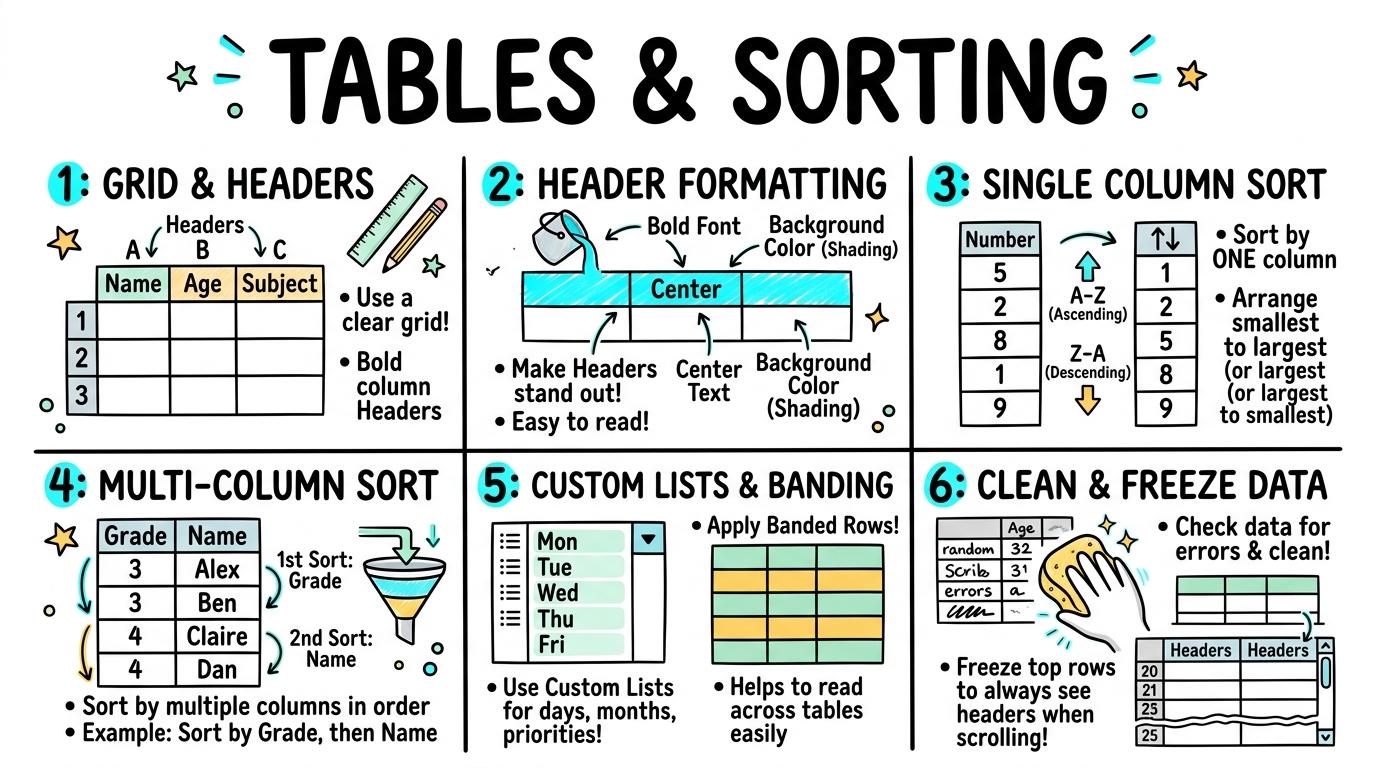
Welcome to Tables & Sorting! In this strand, you will master creating structured data tables, formatting headers, sorting text and numbers logically, and building clean multi-column layouts.
Basic table structure, identifying rows, columns, and headers.
Learning objective
Let's Go!
Routine: See, Think, Wonder
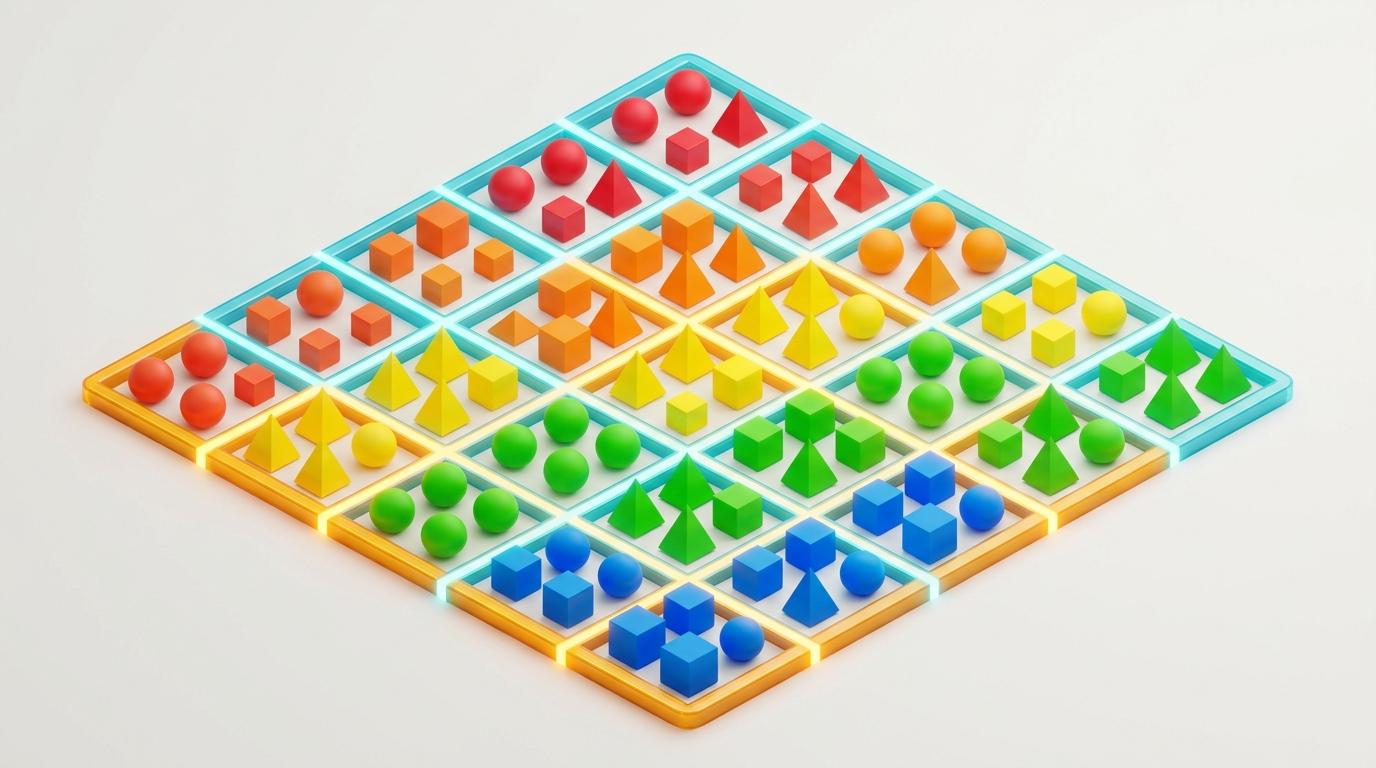
Look closely at this grid of words and numbers. How are the columns different from the rows?
Teacher note: Facilitate the See, Think, Wonder routine for 2–3 minutes. Encourage students to connect the prompt to Form (Organizing information into grids helps us understand and share data clearly.).
Learn
A table organizes information into vertical columns and horizontal rows. Putting titles in the top header row tells everyone exactly what information lives in each column! In computing, organizing information into grids helps us understand and share data clearly. As you explore the interactive Spreadsheet Simulator below, focus on how to create a simple 2-column, 3-row table with clear headers.
| A | B | C | |
|---|---|---|---|
| 1 | Item | Amount | |
| 2 | Apples | 5 | |
| 3 | Bananas | 3 | |
| 4 | Carrots | 2 | |
| 5 | Total |
Apply Simulator Skills • Try it yourself
🚀 Open a practice space
Identify rows and columns in a grid.
Enter words and numbers into individual grid cells.
Create a simple 2-column, 3-row table with clear headers.
Explain the difference between a row and a column. Typing: 5 WPM.
 ⭐ Mastering Standard
 ⭐ Mastering Standard
When you finish creating your project in your software, copy the share link or take a screenshot and publish it onto your student portfolio website!
Reflect
Learning check
Routine: See, Think, Wonder
Teacher notes: Facilitate the See, Think, Wonder routine for 2–3 minutes. Encourage students to connect the prompt to Form (Organizing information into grids helps us understand and share data clearly.).
Curriculum strand: MAT.01.C.1.4
Outcome: TS-O-01 — Basic table structure, identifying rows, columns, and headers.
PYP: Form · Organizing information into grids helps us understand and share data clearly.
Learner profile: Inquirer
Accessibility alternative: Students may verbally explain or point to the correct answer for "Which part of a data table runs vertically from top to bottom?" with a teacher or teaching assistant.
Teacher override: allow
Locked level
Complete the previous learning check to unlock this next level.
Formatting table headers with bold text, fill color, and borders.
Learning objective
Let's Go!
Routine: Zoom In
Look closely at these two tables containing the exact same data. Which one is easier to read instantly?
Teacher note: Facilitate the Zoom In routine for 2–3 minutes. Encourage students to connect the prompt to Function (Visual emphasis and clear headers make complex data tables scannable.).
Learn
Plain text tables can look messy! Bolding header text, adding a shaded fill background, and applying clean grid borders makes your table titles stand out immediately. In computing, visual emphasis and clear headers make complex data tables scannable. As you explore the interactive Diagram Builder Simulator below, focus on how to add clean outer and inner grid borders to separate data cells.
Apply Simulator Skills • Try it yourself
🚀 Open a practice space
Change text formatting inside table cells.
Apply bold text and background fill color to a header row.
Add clean outer and inner grid borders to separate data cells.
Explain why bold headers improve table readability. Typing: 10 WPM.
⭐ Mastering Standard⭐ Mastering StandardWhen you finish creating your project in your software, copy the share link or take a screenshot and publish it onto your student portfolio website!
Reflect
Learning check
Routine: Zoom In
Teacher notes: Facilitate the Zoom In routine for 2–3 minutes. Encourage students to connect the prompt to Function (Visual emphasis and clear headers make complex data tables scannable.).
Curriculum strand: MAT.02.C.1.4
Outcome: TS-O-02 — Formatting table headers with bold text, fill color, and borders.
PYP: Function · Visual emphasis and clear headers make complex data tables scannable.
Learner profile: Communicator
Accessibility alternative: Students may verbally explain or point to the correct answer for "Why is it important to format the top header row of a data table differently from data rows?" with a teacher or teaching assistant.
Teacher override: allow
Locked level
Complete the previous learning check to unlock this next level.
Sorting tables alphabetically A-Z and numerically ascending/descending.
Learning objective
Let's Go!
Routine: Think, Puzzle, Explore
What happens when you sort a list of numbers from highest to lowest?
What puzzles you about sorting text vs numbers?
Teacher note: Facilitate the Think, Puzzle, Explore routine for 2–3 minutes. Encourage students to connect the prompt to Change (Sorting tabular data enables quick searching and pattern detection.).
Learn
Instead of retyping a list to put it in order, use the Sort feature! You can sort words alphabetically (A to Z) or numbers from smallest to largest (Ascending) in one click. In computing, sorting tabular data enables quick searching and pattern detection. As you explore the interactive Folder Tree Simulator below, focus on how to sort numerical columns in ascending (1-9) or descending (9-1) order.
Apply Simulator Skills • Try it yourself
🚀 Open a practice space
Locate the Sort tool in a spreadsheet or word processor.
Sort a list of student names alphabetically from A to Z.
Sort numerical columns in ascending (1-9) or descending (9-1) order.
Verify that entire rows move together when sorting a column. Typing: 15 WPM.
⭐ Mastering Standard⭐ Mastering StandardWhen you finish creating your project in your software, copy the share link or take a screenshot and publish it onto your student portfolio website!
Reflect
Learning check
Routine: Think, Puzzle, Explore
Teacher notes: Facilitate the Think, Puzzle, Explore routine for 2–3 minutes. Encourage students to connect the prompt to Change (Sorting tabular data enables quick searching and pattern detection.).
Curriculum strand: CM.02.B.1.1
Outcome: TS-O-03 — Sorting tables alphabetically A-Z and numerically ascending/descending.
PYP: Change · Sorting tabular data enables quick searching and pattern detection.
Learner profile: Thinker
Accessibility alternative: Students may verbally explain or point to the correct answer for "You have a table of 20 animals and want to find the heaviest animal. How should you sort the 'Weight (kg)' column?" with a teacher or teaching assistant.
Teacher override: allow
Locked level
Complete the previous learning check to unlock this next level.
Multi-level sorting using primary and secondary sort keys.
Learning objective
Let's Go!
Routine: See, Think, Wonder
When you sort a school roster by Year Group, what happens to all the students in Year 4?
How should their names be ordered?
Teacher note: Facilitate the See, Think, Wonder routine for 2–3 minutes. Encourage students to connect the prompt to Connection (Multi-tiered sorting reveals nested patterns across complex datasets.).
Learn
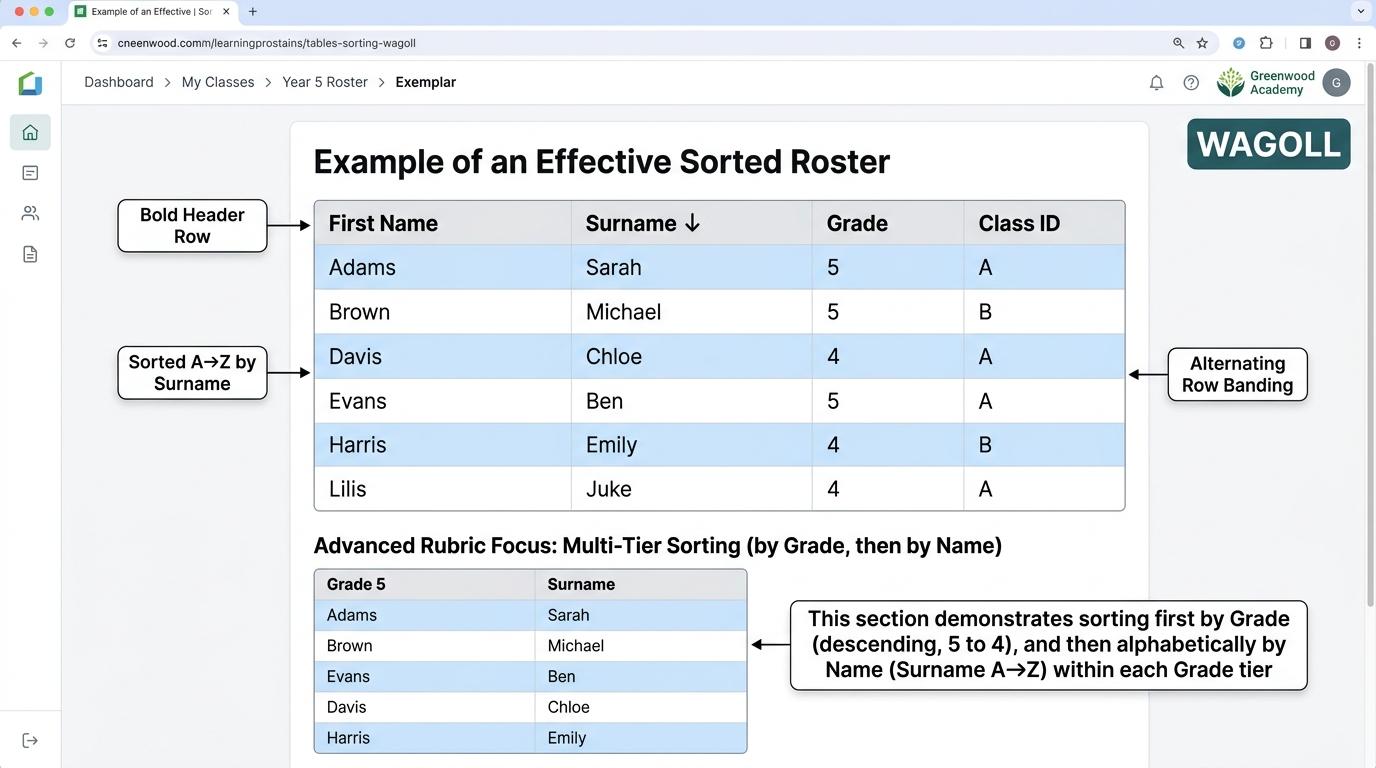
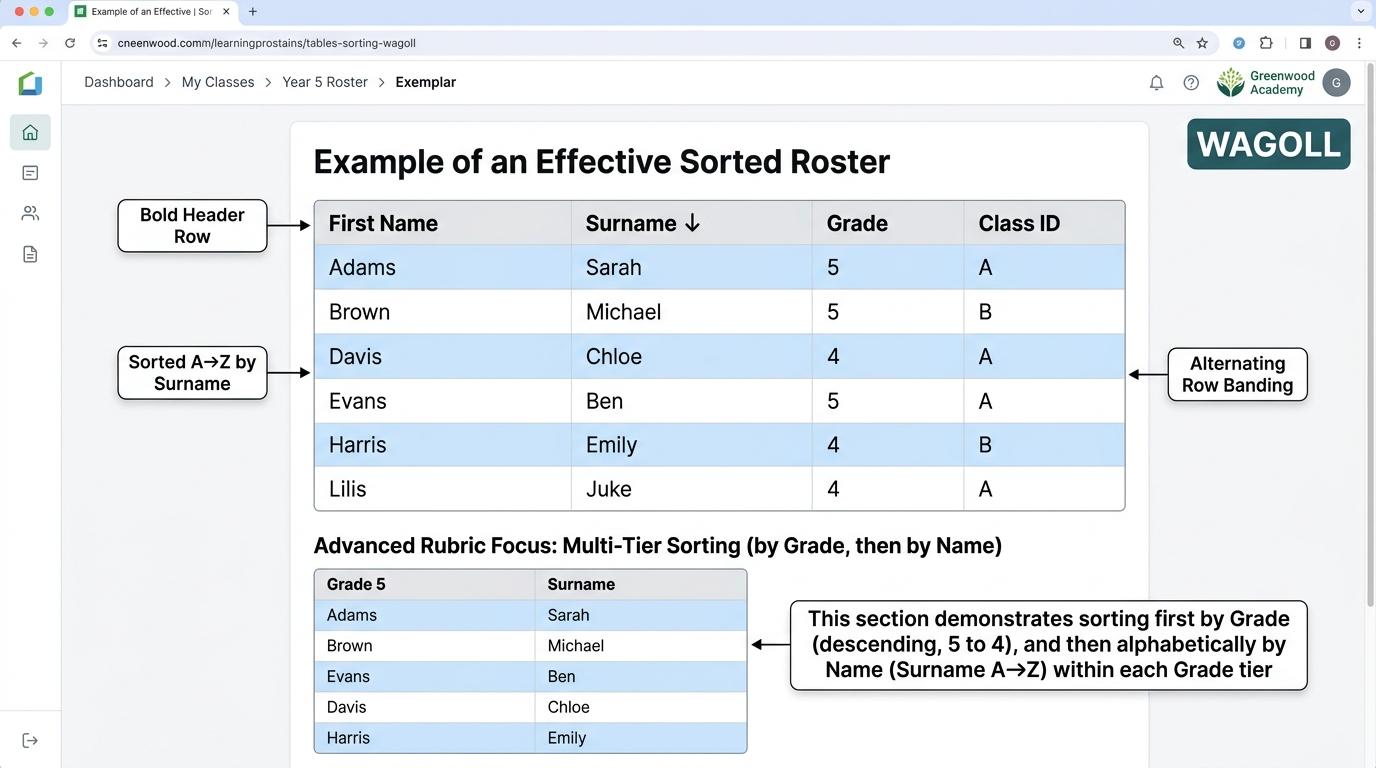
When multiple rows have the exact same value (like 30 students in 'Year 4'), a secondary sort breaks the tie! Sort by Year Group FIRST, then by Last Name SECOND. In computing, multi-tiered sorting reveals nested patterns across complex datasets. As you explore the interactive Formatting Toolbar Simulator below, focus on how to sort school data first by 'Year Group' (Primary) then by 'Last Name' (Secondary).
Apply Simulator Skills • Try it yourself
🚀 Open a practice space
Understand why sorting by one column may leave tied values unsorted.
Apply a primary sort on one column and a secondary sort on another.
Sort school data first by 'Year Group' (Primary) then by 'Last Name' (Secondary).
Explain how multi-level sorting prevents scrambling related data. Typing: 20 WPM.
⭐ Mastering Standard⭐ Mastering StandardWhen you finish creating your project in your software, copy the share link or take a screenshot and publish it onto your student portfolio website!
Reflect
Learning check
Routine: See, Think, Wonder
Teacher notes: Facilitate the See, Think, Wonder routine for 2–3 minutes. Encourage students to connect the prompt to Connection (Multi-tiered sorting reveals nested patterns across complex datasets.).
Curriculum strand: CM.02.B.1.1
Outcome: TS-O-04 — Multi-level sorting using primary and secondary sort keys.
PYP: Connection · Multi-tiered sorting reveals nested patterns across complex datasets.
Learner profile: Principled
Accessibility alternative: Students may verbally explain or point to the correct answer for "You want to organize a sports day table so students are grouped by Team Color, and within each team, ordered by race time. What is the correct setup?" with a teacher or teaching assistant.
Teacher override: allow
Locked level
Complete the previous learning check to unlock this next level.
Custom list sorting (days/months/priorities) and alternating row styles.
Learning objective
Let's Go!
Routine: I used to think...
I used to think sorting A to Z worked for everything... Now I know that days of the week need a Custom List so Monday comes before Tuesday!
Teacher note: Facilitate the I used to think... routine for 2–3 minutes. Encourage students to connect the prompt to Perspective (Custom sorting and zebra striping enhance readability for large datasets.).
Learn
Alphabetical sorting puts 'Friday' before 'Monday' because F comes before M! Using Custom Sort Lists forces the computer to follow chronological or logical orders like 'High > Medium > Low'. In computing, custom sorting and zebra striping enhance readability for large datasets. As you explore the interactive Block Coding Simulator below, focus on how to apply alternating row colors (banded rows / zebra striping) to improve tracking.
Select blocks from the palette on the left to build your program stack.
Assemble blocks in the Studio to inspect the syntax tree.
| Step | Block Instruction | Sprite (X, Y) | Variables | Status |
|---|---|---|---|---|
| No script execution traces yet. Click 🚩 Go to record runtime data. | ||||
Apply Simulator Skills • Try it yourself
🚀 Open a practice space
Recognize when alphabetical sorting fails (e.g. Monday coming after Friday).
Create and apply a Custom Sort List for days of the week or Priority (High/Med/Low).
Apply alternating row colors (banded rows / zebra striping) to improve tracking.
Evaluate readability of wide data tables before and after zebra striping. Typing: 25 WPM.
⭐ Mastering Standard⭐ Mastering StandardWhen you finish creating your project in your software, copy the share link or take a screenshot and publish it onto your student portfolio website!
Reflect
Learning check
Routine: I used to think...
Teacher notes: Facilitate the I used to think... routine for 2–3 minutes. Encourage students to connect the prompt to Perspective (Custom sorting and zebra striping enhance readability for large datasets.).
Curriculum strand: CM.03.B.1.3
Outcome: TS-O-05 — Custom list sorting (days/months/priorities) and alternating row styles.
PYP: Perspective · Custom sorting and zebra striping enhance readability for large datasets.
Learner profile: Knowledgeable
Accessibility alternative: Students may verbally explain or point to the correct answer for "If you sort the days of the week ('Monday', 'Tuesday', 'Wednesday'...) alphabetically A-Z, which day will appear at the very top of your table?" with a teacher or teaching assistant.
Teacher override: allow
Locked level
Complete the previous learning check to unlock this next level.
Data normalization, removing duplicate rows, and freezing header rows.
Learning objective
Let's Go!
Routine: Step Inside
Imagine scrolling through a 500-row table where the headers disappear! How does Freeze Header Row keep you from getting lost?
Teacher note: Facilitate the Step Inside routine for 2–3 minutes. Encourage students to connect the prompt to Reflection (Data integrity and frozen headers allow seamless navigation of large tables.).
Learn
Professional data managers clean their tables before analyzing! Removing duplicate entries prevents double-counting, and Freezing the top header row keeps titles visible no matter how far down you scroll. In computing, data integrity and frozen headers allow seamless navigation of large tables. As you explore the interactive Python Console Simulator below, focus on how to freeze the top header row so column titles remain visible when scrolling down.
Type Python code in the IDE to view real-time AST node tree parsing.
| Identifier | Type | Value | Scope |
|---|---|---|---|
| No active variables in memory. Assign variables (e.g. score = 100) to inspect. | |||
Apply Simulator Skills • Try it yourself
🚀 Open a practice space
Identify duplicate rows and inconsistencies in a dataset.
Use the 'Remove Duplicates' tool to clean raw tabular data.
Freeze the top header row so column titles remain visible when scrolling down.
Audit a large dataset for missing cells and inconsistent data types. Typing: 30+ WPM.
⭐ Mastering Standard⭐ Mastering StandardWhen you finish creating your project in your software, copy the share link or take a screenshot and publish it onto your student portfolio website!
Reflect
Learning check
Routine: Step Inside
Teacher notes: Facilitate the Step Inside routine for 2–3 minutes. Encourage students to connect the prompt to Reflection (Data integrity and frozen headers allow seamless navigation of large tables.).
Curriculum strand: MAT.03.E.1.6
Outcome: TS-O-06 — Data normalization, removing duplicate rows, and freezing header rows.
PYP: Reflection · Data integrity and frozen headers allow seamless navigation of large tables.
Learner profile: Reflective
Accessibility alternative: Students may verbally explain or point to the correct answer for "You are scrolling down a 100-row table and forget what the numbers in Column C represent. What feature should you have enabled to prevent this?" with a teacher or teaching assistant.
Teacher override: allow
"Great explanation! Suggest adding a bulleted list of astronaut equipment here for clarity."