
Learning objective
AI Basics
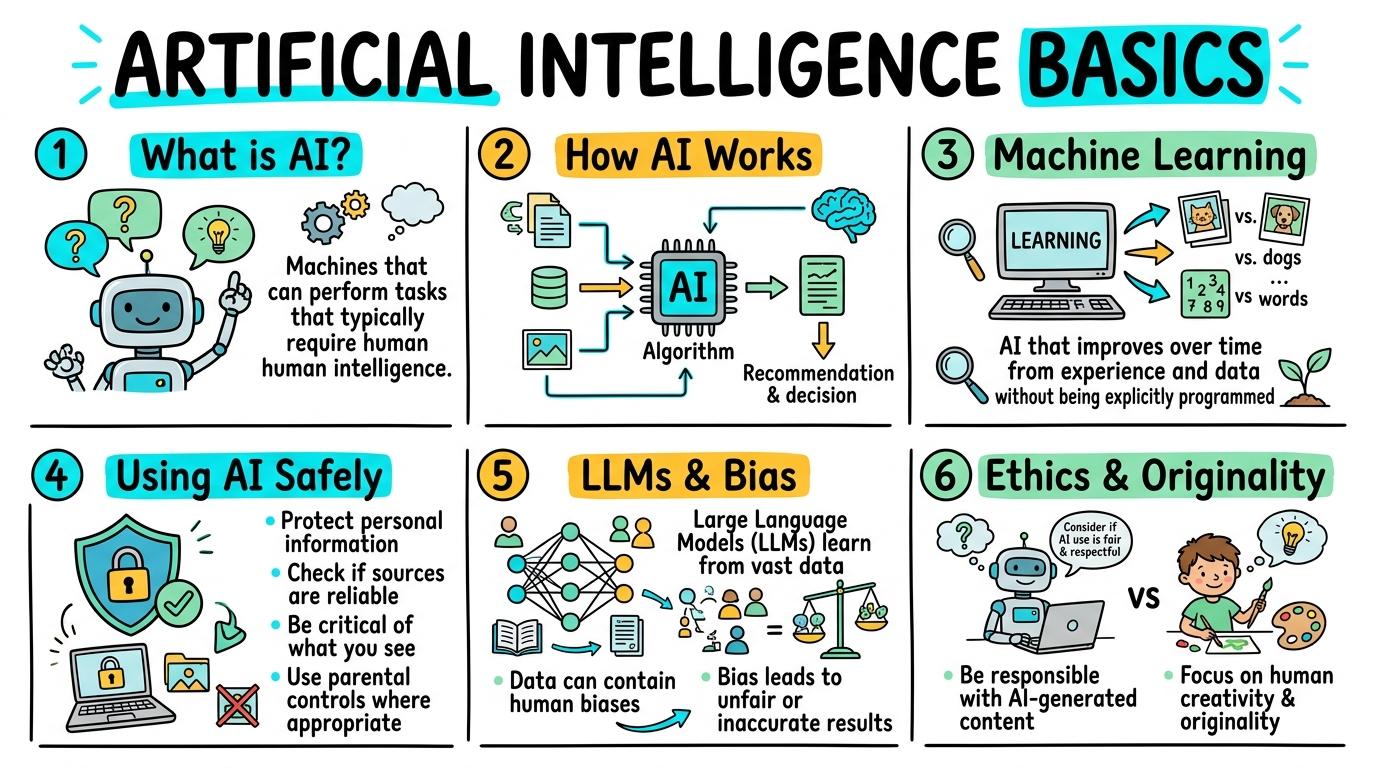
Artificial Intelligence Basics
1
2
3
4
5
6
Understanding what AI is, how it works, how to use it safely, and ethical considerations.
What is AI?
Understand the basic definition of AI.
Let's Go!

Routine: See Think Wonder
What do a voice assistant and a smart thermostat have in common?
Teacher note: Facilitate the See Think Wonder routine for 2–3 minutes. Encourage students to connect the prompt to Form (Artificial Intelligence allows computers to perform tasks that typically require human intelligence.).
Learn
Artificial Intelligence (AI) is a way for computers to do things that usually require human brains, like understanding speech, recognizing pictures, or making decisions. As you explore the interactive AI Simulator below, focus on how to define AI as computers learning to do human-like tasks.

AI EXPLORATION & ETHICS STUDIO
DN8 • Machine Learning, Neural Tokens & AI Safety Lab
LEVEL 1 • BRONZEDN8 • Artificial Intelligence Basics
What is AI? Robot & Computer Recognition
Discover the fundamentals of artificial intelligence and identify AI-driven devices.
⚙ AI Evaluation Inspector
STATUS: UNTRAINED📡 Model Perplexity & Weights Telemetry
LIVE TELEMETRY| Hyperparameter / Metric | Observed Value | Status |
|---|---|---|
| Cross-Entropy Loss | 0.142 (Converged) | OPTIMAL |
| Perplexity Score (PPL) | 12.8 | NORMAL |
| Safety Guardrail Filter | Llama-Guard-3 Active | ALIGNED |
🛡 AI Alignment & Ethical Guardrails
NIST AI RMF1. Accuracy & GroundingMitigating hallucinations via RAG retrieval.
2. Bias & FairnessEqual representation across demographic training tokens.
3. Privacy & Data SafetyZero retention of PII, credentials, or school passwords.
4. Transparency & AttributionExplicit citation of AI assistance in academic work.
💻 AI Training & Inference Audit Stream
[AI-INIT] PyTorch / ONNX Runtime inference engine initialized.
[ALIGN-CHECK] Safety guardrails and bias probes online.
Apply Simulator Skills • Try it yourself
Identifying AI
🚀 Open a practice space
🌟 Student Project GuideSuccess Criteria & WAGOLL (What A Good One Looks Like)
🎯 Task Success Criteria (Rubric)
Foundation
Recognizes that robots and computers use AI.
Developing
Identifies some everyday tools that use AI.
Secure (Goal)
Defines AI as computers learning to do human-like tasks.
Mastery
Explains how AI differs from regular computer programs.
👀 What A Good One Looks Like (WAGOLL)
 ⭐ Secure Standard
📁
Save to Your Website Portfolio:
When you finish creating your project in your software, copy the share link or take a screenshot and publish it onto your student portfolio website!
Reflect
Learning check
Teacher setup, curriculum links and progress descriptors
Spark support
Routine: See Think Wonder
Teacher notes: Facilitate the See Think Wonder routine for 2–3 minutes. Encourage students to connect the prompt to Form (Artificial Intelligence allows computers to perform tasks that typically require human intelligence.).
Achievement pathway
- Foundation: Recognizes that robots and computers use AI.
- Developing: Identifies some everyday tools that use AI.
- Secure: Defines AI as computers learning to do human-like tasks.
- Mastering: Explains how AI differs from regular computer programs.
Curriculum links
Curriculum strand: CM.AI.1.1
Outcome: AI.Y1.01 — Define what AI is in simple terms.
PYP: Form · Artificial Intelligence allows computers to perform tasks that typically require human intelligence.
Learner profile: Inquirer
Competency tags
Gate support
Accessibility alternative: Students may verbally explain or point to the correct answer for "What is Artificial Intelligence (AI)?" with a teacher or teaching assistant.
Teacher override: allow
Locked level
Level 2: How AI Works
Complete the previous learning check to unlock this next level.
How AI Works
Understand the role of data in AI.
Learning objective
Explain how AI systems learn from data.
Let's Go!

Routine: Zoom In
How does a computer know what a cat looks like?
Teacher note: Facilitate the Zoom In routine for 2–3 minutes. Encourage students to connect the prompt to Function (AI learns by finding patterns in large amounts of data.).
Learn
AI works by looking at huge amounts of data (like millions of pictures of cats) and finding patterns. It uses these patterns to guess or make decisions about new things. In computing, AI learns by finding patterns in large amounts of data. As you explore the interactive AI Simulator below, focus on how to explain that AI finds patterns in data to make decisions.

AI EXPLORATION & ETHICS STUDIO
DN8 • Machine Learning, Neural Tokens & AI Safety Lab
LEVEL 1 • BRONZEDN8 • Artificial Intelligence Basics
What is AI? Robot & Computer Recognition
Discover the fundamentals of artificial intelligence and identify AI-driven devices.
⚙ AI Evaluation Inspector
STATUS: UNTRAINED📡 Model Perplexity & Weights Telemetry
LIVE TELEMETRY| Hyperparameter / Metric | Observed Value | Status |
|---|---|---|
| Cross-Entropy Loss | 0.142 (Converged) | OPTIMAL |
| Perplexity Score (PPL) | 12.8 | NORMAL |
| Safety Guardrail Filter | Llama-Guard-3 Active | ALIGNED |
🛡 AI Alignment & Ethical Guardrails
NIST AI RMF1. Accuracy & GroundingMitigating hallucinations via RAG retrieval.
2. Bias & FairnessEqual representation across demographic training tokens.
3. Privacy & Data SafetyZero retention of PII, credentials, or school passwords.
4. Transparency & AttributionExplicit citation of AI assistance in academic work.
💻 AI Training & Inference Audit Stream
[AI-INIT] PyTorch / ONNX Runtime inference engine initialized.
[ALIGN-CHECK] Safety guardrails and bias probes online.
Apply Simulator Skills • Try it yourself
Pattern Finding
🚀 Open a practice space
🌟 Student Project GuideSuccess Criteria & WAGOLL (What A Good One Looks Like)
🎯 Task Success Criteria (Rubric)
Foundation
Knows AI needs information to work.
Developing
Understands that AI uses data.
Secure (Goal)
Explains that AI finds patterns in data to make decisions.
Mastery
Describes how more data improves AI accuracy.
👀 What A Good One Looks Like (WAGOLL)
 ⭐ Secure Standard
📁
Save to Your Website Portfolio:
When you finish creating your project in your software, copy the share link or take a screenshot and publish it onto your student portfolio website!
Reflect
Learning check
Teacher setup, curriculum links and progress descriptors
Spark support
Routine: Zoom In
Teacher notes: Facilitate the Zoom In routine for 2–3 minutes. Encourage students to connect the prompt to Function (AI learns by finding patterns in large amounts of data.).
Achievement pathway
- Foundation: Knows AI needs information to work.
- Developing: Understands that AI uses data.
- Secure: Explains that AI finds patterns in data to make decisions.
- Mastering: Describes how more data improves AI accuracy.
Curriculum links
Curriculum strand: CM.AI.1.2
Outcome: AI.Y2.01 — Understand that AI works using data and patterns.
PYP: Function · AI learns by finding patterns in large amounts of data.
Learner profile: Thinker
Competency tags
Gate support
Accessibility alternative: Students may verbally explain or point to the correct answer for "How does an AI learn to recognize things?" with a teacher or teaching assistant.
Teacher override: allow
Locked level
Level 3: Machine Learning
Complete the previous learning check to unlock this next level.
Machine Learning
Understand how systems improve over time.
Learning objective
Explain the concept of machine learning.
Let's Go!

Routine: Before After Slider
What happens when an AI makes a mistake and is corrected?
Teacher note: Facilitate the Before After Slider routine for 2–3 minutes. Encourage students to connect the prompt to Change (Machine learning enables systems to improve automatically through experience.).
Learn
Machine Learning is a special type of AI where the computer isn't given exact rules for everything. Instead, it learns and improves on its own by analyzing examples and getting feedback when it's wrong. In computing, machine learning enables systems to improve automatically through experience. As you explore the interactive AI Simulator below, focus on how to define machine learning as systems improving automatically through experience.

AI EXPLORATION & ETHICS STUDIO
DN8 • Machine Learning, Neural Tokens & AI Safety Lab
LEVEL 1 • BRONZEDN8 • Artificial Intelligence Basics
What is AI? Robot & Computer Recognition
Discover the fundamentals of artificial intelligence and identify AI-driven devices.
⚙ AI Evaluation Inspector
STATUS: UNTRAINED📡 Model Perplexity & Weights Telemetry
LIVE TELEMETRY| Hyperparameter / Metric | Observed Value | Status |
|---|---|---|
| Cross-Entropy Loss | 0.142 (Converged) | OPTIMAL |
| Perplexity Score (PPL) | 12.8 | NORMAL |
| Safety Guardrail Filter | Llama-Guard-3 Active | ALIGNED |
🛡 AI Alignment & Ethical Guardrails
NIST AI RMF1. Accuracy & GroundingMitigating hallucinations via RAG retrieval.
2. Bias & FairnessEqual representation across demographic training tokens.
3. Privacy & Data SafetyZero retention of PII, credentials, or school passwords.
4. Transparency & AttributionExplicit citation of AI assistance in academic work.
💻 AI Training & Inference Audit Stream
[AI-INIT] PyTorch / ONNX Runtime inference engine initialized.
[ALIGN-CHECK] Safety guardrails and bias probes online.
Apply Simulator Skills • Try it yourself
Training a Model
🚀 Open a practice space
🌟 Student Project GuideSuccess Criteria & WAGOLL (What A Good One Looks Like)
🎯 Task Success Criteria (Rubric)
Foundation
Knows AI can learn.
Developing
Understands that AI gets better with practice.
Secure (Goal)
Defines machine learning as systems improving automatically through experience.
Mastery
Differentiates between explicitly programmed rules and machine learning.
👀 What A Good One Looks Like (WAGOLL)
 ⭐ Secure Standard
📁
Save to Your Website Portfolio:
When you finish creating your project in your software, copy the share link or take a screenshot and publish it onto your student portfolio website!
Reflect
Learning check
Teacher setup, curriculum links and progress descriptors
Spark support
Routine: Before After Slider
Teacher notes: Facilitate the Before After Slider routine for 2–3 minutes. Encourage students to connect the prompt to Change (Machine learning enables systems to improve automatically through experience.).
Achievement pathway
- Foundation: Knows AI can learn.
- Developing: Understands that AI gets better with practice.
- Secure: Defines machine learning as systems improving automatically through experience.
- Mastering: Differentiates between explicitly programmed rules and machine learning.
Curriculum links
Curriculum strand: CM.AI.1.3
Outcome: AI.Y3.01 — Define machine learning.
PYP: Change · Machine learning enables systems to improve automatically through experience.
Learner profile: Knowledgeable
Competency tags
Gate support
Accessibility alternative: Students may verbally explain or point to the correct answer for "What makes machine learning different from a regular computer program?" with a teacher or teaching assistant.
Teacher override: allow
Locked level
Level 4: Using AI Safely
Complete the previous learning check to unlock this next level.
Using AI Safely
Learn to interact safely with AI.
Learning objective
Understand privacy rules and limitations when using AI chatbots or tools.
Let's Go!

Routine: SplitScreenSimulator
What information should you never type into an AI chatbot?
Teacher note: Facilitate the SplitScreenSimulator routine for 2–3 minutes. Encourage students to connect the prompt to Responsibility (Using AI safely involves protecting personal information and understanding AI limitations.).
Learn
When using AI, never share personal information like your address, passwords, or full name. Also, remember that AI can 'hallucinate' or make up false facts, so always double-check important information! In computing, using AI safely involves protecting personal information and understanding AI limitations. As you explore the interactive AI Simulator below, focus on how to practice keeping personal data private and verifying AI responses.

AI EXPLORATION & ETHICS STUDIO
DN8 • Machine Learning, Neural Tokens & AI Safety Lab
LEVEL 1 • BRONZEDN8 • Artificial Intelligence Basics
What is AI? Robot & Computer Recognition
Discover the fundamentals of artificial intelligence and identify AI-driven devices.
⚙ AI Evaluation Inspector
STATUS: UNTRAINED📡 Model Perplexity & Weights Telemetry
LIVE TELEMETRY| Hyperparameter / Metric | Observed Value | Status |
|---|---|---|
| Cross-Entropy Loss | 0.142 (Converged) | OPTIMAL |
| Perplexity Score (PPL) | 12.8 | NORMAL |
| Safety Guardrail Filter | Llama-Guard-3 Active | ALIGNED |
🛡 AI Alignment & Ethical Guardrails
NIST AI RMF1. Accuracy & GroundingMitigating hallucinations via RAG retrieval.
2. Bias & FairnessEqual representation across demographic training tokens.
3. Privacy & Data SafetyZero retention of PII, credentials, or school passwords.
4. Transparency & AttributionExplicit citation of AI assistance in academic work.
💻 AI Training & Inference Audit Stream
[AI-INIT] PyTorch / ONNX Runtime inference engine initialized.
[ALIGN-CHECK] Safety guardrails and bias probes online.
Apply Simulator Skills • Try it yourself
Safe Prompts
🚀 Open a practice space
🌟 Student Project GuideSuccess Criteria & WAGOLL (What A Good One Looks Like)
🎯 Task Success Criteria (Rubric)
Foundation
Knows not to share passwords with AI.
Developing
Understands that AI can sometimes give wrong answers.
Secure (Goal)
Practices keeping personal data private and verifying AI responses.
Mastery
Evaluates the privacy policies of AI tools before using them.
👀 What A Good One Looks Like (WAGOLL)
 ⭐ Secure Standard
📁
Save to Your Website Portfolio:
When you finish creating your project in your software, copy the share link or take a screenshot and publish it onto your student portfolio website!
Reflect
Learning check
Teacher setup, curriculum links and progress descriptors
Spark support
Routine: SplitScreenSimulator
Teacher notes: Facilitate the SplitScreenSimulator routine for 2–3 minutes. Encourage students to connect the prompt to Responsibility (Using AI safely involves protecting personal information and understanding AI limitations.).
Achievement pathway
- Foundation: Knows not to share passwords with AI.
- Developing: Understands that AI can sometimes give wrong answers.
- Secure: Practices keeping personal data private and verifying AI responses.
- Mastering: Evaluates the privacy policies of AI tools before using them.
Curriculum links
Curriculum strand: CM.AI.1.4
Outcome: AI.Y4.01 — Identify safe practices when using AI tools.
PYP: Responsibility · Using AI safely involves protecting personal information and understanding AI limitations.
Learner profile: Principled
Competency tags
Gate support
Accessibility alternative: Students may verbally explain or point to the correct answer for "Which of these is safe to tell an AI chatbot?" with a teacher or teaching assistant.
Teacher override: allow
Locked level
Level 5: LLMs & Bias
Complete the previous learning check to unlock this next level.
LLMs & Bias
Explore Large Language Models and algorithmic bias.
Learning objective
Demonstrate how an LLM predicts the next word (tokens) and identify how biased training data skews results.
Let's Go!

Routine: ShortcutSimulator
How does your phone know what word you are going to type next?
Teacher note: Facilitate the ShortcutSimulator routine for 2–3 minutes. Encourage students to connect the prompt to Perspective (Language models predict words based on training data, which can introduce human bias.).
Learn
Large Language Models (LLMs) work by predicting the most likely next word (or token) based on the text they were trained on. However, if they are trained on data containing human stereotypes (bias), the AI's predictions will also be biased! In computing, language models predict words based on training data, which can introduce human bias. As you explore the interactive AI Simulator below, focus on how to identify that biased training data leads to biased AI predictions.

AI EXPLORATION & ETHICS STUDIO
DN8 • Machine Learning, Neural Tokens & AI Safety Lab
LEVEL 1 • BRONZEDN8 • Artificial Intelligence Basics
What is AI? Robot & Computer Recognition
Discover the fundamentals of artificial intelligence and identify AI-driven devices.
⚙ AI Evaluation Inspector
STATUS: UNTRAINED📡 Model Perplexity & Weights Telemetry
LIVE TELEMETRY| Hyperparameter / Metric | Observed Value | Status |
|---|---|---|
| Cross-Entropy Loss | 0.142 (Converged) | OPTIMAL |
| Perplexity Score (PPL) | 12.8 | NORMAL |
| Safety Guardrail Filter | Llama-Guard-3 Active | ALIGNED |
🛡 AI Alignment & Ethical Guardrails
NIST AI RMF1. Accuracy & GroundingMitigating hallucinations via RAG retrieval.
2. Bias & FairnessEqual representation across demographic training tokens.
3. Privacy & Data SafetyZero retention of PII, credentials, or school passwords.
4. Transparency & AttributionExplicit citation of AI assistance in academic work.
💻 AI Training & Inference Audit Stream
[AI-INIT] PyTorch / ONNX Runtime inference engine initialized.
[ALIGN-CHECK] Safety guardrails and bias probes online.
Apply Simulator Skills • Try it yourself
Exploring Bias
🚀 Open a practice space
🌟 Student Project GuideSuccess Criteria & WAGOLL (What A Good One Looks Like)
🎯 Task Success Criteria (Rubric)
Foundation
Understands that AI predicts words like autocomplete.
Developing
Explains that AI uses probabilities to choose the next word.
Secure (Goal)
Identifies that biased training data leads to biased AI predictions.
Mastery
Analyzes AI outputs critically for underlying stereotypes.
👀 What A Good One Looks Like (WAGOLL)
 ⭐ Secure Standard
📁
Save to Your Website Portfolio:
When you finish creating your project in your software, copy the share link or take a screenshot and publish it onto your student portfolio website!
Reflect
Learning check
Teacher setup, curriculum links and progress descriptors
Spark support
Routine: ShortcutSimulator
Teacher notes: Facilitate the ShortcutSimulator routine for 2–3 minutes. Encourage students to connect the prompt to Perspective (Language models predict words based on training data, which can introduce human bias.).
Achievement pathway
- Foundation: Understands that AI predicts words like autocomplete.
- Developing: Explains that AI uses probabilities to choose the next word.
- Secure: Identifies that biased training data leads to biased AI predictions.
- Mastering: Analyzes AI outputs critically for underlying stereotypes.
Curriculum links
Curriculum strand: CM.AI.1.5
Outcome: AI.Y5.01 — Understand how LLMs predict text and how bias affects outputs.
PYP: Perspective · Language models predict words based on training data, which can introduce human bias.
Learner profile: Open-minded
Competency tags
Gate support
Accessibility alternative: Students may verbally explain or point to the correct answer for "What happens if an AI is trained on biased data?" with a teacher or teaching assistant.
Teacher override: allow
Locked level
Level 6: Ethics & Originality
Complete the previous learning check to unlock this next level.
Ethics & Originality
Understand the ethical use of AI for academic support.
Learning objective
Differentiate between using AI for helpful brainstorming/support and using it unethically to cheat or replace original thought.
Let's Go!

Routine: See Think Wonder
If an AI writes a story, who is the real author?
Teacher note: Facilitate the See Think Wonder routine for 2–3 minutes. Encourage students to connect the prompt to Reflection (Using AI ethically means utilizing it for support while maintaining original thought.).
Learn
AI is a powerful tool to help you brainstorm ideas, summarize long articles, or learn new concepts. However, using it to write your essays or complete your assignments is cheating. Your brain needs to do the hard work of learning! In computing, using AI ethically means utilizing it for support while maintaining original thought. As you explore the interactive AI Simulator below, focus on how to use AI appropriately to brainstorm or summarize, but writes their own work.

AI EXPLORATION & ETHICS STUDIO
DN8 • Machine Learning, Neural Tokens & AI Safety Lab
LEVEL 1 • BRONZEDN8 • Artificial Intelligence Basics
What is AI? Robot & Computer Recognition
Discover the fundamentals of artificial intelligence and identify AI-driven devices.
⚙ AI Evaluation Inspector
STATUS: UNTRAINED📡 Model Perplexity & Weights Telemetry
LIVE TELEMETRY| Hyperparameter / Metric | Observed Value | Status |
|---|---|---|
| Cross-Entropy Loss | 0.142 (Converged) | OPTIMAL |
| Perplexity Score (PPL) | 12.8 | NORMAL |
| Safety Guardrail Filter | Llama-Guard-3 Active | ALIGNED |
🛡 AI Alignment & Ethical Guardrails
NIST AI RMF1. Accuracy & GroundingMitigating hallucinations via RAG retrieval.
2. Bias & FairnessEqual representation across demographic training tokens.
3. Privacy & Data SafetyZero retention of PII, credentials, or school passwords.
4. Transparency & AttributionExplicit citation of AI assistance in academic work.
💻 AI Training & Inference Audit Stream
[AI-INIT] PyTorch / ONNX Runtime inference engine initialized.
[ALIGN-CHECK] Safety guardrails and bias probes online.
Apply Simulator Skills • Try it yourself
AI Ethics Scenario
🚀 Open a practice space
🌟 Student Project GuideSuccess Criteria & WAGOLL (What A Good One Looks Like)
🎯 Task Success Criteria (Rubric)
Foundation
Knows that copying an AI's essay is cheating.
Developing
Explains why their own ideas are important.
Secure (Goal)
Uses AI appropriately to brainstorm or summarize, but writes their own work.
Mastery
Consistently cites AI usage and champions academic integrity.
👀 What A Good One Looks Like (WAGOLL)
 ⭐ Secure Standard
📁
Save to Your Website Portfolio:
When you finish creating your project in your software, copy the share link or take a screenshot and publish it onto your student portfolio website!
Reflect
Learning check
Teacher setup, curriculum links and progress descriptors
Spark support
Routine: See Think Wonder
Teacher notes: Facilitate the See Think Wonder routine for 2–3 minutes. Encourage students to connect the prompt to Reflection (Using AI ethically means utilizing it for support while maintaining original thought.).
Achievement pathway
- Foundation: Knows that copying an AI's essay is cheating.
- Developing: Explains why their own ideas are important.
- Secure: Uses AI appropriately to brainstorm or summarize, but writes their own work.
- Mastering: Consistently cites AI usage and champions academic integrity.
Curriculum links
Curriculum strand: CM.AI.1.6
Outcome: AI.Y6.01 — Apply ethical principles to the use of AI in schoolwork.
PYP: Reflection · Using AI ethically means utilizing it for support while maintaining original thought.
Learner profile: Reflective
Competency tags
Gate support
Accessibility alternative: Students may verbally explain or point to the correct answer for "Which of these is an ethical (good) way to use AI for school?" with a teacher or teaching assistant.
Teacher override: allow