Understanding how computing devices connect to form local networks and the global internet, sharing data securely through wired, wireless, and cloud protocols.
Congratulations on completing all 6 levels of Computer Networks & The Internet! To unlock the Hardware Diagnostics Bench, you must collect all 8 Key Shards across the Devices, Hardware & Networks strands. Here is your cipher fragment for Slot #1:
KEY SHARD #1
8
Slot 1 of 8
🧩 Devices, Hardware & Networks Key Ring Tracker:Slot #1 Active
Identify devices that connect together to share information locally or wirelessly.
Learning objective
Students will understand that computing devices can connect to each other to share pictures, messages, and files.
Let's Go!
Routine: See-Think-Wonder
How can a tablet send a picture to a printer across the room without any wires attached?
Teacher note: Facilitate the See-Think-Wonder routine for 2–3 minutes. Encourage students to connect the prompt to Form (Connected devices allow people to communicate and share ideas across spaces.).
Learn
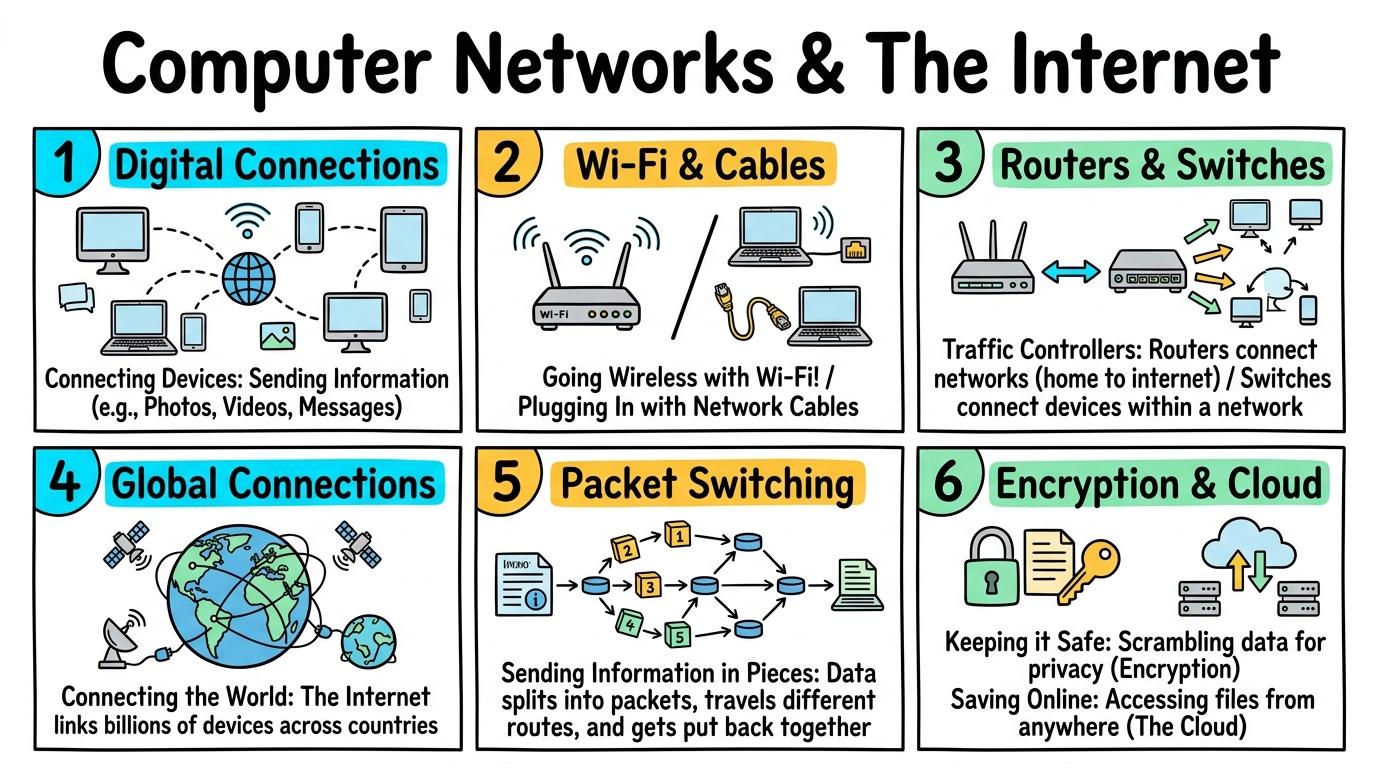
When computers link together, they form a NETWORK. Networks allow devices to talk to each other, share printers, and send messages across the room or across the world! In computing, connected devices allow people to communicate and share ideas across spaces. As you explore the interactive Network Packet Simulator below, focus on how to draws a network connection showing devices linked together.
🌟 Student Project GuideSuccess Criteria & WAGOLL (What A Good One Looks Like)▾
🎯 Task Success Criteria (Rubric)
Foundation
Identifies a tablet connected to a printer or Wi-Fi router.
Developing
Explains that connected devices can share pictures and sound.
Secure (Goal)
Draws a network connection showing devices linked together.
Mastery
Distinguishes between standalone devices and networked devices.
👀 What A Good One Looks Like (WAGOLL)
⭐ Secure Standard
Exemplar Model: Demonstration of secure quality standards for Digital Connections.
📁
Save to Your Website Portfolio:
When you finish creating your project in your software, copy the share link or take a screenshot and publish it onto your student portfolio website!
Reflect
🎯
Self-Assessment & Reflection
Why is it helpful to connect computers together in a school?
🟢Secure Level
Draws a network connection showing devices linked together.
Learning check
Learning Check
What is a computer network?
Select the correct answer:
Hint 1: Networks connect multiple computing devices so they can share data.
Hint 2: Clue: Super! A network is a group of connected devices sharing information.
Answer correctly to unlock the next level.
Super! A network is a group of connected devices sharing information.Remember: networks connect multiple computing devices so they can share data.
Teacher setup, curriculum links and progress descriptors
Spark support
Routine: See-Think-Wonder
Teacher notes: Facilitate the See-Think-Wonder routine for 2–3 minutes. Encourage students to connect the prompt to Form (Connected devices allow people to communicate and share ideas across spaces.).
Achievement pathway
Foundation: Identifies a tablet connected to a printer or Wi-Fi router.
Developing: Explains that connected devices can share pictures and sound.
Secure: Draws a network connection showing devices linked together.
Mastering: Distinguishes between standalone devices and networked devices.
Curriculum links
Curriculum strand: Networks & Communication
Outcome: NETW.01.B.1.1 — Identify devices that connect together to share information locally or wirelessly.
PYP: Form · Connected devices allow people to communicate and share ideas across spaces.
Learner profile: Inquirer
Competency tags
Networks
Connected Devices
Sharing
Connections
Gate support
Accessibility alternative: Students may verbally explain or point to the correct answer for "What is a computer network?" with a teacher or teaching assistant.
Complete the previous learning check to unlock this next level.
Level 2
Wi-Fi & Cables
Compare wired Ethernet connections with wireless Wi-Fi and Bluetooth transmission.
Learning objective
Students will compare how wired cables and invisible wireless signals (Wi-Fi, Bluetooth) transmit network data.
Let's Go!
Routine: Think-Pair-Share
Why do desktop PCs often use cable plugs, while smartphones use Wi-Fi waves?
Teacher note: Facilitate the Think-Pair-Share routine for 2–3 minutes. Encourage students to connect the prompt to Function (Wired and wireless signals enable continuous information transfer.).
Learn
Wired networks use physical copper or fibre cables (Ethernet) to carry electricity or light signals. Wireless networks (Wi-Fi and Bluetooth) use invisible radio waves to travel through the air! In computing, wired and wireless signals enable continuous information transfer. As you explore the interactive Network Packet Simulator below, focus on how to explain advantages of Wi-Fi mobility vs Ethernet speed and stability.
🌟 Student Project GuideSuccess Criteria & WAGOLL (What A Good One Looks Like)▾
🎯 Task Success Criteria (Rubric)
Foundation
Identifies an Ethernet cable and a Wi-Fi symbol.
Developing
Sorts connection types into wired (cables) vs wireless (radio waves).
Secure (Goal)
Explains advantages of Wi-Fi mobility vs Ethernet speed and stability.
Mastery
Selects appropriate connection methods for different hardware devices.
👀 What A Good One Looks Like (WAGOLL)
⭐ Secure Standard
Exemplar Model: Demonstration of secure quality standards for Wi-Fi & Cables.
📁
Save to Your Website Portfolio:
When you finish creating your project in your software, copy the share link or take a screenshot and publish it onto your student portfolio website!
Reflect
🎯
Self-Assessment & Reflection
What can block or weaken wireless Wi-Fi signals in a building?
🟢Secure Level
Explains advantages of Wi-Fi mobility vs Ethernet speed and stability.
Learning check
Learning Check
How do Wi-Fi networks send information through the air?
Select the correct answer:
Hint 1: Wireless connections like Wi-Fi transmit data using radio waves.
Hint 2: Clue: Wi-Fi uses radio waves to send data through the air without wires.
Answer correctly to unlock the next level.
Spot on! Wi-Fi uses radio waves to send data through the air without wires.Remember: wireless connections like Wi-Fi transmit data using radio waves.
Teacher setup, curriculum links and progress descriptors
Spark support
Routine: Think-Pair-Share
Teacher notes: Facilitate the Think-Pair-Share routine for 2–3 minutes. Encourage students to connect the prompt to Function (Wired and wireless signals enable continuous information transfer.).
Achievement pathway
Foundation: Identifies an Ethernet cable and a Wi-Fi symbol.
Developing: Sorts connection types into wired (cables) vs wireless (radio waves).
Secure: Explains advantages of Wi-Fi mobility vs Ethernet speed and stability.
Mastering: Selects appropriate connection methods for different hardware devices.
Curriculum links
Curriculum strand: Network Infrastructure
Outcome: NETW.02.B.1.2 — Compare wired Ethernet connections with wireless Wi-Fi and Bluetooth transmission.
PYP: Function · Wired and wireless signals enable continuous information transfer.
Learner profile: Communicator
Competency tags
Wi-Fi
Ethernet
Bluetooth
Wireless Transmission
Gate support
Accessibility alternative: Students may verbally explain or point to the correct answer for "How do Wi-Fi networks send information through the air?" with a teacher or teaching assistant.
Complete the previous learning check to unlock this next level.
Level 3
Routers & Switches
Model Local Area Network (LAN) hardware components including routers, switches, and network cables.
Learning objective
Students will understand the role of network switches and routers in managing local traffic within a Local Area Network (LAN).
Let's Go!
Routine: See-Think-Wonder
How does a school router know which printer to send your print job to when 30 computers are online?
Teacher note: Facilitate the See-Think-Wonder routine for 2–3 minutes. Encourage students to connect the prompt to Connection (Local area networks organize device traffic within buildings and communities.).
Learn
A Local Area Network (LAN) connects devices within one building. A SWITCH acts as a traffic traffic-cop directing local messages, while a ROUTER acts as a gateway connecting your LAN to outside networks! In computing, local area networks organize device traffic within buildings and communities. As you explore the interactive Network Packet Simulator below, focus on how to diagrams a complete school LAN connecting PCs, printers, and a gateway router.
🌟 Student Project GuideSuccess Criteria & WAGOLL (What A Good One Looks Like)▾
🎯 Task Success Criteria (Rubric)
Foundation
Identifies a Wi-Fi router in a home or classroom.
Developing
Explains that a switch directs messages to specific local devices.
Secure (Goal)
Diagrams a complete school LAN connecting PCs, printers, and a gateway router.
Mastery
Explains how IP addresses identify individual devices on a local network.
👀 What A Good One Looks Like (WAGOLL)
⭐ Secure Standard
Exemplar Model: Demonstration of secure quality standards for Routers & Switches.
📁
Save to Your Website Portfolio:
When you finish creating your project in your software, copy the share link or take a screenshot and publish it onto your student portfolio website!
Reflect
🎯
Self-Assessment & Reflection
What happens to local network printing if the router loses its connection to the internet?
🟢Secure Level
Diagrams a complete school LAN connecting PCs, printers, and a gateway router.
Learning check
Learning Check
What is the main job of a network ROUTER?
Select the correct answer:
Hint 1: A router connects your local network to outside networks like the internet.
Hint 2: Clue: Routers direct network traffic between different networks and the Internet.
Answer correctly to unlock the next level.
Excellent! Routers direct network traffic between different networks and the Internet.Remember: a router connects your local network to outside networks like the internet.
Teacher setup, curriculum links and progress descriptors
Spark support
Routine: See-Think-Wonder
Teacher notes: Facilitate the See-Think-Wonder routine for 2–3 minutes. Encourage students to connect the prompt to Connection (Local area networks organize device traffic within buildings and communities.).
Achievement pathway
Foundation: Identifies a Wi-Fi router in a home or classroom.
Developing: Explains that a switch directs messages to specific local devices.
Secure: Diagrams a complete school LAN connecting PCs, printers, and a gateway router.
Mastering: Explains how IP addresses identify individual devices on a local network.
Curriculum links
Curriculum strand: LAN Architecture
Outcome: NETW.03.B.1.3 — Model Local Area Network (LAN) hardware components including routers, switches, and network cables.
PYP: Connection · Local area networks organize device traffic within buildings and communities.
Learner profile: Thinker
Competency tags
LAN
Routers
Switches
IP Addresses
Local Networks
Gate support
Accessibility alternative: Students may verbally explain or point to the correct answer for "What is the main job of a network ROUTER?" with a teacher or teaching assistant.
Complete the previous learning check to unlock this next level.
Level 4
Global Connections
Differentiate between the physical global Internet infrastructure and web software services (WWW, DNS, Web Servers).
Learning objective
Students will distinguish between the physical global Internet network infrastructure and the World Wide Web software applications that run on it.
Let's Go!
Routine: Chalk Talk
Is 'The Internet' the exact same thing as 'The World Wide Web'? How are they different?
Teacher note: Facilitate the Chalk Talk routine for 2–3 minutes. Encourage students to connect the prompt to Change (Global web services rely on worldwide internet infrastructure to connect humanity.).
Learn
The INTERNET is the physical network of connected computers, undersea cables, and routers worldwide. The WORLD WIDE WEB is a service of hyperlinked web pages and apps that run ON TOP of the Internet! In computing, global web services rely on worldwide internet infrastructure to connect humanity. As you explore the interactive Network Packet Simulator below, focus on how to trace how Domain Name System (DNS) translates web addresses (urls) into IP addresses.
🌟 Student Project GuideSuccess Criteria & WAGOLL (What A Good One Looks Like)▾
🎯 Task Success Criteria (Rubric)
Foundation
Recognizes that web pages are stored on computers called servers.
Developing
Explains the difference between the Internet (hardware network) and the Web (pages/content).
Secure (Goal)
Traces how Domain Name System (DNS) translates web addresses (urls) into IP addresses.
Mastery
Explains client-server web requests across international data pathways.
👀 What A Good One Looks Like (WAGOLL)
⭐ Secure Standard
Exemplar Model: Demonstration of secure quality standards for Global Connections.
📁
Save to Your Website Portfolio:
When you finish creating your project in your software, copy the share link or take a screenshot and publish it onto your student portfolio website!
Reflect
🎯
Self-Assessment & Reflection
Why do we need DNS servers to translate web names like Google.com into numerical IP addresses?
🟢Secure Level
Traces how Domain Name System (DNS) translates web addresses (urls) into IP addresses.
Learning check
Learning Check
What is the role of a DNS (Domain Name System) server?
Select the correct answer:
Hint 1: DNS translates website names (like example.com) into IP addresses.
Hint 2: Clue: DNS acts like an internet phonebook, turning web addresses into IP numbers.
Answer correctly to unlock the next level.
Great job! DNS acts like an internet phonebook, turning web addresses into IP numbers.Remember: DNS translates website names (like example.com) into IP addresses.
Teacher setup, curriculum links and progress descriptors
Spark support
Routine: Chalk Talk
Teacher notes: Facilitate the Chalk Talk routine for 2–3 minutes. Encourage students to connect the prompt to Change (Global web services rely on worldwide internet infrastructure to connect humanity.).
Achievement pathway
Foundation: Recognizes that web pages are stored on computers called servers.
Developing: Explains the difference between the Internet (hardware network) and the Web (pages/content).
Secure: Traces how Domain Name System (DNS) translates web addresses (urls) into IP addresses.
Mastering: Explains client-server web requests across international data pathways.
Curriculum links
Curriculum strand: Web & Internet Systems
Outcome: NETW.04.B.1.4 — Differentiate between the physical global Internet infrastructure and web software services (WWW, DNS, Web Servers).
PYP: Change · Global web services rely on worldwide internet infrastructure to connect humanity.
Learner profile: Principled
Competency tags
Internet
World Wide Web
DNS
Web Servers
Infrastructure
Gate support
Accessibility alternative: Students may verbally explain or point to the correct answer for "What is the role of a DNS (Domain Name System) server?" with a teacher or teaching assistant.
Complete the previous learning check to unlock this next level.
Level 5
Packet Switching
Analyze packet switching, IP routing, and communication protocols (TCP/IP, HTTP/HTTPS).
Learning objective
Students will analyze how data files are broken into numbered packets, routed independently across networks, and reassembled using protocols.
Let's Go!
Routine: See-Think-Wonder
If you email a large video to a friend, does it travel across the internet as one giant block or tiny pieces?
Teacher note: Facilitate the See-Think-Wonder routine for 2–3 minutes. Encourage students to connect the prompt to Perspective (Standardized protocols govern how data is split, routed, and verified across global networks.).
Learn
Data transmitted across networks is split into tiny pieces called PACKETS. Each packet has a HEADER containing sender/receiver IP addresses and sequence numbers. Routers send packets via different pathways, and TCP reassembles them at the end! In computing, standardized protocols govern how data is split, routed, and verified across global networks. As you explore the interactive Network Packet Simulator below, focus on how to simulate packet switching where packets take different network routes and reassemble at the destination.
🌟 Student Project GuideSuccess Criteria & WAGOLL (What A Good One Looks Like)▾
🎯 Task Success Criteria (Rubric)
Foundation
Understands that large digital files are split into smaller pieces to travel over networks.
Developing
Explains how packet headers contain sender/recipient IP addresses and sequence numbers.
Secure (Goal)
Simulates packet switching where packets take different network routes and reassemble at the destination.
Mastery
Analyzes how TCP detects lost packets and requests re-transmission.
👀 What A Good One Looks Like (WAGOLL)
⭐ Secure Standard
Exemplar Model: Demonstration of secure quality standards for Packet Switching.
📁
Save to Your Website Portfolio:
When you finish creating your project in your software, copy the share link or take a screenshot and publish it onto your student portfolio website!
Reflect
🎯
Self-Assessment & Reflection
Why is packet switching more reliable than sending a whole file down a single fixed wire?
🟢Secure Level
Simulates packet switching where packets take different network routes and reassemble at the destination.
Learning check
Learning Check
What happens to a file when it is sent across the internet?
Select the correct answer:
Hint 1: Network data is divided into packets for efficient routing.
Hint 2: Clue: Files are broken into small data packets that travel independently across routers.
Answer correctly to unlock the next level.
Awesome! Files are broken into small data packets that travel independently across routers.Remember: network data is divided into packets for efficient routing.
Teacher setup, curriculum links and progress descriptors
Spark support
Routine: See-Think-Wonder
Teacher notes: Facilitate the See-Think-Wonder routine for 2–3 minutes. Encourage students to connect the prompt to Perspective (Standardized protocols govern how data is split, routed, and verified across global networks.).
Achievement pathway
Foundation: Understands that large digital files are split into smaller pieces to travel over networks.
Developing: Explains how packet headers contain sender/recipient IP addresses and sequence numbers.
Secure: Simulates packet switching where packets take different network routes and reassemble at the destination.
Mastering: Analyzes how TCP detects lost packets and requests re-transmission.
Curriculum links
Curriculum strand: Network Protocols
Outcome: NETW.05.B.1.5 — Analyze packet switching, IP routing, and communication protocols (TCP/IP, HTTP/HTTPS).
PYP: Perspective · Standardized protocols govern how data is split, routed, and verified across global networks.
Learner profile: Knowledgeable
Competency tags
Packets
Packet Switching
TCP/IP
Protocols
Routing
Gate support
Accessibility alternative: Students may verbally explain or point to the correct answer for "What happens to a file when it is sent across the internet?" with a teacher or teaching assistant.
Students will evaluate network security mechanisms, public key encryption (HTTPS), firewalls, and distributed cloud architecture.
Let's Go!
Routine: Compass Points
When you type your password online, how do secure websites prevent hackers from stealing it as it travels through Wi-Fi?
Teacher note: Facilitate the Compass Points routine for 2–3 minutes. Encourage students to connect the prompt to Reflection (Cybersecurity protocols and cloud architectures protect digital infrastructure and data privacy.).
Learn
Network security protects connected systems. FIREWALLS block unauthorized network traffic, ENCRYPTION (HTTPS) scrambles data in transit so only the recipient can read it, and CLOUD COMPUTING stores data on secure distributed server banks! In computing, cybersecurity protocols and cloud architectures protect digital infrastructure and data privacy. As you explore the interactive Network Packet Simulator below, focus on how to demonstrate how encryption scrambles network data so eavesdroppers cannot read it.
Hint 1: HTTPS uses encryption to secure data transmitted over the internet.
Hint 2: Clue: Outstanding! HTTPS indicates that your network connection is encrypted and protected against eavesdropping.
Answer correctly to complete this strand.
Outstanding! HTTPS indicates that your network connection is encrypted and protected against eavesdropping.Remember: HTTPS uses encryption to secure data transmitted over the internet.
Teacher setup, curriculum links and progress descriptors
Spark support
Routine: Compass Points
Teacher notes: Facilitate the Compass Points routine for 2–3 minutes. Encourage students to connect the prompt to Reflection (Cybersecurity protocols and cloud architectures protect digital infrastructure and data privacy.).
Achievement pathway
Foundation: Identifies the padlock icon indicating a secure HTTPS website connection.
Developing: Explains how firewalls filter unauthorized network traffic.
Secure: Demonstrates how encryption scrambles network data so eavesdroppers cannot read it.
Mastering: Evaluates cloud computing infrastructure vulnerabilities and multi-factor authentication systems.
PYP: Reflection · Cybersecurity protocols and cloud architectures protect digital infrastructure and data privacy.
Learner profile: Reflective
Competency tags
Cybersecurity
Encryption
Firewalls
HTTPS
Cloud Computing
Gate support
Accessibility alternative: Students may verbally explain or point to the correct answer for "What does HTTPS with a padlock icon in your browser indicate?" with a teacher or teaching assistant.
We use local browser storage to save your learning progress and optional analytics cookies (Google Analytics 4 with IP masking and zero advertising signals) to help us improve our free computing lessons. Read our Cookie Policy and Privacy Policy.



 ⭐ Secure Standard

 ⭐ Secure Standard

 ⭐ Secure Standard

 ⭐ Secure Standard

 ⭐ Secure Standard

 ⭐ Secure Standard