
Learning objective
Systems
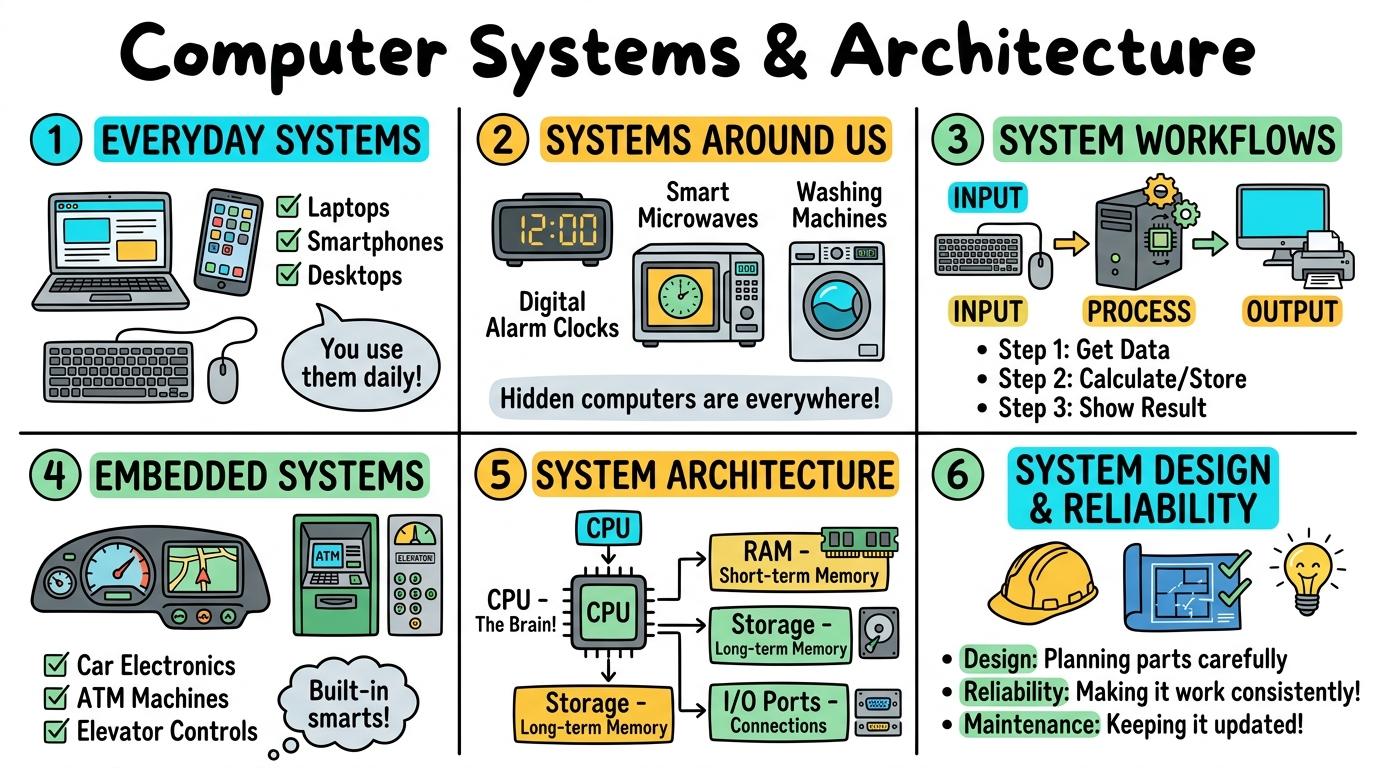
Computer Systems & Architecture
1
2
3
4
5
6
Exploring how hardware, software, data, and human interaction combine into integrated computational systems.
Everyday Systems
Identify technology systems in school and home and explain how their parts work together.
Let's Go!
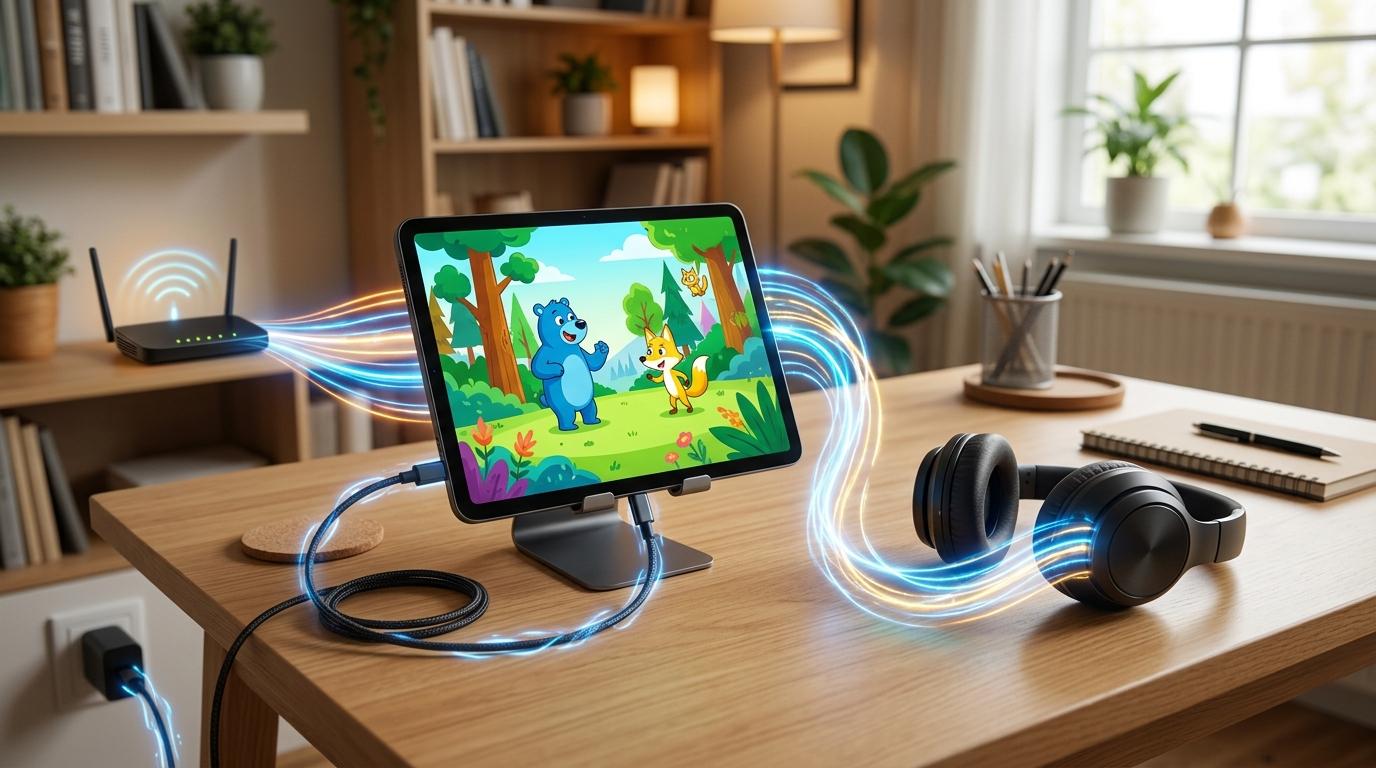
Routine: See Think Wonder
Look at this tablet setup. What components do you see working together to show a video?
Teacher note: Facilitate the See Think Wonder routine for 2–3 minutes. Encourage students to connect the prompt to Form (Connected components work together as systems to achieve purposeful tasks.).
Learn
A system is a set of connected parts that work together to perform a task. A tablet system needs hardware (screen, battery), software (apps), and human input (touch) to function properly. In computing, connected components work together as systems to achieve purposeful tasks. As you explore the interactive System Architect Simulator below, focus on how to explain how tablet hardware, apps, power, and user interaction form an everyday working system.
SYSTEM ARCHITECT STUDIO
DN6 • Computer Systems, Workflows & Resilient Architecture
LEVEL 1 • BRONZEDN6 • Computer Systems & Architecture
Everyday Systems: Core Component Identification
Identify the core interconnected subsystems of everyday computing hardware.
⚙ Architecture Inspector
STATUS: UNVERIFIED📡 Real-Time Bus & Subsystem Telemetry
LIVE TELEMETRY| Subsystem / Bus | Observed Status | Integrity |
|---|---|---|
| System Power Rails | 12.05V Stable (Dual Feed) | NOMINAL |
| Memory Bus (DDR5) | 6400 MT/s Dual Channel | NOMINAL |
| Failover Latency | 1.2 ms Heartbeat | OPTIMAL |
🏗 Layer Topology Overview
ISO/OSI & 3-TIERL3Presentation & UI TierClient Browser / React / Astro UI
L2Application Logic TierCloudflare Workers / Node.js Engine
L1Data Persistence TierSQL / Key-Value Store with Replication
💻 System Architecture Audit Log
[SYS-INIT] System Architect Studio kernel initialized.
[SYS-DIAG] All system bus probes active and listening.
Apply Simulator Skills • Try it yourself
System Inspector
🚀 Open a practice space
🌟 Student Project GuideSuccess Criteria & WAGOLL (What A Good One Looks Like)
🎯 Task Success Criteria (Rubric)
Foundation
Identifies individual technology devices with teacher support.
Developing
Names basic parts of a desktop or tablet system.
Secure (Goal)
Explains how tablet hardware, apps, power, and user interaction form an everyday working system.
Mastery
Compares different everyday systems (e.g. interactive whiteboard vs. personal tablet) and their component interactions.
👀 What A Good One Looks Like (WAGOLL)
Exemplar of 2
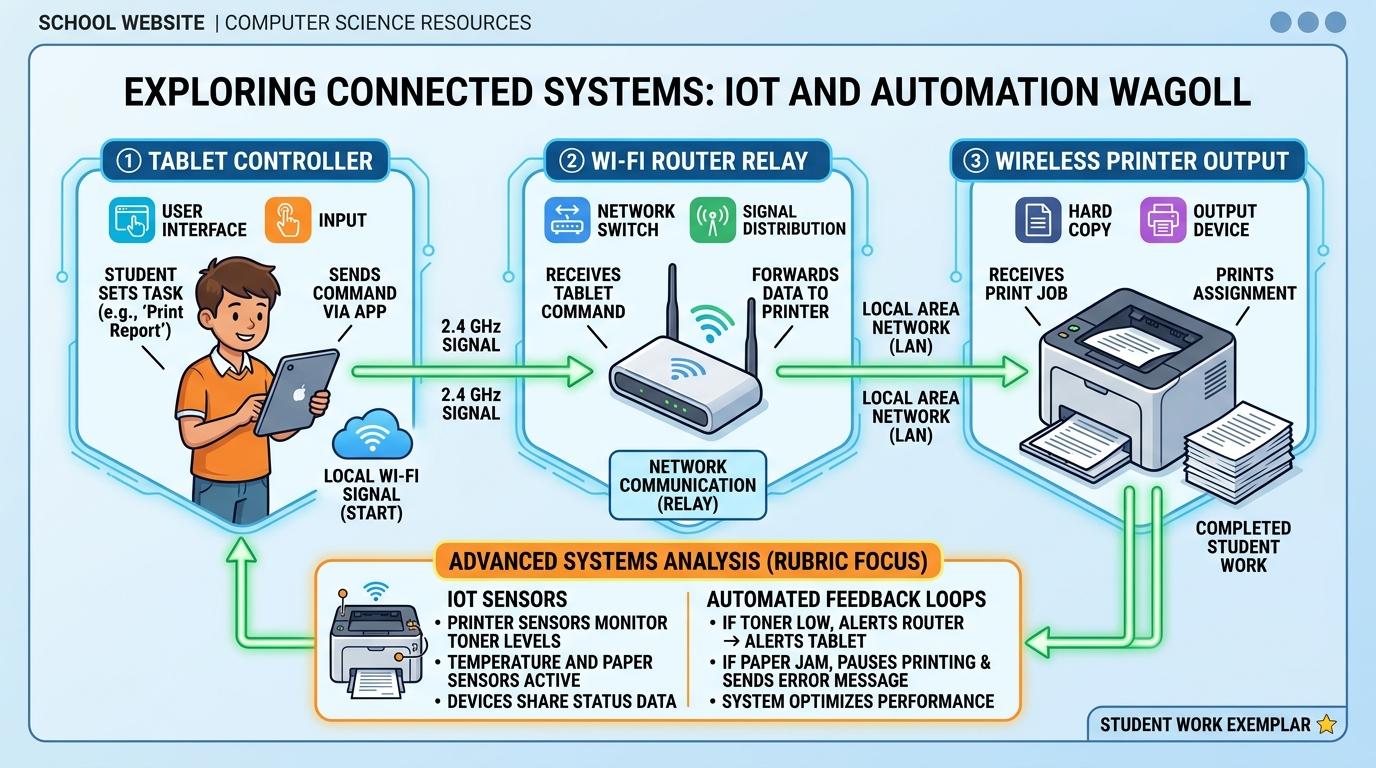 ⭐ Mastering Standard
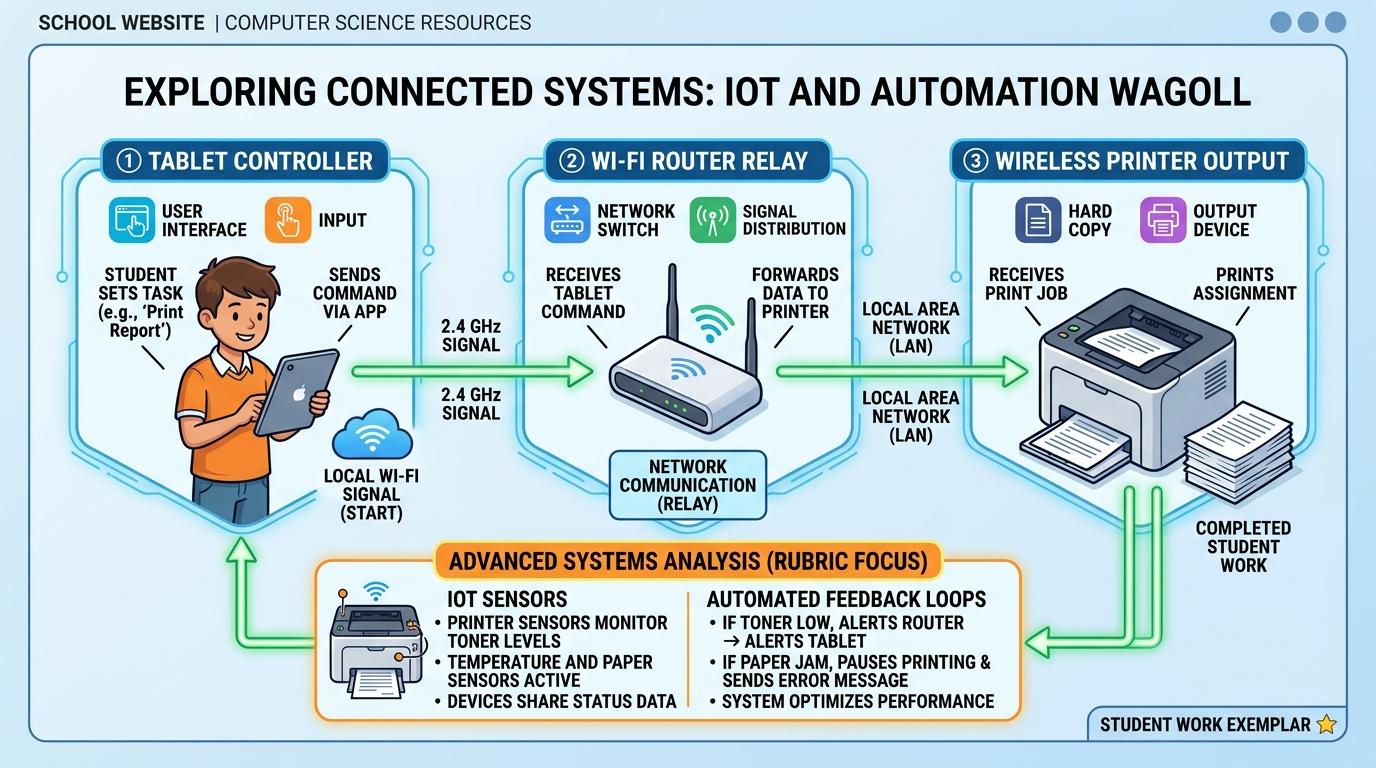 ⭐ Mastering Standard
📁
Save to Your Website Portfolio:
When you finish creating your project in your software, copy the share link or take a screenshot and publish it onto your student portfolio website!
Reflect
Learning check
Teacher setup, curriculum links and progress descriptors
Spark support
Routine: See Think Wonder
Teacher notes: Facilitate the See Think Wonder routine for 2–3 minutes. Encourage students to connect the prompt to Form (Connected components work together as systems to achieve purposeful tasks.).
Achievement pathway
- Foundation: Identifies individual technology devices with teacher support.
- Developing: Names basic parts of a desktop or tablet system.
- Secure: Explains how tablet hardware, apps, power, and user interaction form an everyday working system.
- Mastering: Compares different everyday systems (e.g. interactive whiteboard vs. personal tablet) and their component interactions.
Curriculum links
Curriculum strand: Computer Systems
Outcome: SYS.01.B.1.1 — Identify technology systems in school and home and explain how their parts work together.
PYP: Form · Connected components work together as systems to achieve purposeful tasks.
Learner profile: Inquirer
Competency tags
Gate support
Accessibility alternative: Students may verbally explain or point to the correct answer for "Which option best describes a computer system?" with a teacher or teaching assistant.
Teacher override: allow
Locked level
Level 2: Systems Around Us
Complete the previous learning check to unlock this next level.
Systems Around Us
Recognize automated technology systems in the wider world and describe their inputs and outputs.
Learning objective
Recognize automated technology systems in the wider world (traffic lights, supermarket checkouts, ATMs) and describe their inputs and outputs.
Let's Go!
Routine: Zoom In
Zoom in on this supermarket scanner. What information goes into the system, and what comes out?
Teacher note: Facilitate the Zoom In routine for 2–3 minutes. Encourage students to connect the prompt to Function (Automated systems process inputs from the environment to generate useful real-world outputs.).
Learn
Automated systems are all around us. A supermarket checkout system takes a barcode input, searches a database, displays the price output on a screen, and prints a physical receipt. In computing, automated systems process inputs from the environment to generate useful real-world outputs. As you explore the interactive System Architect Simulator below, focus on how to describe how real-world systems like supermarket checkouts take inputs (barcode scan), process data, and generate outputs (receipt/price).
SYSTEM ARCHITECT STUDIO
DN6 • Computer Systems, Workflows & Resilient Architecture
LEVEL 1 • BRONZEDN6 • Computer Systems & Architecture
Everyday Systems: Core Component Identification
Identify the core interconnected subsystems of everyday computing hardware.
⚙ Architecture Inspector
STATUS: UNVERIFIED📡 Real-Time Bus & Subsystem Telemetry
LIVE TELEMETRY| Subsystem / Bus | Observed Status | Integrity |
|---|---|---|
| System Power Rails | 12.05V Stable (Dual Feed) | NOMINAL |
| Memory Bus (DDR5) | 6400 MT/s Dual Channel | NOMINAL |
| Failover Latency | 1.2 ms Heartbeat | OPTIMAL |
🏗 Layer Topology Overview
ISO/OSI & 3-TIERL3Presentation & UI TierClient Browser / React / Astro UI
L2Application Logic TierCloudflare Workers / Node.js Engine
L1Data Persistence TierSQL / Key-Value Store with Replication
💻 System Architecture Audit Log
[SYS-INIT] System Architect Studio kernel initialized.
[SYS-DIAG] All system bus probes active and listening.
Apply Simulator Skills • Try it yourself
Real-World System Mapping
🚀 Open a practice space
🌟 Student Project GuideSuccess Criteria & WAGOLL (What A Good One Looks Like)
🎯 Task Success Criteria (Rubric)
Foundation
Points out public technology devices like traffic lights or card readers.
Developing
Identifies the main input or output of an automated real-world system.
Secure (Goal)
Describes how real-world systems like supermarket checkouts take inputs (barcode scan), process data, and generate outputs (receipt/price).
Mastery
Analyzes complex public systems like ATMs or airport check-in kiosks and diagrams their multi-step workflow.
👀 What A Good One Looks Like (WAGOLL)
Exemplar of 2
⭐ Mastering Standard⭐ Mastering Standard📁
Save to Your Website Portfolio:
When you finish creating your project in your software, copy the share link or take a screenshot and publish it onto your student portfolio website!
Reflect
Learning check
Teacher setup, curriculum links and progress descriptors
Spark support
Routine: Zoom In
Teacher notes: Facilitate the Zoom In routine for 2–3 minutes. Encourage students to connect the prompt to Function (Automated systems process inputs from the environment to generate useful real-world outputs.).
Achievement pathway
- Foundation: Points out public technology devices like traffic lights or card readers.
- Developing: Identifies the main input or output of an automated real-world system.
- Secure: Describes how real-world systems like supermarket checkouts take inputs (barcode scan), process data, and generate outputs (receipt/price).
- Mastering: Analyzes complex public systems like ATMs or airport check-in kiosks and diagrams their multi-step workflow.
Curriculum links
Curriculum strand: Computer Systems
Outcome: SYS.02.B.1.2 — Recognize automated technology systems in the wider world and describe their inputs and outputs.
PYP: Function · Automated systems process inputs from the environment to generate useful real-world outputs.
Learner profile: Communicator
Competency tags
Gate support
Accessibility alternative: Students may verbally explain or point to the correct answer for "What is the main input when a shop assistant scans an item at a checkout?" with a teacher or teaching assistant.
Teacher override: allow
Locked level
Level 3: System Workflows
Complete the previous learning check to unlock this next level.
System Workflows
Map out system workflows showing how inputs are processed to trigger specific system outputs.
Learning objective
Map out system workflows showing how inputs are processed to trigger specific system outputs.
Let's Go!
Routine: Think Pair Share
How does a vending machine know which snack to drop after you press a button and insert a coin?
Teacher note: Facilitate the Think Pair Share routine for 2–3 minutes. Encourage students to connect the prompt to Connection (Structured system workflows define how inputs travel through processing stages to produce predictable outputs.).
Learn
System workflows follow the Input-Processing-Output (IPO) model. Inputs (coins, button presses) pass to the processor (checking coin value, selection choice), which triggers the actuator output (motor drops snack). In computing, structured system workflows define how inputs travel through processing stages to produce predictable outputs. As you explore the interactive System Architect Simulator below, focus on how to map detailed system workflows incorporating decision points and feedback loops.
SYSTEM ARCHITECT STUDIO
DN6 • Computer Systems, Workflows & Resilient Architecture
LEVEL 1 • BRONZEDN6 • Computer Systems & Architecture
Everyday Systems: Core Component Identification
Identify the core interconnected subsystems of everyday computing hardware.
⚙ Architecture Inspector
STATUS: UNVERIFIED📡 Real-Time Bus & Subsystem Telemetry
LIVE TELEMETRY| Subsystem / Bus | Observed Status | Integrity |
|---|---|---|
| System Power Rails | 12.05V Stable (Dual Feed) | NOMINAL |
| Memory Bus (DDR5) | 6400 MT/s Dual Channel | NOMINAL |
| Failover Latency | 1.2 ms Heartbeat | OPTIMAL |
🏗 Layer Topology Overview
ISO/OSI & 3-TIERL3Presentation & UI TierClient Browser / React / Astro UI
L2Application Logic TierCloudflare Workers / Node.js Engine
L1Data Persistence TierSQL / Key-Value Store with Replication
💻 System Architecture Audit Log
[SYS-INIT] System Architect Studio kernel initialized.
[SYS-DIAG] All system bus probes active and listening.
Apply Simulator Skills • Try it yourself
Workflow Diagrammer
🚀 Open a practice space
🌟 Student Project GuideSuccess Criteria & WAGOLL (What A Good One Looks Like)
🎯 Task Success Criteria (Rubric)
Foundation
Draws simple pictures showing an input and an output.
Developing
Creates a 3-box Input -> Processing -> Output diagram with prompting.
Secure (Goal)
Maps detailed system workflows incorporating decision points and feedback loops.
Mastery
Evaluates workflow bottlenecks and proposes system improvements in automated pipelines.
👀 What A Good One Looks Like (WAGOLL)
Exemplar of 2
⭐ Mastering Standard⭐ Mastering Standard📁
Save to Your Website Portfolio:
When you finish creating your project in your software, copy the share link or take a screenshot and publish it onto your student portfolio website!
Reflect
Learning check
Teacher setup, curriculum links and progress descriptors
Spark support
Routine: Think Pair Share
Teacher notes: Facilitate the Think Pair Share routine for 2–3 minutes. Encourage students to connect the prompt to Connection (Structured system workflows define how inputs travel through processing stages to produce predictable outputs.).
Achievement pathway
- Foundation: Draws simple pictures showing an input and an output.
- Developing: Creates a 3-box Input -> Processing -> Output diagram with prompting.
- Secure: Maps detailed system workflows incorporating decision points and feedback loops.
- Mastering: Evaluates workflow bottlenecks and proposes system improvements in automated pipelines.
Curriculum links
Curriculum strand: Computer Systems
Outcome: SYS.03.B.1.3 — Map out system workflows showing how inputs are processed to trigger specific system outputs.
PYP: Connection · Structured system workflows define how inputs travel through processing stages to produce predictable outputs.
Learner profile: Thinker
Competency tags
Gate support
Accessibility alternative: Students may verbally explain or point to the correct answer for "In what order does data move through a computer system?" with a teacher or teaching assistant.
Teacher override: allow
Locked level
Level 4: Embedded Systems
Complete the previous learning check to unlock this next level.
Embedded Systems
Explore embedded microcontrollers inside smart appliances and program conditional control loops.
Learning objective
Explore embedded microcontrollers inside smart appliances (washing machines, thermostats, micro:bits) and program conditional control loops.
Let's Go!
Routine: See Think Wonder
Did you know your microwave, washing machine, and smart watch all contain microcontrollers?
What makes them different from a PC?
Teacher note: Facilitate the See Think Wonder routine for 2–3 minutes. Encourage students to connect the prompt to Responsibility (Embedded microcontrollers run dedicated software algorithms inside everyday hardware devices.).
Learn
An embedded system is a dedicated computer built into a larger mechanical or electrical system. Unlike general-purpose computers (PCs, laptops), embedded microcontrollers run fixed software programs continuously to control specific hardware. As you explore the interactive System Architect Simulator below, focus on how to program conditional control loops on microcontrollers (e.g. if temperature < 20 then turn on heater).
SYSTEM ARCHITECT STUDIO
DN6 • Computer Systems, Workflows & Resilient Architecture
LEVEL 1 • BRONZEDN6 • Computer Systems & Architecture
Everyday Systems: Core Component Identification
Identify the core interconnected subsystems of everyday computing hardware.
⚙ Architecture Inspector
STATUS: UNVERIFIED📡 Real-Time Bus & Subsystem Telemetry
LIVE TELEMETRY| Subsystem / Bus | Observed Status | Integrity |
|---|---|---|
| System Power Rails | 12.05V Stable (Dual Feed) | NOMINAL |
| Memory Bus (DDR5) | 6400 MT/s Dual Channel | NOMINAL |
| Failover Latency | 1.2 ms Heartbeat | OPTIMAL |
🏗 Layer Topology Overview
ISO/OSI & 3-TIERL3Presentation & UI TierClient Browser / React / Astro UI
L2Application Logic TierCloudflare Workers / Node.js Engine
L1Data Persistence TierSQL / Key-Value Store with Replication
💻 System Architecture Audit Log
[SYS-INIT] System Architect Studio kernel initialized.
[SYS-DIAG] All system bus probes active and listening.
Apply Simulator Skills • Try it yourself
Smart Thermostat Simulator
🚀 Open a practice space
🌟 Student Project GuideSuccess Criteria & WAGOLL (What A Good One Looks Like)
🎯 Task Success Criteria (Rubric)
Foundation
Identifies smart home devices that contain hidden computers.
Developing
Explains that embedded systems run dedicated single-purpose software.
Secure (Goal)
Programs conditional control loops on microcontrollers (e.g. if temperature < 20 then turn on heater).
Mastery
Designs an embedded smart home prototype integrating multiple sensors and actuators.
👀 What A Good One Looks Like (WAGOLL)
Exemplar of 2
⭐ Mastering Standard⭐ Mastering Standard📁
Save to Your Website Portfolio:
When you finish creating your project in your software, copy the share link or take a screenshot and publish it onto your student portfolio website!
Reflect
Learning check
Teacher setup, curriculum links and progress descriptors
Spark support
Routine: See Think Wonder
Teacher notes: Facilitate the See Think Wonder routine for 2–3 minutes. Encourage students to connect the prompt to Responsibility (Embedded microcontrollers run dedicated software algorithms inside everyday hardware devices.).
Achievement pathway
- Foundation: Identifies smart home devices that contain hidden computers.
- Developing: Explains that embedded systems run dedicated single-purpose software.
- Secure: Programs conditional control loops on microcontrollers (e.g. if temperature < 20 then turn on heater).
- Mastering: Designs an embedded smart home prototype integrating multiple sensors and actuators.
Curriculum links
Curriculum strand: Computer Systems
Outcome: SYS.04.B.1.4 — Explore embedded microcontrollers inside smart appliances and program conditional control loops.
PYP: Responsibility · Embedded microcontrollers run dedicated software algorithms inside everyday hardware devices.
Learner profile: Principled
Competency tags
Gate support
Accessibility alternative: Students may verbally explain or point to the correct answer for "Which statement is true about embedded systems?" with a teacher or teaching assistant.
Teacher override: allow
Locked level
Level 5: System Architecture
Complete the previous learning check to unlock this next level.
System Architecture
Analyze client-server system architectures, tracing data flows between user interfaces, servers, and databases.
Learning objective
Analyze client-server system architectures, tracing data flows between front-end user interfaces, back-end server processing, and database storage.
Let's Go!
Routine: 3-2-1 Bridge
When you search on YouTube, where does the video list actually come from?
How does your device communicate with Google's servers?
Teacher note: Facilitate the 3-2-1 Bridge routine for 2–3 minutes. Encourage students to connect the prompt to Perspective (Distributed client-server architectures enable global software applications by separating presentation, logic, and database layers.).
Learn
Modern digital systems use 3-tier architecture: 1) Front-end Client (user interface on phone/browser), 2) Back-end Application Server (business logic and processing), and 3) Database Server (secure persistent data storage). In computing, distributed client-server architectures enable global software applications by separating presentation, logic, and database layers. As you explore the interactive System Architect Simulator below, focus on how to trace complete 3-tier system architecture requests (Client UI -> Web Server Logic -> Database Query -> Response).
SYSTEM ARCHITECT STUDIO
DN6 • Computer Systems, Workflows & Resilient Architecture
LEVEL 1 • BRONZEDN6 • Computer Systems & Architecture
Everyday Systems: Core Component Identification
Identify the core interconnected subsystems of everyday computing hardware.
⚙ Architecture Inspector
STATUS: UNVERIFIED📡 Real-Time Bus & Subsystem Telemetry
LIVE TELEMETRY| Subsystem / Bus | Observed Status | Integrity |
|---|---|---|
| System Power Rails | 12.05V Stable (Dual Feed) | NOMINAL |
| Memory Bus (DDR5) | 6400 MT/s Dual Channel | NOMINAL |
| Failover Latency | 1.2 ms Heartbeat | OPTIMAL |
🏗 Layer Topology Overview
ISO/OSI & 3-TIERL3Presentation & UI TierClient Browser / React / Astro UI
L2Application Logic TierCloudflare Workers / Node.js Engine
L1Data Persistence TierSQL / Key-Value Store with Replication
💻 System Architecture Audit Log
[SYS-INIT] System Architect Studio kernel initialized.
[SYS-DIAG] All system bus probes active and listening.
Apply Simulator Skills • Try it yourself
System Architecture Builder
🚀 Open a practice space
🌟 Student Project GuideSuccess Criteria & WAGOLL (What A Good One Looks Like)
🎯 Task Success Criteria (Rubric)
Foundation
Identifies that web apps connect to remote computers over the internet.
Developing
Distinguishes between front-end screens (client) and back-end servers.
Secure (Goal)
Traces complete 3-tier system architecture requests (Client UI -> Web Server Logic -> Database Query -> Response).
Mastery
Designs scalable system architecture diagrams accounting for server request load balancing.
👀 What A Good One Looks Like (WAGOLL)
Exemplar of 2
⭐ Mastering Standard⭐ Mastering Standard📁
Save to Your Website Portfolio:
When you finish creating your project in your software, copy the share link or take a screenshot and publish it onto your student portfolio website!
Reflect
Learning check
Teacher setup, curriculum links and progress descriptors
Spark support
Routine: 3-2-1 Bridge
Teacher notes: Facilitate the 3-2-1 Bridge routine for 2–3 minutes. Encourage students to connect the prompt to Perspective (Distributed client-server architectures enable global software applications by separating presentation, logic, and database layers.).
Achievement pathway
- Foundation: Identifies that web apps connect to remote computers over the internet.
- Developing: Distinguishes between front-end screens (client) and back-end servers.
- Secure: Traces complete 3-tier system architecture requests (Client UI -> Web Server Logic -> Database Query -> Response).
- Mastering: Designs scalable system architecture diagrams accounting for server request load balancing.
Curriculum links
Curriculum strand: Computer Systems
Outcome: SYS.05.B.1.5 — Analyze client-server system architectures, tracing data flows between user interfaces, servers, and databases.
PYP: Perspective · Distributed client-server architectures enable global software applications by separating presentation, logic, and database layers.
Learner profile: Knowledgeable
Competency tags
Gate support
Accessibility alternative: Students may verbally explain or point to the correct answer for "In client-server system architecture, what is the main job of the database server?" with a teacher or teaching assistant.
Teacher override: allow
Locked level
Level 6: System Design & Reliability
Complete the previous learning check to unlock this next level.
System Design & Reliability
Evaluate system reliability, redundancy, and failure points in complex digital infrastructure.
Learning objective
Evaluate system reliability, redundancy, and failure points in complex digital infrastructure, designing resilient system diagrams.
Let's Go!
Routine: Compass Points
What would happen if a hospital's main computer system lost internet or power?
How do engineers design systems that never fail?
Teacher note: Facilitate the Compass Points routine for 2–3 minutes. Encourage students to connect the prompt to Reflection (Resilient system architecture anticipates single points of failure by embedding redundancy and fail-safe protocols.).
Learn
Critical systems require high availability and resilience. Engineers prevent system crashes by identifying Single Points of Failure (SPOF) and introducing Redundancy—duplicate backup hardware, secondary internet connections, and automated failover protocols. In computing, resilient system architecture anticipates single points of failure by embedding redundancy and fail-safe protocols. As you explore the interactive System Architect Simulator below, focus on how to evaluate system diagrams to spot single points of failure and designs redundant backup channels (backup servers, dual power supplies).
SYSTEM ARCHITECT STUDIO
DN6 • Computer Systems, Workflows & Resilient Architecture
LEVEL 1 • BRONZEDN6 • Computer Systems & Architecture
Everyday Systems: Core Component Identification
Identify the core interconnected subsystems of everyday computing hardware.
⚙ Architecture Inspector
STATUS: UNVERIFIED📡 Real-Time Bus & Subsystem Telemetry
LIVE TELEMETRY| Subsystem / Bus | Observed Status | Integrity |
|---|---|---|
| System Power Rails | 12.05V Stable (Dual Feed) | NOMINAL |
| Memory Bus (DDR5) | 6400 MT/s Dual Channel | NOMINAL |
| Failover Latency | 1.2 ms Heartbeat | OPTIMAL |
🏗 Layer Topology Overview
ISO/OSI & 3-TIERL3Presentation & UI TierClient Browser / React / Astro UI
L2Application Logic TierCloudflare Workers / Node.js Engine
L1Data Persistence TierSQL / Key-Value Store with Replication
💻 System Architecture Audit Log
[SYS-INIT] System Architect Studio kernel initialized.
[SYS-DIAG] All system bus probes active and listening.
Apply Simulator Skills • Try it yourself
System Resilience Audit
🚀 Open a practice space
🌟 Student Project GuideSuccess Criteria & WAGOLL (What A Good One Looks Like)
🎯 Task Success Criteria (Rubric)
Foundation
Recognizes that technology systems can crash or experience power outages.
Developing
Identifies potential single points of failure in basic network setups.
Secure (Goal)
Evaluates system diagrams to spot single points of failure and designs redundant backup channels (backup servers, dual power supplies).
Mastery
Conducts threat and disaster recovery analysis for critical infrastructure (hospitals, emergency services IT).
👀 What A Good One Looks Like (WAGOLL)
Exemplar of 2
⭐ Mastering Standard⭐ Mastering Standard📁
Save to Your Website Portfolio:
When you finish creating your project in your software, copy the share link or take a screenshot and publish it onto your student portfolio website!
Reflect
Learning check
Teacher setup, curriculum links and progress descriptors
Spark support
Routine: Compass Points
Teacher notes: Facilitate the Compass Points routine for 2–3 minutes. Encourage students to connect the prompt to Reflection (Resilient system architecture anticipates single points of failure by embedding redundancy and fail-safe protocols.).
Achievement pathway
- Foundation: Recognizes that technology systems can crash or experience power outages.
- Developing: Identifies potential single points of failure in basic network setups.
- Secure: Evaluates system diagrams to spot single points of failure and designs redundant backup channels (backup servers, dual power supplies).
- Mastering: Conducts threat and disaster recovery analysis for critical infrastructure (hospitals, emergency services IT).
Curriculum links
Curriculum strand: Computer Systems
Outcome: SYS.06.B.1.6 — Evaluate system reliability, redundancy, and failure points in complex digital infrastructure.
PYP: Reflection · Resilient system architecture anticipates single points of failure by embedding redundancy and fail-safe protocols.
Learner profile: Reflective
Competency tags
Gate support
Accessibility alternative: Students may verbally explain or point to the correct answer for "In resilient system design, what does 'redundancy' mean?" with a teacher or teaching assistant.
Teacher override: allow