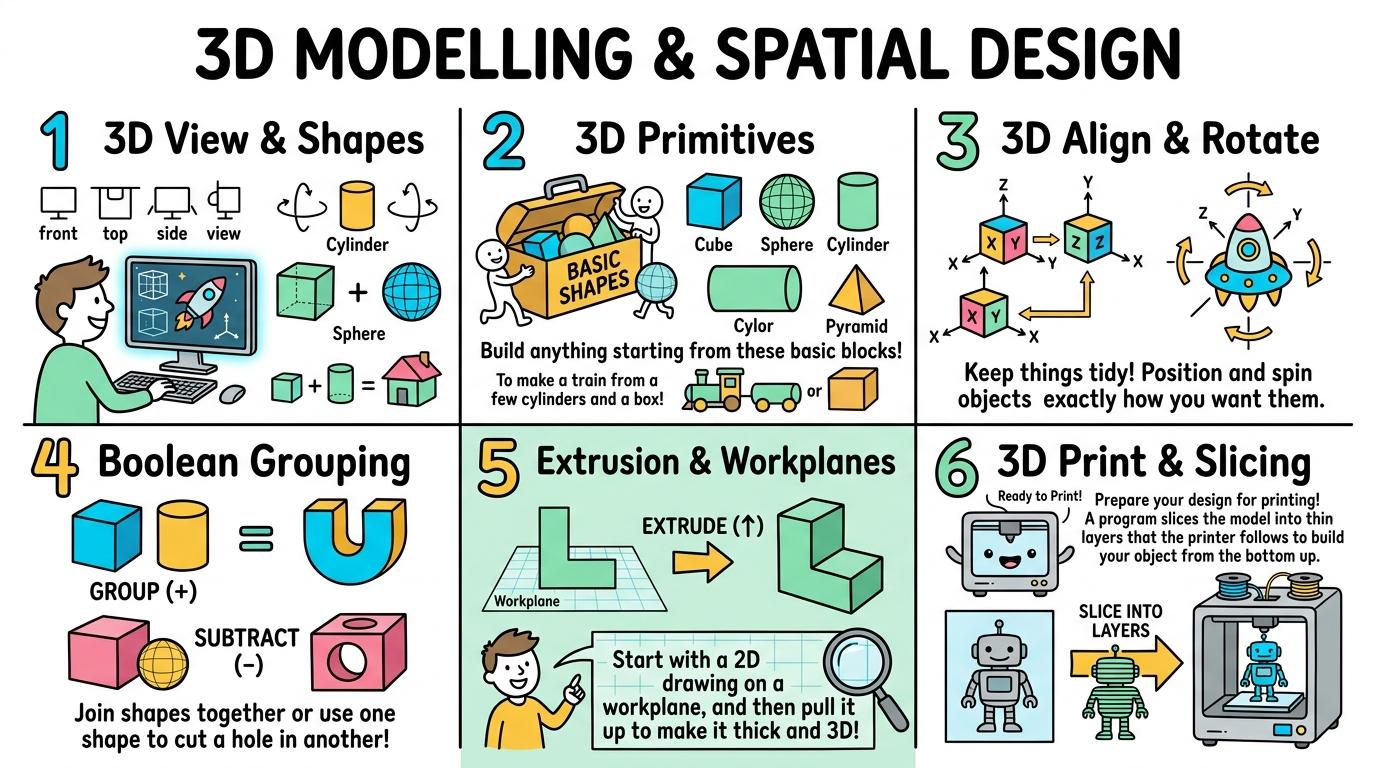
Congratulations on completing all 6 levels of 3D Modelling & Spatial Design! To unlock the Director Suite: Studio Tycoon, you must collect all 8 Key Shards across the Media Production & Broadcasting strands. Here is your cipher fragment for Slot #1:
KEY SHARD #1
1
Slot 1 of 8
🧩 Media Production & Broadcasting Key Ring Tracker:Slot #1 Active
Identify 3D digital shapes and navigate 3D spatial viewports by orbiting, panning, and zooming.
Learning objective
Learn how to orbit, pan, and zoom around 3D digital shapes in a virtual viewport.
Let's Go!
Routine: See Think Wonder
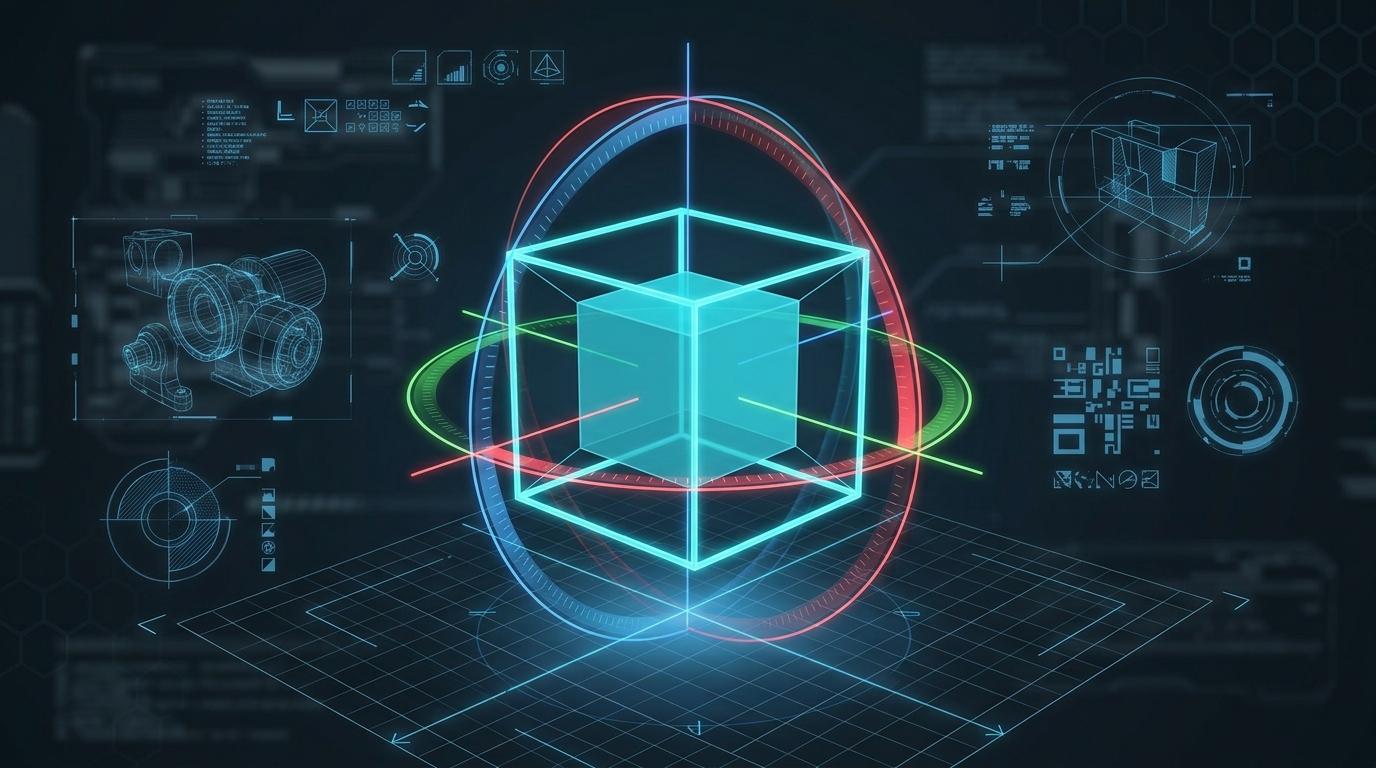
Look at this digital 3D cube. What happens when you rotate your viewpoint around it?
Teacher note: Facilitate the See Think Wonder routine for 2–3 minutes. Encourage students to connect the prompt to Form (Digital creation and spatial design allow us to visualize ideas in three dimensions.).
Learn
In 3D design, objects have length, width, and depth (height). Unlike 2D flat drawings, 3D space lets us look at objects from any angle. Using the orbit control, you can spin around an object 360 degrees. Panning slides your view left, right, up, or down, while zooming brings you closer or further away.
Interactive Simulator Sandbox
Spatial Curriculum:Step 1 • Bronze Tier
🧊
Step 1 • Bronze (Level 1): 2D to 3D AR - Dimension Identification
Identify 2D flat drawings vs 3D objects with depth. Inspect the interactive 3D model in the viewport.
In Progress
🚀 VR MUSEUM LIVEhttps://vr-space.edtechhub.org/galleries/curated-3d-museum-v1
3D Primitives:
Camera Angle:
AR ANCHOR: [0.00, 1.25, 0.00]
Front
Back
Right
Left
Top
Bottom
🔺 Roof Attached
🕳️ HOLE CUT [Carved]
X: Width
Y: Height
Z: Depth
🛋️ 3D Floor Grid & Room Layout Builder
Place furniture and artifact models onto the 10m × 8m architectural floor grid. Balance accessibility paths with floor area efficiency.
💡 Click on any grid tile to place your selected furniture item. Create a spacious, navigable layout.
🎭 CoSpaces Character Events & VR Tour Director
Program interactive event triggers on 3D avatar characters and direct the guided VR camera path with directional spatial audio.
👥 3D Avatar & Trigger Block
Select an event and action to preview interactive trigger code.
🎥 Guided VR Camera & Spatial Audio
VR Rig Standby: Camera at Origin
📐 CAD Coordinate Mesh & VR Spatial Audit
Audit 3D geometry printability, manifold wall thickness, VR motion comfort metrics, and spatial accessibility compliance.
🧊
1. 3D Manifold Geometry & Printability
Watertight solid mesh without non-manifold edges. Wall thickness exceeds minimum 1.5mm threshold for additive manufacturing.
100% Watertight (Manifold)
🥽
2. VR Motion Comfort & Frame Rate
Camera motion smoothing maintains stable 90 FPS rendering without sudden acceleration or narrow field-of-view disorientation.
Zero Discomfort Flagged
♿
3. Spatial Accessibility & Clear Paths
Room aisles maintain at least 1.2 meters clearance width for wheelchair navigation and comfortable virtual avatar movement.
ADA Clearance Met
💾
4. Standardized Mesh Export (.OBJ / .STL)
Export ready for Cura slicing software, WebGL scene loaders, or AR Core/ARKit mobile projection.
STL/OBJ Calibrated
📋 Spatial Engineering Verification Checklist
Apply Simulator Skills • Try it yourself
Explore 3D Viewport Navigation
🔄Direct Simulator Transfer: Step 1 Tasks 1, 2 & 3
Now that you've practiced the virtual mechanics in the simulator above, apply those exact skills in your real computer environment:
🎉
Simulator Tasks 1–3 Mastered!Step 1 Verified
Great job mastering the interactive simulation! Now complete the real-world transfer checklist below and save your work into your digital portfolio.
🌟 Student Project GuideSuccess Criteria & WAGOLL (What A Good One Looks Like)▾
🎯 Task Success Criteria (Rubric)
Foundation
Can view a 3D shape on screen with guidance.
Developing
Can orbit around a 3D shape using mouse or touch controls.
Secure (Goal)
Can comfortably orbit, pan, and zoom to inspect a 3D object from all 360-degree angles.
Mastery
Can assist peers in resetting viewport cameras and navigating complex 3D scenes.
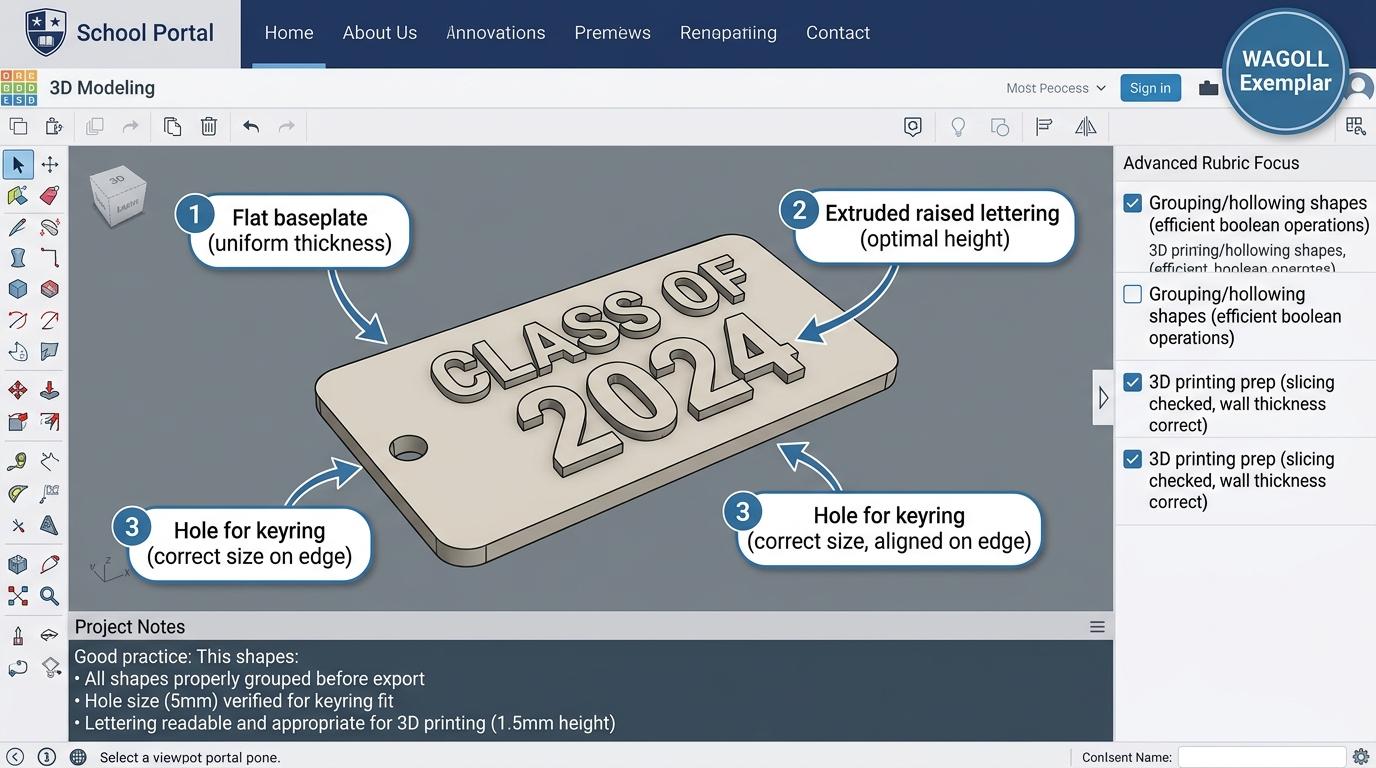
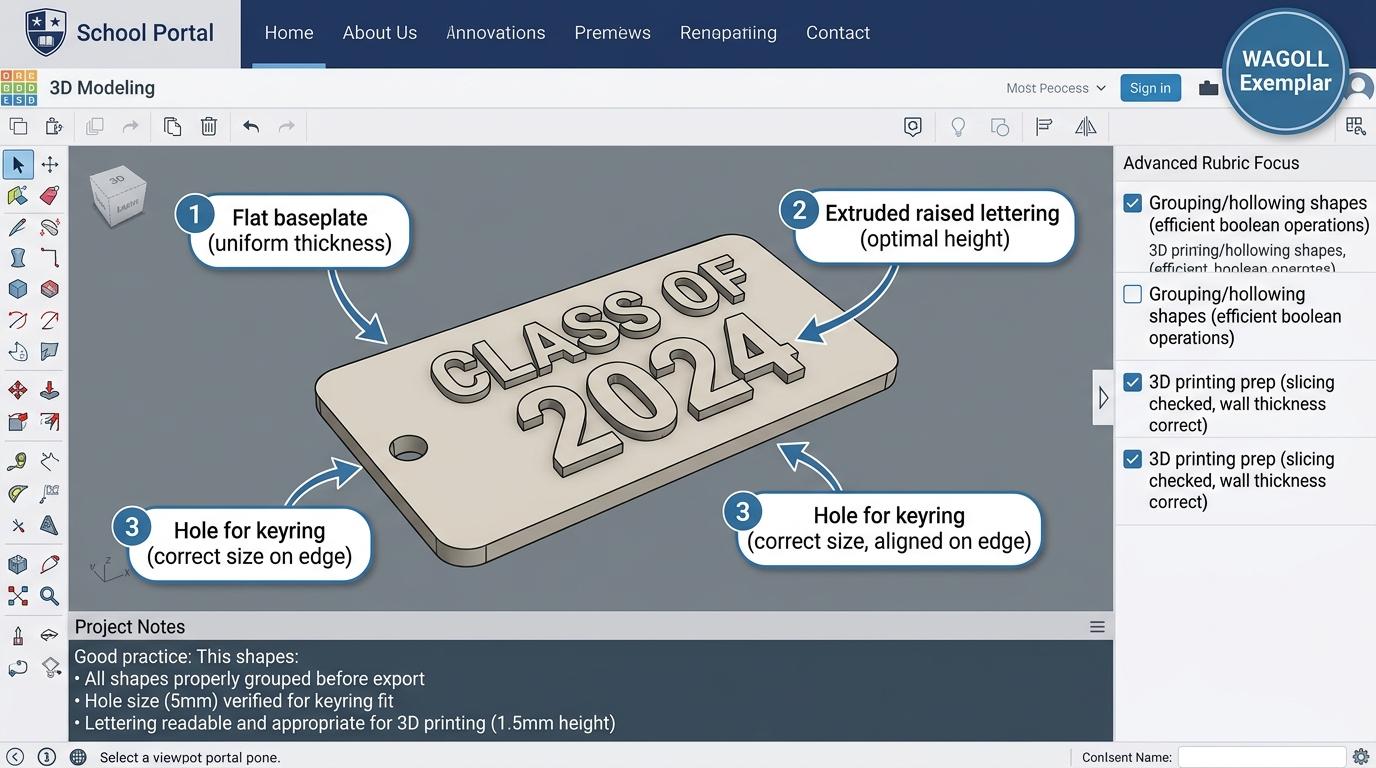
👀 What A Good One Looks Like (WAGOLL)
Exemplar 1 of 2
⭐ Mastering Standard
3D Design Exemplar: Demonstration of mastering quality standards for 3D View & Shapes.
⭐ Mastering Standard
3D Design Exemplar: Demonstration of mastering quality standards for 3D View & Shapes.
📁
Save to Your Website Portfolio:
When you finish creating your project in your software, copy the share link or take a screenshot and publish it onto your student portfolio website!
Reflect
🎯
Self-Assessment & Reflection
How does orbiting in 3D space differ from scrolling on a flat 2D page?
🟢Secure Level
Can comfortably orbit, pan, and zoom to inspect a 3D object from all 360-degree angles.
Learning check
Learning Check
Which control action spins your camera view around a 3D object 360 degrees?
Choose the correct camera control action below:
Hint 1: Orbiting is used to rotate the camera view around the object.
Hint 2: Clue: Orbiting spins your view around a 3D object in all directions.
Answer correctly to unlock the next level.
Great job! Orbiting spins your view around a 3D object in all directions.Not quite. Orbiting is used to rotate the camera view around the object.
Teacher setup, curriculum links and progress descriptors
Spark support
Routine: See Think Wonder
Teacher notes: Facilitate the See Think Wonder routine for 2–3 minutes. Encourage students to connect the prompt to Form (Digital creation and spatial design allow us to visualize ideas in three dimensions.).
Achievement pathway
Foundation: Can view a 3D shape on screen with guidance.
Developing: Can orbit around a 3D shape using mouse or touch controls.
Secure: Can comfortably orbit, pan, and zoom to inspect a 3D object from all 360-degree angles.
Mastering: Can assist peers in resetting viewport cameras and navigating complex 3D scenes.
Curriculum links
Curriculum strand: Creation & Media
Outcome: 3D.01.B.1.1 — Identify 3D digital shapes and navigate 3D spatial viewports by orbiting, panning, and zooming.
PYP: Form · Digital creation and spatial design allow us to visualize ideas in three dimensions.
Learner profile: Inquirer
Competency tags
3d-design
spatial-awareness
geometry
navigation
Gate support
Accessibility alternative: Students may verbally explain or point to the correct answer for "Which control action spins your camera view around a 3D object 360 degrees?" with a teacher or teaching assistant.
Complete the previous learning check to unlock this next level.
Level 2
3D Primitives
Place, scale, move, and recolor basic 3D primitive shapes on a workplane.
Learning objective
Learn how to place 3D primitives onto the workplane and modify their size and color.
Let's Go!
Routine: Think Pair Share
How can you turn a simple cube primitive into a tall skyscraper or a wide brick?
Teacher note: Facilitate the Think Pair Share routine for 2–3 minutes. Encourage students to connect the prompt to Function (Simple 3D geometric shapes can be combined to build complex real-world structures.).
Learn
All complex 3D objects start as simple geometric primitives such as cubes, cylinders, spheres, and cones. By dragging a primitive onto the grid (workplane), you can modify its properties. White and black corner handles allow you to resize its length, width, and height. You can also pick solid colors for each primitive.
Interactive Simulator Sandbox
Spatial Curriculum:Step 2 • Bronze Tier
🧊
Step 1 • Bronze (Level 1): 2D to 3D AR - Dimension Identification
Identify 2D flat drawings vs 3D objects with depth. Inspect the interactive 3D model in the viewport.
In Progress
🚀 VR MUSEUM LIVEhttps://vr-space.edtechhub.org/galleries/curated-3d-museum-v1
3D Primitives:
Camera Angle:
AR ANCHOR: [0.00, 1.25, 0.00]
Front
Back
Right
Left
Top
Bottom
🔺 Roof Attached
🕳️ HOLE CUT [Carved]
X: Width
Y: Height
Z: Depth
🛋️ 3D Floor Grid & Room Layout Builder
Place furniture and artifact models onto the 10m × 8m architectural floor grid. Balance accessibility paths with floor area efficiency.
💡 Click on any grid tile to place your selected furniture item. Create a spacious, navigable layout.
🎭 CoSpaces Character Events & VR Tour Director
Program interactive event triggers on 3D avatar characters and direct the guided VR camera path with directional spatial audio.
👥 3D Avatar & Trigger Block
Select an event and action to preview interactive trigger code.
🎥 Guided VR Camera & Spatial Audio
VR Rig Standby: Camera at Origin
📐 CAD Coordinate Mesh & VR Spatial Audit
Audit 3D geometry printability, manifold wall thickness, VR motion comfort metrics, and spatial accessibility compliance.
🧊
1. 3D Manifold Geometry & Printability
Watertight solid mesh without non-manifold edges. Wall thickness exceeds minimum 1.5mm threshold for additive manufacturing.
100% Watertight (Manifold)
🥽
2. VR Motion Comfort & Frame Rate
Camera motion smoothing maintains stable 90 FPS rendering without sudden acceleration or narrow field-of-view disorientation.
Zero Discomfort Flagged
♿
3. Spatial Accessibility & Clear Paths
Room aisles maintain at least 1.2 meters clearance width for wheelchair navigation and comfortable virtual avatar movement.
ADA Clearance Met
💾
4. Standardized Mesh Export (.OBJ / .STL)
Export ready for Cura slicing software, WebGL scene loaders, or AR Core/ARKit mobile projection.
STL/OBJ Calibrated
📋 Spatial Engineering Verification Checklist
Apply Simulator Skills • Try it yourself
Build a Primitive Structure
🔄Direct Simulator Transfer: Step 2 Tasks 4, 5 & 6
Now that you've practiced the virtual mechanics in the simulator above, apply those exact skills in your real computer environment:
🎉
Simulator Tasks 4–6 Mastered!Step 2 Verified
Great job mastering the interactive simulation! Now complete the real-world transfer checklist below and save your work into your digital portfolio.
🌟 Student Project GuideSuccess Criteria & WAGOLL (What A Good One Looks Like)▾
🎯 Task Success Criteria (Rubric)
Foundation
Can drag a 3D shape onto the screen with assistance.
Developing
Can place a 3D primitive on the workplane and change its color.
Secure (Goal)
Can place, resize (scale length, width, height), move, and recolor 3D primitive shapes accurately.
Mastery
Can design multi-colored 3D structures using diverse primitive shapes.
👀 What A Good One Looks Like (WAGOLL)
Exemplar 1 of 2
⭐ Mastering Standard
3D Design Exemplar: Demonstration of mastering quality standards for 3D Primitives.
⭐ Mastering Standard
3D Design Exemplar: Demonstration of mastering quality standards for 3D Primitives.
📁
Save to Your Website Portfolio:
When you finish creating your project in your software, copy the share link or take a screenshot and publish it onto your student portfolio website!
Reflect
🎯
Self-Assessment & Reflection
What happens when you drag a corner handle on a 3D shape in Tinkercad?
🟢Secure Level
Can place, resize (scale length, width, height), move, and recolor 3D primitive shapes accurately.
Learning check
Learning Check
What do the corner handles on a 3D primitive allow you to change?
Select the correct function of corner handles in 3D design:
Hint 1: Think about how 3d primitives works: place, scale, move, and recolor basic 3D primitive shapes on a workplane.
Hint 2: Clue: Corner handles allow you to scale the length, width, and height of 3D shapes.
Answer correctly to unlock the next level.
Correct! Corner handles allow you to scale the length, width, and height of 3D shapes.Try again. Corner handles adjust the size and dimensions of the shape.
Teacher setup, curriculum links and progress descriptors
Spark support
Routine: Think Pair Share
Teacher notes: Facilitate the Think Pair Share routine for 2–3 minutes. Encourage students to connect the prompt to Function (Simple 3D geometric shapes can be combined to build complex real-world structures.).
Achievement pathway
Foundation: Can drag a 3D shape onto the screen with assistance.
Developing: Can place a 3D primitive on the workplane and change its color.
Secure: Can place, resize (scale length, width, height), move, and recolor 3D primitive shapes accurately.
Mastering: Can design multi-colored 3D structures using diverse primitive shapes.
Curriculum links
Curriculum strand: Creation & Media
Outcome: 3D.02.B.1.2 — Place, scale, move, and recolor basic 3D primitive shapes on a workplane.
PYP: Function · Simple 3D geometric shapes can be combined to build complex real-world structures.
Learner profile: Communicator
Competency tags
3d-primitives
workplane
scaling
coloring
Gate support
Accessibility alternative: Students may verbally explain or point to the correct answer for "What do the corner handles on a 3D primitive allow you to change?" with a teacher or teaching assistant.
Complete the previous learning check to unlock this next level.
Level 3
3D Align & Rotate
Rotate 3D shapes around X, Y, Z axes and align multiple objects along shared center lines.
Learning objective
Learn how to rotate 3D objects on three axes and align them accurately.
Let's Go!
Routine: Zoom In
Look closely at the curved rotation handles. How do they help you tilt a roof shape onto a house base?
Teacher note: Facilitate the Zoom In routine for 2–3 minutes. Encourage students to connect the prompt to Connection (Precise positioning and alignment are essential for building stable digital models.).
Learn
To build complex models, shapes must be positioned precisely relative to one another. Curved rotation arrows allow you to tilt objects around the X, Y, or Z axis. The cone handle lifts shapes up or down off the workplane (Z-axis). Using the Align tool, you can automatically center or edge-align multiple shapes together perfectly.
Interactive Simulator Sandbox
Spatial Curriculum:Step 3 • Bronze Tier
🧊
Step 1 • Bronze (Level 1): 2D to 3D AR - Dimension Identification
Identify 2D flat drawings vs 3D objects with depth. Inspect the interactive 3D model in the viewport.
In Progress
🚀 VR MUSEUM LIVEhttps://vr-space.edtechhub.org/galleries/curated-3d-museum-v1
3D Primitives:
Camera Angle:
AR ANCHOR: [0.00, 1.25, 0.00]
Front
Back
Right
Left
Top
Bottom
🔺 Roof Attached
🕳️ HOLE CUT [Carved]
X: Width
Y: Height
Z: Depth
🛋️ 3D Floor Grid & Room Layout Builder
Place furniture and artifact models onto the 10m × 8m architectural floor grid. Balance accessibility paths with floor area efficiency.
💡 Click on any grid tile to place your selected furniture item. Create a spacious, navigable layout.
🎭 CoSpaces Character Events & VR Tour Director
Program interactive event triggers on 3D avatar characters and direct the guided VR camera path with directional spatial audio.
👥 3D Avatar & Trigger Block
Select an event and action to preview interactive trigger code.
🎥 Guided VR Camera & Spatial Audio
VR Rig Standby: Camera at Origin
📐 CAD Coordinate Mesh & VR Spatial Audit
Audit 3D geometry printability, manifold wall thickness, VR motion comfort metrics, and spatial accessibility compliance.
🧊
1. 3D Manifold Geometry & Printability
Watertight solid mesh without non-manifold edges. Wall thickness exceeds minimum 1.5mm threshold for additive manufacturing.
100% Watertight (Manifold)
🥽
2. VR Motion Comfort & Frame Rate
Camera motion smoothing maintains stable 90 FPS rendering without sudden acceleration or narrow field-of-view disorientation.
Zero Discomfort Flagged
♿
3. Spatial Accessibility & Clear Paths
Room aisles maintain at least 1.2 meters clearance width for wheelchair navigation and comfortable virtual avatar movement.
ADA Clearance Met
💾
4. Standardized Mesh Export (.OBJ / .STL)
Export ready for Cura slicing software, WebGL scene loaders, or AR Core/ARKit mobile projection.
STL/OBJ Calibrated
📋 Spatial Engineering Verification Checklist
Apply Simulator Skills • Try it yourself
Align and Stack 3D Primitives
🔄Direct Simulator Transfer: Step 3 Tasks 7, 8 & 9
Now that you've practiced the virtual mechanics in the simulator above, apply those exact skills in your real computer environment:
🎉
Simulator Tasks 7–9 Mastered!Step 3 Verified
Great job mastering the interactive simulation! Now complete the real-world transfer checklist below and save your work into your digital portfolio.
🌟 Student Project GuideSuccess Criteria & WAGOLL (What A Good One Looks Like)▾
🎯 Task Success Criteria (Rubric)
Foundation
Can tilt a 3D shape with guidance.
Developing
Can rotate a shape 90 degrees and lift it off the workplane.
Secure (Goal)
Can rotate 3D shapes precisely along X, Y, and Z axes and align multiple shapes along shared axes.
Mastery
Can construct perfectly symmetrical multi-part 3D models using alignment tools.
👀 What A Good One Looks Like (WAGOLL)
Exemplar 1 of 2
⭐ Mastering Standard
3D Design Exemplar: Demonstration of mastering quality standards for 3D Align & Rotate.
⭐ Mastering Standard
3D Design Exemplar: Demonstration of mastering quality standards for 3D Align & Rotate.
📁
Save to Your Website Portfolio:
When you finish creating your project in your software, copy the share link or take a screenshot and publish it onto your student portfolio website!
Reflect
🎯
Self-Assessment & Reflection
Which handle is used to raise or lower a 3D shape off the workplane grid?
🟢Secure Level
Can rotate 3D shapes precisely along X, Y, and Z axes and align multiple shapes along shared axes.
Learning check
Learning Check
Which handle lifts a 3D object vertically up or down along the Z-axis?
Identify the vertical lifting handle in 3D design:
Hint 1: The black lifting cone handle adjusts vertical height above the workplane.
Hint 2: Clue: The black lifting cone raises or lowers shapes off the workplane grid.
Answer correctly to unlock the next level.
Spot on! The black lifting cone raises or lowers shapes off the workplane grid.Not quite. The black lifting cone handle adjusts vertical height above the workplane.
Teacher setup, curriculum links and progress descriptors
Spark support
Routine: Zoom In
Teacher notes: Facilitate the Zoom In routine for 2–3 minutes. Encourage students to connect the prompt to Connection (Precise positioning and alignment are essential for building stable digital models.).
Achievement pathway
Foundation: Can tilt a 3D shape with guidance.
Developing: Can rotate a shape 90 degrees and lift it off the workplane.
Secure: Can rotate 3D shapes precisely along X, Y, and Z axes and align multiple shapes along shared axes.
Mastering: Can construct perfectly symmetrical multi-part 3D models using alignment tools.
Curriculum links
Curriculum strand: Creation & Media
Outcome: 3D.03.B.1.3 — Rotate 3D shapes around X, Y, Z axes and align multiple objects along shared center lines.
PYP: Connection · Precise positioning and alignment are essential for building stable digital models.
Learner profile: Thinker
Competency tags
3d-rotation
alignment
z-axis
spatial-math
Gate support
Accessibility alternative: Students may verbally explain or point to the correct answer for "Which handle lifts a 3D object vertically up or down along the Z-axis?" with a teacher or teaching assistant.
Complete the previous learning check to unlock this next level.
Level 4
Boolean Grouping
Create hollow cavities using Hole shapes and combine multiple primitives into single grouped objects.
Learning objective
Learn how to turn solid shapes into holes and group objects to carve out hollow 3D designs.
Let's Go!
Routine: Connect Extend Challenge
How does making a shape a "Hole" and grouping it act like a digital cookie cutter?
Teacher note: Facilitate the Connect Extend Challenge routine for 2–3 minutes. Encourage students to connect the prompt to Change (Combining and subtracting shapes allows us to create custom functional 3D designs.).
Learn
In 3D design, Boolean operations allow you to merge shapes or cut shapes out of other shapes. Turning a primitive into a "Hole" transforms it into a transparent cutter. When you select a solid shape and a Hole shape together and click "Group", the Hole area is carved out completely, leaving a hollow cavity or opening.
Interactive Simulator Sandbox
Spatial Curriculum:Step 4 • Bronze Tier
🧊
Step 1 • Bronze (Level 1): 2D to 3D AR - Dimension Identification
Identify 2D flat drawings vs 3D objects with depth. Inspect the interactive 3D model in the viewport.
In Progress
🚀 VR MUSEUM LIVEhttps://vr-space.edtechhub.org/galleries/curated-3d-museum-v1
3D Primitives:
Camera Angle:
AR ANCHOR: [0.00, 1.25, 0.00]
Front
Back
Right
Left
Top
Bottom
🔺 Roof Attached
🕳️ HOLE CUT [Carved]
X: Width
Y: Height
Z: Depth
🛋️ 3D Floor Grid & Room Layout Builder
Place furniture and artifact models onto the 10m × 8m architectural floor grid. Balance accessibility paths with floor area efficiency.
💡 Click on any grid tile to place your selected furniture item. Create a spacious, navigable layout.
🎭 CoSpaces Character Events & VR Tour Director
Program interactive event triggers on 3D avatar characters and direct the guided VR camera path with directional spatial audio.
👥 3D Avatar & Trigger Block
Select an event and action to preview interactive trigger code.
🎥 Guided VR Camera & Spatial Audio
VR Rig Standby: Camera at Origin
📐 CAD Coordinate Mesh & VR Spatial Audit
Audit 3D geometry printability, manifold wall thickness, VR motion comfort metrics, and spatial accessibility compliance.
🧊
1. 3D Manifold Geometry & Printability
Watertight solid mesh without non-manifold edges. Wall thickness exceeds minimum 1.5mm threshold for additive manufacturing.
100% Watertight (Manifold)
🥽
2. VR Motion Comfort & Frame Rate
Camera motion smoothing maintains stable 90 FPS rendering without sudden acceleration or narrow field-of-view disorientation.
Zero Discomfort Flagged
♿
3. Spatial Accessibility & Clear Paths
Room aisles maintain at least 1.2 meters clearance width for wheelchair navigation and comfortable virtual avatar movement.
ADA Clearance Met
💾
4. Standardized Mesh Export (.OBJ / .STL)
Export ready for Cura slicing software, WebGL scene loaders, or AR Core/ARKit mobile projection.
🌟 Student Project GuideSuccess Criteria & WAGOLL (What A Good One Looks Like)▾
🎯 Task Success Criteria (Rubric)
Foundation
Can select two shapes at the same time.
Developing
Can group two solid shapes together into one object.
Secure (Goal)
Can convert shapes into Holes, align them inside solid objects, and Group them to create hollow cavities.
Mastery
Can design intricate functional objects (like cups, pencil pots, or keyrings) using Boolean grouping.
👀 What A Good One Looks Like (WAGOLL)
Exemplar 1 of 2
⭐ Mastering Standard
3D Design Exemplar: Demonstration of mastering quality standards for Boolean Grouping.
⭐ Mastering Standard
3D Design Exemplar: Demonstration of mastering quality standards for Boolean Grouping.
📁
Save to Your Website Portfolio:
When you finish creating your project in your software, copy the share link or take a screenshot and publish it onto your student portfolio website!
Reflect
🎯
Self-Assessment & Reflection
What happens when you group a solid shape together with a "Hole" shape?
🟢Secure Level
Can convert shapes into Holes, align them inside solid objects, and Group them to create hollow cavities.
Learning check
Learning Check
What occurs when a solid shape and a Hole shape are grouped together?
Understand Boolean shape subtraction:
Hint 1: Think about how boolean grouping works: create hollow cavities using Hole shapes and combine multiple primitives into single grouped objects.
Hint 2: Clue: Excellently answered! Grouping with a Hole carves out an opening or cavity from the solid shape.
Answer correctly to unlock the next level.
Excellently answered! Grouping with a Hole carves out an opening or cavity from the solid shape.Try again. Grouping a Hole with a solid shape subtracts the Hole region from the solid object.
Teacher setup, curriculum links and progress descriptors
Spark support
Routine: Connect Extend Challenge
Teacher notes: Facilitate the Connect Extend Challenge routine for 2–3 minutes. Encourage students to connect the prompt to Change (Combining and subtracting shapes allows us to create custom functional 3D designs.).
Achievement pathway
Foundation: Can select two shapes at the same time.
Developing: Can group two solid shapes together into one object.
Secure: Can convert shapes into Holes, align them inside solid objects, and Group them to create hollow cavities.
Mastering: Can design intricate functional objects (like cups, pencil pots, or keyrings) using Boolean grouping.
Curriculum links
Curriculum strand: Creation & Media
Outcome: 3D.04.B.1.4 — Create hollow cavities using Hole shapes and combine multiple primitives into single grouped objects.
PYP: Change · Combining and subtracting shapes allows us to create custom functional 3D designs.
Learner profile: Principled
Competency tags
boolean-operations
grouping
hole-shapes
composite-3d
Gate support
Accessibility alternative: Students may verbally explain or point to the correct answer for "What occurs when a solid shape and a Hole shape are grouped together?" with a teacher or teaching assistant.
Complete the previous learning check to unlock this next level.
Level 5
Extrusion & Workplanes
Extrude 2D vector sketches into 3D objects and attach new workplanes to angled surfaces.
Learning objective
Learn how to convert 2D flat vector outlines into extruded 3D objects and place new workplanes on angled faces.
Let's Go!
Routine: Chalk Talk
Why is starting with a 2D vector sketch helpful when designing custom 3D objects or logos?
Teacher note: Facilitate the Chalk Talk routine for 2–3 minutes. Encourage students to connect the prompt to Perspective (Converting 2D vector outlines into 3D forms enables custom logo and product design.).
Learn
Extrusion is the process of pulling a flat 2D vector shape into 3D space by giving it height. Designers often draw custom 2D logos or shapes (SVG files) and import them into 3D software. Additionally, placing a temporary Workplane onto any flat or angled face of an object allows you to build directly on that surface without manual alignment.
Interactive Simulator Sandbox
Spatial Curriculum:Step 5 • Bronze Tier
🧊
Step 1 • Bronze (Level 1): 2D to 3D AR - Dimension Identification
Identify 2D flat drawings vs 3D objects with depth. Inspect the interactive 3D model in the viewport.
In Progress
🚀 VR MUSEUM LIVEhttps://vr-space.edtechhub.org/galleries/curated-3d-museum-v1
3D Primitives:
Camera Angle:
AR ANCHOR: [0.00, 1.25, 0.00]
Front
Back
Right
Left
Top
Bottom
🔺 Roof Attached
🕳️ HOLE CUT [Carved]
X: Width
Y: Height
Z: Depth
🛋️ 3D Floor Grid & Room Layout Builder
Place furniture and artifact models onto the 10m × 8m architectural floor grid. Balance accessibility paths with floor area efficiency.
💡 Click on any grid tile to place your selected furniture item. Create a spacious, navigable layout.
🎭 CoSpaces Character Events & VR Tour Director
Program interactive event triggers on 3D avatar characters and direct the guided VR camera path with directional spatial audio.
👥 3D Avatar & Trigger Block
Select an event and action to preview interactive trigger code.
🎥 Guided VR Camera & Spatial Audio
VR Rig Standby: Camera at Origin
📐 CAD Coordinate Mesh & VR Spatial Audit
Audit 3D geometry printability, manifold wall thickness, VR motion comfort metrics, and spatial accessibility compliance.
🧊
1. 3D Manifold Geometry & Printability
Watertight solid mesh without non-manifold edges. Wall thickness exceeds minimum 1.5mm threshold for additive manufacturing.
100% Watertight (Manifold)
🥽
2. VR Motion Comfort & Frame Rate
Camera motion smoothing maintains stable 90 FPS rendering without sudden acceleration or narrow field-of-view disorientation.
Zero Discomfort Flagged
♿
3. Spatial Accessibility & Clear Paths
Room aisles maintain at least 1.2 meters clearance width for wheelchair navigation and comfortable virtual avatar movement.
ADA Clearance Met
💾
4. Standardized Mesh Export (.OBJ / .STL)
Export ready for Cura slicing software, WebGL scene loaders, or AR Core/ARKit mobile projection.
🌟 Student Project GuideSuccess Criteria & WAGOLL (What A Good One Looks Like)▾
🎯 Task Success Criteria (Rubric)
Foundation
Can view a flat 2D vector shape in the software.
Developing
Can import an SVG vector logo and extrude its height.
Secure (Goal)
Can import 2D vector SVG files, extrude them into 3D, and place temporary workplanes on angled faces for detailed modeling.
Mastery
Can design custom product prototypes combining extruded vector logos and complex geometric features.
👀 What A Good One Looks Like (WAGOLL)
Exemplar 1 of 2
⭐ Mastering Standard
3D Design Exemplar: Demonstration of mastering quality standards for Extrusion & Workplanes.
⭐ Mastering Standard
3D Design Exemplar: Demonstration of mastering quality standards for Extrusion & Workplanes.
📁
Save to Your Website Portfolio:
When you finish creating your project in your software, copy the share link or take a screenshot and publish it onto your student portfolio website!
Reflect
🎯
Self-Assessment & Reflection
What does the extrusion process do to a flat 2D vector shape?
🟢Secure Level
Can import 2D vector SVG files, extrude them into 3D, and place temporary workplanes on angled faces for detailed modeling.
Learning check
Learning Check
What does extrusion do when applied to a 2D vector sketch?
Define 3D extrusion:
Hint 1: Extrusion pulls a flat 2D shape into three dimensions by adding height.
Hint 2: Clue: Extrusion adds height/depth to a flat 2D vector shape, turning it into a 3D object.
Answer correctly to unlock the next level.
Bingo! Extrusion adds height/depth to a flat 2D vector shape, turning it into a 3D object.Not quite. Extrusion pulls a flat 2D shape into three dimensions by adding height.
Teacher setup, curriculum links and progress descriptors
Spark support
Routine: Chalk Talk
Teacher notes: Facilitate the Chalk Talk routine for 2–3 minutes. Encourage students to connect the prompt to Perspective (Converting 2D vector outlines into 3D forms enables custom logo and product design.).
Achievement pathway
Foundation: Can view a flat 2D vector shape in the software.
Developing: Can import an SVG vector logo and extrude its height.
Secure: Can import 2D vector SVG files, extrude them into 3D, and place temporary workplanes on angled faces for detailed modeling.
Mastering: Can design custom product prototypes combining extruded vector logos and complex geometric features.
Curriculum links
Curriculum strand: Creation & Media
Outcome: 3D.05.B.1.5 — Extrude 2D vector sketches into 3D objects and attach new workplanes to angled surfaces.
PYP: Perspective · Converting 2D vector outlines into 3D forms enables custom logo and product design.
Learner profile: Knowledgeable
Competency tags
extrusion
2d-to-3d
svg-import
custom-workplanes
Gate support
Accessibility alternative: Students may verbally explain or point to the correct answer for "What does extrusion do when applied to a 2D vector sketch?" with a teacher or teaching assistant.
Complete the previous learning check to unlock this next level.
Level 6
3D Print & Slicing
Prepare 3D models for additive manufacturing by exporting STL/OBJ files, checking wall thickness, and slicing with support structures.
Learning objective
Learn how to inspect 3D models for printability, export STL files, and configure slicing software for 3D printing.
Let's Go!
Routine: I Used to Think... Now I Think...
I used to think 3D printers could print any shape instantly. Now I think about overhangs, supports, and layer slicing...
Teacher note: Facilitate the I Used to Think... Now I Think... routine for 2–3 minutes. Encourage students to connect the prompt to Reflection (3D manufacturing reduces material waste and enables rapid prototyping of physical solutions.).
Learn
3D printers build physical objects layer by layer (additive manufacturing). Before printing, 3D digital models must be exported in standard mesh formats like STL or OBJ. Slicing software then cuts the model into hundreds of horizontal layers, calculates plastic infill density (e.g. 15%), and adds removable support structures for steep overhangs.
Interactive Simulator Sandbox
Spatial Curriculum:Step 6 • Bronze Tier
🧊
Step 1 • Bronze (Level 1): 2D to 3D AR - Dimension Identification
Identify 2D flat drawings vs 3D objects with depth. Inspect the interactive 3D model in the viewport.
In Progress
🚀 VR MUSEUM LIVEhttps://vr-space.edtechhub.org/galleries/curated-3d-museum-v1
3D Primitives:
Camera Angle:
AR ANCHOR: [0.00, 1.25, 0.00]
Front
Back
Right
Left
Top
Bottom
🔺 Roof Attached
🕳️ HOLE CUT [Carved]
X: Width
Y: Height
Z: Depth
🛋️ 3D Floor Grid & Room Layout Builder
Place furniture and artifact models onto the 10m × 8m architectural floor grid. Balance accessibility paths with floor area efficiency.
💡 Click on any grid tile to place your selected furniture item. Create a spacious, navigable layout.
🎭 CoSpaces Character Events & VR Tour Director
Program interactive event triggers on 3D avatar characters and direct the guided VR camera path with directional spatial audio.
👥 3D Avatar & Trigger Block
Select an event and action to preview interactive trigger code.
🎥 Guided VR Camera & Spatial Audio
VR Rig Standby: Camera at Origin
📐 CAD Coordinate Mesh & VR Spatial Audit
Audit 3D geometry printability, manifold wall thickness, VR motion comfort metrics, and spatial accessibility compliance.
🧊
1. 3D Manifold Geometry & Printability
Watertight solid mesh without non-manifold edges. Wall thickness exceeds minimum 1.5mm threshold for additive manufacturing.
100% Watertight (Manifold)
🥽
2. VR Motion Comfort & Frame Rate
Camera motion smoothing maintains stable 90 FPS rendering without sudden acceleration or narrow field-of-view disorientation.
Zero Discomfort Flagged
♿
3. Spatial Accessibility & Clear Paths
Room aisles maintain at least 1.2 meters clearance width for wheelchair navigation and comfortable virtual avatar movement.
ADA Clearance Met
💾
4. Standardized Mesh Export (.OBJ / .STL)
Export ready for Cura slicing software, WebGL scene loaders, or AR Core/ARKit mobile projection.
🌟 Student Project GuideSuccess Criteria & WAGOLL (What A Good One Looks Like)▾
🎯 Task Success Criteria (Rubric)
Foundation
Can save a 3D design file on the computer.
Developing
Can export a 3D model as an STL file for 3D printing.
Secure (Goal)
Can evaluate 3D models for printability (overhangs, wall thickness), export STL/OBJ formats, and configure slicing software (infill, support structures).
Mastery
Can troubleshoot failed 3D print slices and optimize model geometry for efficient, low-waste manufacturing.
👀 What A Good One Looks Like (WAGOLL)
Exemplar 1 of 2
⭐ Mastering Standard
3D Design Exemplar: Demonstration of mastering quality standards for 3D Print & Slicing.
⭐ Mastering Standard
3D Design Exemplar: Demonstration of mastering quality standards for 3D Print & Slicing.
📁
Save to Your Website Portfolio:
When you finish creating your project in your software, copy the share link or take a screenshot and publish it onto your student portfolio website!
Reflect
🎯
Self-Assessment & Reflection
Why are support structures needed when 3D printing models with steep overhangs?
🟢Secure Level
Can evaluate 3D models for printability (overhangs, wall thickness), export STL/OBJ formats, and configure slicing software (infill, support structures).
Learning check
Learning Check
Why does slicing software add temporary support structures under steep overhangs?
Hint 1: Think about how 3d print & slicing works: prepare 3D models for additive manufacturing by exporting STL/OBJ files, checking wall thickness, and slicing with support structures.
Hint 2: Clue: Support structures hold up overhanging layers so plastic does not droop in mid-air.
Answer correctly to complete this strand.
Spot on! Support structures hold up overhanging layers so plastic does not droop in mid-air.Try again. Supports hold up overhanging parts so the 3D printer isn't trying to print in mid-air.
Teacher setup, curriculum links and progress descriptors
Spark support
Routine: I Used to Think... Now I Think...
Teacher notes: Facilitate the I Used to Think... Now I Think... routine for 2–3 minutes. Encourage students to connect the prompt to Reflection (3D manufacturing reduces material waste and enables rapid prototyping of physical solutions.).
Achievement pathway
Foundation: Can save a 3D design file on the computer.
Developing: Can export a 3D model as an STL file for 3D printing.
Secure: Can evaluate 3D models for printability (overhangs, wall thickness), export STL/OBJ formats, and configure slicing software (infill, support structures).
Mastering: Can troubleshoot failed 3D print slices and optimize model geometry for efficient, low-waste manufacturing.
Curriculum links
Curriculum strand: Creation & Media
Outcome: 3D.06.B.1.6 — Prepare 3D models for additive manufacturing by exporting STL/OBJ files, checking wall thickness, and slicing with support structures.
PYP: Reflection · 3D manufacturing reduces material waste and enables rapid prototyping of physical solutions.
Learner profile: Reflective
Competency tags
3d-printing
stl-export
slicing
additive-manufacturing
Gate support
Accessibility alternative: Students may verbally explain or point to the correct answer for "Why does slicing software add temporary support structures under steep overhangs?" with a teacher or teaching assistant.
We use local browser storage to save your learning progress and optional analytics cookies (Google Analytics 4 with IP masking and zero advertising signals) to help us improve our free computing lessons. Read our Cookie Policy and Privacy Policy.

 ⭐ Mastering Standard
 ⭐ Mastering Standard