
Learning objective
Diagrams
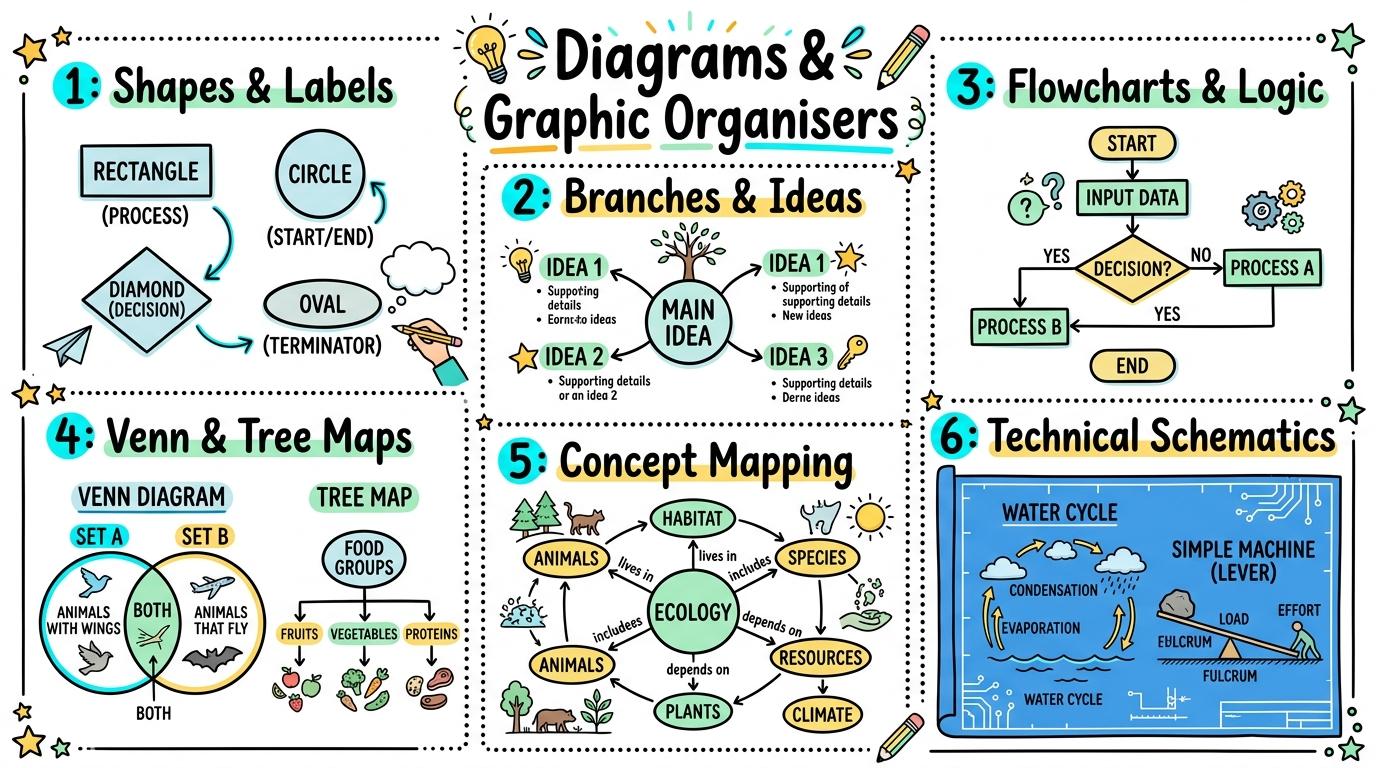
Diagrams & Graphic Organisers
1
2
3
4
5
6
Creating, structuring, and communicating complex ideas through digital visual diagrams, mind maps, flowcharts, and concept maps.
Shapes & Labels
Drag, place, and label simple visual shapes and picture nodes to organize items into visual categories.
Let's Go!
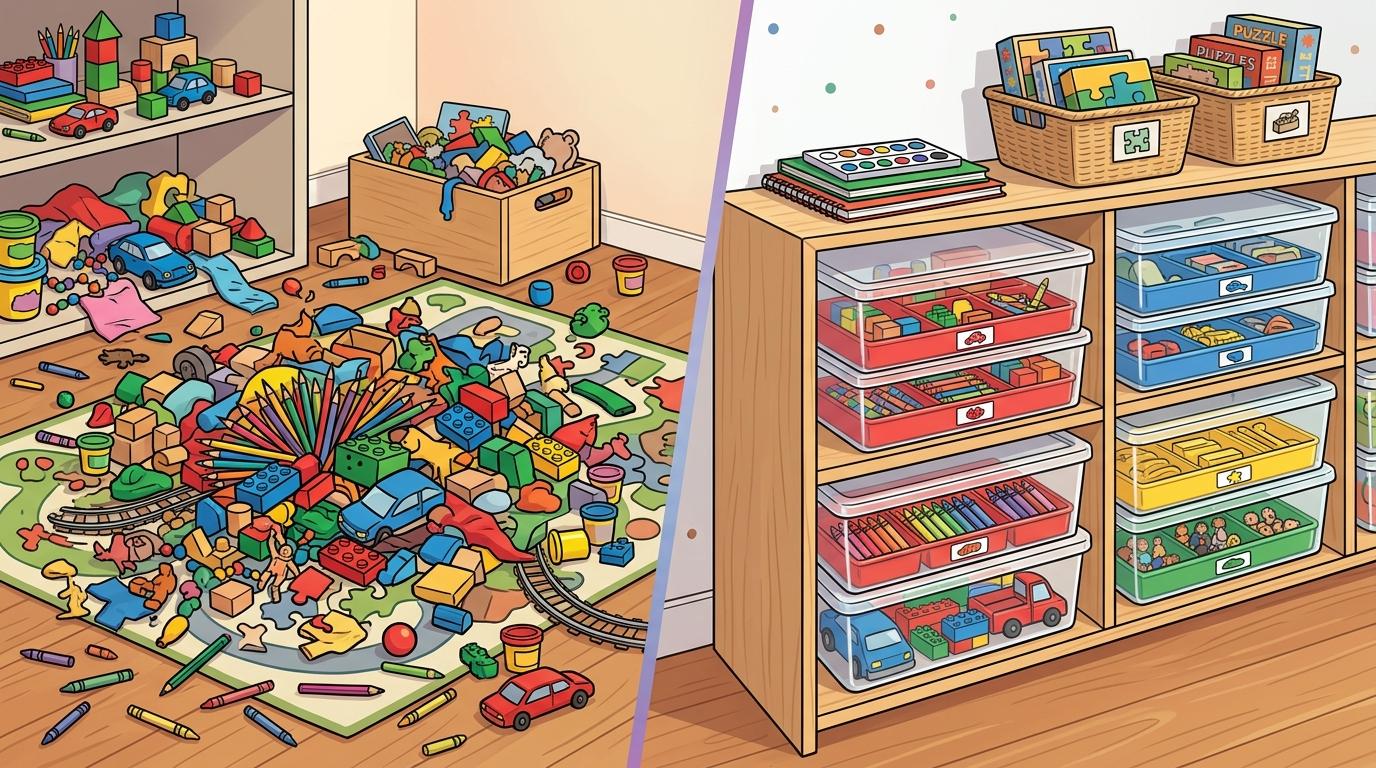
Routine: See-Think-Wonder
Look at a messy pile of toys versus toys sorted into labelled bins. How does visual organization help us find things quickly?
Teacher note: Facilitate the See-Think-Wonder routine for 2–3 minutes. Encourage students to connect the prompt to Form (Visual grouping helps us structure thoughts and categorize items clearly.).
Learn
A diagram uses shapes called nodes to represent items or ideas. By placing items inside matching shape boxes and adding text labels, you turn a clutter of facts into an easy-to-read visual graphic organiser. In computing, visual grouping helps us structure thoughts and categorize items clearly. As you explore the interactive Diagram Builder Simulator below, focus on how to create a clean visual diagram with labeled category nodes and grouped item boxes.
Apply Simulator Skills • Try it yourself
Sort Objects into Category Nodes
🚀 Open a practice space
🌟 Student Project GuideSuccess Criteria & WAGOLL (What A Good One Looks Like)
🎯 Task Success Criteria (Rubric)
Foundation
Can drag picture nodes into labeled containers or boxes on screen.
Developing
Places items into separate shape nodes according to shared characteristics.
Secure (Goal)
Creates a clean visual diagram with labeled category nodes and grouped item boxes.
Mastery
Explains how organizing information visually makes ideas easier to understand than plain lists.
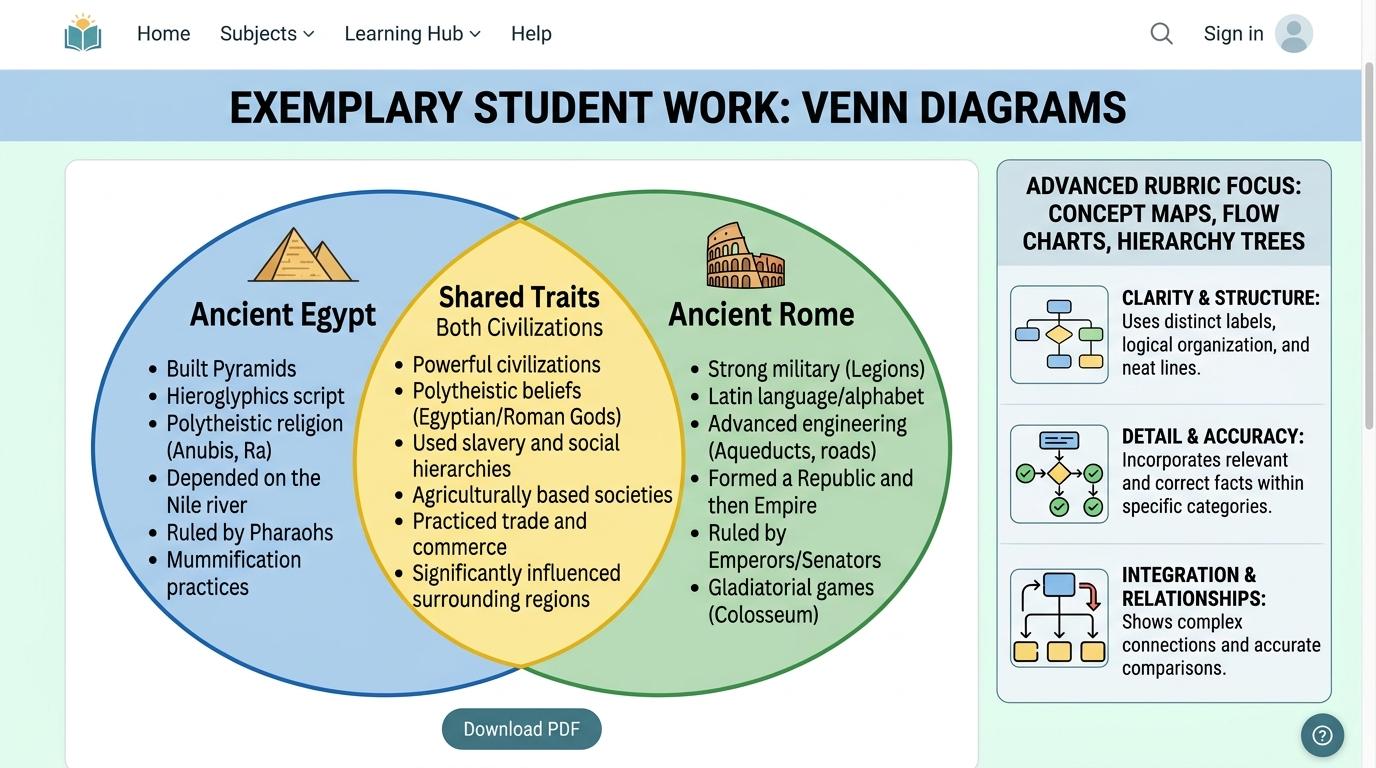
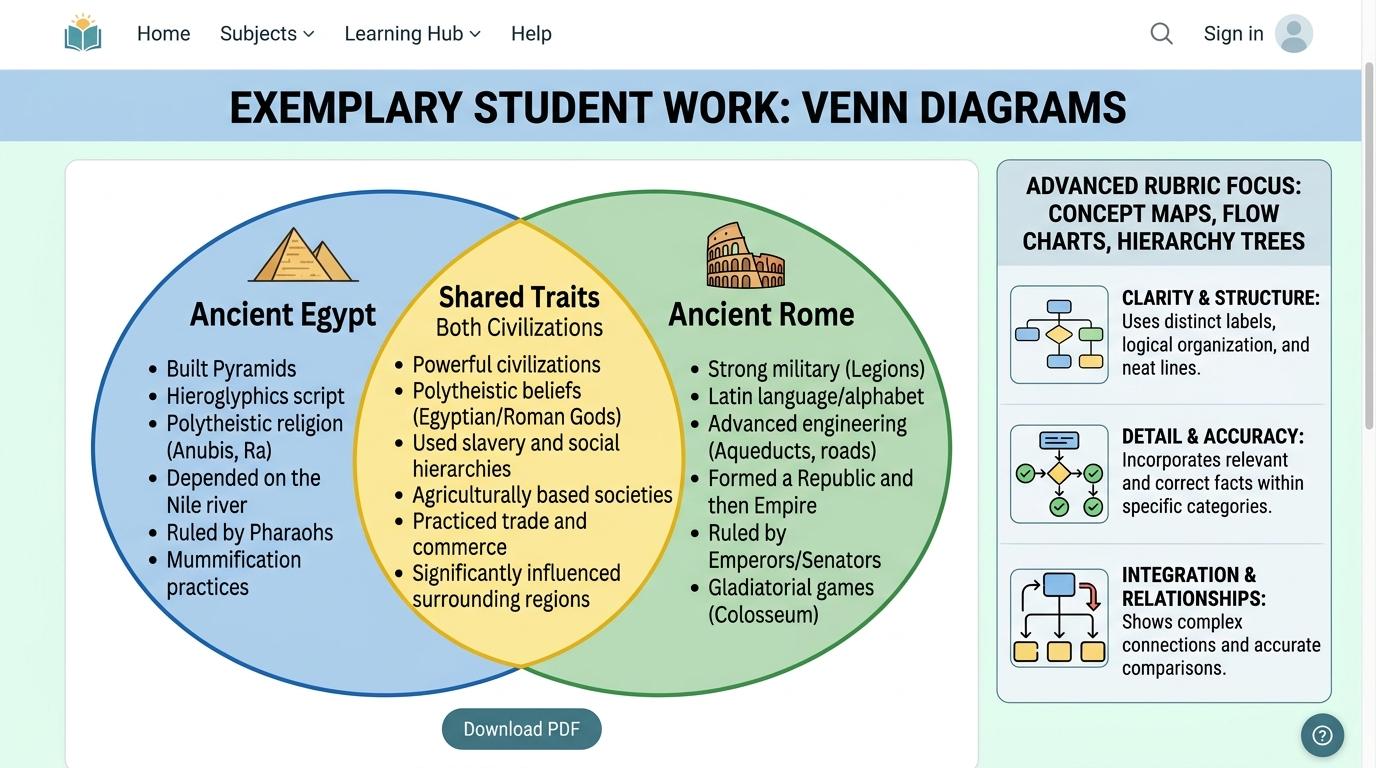
👀 What A Good One Looks Like (WAGOLL)
Exemplar of 2
 ⭐ Mastering Standard
 ⭐ Mastering Standard
📁
Save to Your Website Portfolio:
When you finish creating your project in your software, copy the share link or take a screenshot and publish it onto your student portfolio website!
Reflect
Learning check
Teacher setup, curriculum links and progress descriptors
Spark support
Routine: See-Think-Wonder
Teacher notes: Facilitate the See-Think-Wonder routine for 2–3 minutes. Encourage students to connect the prompt to Form (Visual grouping helps us structure thoughts and categorize items clearly.).
Achievement pathway
- Foundation: Can drag picture nodes into labeled containers or boxes on screen.
- Developing: Places items into separate shape nodes according to shared characteristics.
- Secure: Creates a clean visual diagram with labeled category nodes and grouped item boxes.
- Mastering: Explains how organizing information visually makes ideas easier to understand than plain lists.
Curriculum links
Curriculum strand: Digital Media and Visual Communication
Outcome: DMVC.01.B.1.1 — Drag, place, and label simple visual shapes and picture nodes to organize items into visual categories.
PYP: Form · Visual grouping helps us structure thoughts and categorize items clearly.
Learner profile: Inquirer
Competency tags
Gate support
Accessibility alternative: Students may verbally explain or point to the correct answer for "What is a "node" in a digital diagram or graphic organiser?" with a teacher or teaching assistant.
Teacher override: allow
Locked level
Level 2: Branches & Ideas
Complete the previous learning check to unlock this next level.
Branches & Ideas
Construct digital mind maps connecting a central topic node to sub-topic branches with icons and text.
Learning objective
Students will build a digital mind map radiating from a central idea node to primary and secondary sub-topic branches.
Let's Go!
Routine: Think-Pair-Share
Imagine brainstorming ideas for a school party. Why is branching out ideas on paper or screen better than writing one long list?
Teacher note: Facilitate the Think-Pair-Share routine for 2–3 minutes. Encourage students to connect the prompt to Function (Mind maps branch out from central ideas to capture creative brainstorming and structured thoughts.).
Learn
A mind map starts with one Central Topic node in the middle. Main sub-topics branch outward like tree limbs. You can add smaller child branches, use different colors for each theme, and attach icons to make thoughts visual. In computing, mind maps branch out from central ideas to capture creative brainstorming and structured thoughts. As you explore the interactive Diagram Builder Simulator below, focus on how to construct a structured multi-level mind map with color-coded branches, icons, and sub-branches.
Apply Simulator Skills • Try it yourself
Build a Brainstorming Mind Map
🚀 Open a practice space
🌟 Student Project GuideSuccess Criteria & WAGOLL (What A Good One Looks Like)
🎯 Task Success Criteria (Rubric)
Foundation
Can add a central topic shape and draw a line to one sub-topic.
Developing
Creates a mind map with a central node and 3 primary branches with text labels.
Secure (Goal)
Constructs a structured multi-level mind map with color-coded branches, icons, and sub-branches.
Mastery
Uses visual hierarchy (font size, node color, line thickness) to signal key relationships and sub-points.
👀 What A Good One Looks Like (WAGOLL)
Exemplar of 2
⭐ Mastering Standard⭐ Mastering Standard📁
Save to Your Website Portfolio:
When you finish creating your project in your software, copy the share link or take a screenshot and publish it onto your student portfolio website!
Reflect
Learning check
Teacher setup, curriculum links and progress descriptors
Spark support
Routine: Think-Pair-Share
Teacher notes: Facilitate the Think-Pair-Share routine for 2–3 minutes. Encourage students to connect the prompt to Function (Mind maps branch out from central ideas to capture creative brainstorming and structured thoughts.).
Achievement pathway
- Foundation: Can add a central topic shape and draw a line to one sub-topic.
- Developing: Creates a mind map with a central node and 3 primary branches with text labels.
- Secure: Constructs a structured multi-level mind map with color-coded branches, icons, and sub-branches.
- Mastering: Uses visual hierarchy (font size, node color, line thickness) to signal key relationships and sub-points.
Curriculum links
Curriculum strand: Digital Media and Visual Communication
Outcome: DMVC.01.B.1.2 — Construct digital mind maps connecting a central topic node to sub-topic branches with icons and text.
PYP: Function · Mind maps branch out from central ideas to capture creative brainstorming and structured thoughts.
Learner profile: Communicator
Competency tags
Gate support
Accessibility alternative: Students may verbally explain or point to the correct answer for "Where does the main topic go in a mind map diagram?" with a teacher or teaching assistant.
Teacher override: allow
Locked level
Level 3: Flowcharts & Logic
Complete the previous learning check to unlock this next level.
Flowcharts & Logic
Construct sequential process flowcharts using standard start/end ovals, action rectangles, and directional arrows.
Learning objective
Students will use standard flowchart symbols to visually model a step-by-step real-world or digital procedure.
Let's Go!
Routine: See-Think-Wonder
Look at a flowchart for making toast. Why do we use arrows pointing in one direction between steps?
Teacher note: Facilitate the See-Think-Wonder routine for 2–3 minutes. Encourage students to connect the prompt to Connection (Flowcharts visually map out step-by-step processes and algorithms clearly.).
Learn
Flowcharts map out processes step by step. Standard shapes have special meanings: Ovals mean Start or Stop, Rectangles show Action steps, and Connector Arrows point the direction the process flows. In computing, flowcharts visually map out step-by-step processes and algorithms clearly. As you explore the interactive Diagram Builder Simulator below, focus on how to construct a complete process flowchart using correct standard symbols (Ovals for Start/End, Rectangles for Actions).
Apply Simulator Skills • Try it yourself
Map Out a Daily Routine Flowchart
🚀 Open a practice space
🌟 Student Project GuideSuccess Criteria & WAGOLL (What A Good One Looks Like)
🎯 Task Success Criteria (Rubric)
Foundation
Recognizes directional arrows connecting sequential steps in a diagram.
Developing
Uses start ovals and action rectangles to map out a 3-step routine.
Secure (Goal)
Constructs a complete process flowchart using correct standard symbols (Ovals for Start/End, Rectangles for Actions).
Mastery
Traces execution paths through complex flowcharts to audit logic and step sequence.
👀 What A Good One Looks Like (WAGOLL)
Exemplar of 2
⭐ Mastering Standard⭐ Mastering Standard📁
Save to Your Website Portfolio:
When you finish creating your project in your software, copy the share link or take a screenshot and publish it onto your student portfolio website!
Reflect
Learning check
Teacher setup, curriculum links and progress descriptors
Spark support
Routine: See-Think-Wonder
Teacher notes: Facilitate the See-Think-Wonder routine for 2–3 minutes. Encourage students to connect the prompt to Connection (Flowcharts visually map out step-by-step processes and algorithms clearly.).
Achievement pathway
- Foundation: Recognizes directional arrows connecting sequential steps in a diagram.
- Developing: Uses start ovals and action rectangles to map out a 3-step routine.
- Secure: Constructs a complete process flowchart using correct standard symbols (Ovals for Start/End, Rectangles for Actions).
- Mastering: Traces execution paths through complex flowcharts to audit logic and step sequence.
Curriculum links
Curriculum strand: Digital Media and Visual Communication
Outcome: DMVC.02.B.1.1 — Construct sequential process flowcharts using standard start/end ovals, action rectangles, and directional arrows.
PYP: Connection · Flowcharts visually map out step-by-step processes and algorithms clearly.
Learner profile: Thinker
Competency tags
Gate support
Accessibility alternative: Students may verbally explain or point to the correct answer for "In a standard flowchart, what shape is used to represent an Action step?" with a teacher or teaching assistant.
Teacher override: allow
Locked level
Level 4: Venn & Tree Maps
Complete the previous learning check to unlock this next level.
Venn & Tree Maps
Create digital overlapping Venn diagrams and hierarchical classification trees to compare and group data sets.
Learning objective
Students will design digital Venn diagrams and hierarchical tree charts to organize shared and unique characteristics.
Let's Go!
Routine: Think-Pair-Share
If we compare a Frog and a Fish, where do we place "Has Legs" versus "Lays Eggs in Water" on a Venn diagram?
Teacher note: Facilitate the Think-Pair-Share routine for 2–3 minutes. Encourage students to connect the prompt to Responsibility (Overlapping shapes and hierarchical trees allow us to organize relationships and compare attributes efficiently.).
Learn
Venn diagrams use overlapping circles to compare items: unique traits go in separate outer circles, while shared traits go in the overlapping intersection. Tree diagrams use branching lines from top to bottom to show classification hierarchies. In computing, overlapping shapes and hierarchical trees allow us to organize relationships and compare attributes efficiently. As you explore the interactive Diagram Builder Simulator below, focus on how to construct both a 2-circle Venn comparison diagram and a 3-level hierarchical classification tree with proper labels.
Apply Simulator Skills • Try it yourself
Build a Science Comparison Venn Diagram
🚀 Open a practice space
🌟 Student Project GuideSuccess Criteria & WAGOLL (What A Good One Looks Like)
🎯 Task Success Criteria (Rubric)
Foundation
Identifies the overlapping middle section of a 2-circle Venn diagram.
Developing
Places unique items in outer circles and shared items in the middle overlap of a Venn diagram.
Secure (Goal)
Constructs both a 2-circle Venn comparison diagram and a 3-level hierarchical classification tree with proper labels.
Mastery
Evaluates whether a Venn diagram or tree diagram is more appropriate for representing complex nested relationships.
👀 What A Good One Looks Like (WAGOLL)
Exemplar of 2
⭐ Mastering Standard⭐ Mastering Standard📁
Save to Your Website Portfolio:
When you finish creating your project in your software, copy the share link or take a screenshot and publish it onto your student portfolio website!
Reflect
Learning check
Teacher setup, curriculum links and progress descriptors
Spark support
Routine: Think-Pair-Share
Teacher notes: Facilitate the Think-Pair-Share routine for 2–3 minutes. Encourage students to connect the prompt to Responsibility (Overlapping shapes and hierarchical trees allow us to organize relationships and compare attributes efficiently.).
Achievement pathway
- Foundation: Identifies the overlapping middle section of a 2-circle Venn diagram.
- Developing: Places unique items in outer circles and shared items in the middle overlap of a Venn diagram.
- Secure: Constructs both a 2-circle Venn comparison diagram and a 3-level hierarchical classification tree with proper labels.
- Mastering: Evaluates whether a Venn diagram or tree diagram is more appropriate for representing complex nested relationships.
Curriculum links
Curriculum strand: Digital Media and Visual Communication
Outcome: DMVC.02.B.1.2 — Create digital overlapping Venn diagrams and hierarchical classification trees to compare and group data sets.
PYP: Responsibility · Overlapping shapes and hierarchical trees allow us to organize relationships and compare attributes efficiently.
Learner profile: Principled
Competency tags
Gate support
Accessibility alternative: Students may verbally explain or point to the correct answer for "What belongs in the overlapping center section of a 2-circle Venn diagram?" with a teacher or teaching assistant.
Teacher override: allow
Locked level
Level 5: Concept Mapping
Complete the previous learning check to unlock this next level.
Concept Mapping
Build relational concept maps with labelled linking arrows to model complex cause-and-effect systems.
Learning objective
Students will construct a concept map connecting concept nodes with prepositional linking verbs (e.g. "leads to", "causes", "requires").
Let's Go!
Routine: See-Think-Wonder
Look at two nodes: "Sunlight" and "Plant Growth". What linking words (like "provides energy for") explain how they interact?
Teacher note: Facilitate the See-Think-Wonder routine for 2–3 minutes. Encourage students to connect the prompt to Perspective (Concept maps use linking phrases to define dynamic relationships across complex systems.).
Learn
Unlike mind maps, Concept Maps connect any two nodes with a arrow and a Linking Phrase (e.g., "Deforestation" -> [causes] -> "Soil Erosion"). Linking phrases turn lines into complete readable propositions: Concept A -> Link -> Concept B. In computing, concept maps use linking phrases to define dynamic relationships across complex systems. As you explore the interactive Diagram Builder Simulator below, focus on how to construct a concept map where every connecting line features a clear linking phrase explaining the relationship.
Apply Simulator Skills • Try it yourself
Model an Ecosystem Concept Map
🚀 Open a practice space
🌟 Student Project GuideSuccess Criteria & WAGOLL (What A Good One Looks Like)
🎯 Task Success Criteria (Rubric)
Foundation
Understands that lines in concept maps show connections between concepts.
Developing
Connects concept nodes using directional arrows.
Secure (Goal)
Constructs a concept map where every connecting line features a clear linking phrase explaining the relationship.
Mastery
Identifies cross-links between distant nodes to demonstrate holistic systems thinking.
👀 What A Good One Looks Like (WAGOLL)
Exemplar of 2
⭐ Mastering Standard⭐ Mastering Standard📁
Save to Your Website Portfolio:
When you finish creating your project in your software, copy the share link or take a screenshot and publish it onto your student portfolio website!
Reflect
Learning check
Teacher setup, curriculum links and progress descriptors
Spark support
Routine: See-Think-Wonder
Teacher notes: Facilitate the See-Think-Wonder routine for 2–3 minutes. Encourage students to connect the prompt to Perspective (Concept maps use linking phrases to define dynamic relationships across complex systems.).
Achievement pathway
- Foundation: Understands that lines in concept maps show connections between concepts.
- Developing: Connects concept nodes using directional arrows.
- Secure: Constructs a concept map where every connecting line features a clear linking phrase explaining the relationship.
- Mastering: Identifies cross-links between distant nodes to demonstrate holistic systems thinking.
Curriculum links
Curriculum strand: Digital Media and Visual Communication
Outcome: DMVC.03.B.1.1 — Build relational concept maps with labelled linking arrows to model complex cause-and-effect systems.
PYP: Perspective · Concept maps use linking phrases to define dynamic relationships across complex systems.
Learner profile: Knowledgeable
Competency tags
Gate support
Accessibility alternative: Students may verbally explain or point to the correct answer for "In a concept map, what is the purpose of a "linking phrase" on a line?" with a teacher or teaching assistant.
Teacher override: allow
Locked level
Level 6: Technical Schematics
Complete the previous learning check to unlock this next level.
Technical Schematics
Design multi-layered technical diagrams, system architectures, and interactive schematics with linked callouts.
Learning objective
Students will design a multi-layered technical schematic with numbered callout markers, legend keys, and precision alignment.
Let's Go!
Routine: Think-Pair-Share
Look at a blueprint for a school building. How do architects use layers, symbols, and legends so workers don't get confused?
Teacher note: Facilitate the Think-Pair-Share routine for 2–3 minutes. Encourage students to connect the prompt to Reflection (Technical schematics and layered architectural diagrams allow engineers to communicate complex systems precisely.).
Learn
Technical diagrams require precision. Use alignment grids to snap shapes into position, create separate layers for structure vs wiring, add numbered callout pins pointing to key components, and provide a clear Legend Key explaining all symbols. In computing, technical schematics and layered architectural diagrams allow engineers to communicate complex systems precisely. As you explore the interactive Diagram Builder Simulator below, focus on how to construct a multi-layer technical schematic featuring alignment grids, legend keys, and interactive callout notes.
Apply Simulator Skills • Try it yourself
Create a Smart Classroom Schematic
🚀 Open a practice space
🌟 Student Project GuideSuccess Criteria & WAGOLL (What A Good One Looks Like)
🎯 Task Success Criteria (Rubric)
Foundation
Identifies legend symbols on a technical diagram map or schematic.
Developing
Adds numbered callout labels to point out components on a diagram.
Secure (Goal)
Constructs a multi-layer technical schematic featuring alignment grids, legend keys, and interactive callout notes.
Mastery
Evaluates technical diagram precision, standard symbol usage, and architectural clarity against professional CAD standards.
👀 What A Good One Looks Like (WAGOLL)
Exemplar of 2
⭐ Mastering Standard⭐ Mastering Standard📁
Save to Your Website Portfolio:
When you finish creating your project in your software, copy the share link or take a screenshot and publish it onto your student portfolio website!
Reflect
Learning check
Teacher setup, curriculum links and progress descriptors
Spark support
Routine: Think-Pair-Share
Teacher notes: Facilitate the Think-Pair-Share routine for 2–3 minutes. Encourage students to connect the prompt to Reflection (Technical schematics and layered architectural diagrams allow engineers to communicate complex systems precisely.).
Achievement pathway
- Foundation: Identifies legend symbols on a technical diagram map or schematic.
- Developing: Adds numbered callout labels to point out components on a diagram.
- Secure: Constructs a multi-layer technical schematic featuring alignment grids, legend keys, and interactive callout notes.
- Mastering: Evaluates technical diagram precision, standard symbol usage, and architectural clarity against professional CAD standards.
Curriculum links
Curriculum strand: Digital Media and Visual Communication
Outcome: DMVC.03.B.1.2 — Design multi-layered technical diagrams, system architectures, and interactive schematics with linked callouts.
PYP: Reflection · Technical schematics and layered architectural diagrams allow engineers to communicate complex systems precisely.
Learner profile: Reflective
Competency tags
Gate support
Accessibility alternative: Students may verbally explain or point to the correct answer for "What is the function of a Legend Key on a technical diagram or schematic?" with a teacher or teaching assistant.
Teacher override: allow