
Learning objective
Kind Online Behaviour
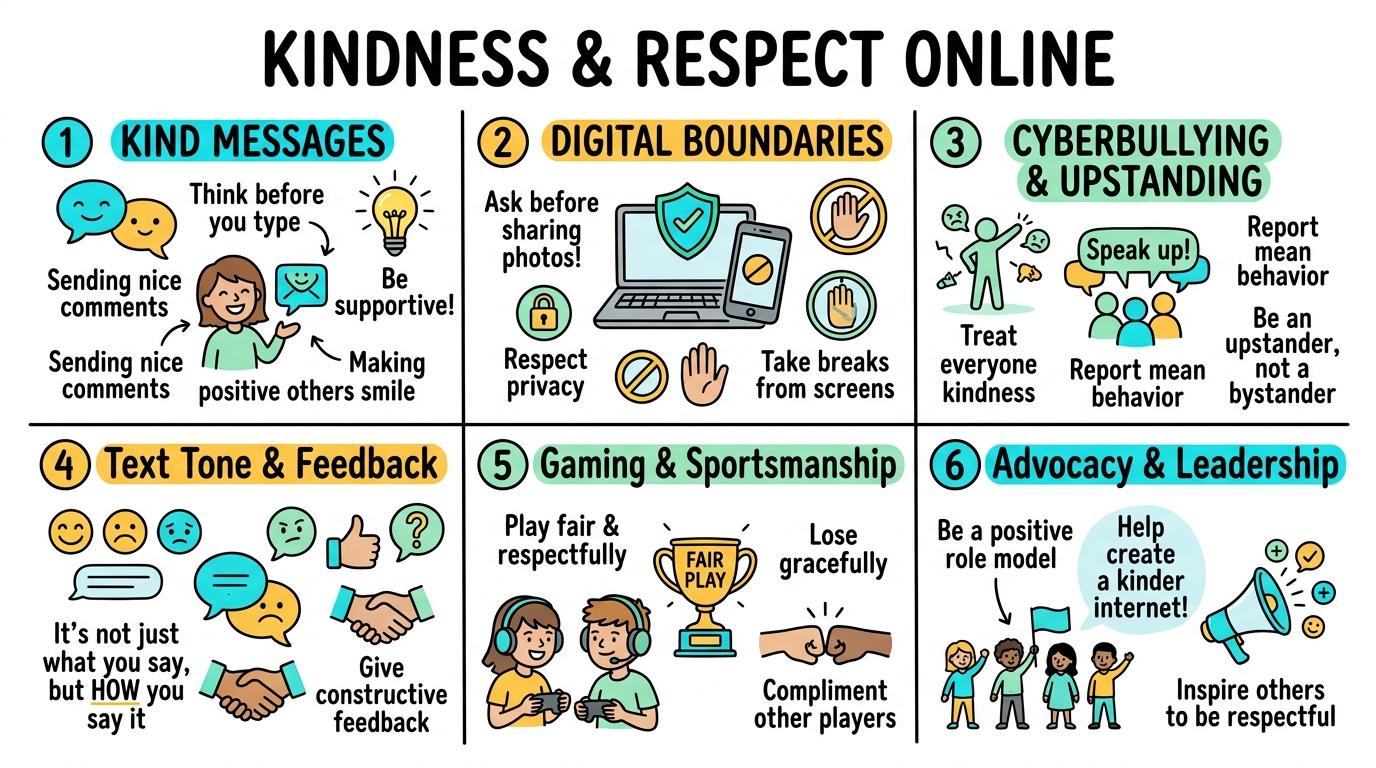
Kindness & Respect Online
1
2
3
4
5
6
Developing digital empathy, positive online etiquette, constructive messaging, cyberbullying prevention, and respectful communication across digital communities.
Kind Messages
Understand that digital messages should be kind, polite, and encouraging to others.
Let's Go!
Routine: See-Think-Wonder
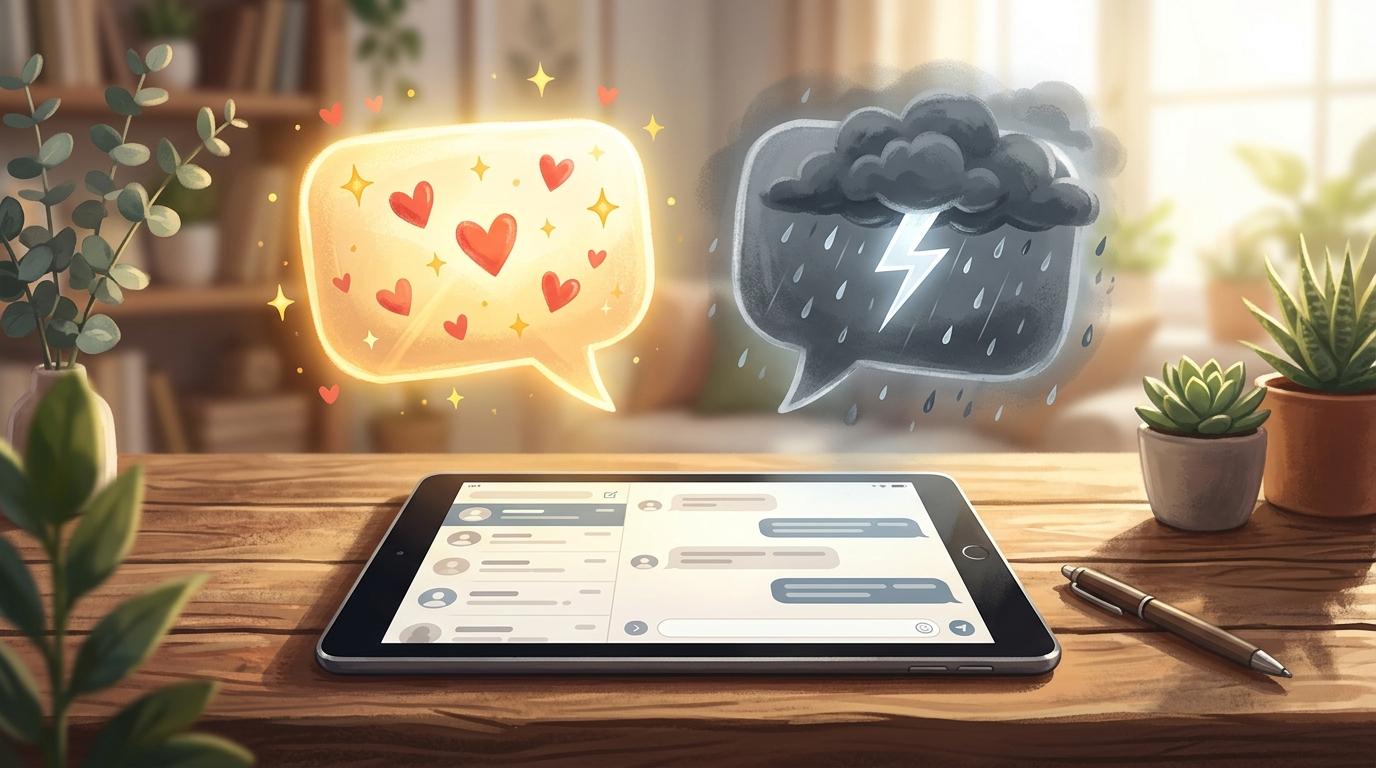
Look at two messages: "Great job on your drawing! 🌟" vs "This is bad." How do these words feel different to read?
Teacher note: Facilitate the See-Think-Wonder routine for 2–3 minutes. Encourage students to connect the prompt to Form (Positive digital communication builds a caring classroom community.).
Learn
When we chat or leave comments online, our words travel through screens to real people. Using encouraging words, smiley emojis, and polite phrasing makes our digital spaces happy and safe for everyone. In computing, positive digital communication builds a caring classroom community. As you explore the interactive Social Privacy Simulator below, focus on how to independently sends kind comments and encouraging feedback on peer work.
Apply Simulator Skills • Try it yourself
Send a Kindness Note
🚀 Open a practice space
🌟 Student Project GuideSuccess Criteria & WAGOLL (What A Good One Looks Like)
🎯 Task Success Criteria (Rubric)
Foundation
Identifies happy/kind emojis and friendly words in simple digital messages.
Developing
Composes simple polite messages with teacher support.
Secure (Goal)
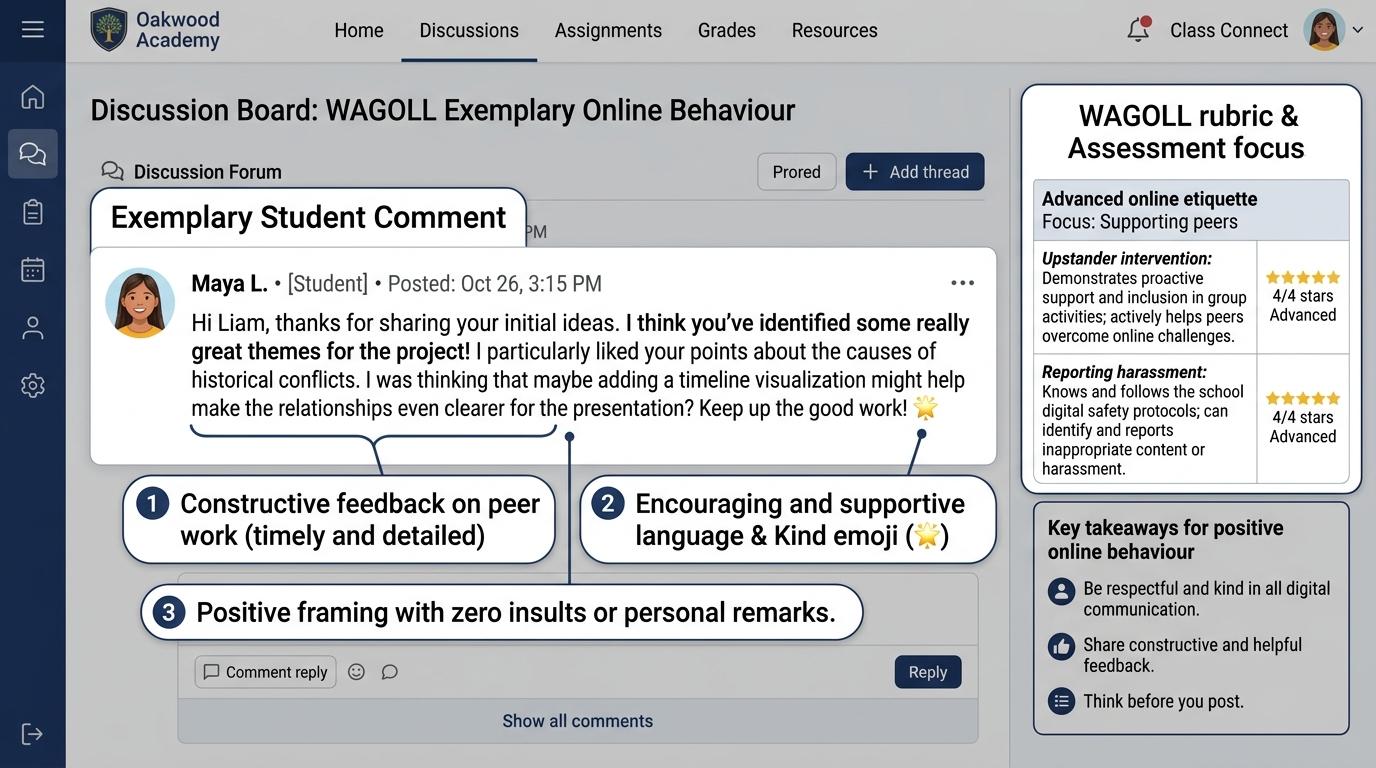
Independently sends kind comments and encouraging feedback on peer work.
Mastery
Explains how kind digital words make others feel supported and builds positive class culture.
👀 What A Good One Looks Like (WAGOLL)
 ⭐ Mastering Standard
📁
Save to Your Website Portfolio:
When you finish creating your project in your software, copy the share link or take a screenshot and publish it onto your student portfolio website!
Reflect
Learning check
Teacher setup, curriculum links and progress descriptors
Spark support
Routine: See-Think-Wonder
Teacher notes: Facilitate the See-Think-Wonder routine for 2–3 minutes. Encourage students to connect the prompt to Form (Positive digital communication builds a caring classroom community.).
Achievement pathway
- Foundation: Identifies happy/kind emojis and friendly words in simple digital messages.
- Developing: Composes simple polite messages with teacher support.
- Secure: Independently sends kind comments and encouraging feedback on peer work.
- Mastering: Explains how kind digital words make others feel supported and builds positive class culture.
Curriculum links
Curriculum strand: Online Safety
Outcome: KIND.01.B.1.1 — Understand that digital messages should be kind, polite, and encouraging to others.
PYP: Form · Positive digital communication builds a caring classroom community.
Learner profile: Caring
Competency tags
Gate support
Accessibility alternative: Students may verbally explain or point to the correct answer for "A classmate shares a drawing online. What is the kindest comment to leave?" with a teacher or teaching assistant.
Teacher override: allow
Locked level
Level 2: Digital Boundaries
Complete the previous learning check to unlock this next level.
Digital Boundaries
Practice digital etiquette by asking permission before sharing photos or work created by peers.
Learning objective
Students will ask permission before sharing photos, audio, or projects belonging to classmates.
Let's Go!
Routine: Think-Pair-Share
Imagine someone takes a picture of you without asking and posts it online. How would you feel?
Teacher note: Facilitate the Think-Pair-Share routine for 2–3 minutes. Encourage students to connect the prompt to Function (Respecting others' digital boundaries protects individual rights and feelings.).
Learn
Before taking a photo of a classmate, recording their voice, or sharing their project, always ask: "May I share this?" Respecting their choice ensures everyone feels safe and respected. In computing, respecting others' digital boundaries protects individual rights and feelings. As you explore the interactive Formatting Toolbar Simulator below, focus on how to consistently seeks explicit consent before recording or sharing peer creations.
Apply Simulator Skills • Try it yourself
Ask Before Sharing
🚀 Open a practice space
🌟 Student Project GuideSuccess Criteria & WAGOLL (What A Good One Looks Like)
🎯 Task Success Criteria (Rubric)
Foundation
Understands that peer work and photos belong to the creator.
Developing
Asks a peer for permission before showing their work to others.
Secure (Goal)
Consistently seeks explicit consent before recording or sharing peer creations.
Mastery
Advocates for digital boundaries and respects peer privacy preferences in all projects.
👀 What A Good One Looks Like (WAGOLL)
⭐ Mastering Standard📁
Save to Your Website Portfolio:
When you finish creating your project in your software, copy the share link or take a screenshot and publish it onto your student portfolio website!
Reflect
Learning check
Teacher setup, curriculum links and progress descriptors
Spark support
Routine: Think-Pair-Share
Teacher notes: Facilitate the Think-Pair-Share routine for 2–3 minutes. Encourage students to connect the prompt to Function (Respecting others' digital boundaries protects individual rights and feelings.).
Achievement pathway
- Foundation: Understands that peer work and photos belong to the creator.
- Developing: Asks a peer for permission before showing their work to others.
- Secure: Consistently seeks explicit consent before recording or sharing peer creations.
- Mastering: Advocates for digital boundaries and respects peer privacy preferences in all projects.
Curriculum links
Curriculum strand: Online Safety
Outcome: KIND.02.B.1.2 — Practice digital etiquette by asking permission before sharing photos or work created by peers.
PYP: Function · Respecting others' digital boundaries protects individual rights and feelings.
Learner profile: Communicator
Competency tags
Gate support
Accessibility alternative: Students may verbally explain or point to the correct answer for "You want to post a video of your friend singing in class. What should you do first?" with a teacher or teaching assistant.
Teacher override: allow
Locked level
Level 3: Cyberbullying & Upstanding
Complete the previous learning check to unlock this next level.
Cyberbullying & Upstanding
Recognize cyberbullying behaviors and demonstrate upstander strategies to support targeted peers.
Learning objective
Students will distinguish between accidental mistakes and repeated cyberbullying, applying upstander tactics.
Let's Go!
Routine: Chalk Talk
What is the difference between watching someone be mistreated online (bystander) and taking action to help (upstander)?
Teacher note: Facilitate the Chalk Talk routine for 2–3 minutes. Encourage students to connect the prompt to Connection (Upstanders use empathy and reporting tools to counter online harm.).
Learn
Cyberbullying is when someone repeatedly uses digital tools to hurt, exclude, or embarrass others. Instead of standing by or forwarding mean content, an UPSTANDER supports the target, saves evidence, and tells a trusted adult. In computing, upstanders use empathy and reporting tools to counter online harm. As you explore the interactive Safety Shield Simulator below, focus on how to apply upstander strategies: comforting targets, reporting mean posts, avoiding re-sharing.
✋ 5-Finger Trusted Adults Network Hand
Identify 5 distinct trusted people in your personal safety network:
ThumbEmpty
IndexEmpty
MiddleEmpty
RingEmpty
PinkyEmpty
📞 Official Child Support & Helplines
Childline (UK & International)Free, 24/7 confidential advice for any child under 19. Call 0800 1111.
CEOP Safety CentreOfficial Police Online Safety Reporting for inappropriate contact.
Internet Watch Foundation (IWF)Confidential anonymous reporting of criminal or disturbing online imagery.
Apply Simulator Skills • Try it yourself
Upstander Action Plan
🚀 Open a practice space
🌟 Student Project GuideSuccess Criteria & WAGOLL (What A Good One Looks Like)
🎯 Task Success Criteria (Rubric)
Foundation
Defines cyberbullying as repeated mean behavior online.
Developing
Identifies the difference between a bystander and an upstander.
Secure (Goal)
Applies upstander strategies: comforting targets, reporting mean posts, avoiding re-sharing.
Mastery
Role-models proactive upstander habits in digital group spaces.
👀 What A Good One Looks Like (WAGOLL)
⭐ Mastering Standard📁
Save to Your Website Portfolio:
When you finish creating your project in your software, copy the share link or take a screenshot and publish it onto your student portfolio website!
Reflect
Learning check
Teacher setup, curriculum links and progress descriptors
Spark support
Routine: Chalk Talk
Teacher notes: Facilitate the Chalk Talk routine for 2–3 minutes. Encourage students to connect the prompt to Connection (Upstanders use empathy and reporting tools to counter online harm.).
Achievement pathway
- Foundation: Defines cyberbullying as repeated mean behavior online.
- Developing: Identifies the difference between a bystander and an upstander.
- Secure: Applies upstander strategies: comforting targets, reporting mean posts, avoiding re-sharing.
- Mastering: Role-models proactive upstander habits in digital group spaces.
Curriculum links
Curriculum strand: Online Safety
Outcome: KIND.03.B.1.3 — Recognize cyberbullying behaviors and demonstrate upstander strategies to support targeted peers.
PYP: Connection · Upstanders use empathy and reporting tools to counter online harm.
Learner profile: Thinker
Competency tags
Gate support
Accessibility alternative: Students may verbally explain or point to the correct answer for "You see a group chat where kids are repeatedly excluding a classmate. What should an upstander do?" with a teacher or teaching assistant.
Teacher override: allow
Locked level
Level 4: Text Tone & Feedback
Complete the previous learning check to unlock this next level.
Text Tone & Feedback
Evaluate text tone and deliver constructive, respectful peer feedback during collaborative digital work.
Learning objective
Students will analyze how text formatting affects emotional tone and compose constructive critique.
Let's Go!
Routine: Sentence Strip Rewrite
Compare: "THIS IS WRONG FIX IT NOW!!!" vs "I noticed a small spelling typo in slide 3. Great work overall!" How does tone change meaning?
Teacher note: Facilitate the Sentence Strip Rewrite routine for 2–3 minutes. Encourage students to connect the prompt to Responsibility (Thoughtful digital tone and constructive feedback strengthen collaborative projects.).
Learn
Without facial expressions or tone of voice, written text can easily be misunderstood. Typing in ALL CAPS feels like shouting. Effective digital collaborators use neutral, polite language and frame critique constructively using the sandwich method (Compliment - Suggestion - Encouragement).
Capture Mode:Fullscreen Snip
⌨️ Shortcut: PrtScn or Win + Shift + S
Ready to Capture
Science Project
School Browser
Recycle Bin
Golden Retriever Puppy
Loyal, gentle family dog known for intelligence and playful temperament.
Owner ID: Sarah_Smith_Room12 (Confidential Data)
📄 Student Science Report (Pastepad)
Click 'Ctrl+V Paste Snip' or press Ctrl+V to attach captured screenshot into your document.
Apply Simulator Skills • Try it yourself
Tone & Feedback Audit
🚀 Open a practice space
🌟 Student Project GuideSuccess Criteria & WAGOLL (What A Good One Looks Like)
🎯 Task Success Criteria (Rubric)
Foundation
Recognizes that ALL CAPS can feel like shouting text online.
Developing
Edits rude or aggressive text to sound polite and neutral.
Secure (Goal)
Provides balanced feedback using Praise-Suggest-Praise structure.
Mastery
Mentors peers on maintaining professional, respectful tone in digital collaborations.
👀 What A Good One Looks Like (WAGOLL)
⭐ Mastering Standard📁
Save to Your Website Portfolio:
When you finish creating your project in your software, copy the share link or take a screenshot and publish it onto your student portfolio website!
Reflect
Learning check
Teacher setup, curriculum links and progress descriptors
Spark support
Routine: Sentence Strip Rewrite
Teacher notes: Facilitate the Sentence Strip Rewrite routine for 2–3 minutes. Encourage students to connect the prompt to Responsibility (Thoughtful digital tone and constructive feedback strengthen collaborative projects.).
Achievement pathway
- Foundation: Recognizes that ALL CAPS can feel like shouting text online.
- Developing: Edits rude or aggressive text to sound polite and neutral.
- Secure: Provides balanced feedback using Praise-Suggest-Praise structure.
- Mastering: Mentors peers on maintaining professional, respectful tone in digital collaborations.
Curriculum links
Curriculum strand: Online Safety
Outcome: KIND.04.B.1.4 — Evaluate text tone and deliver constructive, respectful peer feedback during collaborative digital work.
PYP: Responsibility · Thoughtful digital tone and constructive feedback strengthen collaborative projects.
Learner profile: Principled
Competency tags
Gate support
Accessibility alternative: Students may verbally explain or point to the correct answer for "Which sentence gives constructive feedback on a peer's digital poster?" with a teacher or teaching assistant.
Teacher override: allow
Locked level
Level 5: Gaming & Sportsmanship
Complete the previous learning check to unlock this next level.
Gaming & Sportsmanship
Demonstrate digital empathy and sportsmanship in multiplayer environments and online communities.
Learning objective
Students will analyze online gaming interactions and implement strategies to counter toxic gaming behavior.
Let's Go!
Routine: Perspective Taking
How do you feel when someone says "gg" (good game) vs spamming "ez" (easy) after a match?
Teacher note: Facilitate the Perspective Taking routine for 2–3 minutes. Encourage students to connect the prompt to Perspective (Empathy and sportsmanship foster inclusive global gaming and learning communities.).
Learn
Online games are global meeting places. Toxic behavior (griefing, rage-quitting, trash-talking) ruins fun for everyone. Digital citizens practice good sportsmanship by encouraging teammates, congratulating opponents ("GG"), and reporting toxic players. In computing, empathy and sportsmanship foster inclusive global gaming and learning communities. As you explore the interactive Search Browser Simulator below, focus on how to demonstrate inclusive habits by inviting new players and shutting down toxic chat.
Apply Simulator Skills • Try it yourself
Draft Gaming Code of Conduct
🚀 Open a practice space
🌟 Student Project GuideSuccess Criteria & WAGOLL (What A Good One Looks Like)
🎯 Task Success Criteria (Rubric)
Foundation
Identifies good sportsmanship vs bad sportsmanship in online games.
Developing
Responds calmly to losing or winning in online multiplayer matches.
Secure (Goal)
Demonstrates inclusive habits by inviting new players and shutting down toxic chat.
Mastery
Designs community guidelines for respectful multiplayer gaming servers.
👀 What A Good One Looks Like (WAGOLL)
⭐ Mastering Standard📁
Save to Your Website Portfolio:
When you finish creating your project in your software, copy the share link or take a screenshot and publish it onto your student portfolio website!
Reflect
Learning check
Teacher setup, curriculum links and progress descriptors
Spark support
Routine: Perspective Taking
Teacher notes: Facilitate the Perspective Taking routine for 2–3 minutes. Encourage students to connect the prompt to Perspective (Empathy and sportsmanship foster inclusive global gaming and learning communities.).
Achievement pathway
- Foundation: Identifies good sportsmanship vs bad sportsmanship in online games.
- Developing: Responds calmly to losing or winning in online multiplayer matches.
- Secure: Demonstrates inclusive habits by inviting new players and shutting down toxic chat.
- Mastering: Designs community guidelines for respectful multiplayer gaming servers.
Curriculum links
Curriculum strand: Online Safety
Outcome: KIND.05.B.1.5 — Demonstrate digital empathy and sportsmanship in multiplayer environments and online communities.
PYP: Perspective · Empathy and sportsmanship foster inclusive global gaming and learning communities.
Learner profile: Knowledgeable
Competency tags
Gate support
Accessibility alternative: Students may verbally explain or point to the correct answer for "After winning a close multiplayer match, what is the most respectful message to send in chat?" with a teacher or teaching assistant.
Teacher override: allow
Locked level
Level 6: Advocacy & Leadership
Complete the previous learning check to unlock this next level.
Advocacy & Leadership
Lead digital citizenship initiatives to combat online harassment and champion inclusive digital culture.
Learning objective
Students will design and publish a school-wide campaign promoting digital kindness and countering online hate.
Let's Go!
Routine: Compass Points
What WORRIES you about online comments today, and what INSPIRES you to build a kinder digital world?
Teacher note: Facilitate the Compass Points routine for 2–3 minutes. Encourage students to connect the prompt to Reflection (Student advocates shape positive digital cultures through education, policy, and creative campaigns.).
Learn
As senior primary students, you are leaders in digital spaces. Beyond personal kindness, you can advocate for systemic change by raising awareness against hate speech, creating campaign media, establishing peer support networks, and modeling digital citizenship.
Cybersecurity & Scam Defense Audit Engine
Master Security Audits, Threat Analysis & Defense-in-Depth
LEVEL 1 • BRONZEOS6 • Free Gift Traps
Deceptive Reward Screen Detection
Review the incoming web element. Identify signs of fraudulent "Free Prize" lures before taking action.
🛡️ Security Inspector & Triage
THREAT LEVEL: UNRATED📋 NIST Cybersecurity Framework Mapping
CSF v2.0IDIdentifyAsset & Threat Identification
PRProtectSafeguards & MFA
DEDetectAnomalies & Phishing
RSRespondContainment Protocol
RCRecoverRestoration & Backups
📡 Live Telemetry & Threat Vector Indicators
LIVE TELEMETRY| Metric / Indicator | Observed Value | Risk Factor |
|---|---|---|
| TLS Certificate | Self-Signed / Untrusted | HIGH |
| Sender Domain Entropy | 0.89 (Spoofed DMARC) | CRITICAL |
| Urgency Emotion Vector | Active Countdown Detected | ELEVATED |
💻 SOC Incident Event Stream & Telemetry Log
[SOC-INIT] Defense telemetry daemon active. Port 443 TLS 1.3 inspector online.
[AUDIT-READY] Simulator initialized. Select a step to commence security audit.
Apply Simulator Skills • Try it yourself
Design a Kindness Campaign
🚀 Open a practice space
🌟 Student Project GuideSuccess Criteria & WAGOLL (What A Good One Looks Like)
🎯 Task Success Criteria (Rubric)
Foundation
Recognizes hate speech and discriminatory online behavior.
Developing
Analyzes school digital interaction patterns and identifies areas for improvement.
Secure (Goal)
Designs and presents an anti-cyberbullying or digital kindness campaign.
Mastery
Leads peer mentoring workshops and evaluates campaign impact across school community.
👀 What A Good One Looks Like (WAGOLL)
⭐ Mastering Standard📁
Save to Your Website Portfolio:
When you finish creating your project in your software, copy the share link or take a screenshot and publish it onto your student portfolio website!
Reflect
Learning check
Teacher setup, curriculum links and progress descriptors
Spark support
Routine: Compass Points
Teacher notes: Facilitate the Compass Points routine for 2–3 minutes. Encourage students to connect the prompt to Reflection (Student advocates shape positive digital cultures through education, policy, and creative campaigns.).
Achievement pathway
- Foundation: Recognizes hate speech and discriminatory online behavior.
- Developing: Analyzes school digital interaction patterns and identifies areas for improvement.
- Secure: Designs and presents an anti-cyberbullying or digital kindness campaign.
- Mastering: Leads peer mentoring workshops and evaluates campaign impact across school community.
Curriculum links
Curriculum strand: Online Safety
Outcome: KIND.06.B.1.6 — Lead digital citizenship initiatives to combat online harassment and champion inclusive digital culture.
PYP: Reflection · Student advocates shape positive digital cultures through education, policy, and creative campaigns.
Learner profile: Reflective
Competency tags
Gate support
Accessibility alternative: Students may verbally explain or point to the correct answer for "What is the most effective way for student leaders to promote positive online behavior in school?" with a teacher or teaching assistant.
Teacher override: allow
"Great explanation! Suggest adding a bulleted list of astronaut equipment here for clarity."