Understanding what personally identifiable information (PII) is, how to safeguard private details online, manage digital identity using avatars, and analyze data collection and privacy settings.
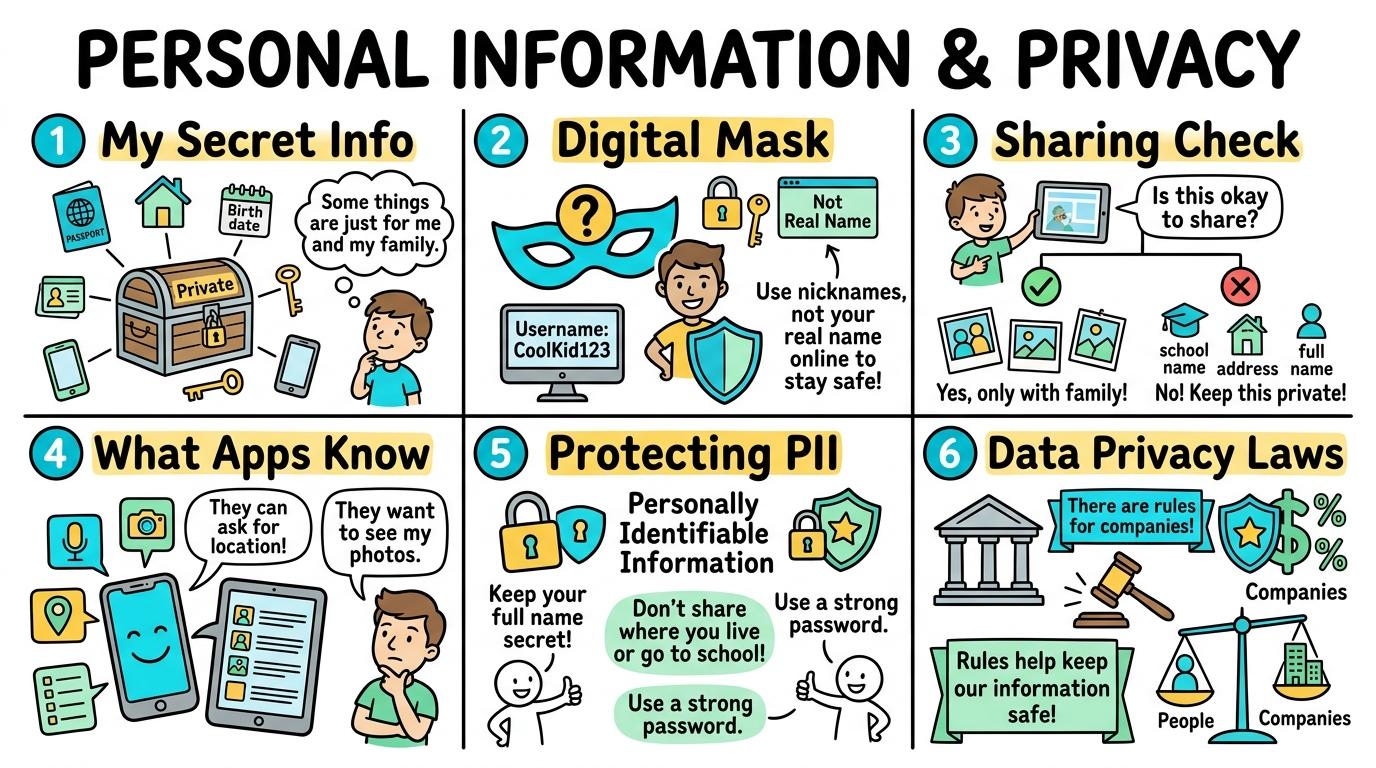
Congratulations on mastering Levels 1 to 6! Here is your one-page visual synthesis of every key concept learned:
▶View All 6 Level Key Concepts & Standards6 Levels Summarised
📌
Level 1🚀
My Secret Info
Distinguish between private personally identifiable information (PII) and public safe details.
Key Takeaway:Personally Identifiable Information (PII) is any detail that can be used to locate, contact, or identify you in real life.
#PII#Privacy#Personal Data
✓ Mastered
📌
Level 2🛡️
Digital Mask
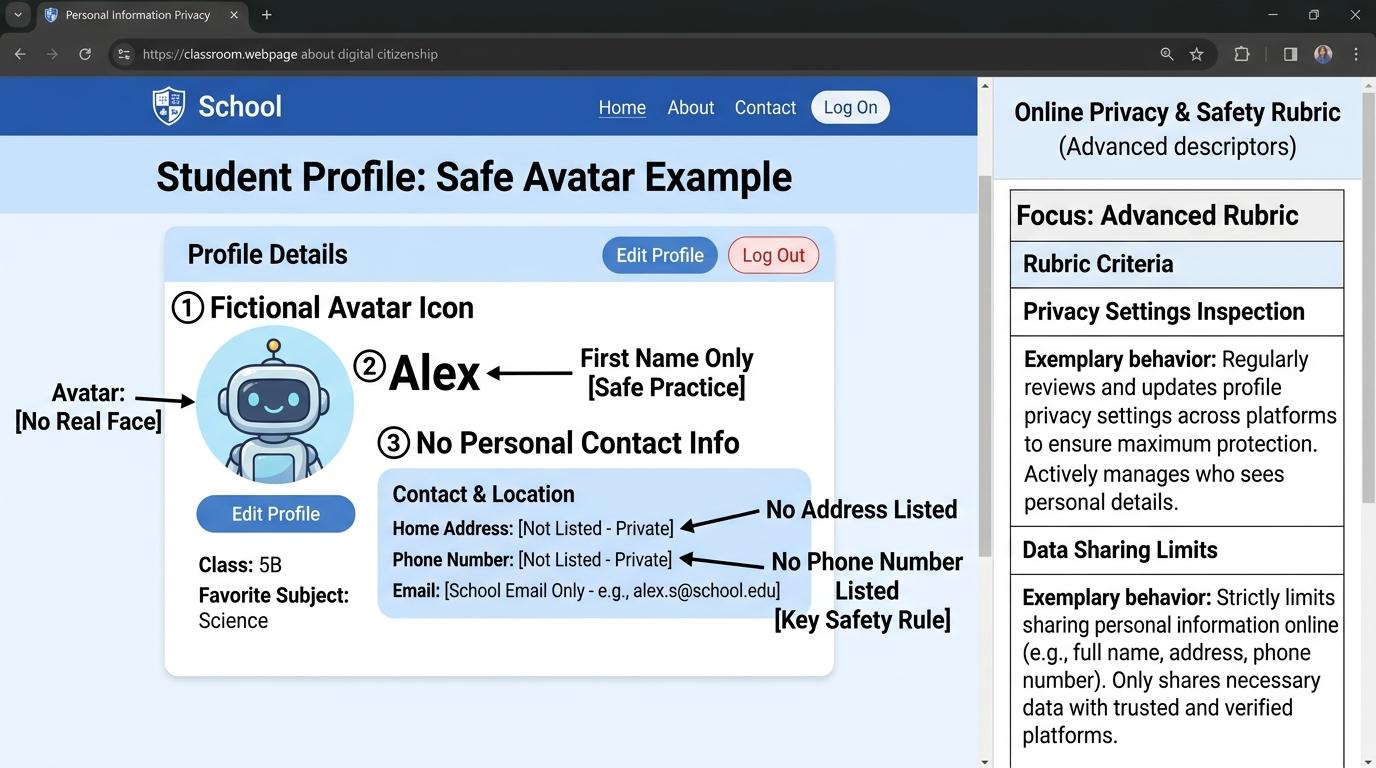
Create anonymous screen names and visual avatars to protect real identity online.
Key Takeaway:When playing games or using school apps, you do not need to use your real face photo or full legal name.
#Avatars#Screen Names#Digital Identity
✓ Mastered
📌
Level 3🔑
Sharing Check
Identify required form fields and seek trusted adult permission before submitting data.
Key Takeaway:Websites use digital forms to collect information.
#Web Forms#Data Entry#Trusted Adult
✓ Mastered
📌
Level 4💻
What Apps Know
Analyze application hardware permissions and evaluate why platforms collect user data.
Key Takeaway:When you install apps, they often request permission to access your device hardware—such as your camera, microphone, precise GPS location, or photos.
#App Permissions#Location Data#Camera Access
✓ Mastered
📌
Level 5🔐
Protecting PII
Explain risks of identity theft and recognize social engineering traps designed to harvest PII.
Key Takeaway:Identity theft happens when someone steals your personal information to pretend to be you online.
#Identity Theft#Social Engineering#Phishing
✓ Mastered
📌
Level 6🏆
Data Privacy Laws
Evaluate privacy policies, terms of service agreements, and individual digital data rights.
Key Takeaway:Privacy Policies and Terms of Service (ToS) are legal agreements explaining how companies collect, store, share, or sell your data.
#Privacy Policy#Terms of Service#GDPR
✓ Mastered
✨
SECRET MASTERY UNLOCK
Stage Mastery Quest Challenge
You've unlocked the secret final review dungeon! Can you solve every checkpoint gate and escape the maze?
🕹️🔒 Privacy Sentinel
Personal Information & Privacy
Hearts❤️❤️❤️
StageL1: Remember
XP Score0 PTS
1My Secret Info
2Digital Mask
3Sharing Check
4What Apps Know
5Protecting PII
6Data Privacy Laws
Chapter 1: The Incident
🧙♂️
Loading narrative situation...
What is your next action?
🚨 Roadblock Encountered! -1 Heart! Hint: Check the core standard.
TERMINAL://EDTECH-ROOT/NODE-EXEC● LIVE LINK
// SYSTEM DIAGNOSTIC INITIALIZED...
>Select verification command:
🚨 SYNTAX CRASH! -1 Heart & Buffer Overflow!
⌨️ Arrows/WASD to Move & Jump • Land on Question Beacon to Elevate!
⌨️ Left/Right to Steer • Space to Fire Tractor Beam at Correct Capsule!
⌨️ Space to Launch Spark • A/D or Left/Right to Trigger Flipper Gates!
Level 1 Checkpoint⌨️ Press [1]–[3]
Question Prompt goes here?
🚨 INCORRECT CHOICE! -100 PTS & -1 Heart!
💡 Mastery Insight Verified (+200 PTS):
🏆✨
STRAND MASTERY ACHIEVED!
You conquered all 6 levels and demonstrated digital mastery!
Final XP Score: 0 PTS
🔑SECRET AREA BOSS KEY DISCOVERED!
Use this secret PIN to unlock the Cyber Agent Incident Simulator in the Area Capstone Vault:
Congratulations on completing all 6 levels of Personal Information & Privacy! To unlock the Cyber Agent Incident Simulator, you must collect all 9 Key Shards across the Online Safety & Digital Citizenship strands. Here is your cipher fragment for Slot #7:
KEY SHARD #7
4
Slot 7 of 9
🧩 Online Safety & Digital Citizenship Key Ring Tracker:Slot #7 Active
Distinguish between private personally identifiable information (PII) and public safe details.
Learning objective
Students will identify examples of Personally Identifiable Information (PII) such as full name, home address, and phone number, distinguishing them from safe public preferences.
Let's Go!
Routine: See-Think-Wonder
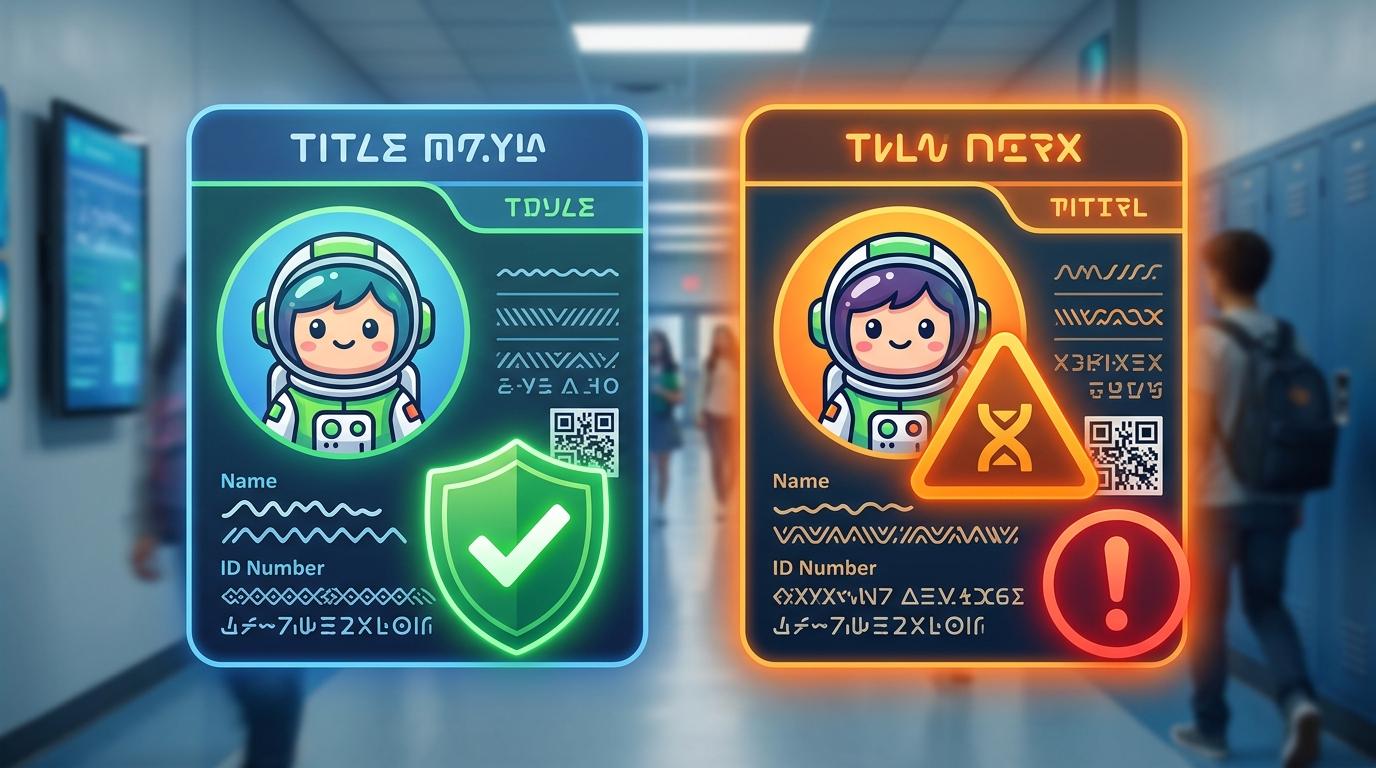
Look at two online profile cards: one shows a favorite cartoon character, and the other shows a child's full name and home address. Which one is safe to show online?
Teacher note: Facilitate the See-Think-Wonder routine for 2–3 minutes. Encourage students to connect the prompt to Form (Protecting private personal information keeps individuals safe in digital and physical communities.).
Learn
Personally Identifiable Information (PII) is any detail that can be used to locate, contact, or identify you in real life. This includes your full name, home address, phone number, school name, and date of birth. Safe public details include your favorite color, favorite animal, or favorite food. Always keep PII private!
Interactive Simulator Sandbox
Social & Privacy Studio:Step 1 • Bronze Tier
🔒
Step 1 • Bronze (Level 1): Secret PII vs Public Information
Classify 6 items into 'Private PII' (secret) versus 'Safe to Share' (hobbies/favorites) to protect identity.
In Progress
🦊
@DigitalExplorer_Kid🌍 Public Account
Learning code, creating digital art & gaming! 🚀
14 posts48 followers52 following
Account Privacy Controls
Account Visibility:
Search Engine Indexing:
Tagging & Photo Mentions:
Secret PII vs Safe Interests Sorter
Classify each piece of information. Protect sensitive Personally Identifiable Information (PII):
🏠 Home Street Address & House Number
🎨 Favorite Color: Cosmic Blue
💳 Parent's Bank Card Number
🍕 Favorite Food: Margherita Pizza
Visual PII Leak Detective
This draft photo leaks 3 pieces of private data! Click each sensitive area to censor it before publishing:
📸 Birthday Photo Draft
Censored: 0 / 3
The Permanent Digital Trail
Analyze the statement and choose the true reality of digital content persistence:
Question: "If you post an upsetting photo and click 'Delete' 2 minutes later, is it completely gone from the world?"
Anonymous Avatar & Handle Generator
Choose an illustrated avatar and assemble a private handle without real names:
Pick Avatar:
Username Privacy Vulnerability Audit
Identify which usernames leak personal details and which is 100% safe:
@oliver_woodland_2016
@StarPioneer73
@lucas_apt4b_london
Bio & Friends Privacy Hardening
Audit your public profile bio. Remove sensitive security-question answers:
"Hi! I'm in Year 5 at Oakridge Primary. My dog Buster is my best friend! Born in July 2015 🐶"
Smart Sign-Up Form Audit
An educational quiz app asks for registration. Mark which fields should be filled vs left blank:
Username * (Required for account):
Home Street Address (Optional):
Parent Phone Number (Optional):
Deceptive Quiz Trap Detector
A viral quiz promises to calculate "Your Secret Pirate Name":
🏴☠️ What Is Your Pirate Captain Name?
Question 1: What was your mother's maiden name?
Question 2: What was the name of your first childhood pet?
Question 3: What city were you born in?
The Billboard Test Evaluation
Only approve the post that is 100% safe to display on a public billboard:
"We are flying to Spain for two weeks tomorrow morning! Our house will be empty!"
"Our science team finished our solar oven project! Here is our temperature chart."
Sensor Permission Auditor
Evaluate 3 app permission requests. Grant only what is functionally essential:
🌟 Student Project GuideSuccess Criteria & WAGOLL (What A Good One Looks Like)▾
🎯 Task Success Criteria (Rubric)
Foundation
Can state that some information is private and should not be shared with strangers.
Developing
Categorizes examples like full name and home address as private PII, and favorite color as safe public info.
Secure (Goal)
Explains why sharing PII online can pose safety risks and consistently keeps personal details private.
Mastery
Teaches peers how to identify subtle PII details (like uniform logos or birthdates) in digital content.
👀 What A Good One Looks Like (WAGOLL)
⭐ Mastering Standard
Personal Information Exemplar: Demonstration of mastering quality standards for My Secret Info.
📁
Save to Your Website Portfolio:
When you finish creating your project in your software, copy the share link or take a screenshot and publish it onto your student portfolio website!
Reflect
🎯
Self-Assessment & Reflection
Why is your home address considered private PII, but your favorite animal is safe to share publicly?
🟢Secure Level
Explains why sharing PII online can pose safety risks and consistently keeps personal details private.
Learning check
Learning Check
Which of the following is considered private Personally Identifiable Information (PII)?
Select the best answer:
Hint 1: PII includes personal details like your address, phone number, and full legal name.
Hint 2: Clue: Home addresses and phone numbers are private PII that must never be shared publicly.
Answer correctly to unlock the next level.
Spot on! Home addresses and phone numbers are private PII that must never be shared publicly.Remember: PII includes personal details like your address, phone number, and full legal name.
Teacher setup, curriculum links and progress descriptors
Spark support
Routine: See-Think-Wonder
Teacher notes: Facilitate the See-Think-Wonder routine for 2–3 minutes. Encourage students to connect the prompt to Form (Protecting private personal information keeps individuals safe in digital and physical communities.).
Achievement pathway
Foundation: Can state that some information is private and should not be shared with strangers.
Developing: Categorizes examples like full name and home address as private PII, and favorite color as safe public info.
Secure: Explains why sharing PII online can pose safety risks and consistently keeps personal details private.
Mastering: Teaches peers how to identify subtle PII details (like uniform logos or birthdates) in digital content.
Curriculum links
Curriculum strand: Online Safety & Digital Citizenship
Outcome: PINF.01.B.1.1 — Distinguish between private personally identifiable information (PII) and public safe details.
PYP: Form · Protecting private personal information keeps individuals safe in digital and physical communities.
Learner profile: Inquirer
Competency tags
PII
Privacy
Personal Data
Unplugged Safety
Gate support
Accessibility alternative: Students may verbally explain or point to the correct answer for "Which of the following is considered private Personally Identifiable Information (PII)?" with a teacher or teaching assistant.
Complete the previous learning check to unlock this next level.
Level 2
Digital Mask
Create anonymous screen names and visual avatars to protect real identity online.
Learning objective
Students will design anonymous screen names and illustrated avatars that express personality without revealing legal names or real personal photos.
Let's Go!
Routine: Think-Pair-Share
Look at the username "Emma_Smith_2017". What private details does this reveal? How can we make it anonymous?
Teacher note: Facilitate the Think-Pair-Share routine for 2–3 minutes. Encourage students to connect the prompt to Function (Avatars and usernames allow self-expression while maintaining privacy and protecting personal identity.).
Learn
When playing games or using school apps, you do not need to use your real face photo or full legal name. An avatar is an illustrated character that represents you. A safe screen name combines fun words (like "CosmicRunner99") without including your real name, birth year, or location.
Interactive Simulator Sandbox
Social & Privacy Studio:Step 2 • Bronze Tier
🔒
Step 1 • Bronze (Level 1): Secret PII vs Public Information
Classify 6 items into 'Private PII' (secret) versus 'Safe to Share' (hobbies/favorites) to protect identity.
In Progress
🦊
@DigitalExplorer_Kid🌍 Public Account
Learning code, creating digital art & gaming! 🚀
14 posts48 followers52 following
Account Privacy Controls
Account Visibility:
Search Engine Indexing:
Tagging & Photo Mentions:
Secret PII vs Safe Interests Sorter
Classify each piece of information. Protect sensitive Personally Identifiable Information (PII):
🏠 Home Street Address & House Number
🎨 Favorite Color: Cosmic Blue
💳 Parent's Bank Card Number
🍕 Favorite Food: Margherita Pizza
Visual PII Leak Detective
This draft photo leaks 3 pieces of private data! Click each sensitive area to censor it before publishing:
📸 Birthday Photo Draft
Censored: 0 / 3
The Permanent Digital Trail
Analyze the statement and choose the true reality of digital content persistence:
Question: "If you post an upsetting photo and click 'Delete' 2 minutes later, is it completely gone from the world?"
Anonymous Avatar & Handle Generator
Choose an illustrated avatar and assemble a private handle without real names:
Pick Avatar:
Username Privacy Vulnerability Audit
Identify which usernames leak personal details and which is 100% safe:
@oliver_woodland_2016
@StarPioneer73
@lucas_apt4b_london
Bio & Friends Privacy Hardening
Audit your public profile bio. Remove sensitive security-question answers:
"Hi! I'm in Year 5 at Oakridge Primary. My dog Buster is my best friend! Born in July 2015 🐶"
Smart Sign-Up Form Audit
An educational quiz app asks for registration. Mark which fields should be filled vs left blank:
Username * (Required for account):
Home Street Address (Optional):
Parent Phone Number (Optional):
Deceptive Quiz Trap Detector
A viral quiz promises to calculate "Your Secret Pirate Name":
🏴☠️ What Is Your Pirate Captain Name?
Question 1: What was your mother's maiden name?
Question 2: What was the name of your first childhood pet?
Question 3: What city were you born in?
The Billboard Test Evaluation
Only approve the post that is 100% safe to display on a public billboard:
"We are flying to Spain for two weeks tomorrow morning! Our house will be empty!"
"Our science team finished our solar oven project! Here is our temperature chart."
Sensor Permission Auditor
Evaluate 3 app permission requests. Grant only what is functionally essential:
🌟 Student Project GuideSuccess Criteria & WAGOLL (What A Good One Looks Like)▾
🎯 Task Success Criteria (Rubric)
Foundation
Understands that a screen name is a nickname used in online games and apps.
Developing
Creates a screen name that does not include their real full name or age.
Secure (Goal)
Designs an anonymous screen name and avatar, explaining how they protect personal privacy.
Mastery
Evaluates screen names for hidden privacy leaks (e.g., combining birth year and real first name).
👀 What A Good One Looks Like (WAGOLL)
⭐ Mastering Standard
Personal Information Exemplar: Demonstration of mastering quality standards for Digital Mask.
📁
Save to Your Website Portfolio:
When you finish creating your project in your software, copy the share link or take a screenshot and publish it onto your student portfolio website!
Reflect
🎯
Self-Assessment & Reflection
How does using an avatar help protect your privacy while still letting you express yourself?
🟢Secure Level
Designs an anonymous screen name and avatar, explaining how they protect personal privacy.
Learning check
Learning Check
Which username is the SAFEST option for an online game?
Select the best answer:
Hint 1: Safe screen names should never reveal your real full name, city, school, or phone number.
Hint 2: Clue: PixelTiger42 expresses personality without revealing any real PII.
Answer correctly to unlock the next level.
Awesome! PixelTiger42 expresses personality without revealing any real PII.Remember: safe screen names should never reveal your real full name, city, school, or phone number.
Teacher setup, curriculum links and progress descriptors
Spark support
Routine: Think-Pair-Share
Teacher notes: Facilitate the Think-Pair-Share routine for 2–3 minutes. Encourage students to connect the prompt to Function (Avatars and usernames allow self-expression while maintaining privacy and protecting personal identity.).
Achievement pathway
Foundation: Understands that a screen name is a nickname used in online games and apps.
Developing: Creates a screen name that does not include their real full name or age.
Secure: Designs an anonymous screen name and avatar, explaining how they protect personal privacy.
Mastering: Evaluates screen names for hidden privacy leaks (e.g., combining birth year and real first name).
Curriculum links
Curriculum strand: Online Safety & Digital Citizenship
Outcome: PINF.02.B.1.2 — Create anonymous screen names and visual avatars to protect real identity online.
PYP: Function · Avatars and usernames allow self-expression while maintaining privacy and protecting personal identity.
Learner profile: Communicator
Competency tags
Avatars
Screen Names
Digital Identity
Privacy
Gate support
Accessibility alternative: Students may verbally explain or point to the correct answer for "Which username is the SAFEST option for an online game?" with a teacher or teaching assistant.
Complete the previous learning check to unlock this next level.
Level 3
Sharing Check
Identify required form fields and seek trusted adult permission before submitting data.
Learning objective
Students will evaluate digital signup forms, distinguish mandatory from optional fields, and recognize when trusted adult permission is required.
Let's Go!
Routine: See-Think-Wonder
A free online game asks for your full name, home address, and parent's credit card before letting you play. Should you fill it in?
Teacher note: Facilitate the See-Think-Wonder routine for 2–3 minutes. Encourage students to connect the prompt to Connection (Digital forms request data for different purposes, requiring critical evaluation and permission before submission.).
Learn
Websites use digital forms to collect information. Mandatory fields marked with an asterisk (*) must be filled to use a service, while optional fields can be left blank. Before typing any PII or submitting any form online, always perform a Sharing Check with a trusted adult!
Interactive Simulator Sandbox
Social & Privacy Studio:Step 3 • Bronze Tier
🔒
Step 1 • Bronze (Level 1): Secret PII vs Public Information
Classify 6 items into 'Private PII' (secret) versus 'Safe to Share' (hobbies/favorites) to protect identity.
In Progress
🦊
@DigitalExplorer_Kid🌍 Public Account
Learning code, creating digital art & gaming! 🚀
14 posts48 followers52 following
Account Privacy Controls
Account Visibility:
Search Engine Indexing:
Tagging & Photo Mentions:
Secret PII vs Safe Interests Sorter
Classify each piece of information. Protect sensitive Personally Identifiable Information (PII):
🏠 Home Street Address & House Number
🎨 Favorite Color: Cosmic Blue
💳 Parent's Bank Card Number
🍕 Favorite Food: Margherita Pizza
Visual PII Leak Detective
This draft photo leaks 3 pieces of private data! Click each sensitive area to censor it before publishing:
📸 Birthday Photo Draft
Censored: 0 / 3
The Permanent Digital Trail
Analyze the statement and choose the true reality of digital content persistence:
Question: "If you post an upsetting photo and click 'Delete' 2 minutes later, is it completely gone from the world?"
Anonymous Avatar & Handle Generator
Choose an illustrated avatar and assemble a private handle without real names:
Pick Avatar:
Username Privacy Vulnerability Audit
Identify which usernames leak personal details and which is 100% safe:
@oliver_woodland_2016
@StarPioneer73
@lucas_apt4b_london
Bio & Friends Privacy Hardening
Audit your public profile bio. Remove sensitive security-question answers:
"Hi! I'm in Year 5 at Oakridge Primary. My dog Buster is my best friend! Born in July 2015 🐶"
Smart Sign-Up Form Audit
An educational quiz app asks for registration. Mark which fields should be filled vs left blank:
Username * (Required for account):
Home Street Address (Optional):
Parent Phone Number (Optional):
Deceptive Quiz Trap Detector
A viral quiz promises to calculate "Your Secret Pirate Name":
🏴☠️ What Is Your Pirate Captain Name?
Question 1: What was your mother's maiden name?
Question 2: What was the name of your first childhood pet?
Question 3: What city were you born in?
The Billboard Test Evaluation
Only approve the post that is 100% safe to display on a public billboard:
"We are flying to Spain for two weeks tomorrow morning! Our house will be empty!"
"Our science team finished our solar oven project! Here is our temperature chart."
Sensor Permission Auditor
Evaluate 3 app permission requests. Grant only what is functionally essential:
🌟 Student Project GuideSuccess Criteria & WAGOLL (What A Good One Looks Like)▾
🎯 Task Success Criteria (Rubric)
Foundation
Recognizes that filling in online boxes sends information to a website.
Developing
Identifies asterisk (*) symbols as mandatory form fields.
Secure (Goal)
Evaluates whether a form is asking for unnecessary PII and asks a trusted adult before submitting.
Mastery
Explains why websites request data and identifies illegitimate forms designed to collect PII.
👀 What A Good One Looks Like (WAGOLL)
⭐ Mastering Standard
Personal Information Exemplar: Demonstration of mastering quality standards for Sharing Check.
📁
Save to Your Website Portfolio:
When you finish creating your project in your software, copy the share link or take a screenshot and publish it onto your student portfolio website!
Reflect
🎯
Self-Assessment & Reflection
Why should you ask a trusted adult before submitting a form that requests personal information?
🟢Secure Level
Evaluates whether a form is asking for unnecessary PII and asks a trusted adult before submitting.
Learning check
Learning Check
What should you do if a online game form asks for your home address before letting you start?
Select the best answer:
Hint 1: Never submit PII on web forms without trusted adult permission.
Hint 2: Clue: Great decision! Always consult a trusted adult before sharing personal details in online forms.
Answer correctly to unlock the next level.
Great decision! Always consult a trusted adult before sharing personal details in online forms.Remember: never submit PII on web forms without trusted adult permission.
Teacher setup, curriculum links and progress descriptors
Spark support
Routine: See-Think-Wonder
Teacher notes: Facilitate the See-Think-Wonder routine for 2–3 minutes. Encourage students to connect the prompt to Connection (Digital forms request data for different purposes, requiring critical evaluation and permission before submission.).
Achievement pathway
Foundation: Recognizes that filling in online boxes sends information to a website.
Developing: Identifies asterisk (*) symbols as mandatory form fields.
Secure: Evaluates whether a form is asking for unnecessary PII and asks a trusted adult before submitting.
Mastering: Explains why websites request data and identifies illegitimate forms designed to collect PII.
Curriculum links
Curriculum strand: Online Safety & Digital Citizenship
Outcome: PINF.03.B.1.3 — Identify required form fields and seek trusted adult permission before submitting data.
PYP: Connection · Digital forms request data for different purposes, requiring critical evaluation and permission before submission.
Learner profile: Thinker
Competency tags
Web Forms
Data Entry
Trusted Adult
Consent
Gate support
Accessibility alternative: Students may verbally explain or point to the correct answer for "What should you do if a online game form asks for your home address before letting you start?" with a teacher or teaching assistant.
Complete the previous learning check to unlock this next level.
Level 4
What Apps Know
Analyze application hardware permissions and evaluate why platforms collect user data.
Learning objective
Students will analyze device permission prompts (camera, microphone, location, contacts) and disable unnecessary permissions to protect personal privacy.
Let's Go!
Routine: Chalk Talk
Why would a flashlight app request access to your precise GPS location and contacts list? Does that seem necessary?
Teacher note: Facilitate the Chalk Talk routine for 2–3 minutes. Encourage students to connect the prompt to Responsibility (Digital applications request system permissions to access sensors and user data, requiring conscious control.).
Learn
When you install apps, they often request permission to access your device hardware—such as your camera, microphone, precise GPS location, or photos. While a video recording app needs camera access to function, many apps request data they do not need. Always review app permissions and toggle off unnecessary access!
Interactive Simulator Sandbox
Social & Privacy Studio:Step 4 • Bronze Tier
🔒
Step 1 • Bronze (Level 1): Secret PII vs Public Information
Classify 6 items into 'Private PII' (secret) versus 'Safe to Share' (hobbies/favorites) to protect identity.
In Progress
🦊
@DigitalExplorer_Kid🌍 Public Account
Learning code, creating digital art & gaming! 🚀
14 posts48 followers52 following
Account Privacy Controls
Account Visibility:
Search Engine Indexing:
Tagging & Photo Mentions:
Secret PII vs Safe Interests Sorter
Classify each piece of information. Protect sensitive Personally Identifiable Information (PII):
🏠 Home Street Address & House Number
🎨 Favorite Color: Cosmic Blue
💳 Parent's Bank Card Number
🍕 Favorite Food: Margherita Pizza
Visual PII Leak Detective
This draft photo leaks 3 pieces of private data! Click each sensitive area to censor it before publishing:
📸 Birthday Photo Draft
Censored: 0 / 3
The Permanent Digital Trail
Analyze the statement and choose the true reality of digital content persistence:
Question: "If you post an upsetting photo and click 'Delete' 2 minutes later, is it completely gone from the world?"
Anonymous Avatar & Handle Generator
Choose an illustrated avatar and assemble a private handle without real names:
Pick Avatar:
Username Privacy Vulnerability Audit
Identify which usernames leak personal details and which is 100% safe:
@oliver_woodland_2016
@StarPioneer73
@lucas_apt4b_london
Bio & Friends Privacy Hardening
Audit your public profile bio. Remove sensitive security-question answers:
"Hi! I'm in Year 5 at Oakridge Primary. My dog Buster is my best friend! Born in July 2015 🐶"
Smart Sign-Up Form Audit
An educational quiz app asks for registration. Mark which fields should be filled vs left blank:
Username * (Required for account):
Home Street Address (Optional):
Parent Phone Number (Optional):
Deceptive Quiz Trap Detector
A viral quiz promises to calculate "Your Secret Pirate Name":
🏴☠️ What Is Your Pirate Captain Name?
Question 1: What was your mother's maiden name?
Question 2: What was the name of your first childhood pet?
Question 3: What city were you born in?
The Billboard Test Evaluation
Only approve the post that is 100% safe to display on a public billboard:
"We are flying to Spain for two weeks tomorrow morning! Our house will be empty!"
"Our science team finished our solar oven project! Here is our temperature chart."
Sensor Permission Auditor
Evaluate 3 app permission requests. Grant only what is functionally essential:
🌟 Student Project GuideSuccess Criteria & WAGOLL (What A Good One Looks Like)▾
🎯 Task Success Criteria (Rubric)
Foundation
Notices pop-up messages asking for permission to use the camera or microphone.
Developing
Explains why a camera app needs camera access, but a calculator app does not.
Secure (Goal)
Audits app settings on a tablet or computer, turning off unnecessary location and microphone access.
Mastery
Evaluates how location tracking and background data collection impact personal privacy and battery usage.
👀 What A Good One Looks Like (WAGOLL)
⭐ Mastering Standard
Personal Information Exemplar: Demonstration of mastering quality standards for What Apps Know.
📁
Save to Your Website Portfolio:
When you finish creating your project in your software, copy the share link or take a screenshot and publish it onto your student portfolio website!
Reflect
🎯
Self-Assessment & Reflection
Why is it important to turn off location permissions for apps that do not need them to function?
🟢Secure Level
Audits app settings on a tablet or computer, turning off unnecessary location and microphone access.
Learning check
Learning Check
A offline puzzle game requests access to your precise GPS location. What is the safest action?
Select the best answer:
Hint 1: Only grant permissions that are genuinely required for an app to perform its core function.
Hint 2: Clue: Excellent privacy practice! Denying unnecessary location access protects your physical privacy.
Answer correctly to unlock the next level.
Excellent privacy practice! Denying unnecessary location access protects your physical privacy.Remember: only grant permissions that are genuinely required for an app to perform its core function.
Teacher setup, curriculum links and progress descriptors
Spark support
Routine: Chalk Talk
Teacher notes: Facilitate the Chalk Talk routine for 2–3 minutes. Encourage students to connect the prompt to Responsibility (Digital applications request system permissions to access sensors and user data, requiring conscious control.).
Achievement pathway
Foundation: Notices pop-up messages asking for permission to use the camera or microphone.
Developing: Explains why a camera app needs camera access, but a calculator app does not.
Secure: Audits app settings on a tablet or computer, turning off unnecessary location and microphone access.
Mastering: Evaluates how location tracking and background data collection impact personal privacy and battery usage.
Curriculum links
Curriculum strand: Online Safety & Digital Citizenship
Outcome: PINF.04.B.1.4 — Analyze application hardware permissions and evaluate why platforms collect user data.
PYP: Responsibility · Digital applications request system permissions to access sensors and user data, requiring conscious control.
Learner profile: Principled
Competency tags
App Permissions
Location Data
Camera Access
Data Collection
Gate support
Accessibility alternative: Students may verbally explain or point to the correct answer for "A offline puzzle game requests access to your precise GPS location. What is the safest action?" with a teacher or teaching assistant.
Complete the previous learning check to unlock this next level.
Level 5
Protecting PII
Explain risks of identity theft and recognize social engineering traps designed to harvest PII.
Learning objective
Students will explain the concept of identity theft and identify social engineering tricks (such as fake giveaways or quizzes) designed to extract personal information.
Let's Go!
Routine: Headline News
An online quiz promises to reveal "Your Secret Wizard Name" if you enter your mother's maiden name and your pet's name. Is this really a game or a trick?
Teacher note: Facilitate the Headline News routine for 2–3 minutes. Encourage students to connect the prompt to Perspective (Securing personal identity requires awareness of social engineering tactics and proactive defensive habits.).
Learn
Identity theft happens when someone steals your personal information to pretend to be you online. Bad actors often use social engineering—clever tricks like fake prize pop-ups, online personality quizzes asking security question answers, or impersonating friends—to harvest your PII. Never reveal private details to unverified sources!
Interactive Simulator Sandbox
Social & Privacy Studio:Step 5 • Bronze Tier
🔒
Step 1 • Bronze (Level 1): Secret PII vs Public Information
Classify 6 items into 'Private PII' (secret) versus 'Safe to Share' (hobbies/favorites) to protect identity.
In Progress
🦊
@DigitalExplorer_Kid🌍 Public Account
Learning code, creating digital art & gaming! 🚀
14 posts48 followers52 following
Account Privacy Controls
Account Visibility:
Search Engine Indexing:
Tagging & Photo Mentions:
Secret PII vs Safe Interests Sorter
Classify each piece of information. Protect sensitive Personally Identifiable Information (PII):
🏠 Home Street Address & House Number
🎨 Favorite Color: Cosmic Blue
💳 Parent's Bank Card Number
🍕 Favorite Food: Margherita Pizza
Visual PII Leak Detective
This draft photo leaks 3 pieces of private data! Click each sensitive area to censor it before publishing:
📸 Birthday Photo Draft
Censored: 0 / 3
The Permanent Digital Trail
Analyze the statement and choose the true reality of digital content persistence:
Question: "If you post an upsetting photo and click 'Delete' 2 minutes later, is it completely gone from the world?"
Anonymous Avatar & Handle Generator
Choose an illustrated avatar and assemble a private handle without real names:
Pick Avatar:
Username Privacy Vulnerability Audit
Identify which usernames leak personal details and which is 100% safe:
@oliver_woodland_2016
@StarPioneer73
@lucas_apt4b_london
Bio & Friends Privacy Hardening
Audit your public profile bio. Remove sensitive security-question answers:
"Hi! I'm in Year 5 at Oakridge Primary. My dog Buster is my best friend! Born in July 2015 🐶"
Smart Sign-Up Form Audit
An educational quiz app asks for registration. Mark which fields should be filled vs left blank:
Username * (Required for account):
Home Street Address (Optional):
Parent Phone Number (Optional):
Deceptive Quiz Trap Detector
A viral quiz promises to calculate "Your Secret Pirate Name":
🏴☠️ What Is Your Pirate Captain Name?
Question 1: What was your mother's maiden name?
Question 2: What was the name of your first childhood pet?
Question 3: What city were you born in?
The Billboard Test Evaluation
Only approve the post that is 100% safe to display on a public billboard:
"We are flying to Spain for two weeks tomorrow morning! Our house will be empty!"
"Our science team finished our solar oven project! Here is our temperature chart."
Sensor Permission Auditor
Evaluate 3 app permission requests. Grant only what is functionally essential:
🌟 Student Project GuideSuccess Criteria & WAGOLL (What A Good One Looks Like)▾
🎯 Task Success Criteria (Rubric)
Foundation
Understands that someone pretending to be you online can cause trouble.
Developing
Identifies suspicious messages asking for account details or personal secrets.
Secure (Goal)
Recognizes social engineering traps (like "Which superhero are you?" quizzes collecting birthdates) and configures strict privacy settings.
Mastery
Analyzes complex phishing and impersonation scenarios, explaining the mechanisms of identity theft.
👀 What A Good One Looks Like (WAGOLL)
⭐ Mastering Standard
Personal Information Exemplar: Demonstration of mastering quality standards for Protecting PII.
📁
Save to Your Website Portfolio:
When you finish creating your project in your software, copy the share link or take a screenshot and publish it onto your student portfolio website!
Reflect
🎯
Self-Assessment & Reflection
How can online quizzes or surveys trick people into giving away answers to password security questions?
🟢Secure Level
Recognizes social engineering traps (like "Which superhero are you?" quizzes collecting birthdates) and configures strict privacy settings.
Learning check
Learning Check
What is social engineering in the context of online safety?
Select the best answer:
Hint 1: Social engineering relies on deception (like fake quizzes or prizes) to collect PII.
Hint 2: Clue: Social engineering uses trickery to manipulate people into surrendering private data.
Answer correctly to unlock the next level.
Spot on! Social engineering uses trickery to manipulate people into surrendering private data.Remember: social engineering relies on deception (like fake quizzes or prizes) to collect PII.
Teacher setup, curriculum links and progress descriptors
Spark support
Routine: Headline News
Teacher notes: Facilitate the Headline News routine for 2–3 minutes. Encourage students to connect the prompt to Perspective (Securing personal identity requires awareness of social engineering tactics and proactive defensive habits.).
Achievement pathway
Foundation: Understands that someone pretending to be you online can cause trouble.
Developing: Identifies suspicious messages asking for account details or personal secrets.
Secure: Recognizes social engineering traps (like "Which superhero are you?" quizzes collecting birthdates) and configures strict privacy settings.
Mastering: Analyzes complex phishing and impersonation scenarios, explaining the mechanisms of identity theft.
Curriculum links
Curriculum strand: Online Safety & Digital Citizenship
Outcome: PINF.05.B.1.5 — Explain risks of identity theft and recognize social engineering traps designed to harvest PII.
PYP: Perspective · Securing personal identity requires awareness of social engineering tactics and proactive defensive habits.
Learner profile: Knowledgeable
Competency tags
Identity Theft
Social Engineering
Phishing
Privacy Settings
Gate support
Accessibility alternative: Students may verbally explain or point to the correct answer for "What is social engineering in the context of online safety?" with a teacher or teaching assistant.
Complete the previous learning check to unlock this next level.
Level 6
Data Privacy Laws
Evaluate privacy policies, terms of service agreements, and individual digital data rights.
Learning objective
Students will evaluate simplified Privacy Policies and Terms of Service (ToS) summaries, understanding user rights regarding data access, consent, and deletion.
Let's Go!
Routine: 4 A's (Assumption, Agree, Argue, Aspire)
When you click "I Agree" on a 20-page Terms of Service contract without reading it, what rights might you be giving away?
Teacher note: Facilitate the 4 A's (Assumption, Agree, Argue, Aspire) routine for 2–3 minutes. Encourage students to connect the prompt to Reflection (Digital rights frameworks empower individuals to inspect, control, and request deletion of their personal data.).
Learn
Privacy Policies and Terms of Service (ToS) are legal agreements explaining how companies collect, store, share, or sell your data. Modern data privacy laws (like GDPR and COPPA) give you specific rights: the right to know what data is collected, the right to correct errors, and the right to request full data deletion ("Right to be Forgotten").
Interactive Simulator Sandbox
Social & Privacy Studio:Step 6 • Bronze Tier
🔒
Step 1 • Bronze (Level 1): Secret PII vs Public Information
Classify 6 items into 'Private PII' (secret) versus 'Safe to Share' (hobbies/favorites) to protect identity.
In Progress
🦊
@DigitalExplorer_Kid🌍 Public Account
Learning code, creating digital art & gaming! 🚀
14 posts48 followers52 following
Account Privacy Controls
Account Visibility:
Search Engine Indexing:
Tagging & Photo Mentions:
Secret PII vs Safe Interests Sorter
Classify each piece of information. Protect sensitive Personally Identifiable Information (PII):
🏠 Home Street Address & House Number
🎨 Favorite Color: Cosmic Blue
💳 Parent's Bank Card Number
🍕 Favorite Food: Margherita Pizza
Visual PII Leak Detective
This draft photo leaks 3 pieces of private data! Click each sensitive area to censor it before publishing:
📸 Birthday Photo Draft
Censored: 0 / 3
The Permanent Digital Trail
Analyze the statement and choose the true reality of digital content persistence:
Question: "If you post an upsetting photo and click 'Delete' 2 minutes later, is it completely gone from the world?"
Anonymous Avatar & Handle Generator
Choose an illustrated avatar and assemble a private handle without real names:
Pick Avatar:
Username Privacy Vulnerability Audit
Identify which usernames leak personal details and which is 100% safe:
@oliver_woodland_2016
@StarPioneer73
@lucas_apt4b_london
Bio & Friends Privacy Hardening
Audit your public profile bio. Remove sensitive security-question answers:
"Hi! I'm in Year 5 at Oakridge Primary. My dog Buster is my best friend! Born in July 2015 🐶"
Smart Sign-Up Form Audit
An educational quiz app asks for registration. Mark which fields should be filled vs left blank:
Username * (Required for account):
Home Street Address (Optional):
Parent Phone Number (Optional):
Deceptive Quiz Trap Detector
A viral quiz promises to calculate "Your Secret Pirate Name":
🏴☠️ What Is Your Pirate Captain Name?
Question 1: What was your mother's maiden name?
Question 2: What was the name of your first childhood pet?
Question 3: What city were you born in?
The Billboard Test Evaluation
Only approve the post that is 100% safe to display on a public billboard:
"We are flying to Spain for two weeks tomorrow morning! Our house will be empty!"
"Our science team finished our solar oven project! Here is our temperature chart."
Sensor Permission Auditor
Evaluate 3 app permission requests. Grant only what is functionally essential:
Hint 1: Data privacy laws grant individuals the right to request deletion of their stored personal information.
Hint 2: Clue: Outstanding! The Right to be Forgotten empowers users to have their personal data permanently erased.
Answer correctly to complete this strand.
Outstanding! The Right to be Forgotten empowers users to have their personal data permanently erased.Remember: data privacy laws grant individuals the right to request deletion of their stored personal information.
Teacher setup, curriculum links and progress descriptors
Spark support
Routine: 4 A's (Assumption, Agree, Argue, Aspire)
Teacher notes: Facilitate the 4 A's (Assumption, Agree, Argue, Aspire) routine for 2–3 minutes. Encourage students to connect the prompt to Reflection (Digital rights frameworks empower individuals to inspect, control, and request deletion of their personal data.).
Achievement pathway
Foundation: Recognizes that websites have rules called Terms of Service.
Developing: Identifies key sections in child-friendly privacy policies detailing what data is stored.
Secure: Explains fundamental data rights (Right to Access, Right to be Forgotten) and evaluates platform data practices.
Mastering: Audits platform Terms of Service for data monetization practices and advocates for ethical data handling.
Curriculum links
Curriculum strand: Online Safety & Digital Citizenship
Outcome: PINF.06.B.1.6 — Evaluate privacy policies, terms of service agreements, and individual digital data rights.
PYP: Reflection · Digital rights frameworks empower individuals to inspect, control, and request deletion of their personal data.
Learner profile: Reflective
Competency tags
Privacy Policy
Terms of Service
GDPR
Data Rights
Gate support
Accessibility alternative: Students may verbally explain or point to the correct answer for "What does the "Right to be Forgotten" mean in digital privacy laws?" with a teacher or teaching assistant.
We use local browser storage to save your learning progress and optional analytics cookies (Google Analytics 4 with IP masking and zero advertising signals) to help us improve our free computing lessons. Read our Cookie Policy and Privacy Policy.

 ⭐ Mastering Standard
Classify 6 items into 'Private PII' (secret) versus 'Safe to Share' (hobbies/favorites) to protect identity.
Learning code, creating digital art & gaming! 🚀
Classify each piece of information. Protect sensitive Personally Identifiable Information (PII):
This draft photo leaks 3 pieces of private data! Click each sensitive area to censor it before publishing:
Analyze the statement and choose the true reality of digital content persistence:
Choose an illustrated avatar and assemble a private handle without real names:
Identify which usernames leak personal details and which is 100% safe:
Audit your public profile bio. Remove sensitive security-question answers:
"Hi! I'm in Year 5 at Oakridge Primary. My dog Buster is my best friend! Born in July 2015 🐶"
An educational quiz app asks for registration. Mark which fields should be filled vs left blank:
A viral quiz promises to calculate "Your Secret Pirate Name":
Only approve the post that is 100% safe to display on a public billboard:
"We are flying to Spain for two weeks tomorrow morning! Our house will be empty!"
"Our science team finished our solar oven project! Here is our temperature chart."
Evaluate 3 app permission requests. Grant only what is functionally essential:
Harden these 3 tablet settings to restrict background data collection:
When a website displays a Cookie Banner, what is the safest configuration?
You receive an urgent direct message from an account with your friend Liam's photo:
Audit connected apps on your social account. Revoke access from sketchy third parties:
Enable all 3 master security gates to achieve 100% Armor Rating:
Match each legal clause to its real-world plain English meaning:
What does COPPA / GDPR require from apps targeting children under 13?
Select 3 high-quality learning artifacts to publish in your academic portfolio:
Understand the two ways information is stored about you online: