
Learning objective
Trusted Adults
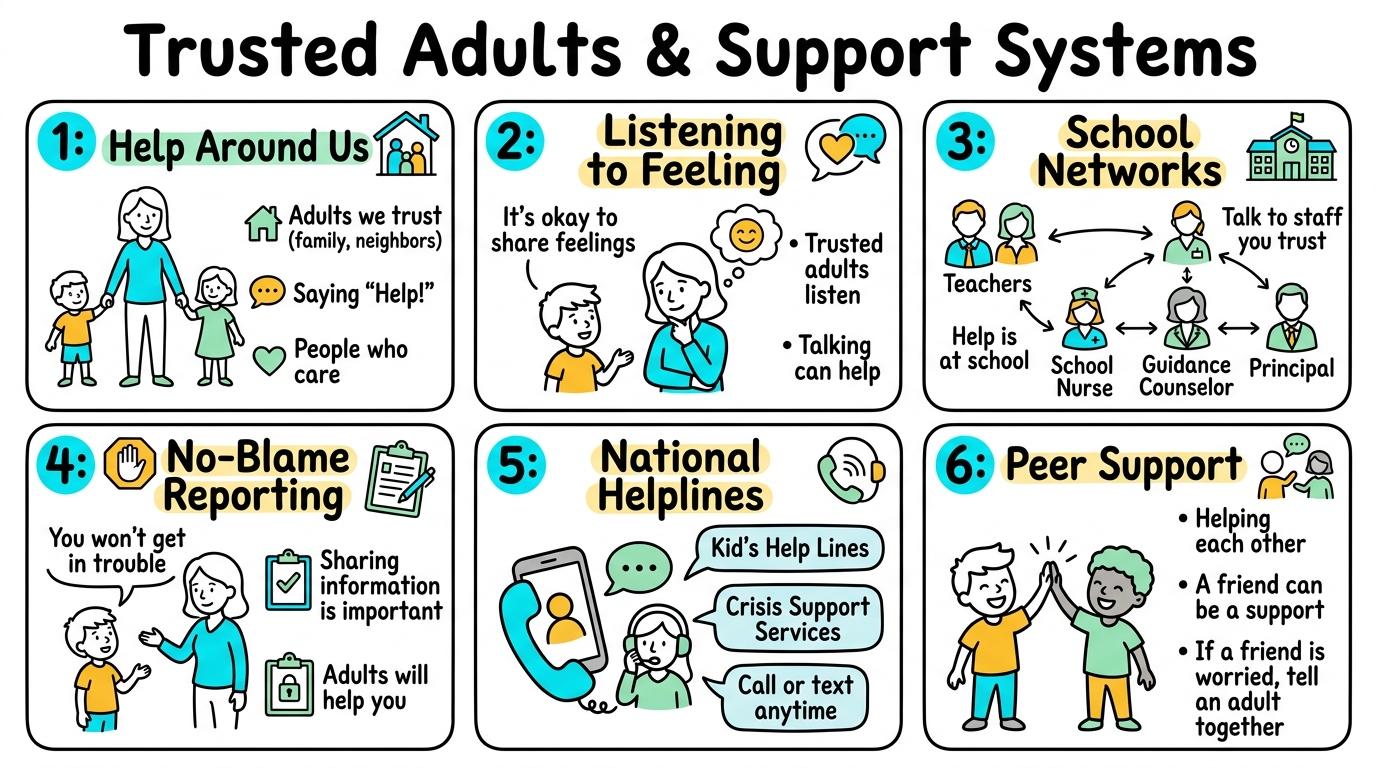
Trusted Adults & Support Systems
1
2
3
4
5
6
Understanding who trusted adults are, recognizing body warning signals, navigating school support networks, overcoming fear under No-Blame culture, utilizing national child helplines, and acting as peer bridge helpers.
Help Around Us
Identify who trusted adults are in family and school environments, explaining that they provide safe help when using digital technology.
Let's Go!

Routine: See-Think-Wonder
Look at a drawing of a hand with 5 fingers. How can each finger represent a different person who keeps you safe?
Teacher note: Facilitate the See-Think-Wonder routine for 2–3 minutes. Encourage students to connect the prompt to Form (Having trusted adults at home and school helps us stay safe and supported when exploring digital tools.).
Learn
A trusted adult is a grown-up you know well in real life who listens to you, cares about your safety, and helps you when things feel tricky or scary. Trusted adults include parents, grandparents, teachers, school counselors, and guardians. When anything weird happens on a screen, your trusted adults are always there to help!
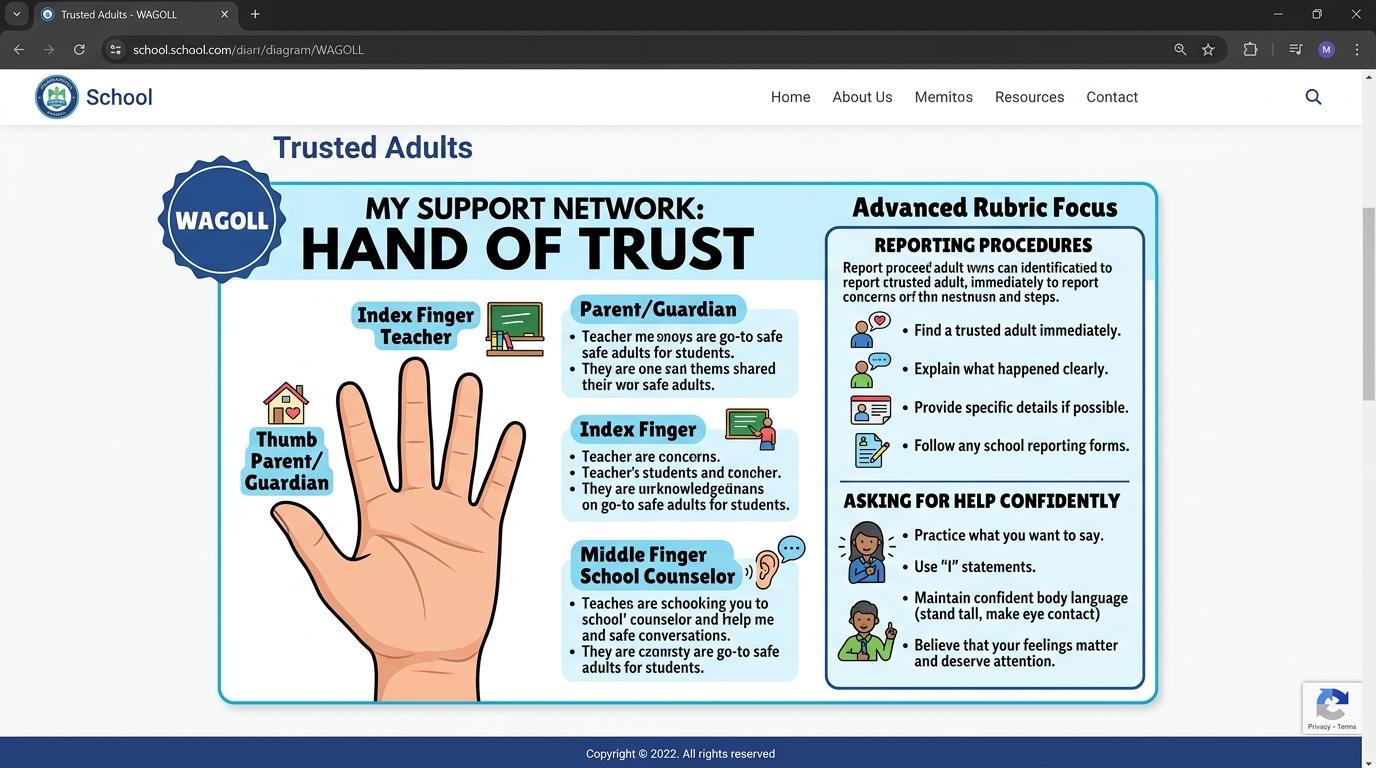
✋ 5-Finger Trusted Adults Network Hand
Identify 5 distinct trusted people in your personal safety network:
ThumbEmpty
IndexEmpty
MiddleEmpty
RingEmpty
PinkyEmpty
📞 Official Child Support & Helplines
Childline (UK & International)Free, 24/7 confidential advice for any child under 19. Call 0800 1111.
CEOP Safety CentreOfficial Police Online Safety Reporting for inappropriate contact.
Internet Watch Foundation (IWF)Confidential anonymous reporting of criminal or disturbing online imagery.
Apply Simulator Skills • Try it yourself
Build Your Safety Network Hand
🚀 Open a practice space
🌟 Student Project GuideSuccess Criteria & WAGOLL (What A Good One Looks Like)
🎯 Task Success Criteria (Rubric)
Foundation
Names at least one person at home or school who can help when using a tablet or computer.
Developing
Lists multiple trusted adults (parents, teachers, guardians) across home and school settings.
Secure (Goal)
Distinguishes between trusted adults (known, responsible caregivers) and online strangers or acquaintances.
Mastery
Creates a 'Trusted Adults Safety Network Hand' identifying 5 specific trusted people they can talk to.
👀 What A Good One Looks Like (WAGOLL)
 ⭐ Mastering Standard
📁
Save to Your Website Portfolio:
When you finish creating your project in your software, copy the share link or take a screenshot and publish it onto your student portfolio website!
Reflect
Learning check
Teacher setup, curriculum links and progress descriptors
Spark support
Routine: See-Think-Wonder
Teacher notes: Facilitate the See-Think-Wonder routine for 2–3 minutes. Encourage students to connect the prompt to Form (Having trusted adults at home and school helps us stay safe and supported when exploring digital tools.).
Achievement pathway
- Foundation: Names at least one person at home or school who can help when using a tablet or computer.
- Developing: Lists multiple trusted adults (parents, teachers, guardians) across home and school settings.
- Secure: Distinguishes between trusted adults (known, responsible caregivers) and online strangers or acquaintances.
- Mastering: Creates a 'Trusted Adults Safety Network Hand' identifying 5 specific trusted people they can talk to.
Curriculum links
Curriculum strand: Online Safety and Digital Citizenship
Outcome: TRAD.01.B.1.1 — Identify who trusted adults are in family and school environments, explaining that they provide safe help when using digital technology.
PYP: Form · Having trusted adults at home and school helps us stay safe and supported when exploring digital tools.
Learner profile: Inquirer
Competency tags
Gate support
Accessibility alternative: Students may verbally explain or point to the correct answer for "Which of the following describes a trusted adult?" with a teacher or teaching assistant.
Teacher override: allow
Locked level
Level 2: Listening to Feeling
Complete the previous learning check to unlock this next level.
Listening to Feeling
Recognize physical body signals (butterflies in stomach, feeling worried) that indicate it is time to stop and ask a trusted adult for help.
Learning objective
Students will connect physical body warning signals (racing heart, butterflies in stomach) to seeking immediate help from a trusted adult.
Let's Go!
Routine: Think-Pair-Share
Have you ever felt 'butterflies' in your tummy when seeing something scary or unexpected?
How does your body tell you that something isn't right?
Teacher note: Facilitate the Think-Pair-Share routine for 2–3 minutes. Encourage students to connect the prompt to Function (Listening to our feelings and body signals helps us know when to seek guidance from trusted adults.).
Learn
Your body has a built-in alarm system! When you see or read something online that is scary, confusing, or weird, your body gives you early warning signs: butterflies in your stomach, a fast heartbeat, or a heavy feeling in your chest. When your body alarm goes off, don't keep it a secret—tell a trusted adult right away!
Capture Mode:Fullscreen Snip
⌨️ Shortcut: PrtScn or Win + Shift + S
Ready to Capture
Science Project
School Browser
Recycle Bin
Golden Retriever Puppy
Loyal, gentle family dog known for intelligence and playful temperament.
Owner ID: Sarah_Smith_Room12 (Confidential Data)
📄 Student Science Report (Pastepad)
Click 'Ctrl+V Paste Snip' or press Ctrl+V to attach captured screenshot into your document.
Apply Simulator Skills • Try it yourself
Map Your Body Warning Alarm
🚀 Open a practice space
🌟 Student Project GuideSuccess Criteria & WAGOLL (What A Good One Looks Like)
🎯 Task Success Criteria (Rubric)
Foundation
States that feeling scared or uncomfortable on a device is a sign to stop and ask for help.
Developing
Identifies physical warning feelings (butterflies in tummy, tense shoulders, feeling worried).
Secure (Goal)
Demonstrates stepping away from a screen and asking a trusted adult for help when experiencing an early warning signal.
Mastery
Role-plays communicating uncomfortable digital situations clearly to a parent or teacher.
👀 What A Good One Looks Like (WAGOLL)
⭐ Mastering Standard📁
Save to Your Website Portfolio:
When you finish creating your project in your software, copy the share link or take a screenshot and publish it onto your student portfolio website!
Reflect
Learning check
Teacher setup, curriculum links and progress descriptors
Spark support
Routine: Think-Pair-Share
Teacher notes: Facilitate the Think-Pair-Share routine for 2–3 minutes. Encourage students to connect the prompt to Function (Listening to our feelings and body signals helps us know when to seek guidance from trusted adults.).
Achievement pathway
- Foundation: States that feeling scared or uncomfortable on a device is a sign to stop and ask for help.
- Developing: Identifies physical warning feelings (butterflies in tummy, tense shoulders, feeling worried).
- Secure: Demonstrates stepping away from a screen and asking a trusted adult for help when experiencing an early warning signal.
- Mastering: Role-plays communicating uncomfortable digital situations clearly to a parent or teacher.
Curriculum links
Curriculum strand: Online Safety and Digital Citizenship
Outcome: TRAD.02.B.1.2 — Recognize physical body signals (butterflies in stomach, feeling worried) that indicate it is time to stop and ask a trusted adult for help.
PYP: Function · Listening to our feelings and body signals helps us know when to seek guidance from trusted adults.
Learner profile: Communicator
Competency tags
Gate support
Accessibility alternative: Students may verbally explain or point to the correct answer for "What should you do if your 'body alarm' gives you a worried feeling while looking at a webpage?" with a teacher or teaching assistant.
Teacher override: allow
Locked level
Level 3: School Networks
Complete the previous learning check to unlock this next level.
School Networks
Map out school-based support systems (class teachers, computing leads, counselors, digital leaders) and know how to access help during the school day.
Learning objective
Students will map out the network of trusted adults within their school community, detailing who to approach for different safety concerns.
Let's Go!
Routine: Connect-Extend-Challenge
Who are all the different adults in our school building who help with computers, safety, and student well-being?
Teacher note: Facilitate the Connect-Extend-Challenge routine for 2–3 minutes. Encourage students to connect the prompt to Connection (Schools provide structured support systems and safe adults to assist students with technology and well-being.).
Learn
Your school is full of people ready to help you! Besides your main class teacher, there are computing leads, IT technicians, school counselors, digital student leaders, and safeguarding staff. If you ever experience cyberbullying, accidental clicks, or tech glitches at school, any of these trusted adults will help you solve the problem safely.
Apply Simulator Skills • Try it yourself
Map School Support Stations
🚀 Open a practice space
🌟 Student Project GuideSuccess Criteria & WAGOLL (What A Good One Looks Like)
🎯 Task Success Criteria (Rubric)
Foundation
Identifies the classroom teacher as the primary person to ask for help with school devices.
Developing
Explains the roles of various school helpers (IT technician, school counselor, headteacher).
Secure (Goal)
Constructs a school support map detailing where and how to reach trusted adults during school hours.
Mastery
Evaluates scenario cards to determine the most appropriate school helper for technical vs emotional or safety concerns.
👀 What A Good One Looks Like (WAGOLL)
⭐ Mastering Standard📁
Save to Your Website Portfolio:
When you finish creating your project in your software, copy the share link or take a screenshot and publish it onto your student portfolio website!
Reflect
Learning check
Teacher setup, curriculum links and progress descriptors
Spark support
Routine: Connect-Extend-Challenge
Teacher notes: Facilitate the Connect-Extend-Challenge routine for 2–3 minutes. Encourage students to connect the prompt to Connection (Schools provide structured support systems and safe adults to assist students with technology and well-being.).
Achievement pathway
- Foundation: Identifies the classroom teacher as the primary person to ask for help with school devices.
- Developing: Explains the roles of various school helpers (IT technician, school counselor, headteacher).
- Secure: Constructs a school support map detailing where and how to reach trusted adults during school hours.
- Mastering: Evaluates scenario cards to determine the most appropriate school helper for technical vs emotional or safety concerns.
Curriculum links
Curriculum strand: Online Safety and Digital Citizenship
Outcome: TRAD.03.B.1.3 — Map out school-based support systems (class teachers, computing leads, counselors, digital leaders) and know how to access help during the school day.
PYP: Connection · Schools provide structured support systems and safe adults to assist students with technology and well-being.
Learner profile: Thinker
Competency tags
Gate support
Accessibility alternative: Students may verbally explain or point to the correct answer for "Who in your school can you talk to if you see something upsetting on a school computer?" with a teacher or teaching assistant.
Teacher override: allow
Locked level
Level 4: No-Blame Reporting
Complete the previous learning check to unlock this next level.
No-Blame Reporting
Understand that asking for help with digital mistakes is a brave choice supported by a 'No-Blame' culture where adults help without punishment.
Learning objective
Students will analyze why children hesitate to report online incidents (fear of losing devices) and demonstrate how 'No-Blame' support works.
Let's Go!
Routine: What If...?
What if a student accidentally clicks a bad link while doing homework?
Why might they feel scared to tell their parents, and what will a trusted adult actually do?
Teacher note: Facilitate the What If...? routine for 2–3 minutes. Encourage students to connect the prompt to Responsibility (Seeking help for digital mistakes or scary content is a brave choice that trusted adults support without blame.).
Learn
Sometimes children don't report online problems because they are afraid of getting into trouble or having their tablets taken away. But trusted adults understand that accidental clicks happen to everyone! Responsible schools and families follow the 'No-Blame' rule: you will not be punished for asking for help when something goes wrong online. Asking for help is brave!
Apply Simulator Skills • Try it yourself
Debunk Reporting Myths
🚀 Open a practice space
🌟 Student Project GuideSuccess Criteria & WAGOLL (What A Good One Looks Like)
🎯 Task Success Criteria (Rubric)
Foundation
States that trusted adults want to help, not punish, when accidental digital mistakes happen.
Developing
Identifies common worries about reporting (fear of device removal) and counters them with truth statements.
Secure (Goal)
Explains how the 'No-Blame' rule works and practices phrasing requests for help clearly and honestly.
Mastery
Creates a peer encouragement poster reassuring younger students that asking for help is always the right choice.
👀 What A Good One Looks Like (WAGOLL)
⭐ Mastering Standard📁
Save to Your Website Portfolio:
When you finish creating your project in your software, copy the share link or take a screenshot and publish it onto your student portfolio website!
Reflect
Learning check
Teacher setup, curriculum links and progress descriptors
Spark support
Routine: What If...?
Teacher notes: Facilitate the What If...? routine for 2–3 minutes. Encourage students to connect the prompt to Responsibility (Seeking help for digital mistakes or scary content is a brave choice that trusted adults support without blame.).
Achievement pathway
- Foundation: States that trusted adults want to help, not punish, when accidental digital mistakes happen.
- Developing: Identifies common worries about reporting (fear of device removal) and counters them with truth statements.
- Secure: Explains how the 'No-Blame' rule works and practices phrasing requests for help clearly and honestly.
- Mastering: Creates a peer encouragement poster reassuring younger students that asking for help is always the right choice.
Curriculum links
Curriculum strand: Online Safety and Digital Citizenship
Outcome: TRAD.04.B.1.4 — Understand that asking for help with digital mistakes is a brave choice supported by a 'No-Blame' culture where adults help without punishment.
PYP: Responsibility · Seeking help for digital mistakes or scary content is a brave choice that trusted adults support without blame.
Learner profile: Principled
Competency tags
Gate support
Accessibility alternative: Students may verbally explain or point to the correct answer for "What happens when you tell a trusted adult about an accidental click or unexpected pop-up under a 'No-Blame' rule?" with a teacher or teaching assistant.
Teacher override: allow
Locked level
Level 5: National Helplines
Complete the previous learning check to unlock this next level.
National Helplines
Identify national child support organizations and helplines (Childline, CEOP, CyberTipline) and understand how confidential support works.
Learning objective
Students will research national and international child protection services (Childline, CEOP), explaining how free confidential helplines operate.
Let's Go!
Routine: Parts-Purposes-Complexities
What is a helpline?
Who answers the phone when a child calls a helpline like Childline?
Teacher note: Facilitate the Parts-Purposes-Complexities routine for 2–3 minutes. Encourage students to connect the prompt to Perspective (External organizations and national helplines provide confidential support and protection for young citizens.).
Learn
If a child ever feels they cannot talk to someone at home or school, official national organizations exist to help! Organizations like Childline, CEOP (Child Exploitation and Online Protection), and the CyberTipline provide free, 24/7 confidential advice via phone calls or web chats. Trained counselors listen kindly and help solve serious safety concerns.
🔌 Physical Rear Ports & Peripheral Cables
EDTECH PRO-VISION 24"
Technician Diagnostic Actions & Triage Tools
Select the correct diagnostic action below:Apply Simulator Skills • Try it yourself
Research Official Safety Resources
🚀 Open a practice space
🌟 Student Project GuideSuccess Criteria & WAGOLL (What A Good One Looks Like)
🎯 Task Success Criteria (Rubric)
Foundation
Identifies that official telephone and chat helplines exist for children needing advice.
Developing
Explains the concept of confidential support provided by trained child safety counselors.
Secure (Goal)
Researches contact methods (free 24/7 phone numbers, online text chat) for official organizations like Childline or CEOP.
Mastery
Compares local adult support vs official helpline reporting, creating a pocket reference card of emergency safety numbers.
👀 What A Good One Looks Like (WAGOLL)
⭐ Mastering Standard📁
Save to Your Website Portfolio:
When you finish creating your project in your software, copy the share link or take a screenshot and publish it onto your student portfolio website!
Reflect
Learning check
Teacher setup, curriculum links and progress descriptors
Spark support
Routine: Parts-Purposes-Complexities
Teacher notes: Facilitate the Parts-Purposes-Complexities routine for 2–3 minutes. Encourage students to connect the prompt to Perspective (External organizations and national helplines provide confidential support and protection for young citizens.).
Achievement pathway
- Foundation: Identifies that official telephone and chat helplines exist for children needing advice.
- Developing: Explains the concept of confidential support provided by trained child safety counselors.
- Secure: Researches contact methods (free 24/7 phone numbers, online text chat) for official organizations like Childline or CEOP.
- Mastering: Compares local adult support vs official helpline reporting, creating a pocket reference card of emergency safety numbers.
Curriculum links
Curriculum strand: Online Safety and Digital Citizenship
Outcome: TRAD.05.B.1.5 — Identify national child support organizations and helplines (Childline, CEOP, CyberTipline) and understand how confidential support works.
PYP: Perspective · External organizations and national helplines provide confidential support and protection for young citizens.
Learner profile: Knowledgeable
Competency tags
Gate support
Accessibility alternative: Students may verbally explain or point to the correct answer for "What service does an official child helpline like Childline provide?" with a teacher or teaching assistant.
Teacher override: allow
Locked level
Level 6: Peer Support
Complete the previous learning check to unlock this next level.
Peer Support
Demonstrate peer support skills by listening compassionately to friends facing digital problems and accompanying them to seek trusted adult help.
Learning objective
Students will apply peer advocacy skills, acting as a 'Bridge Helper' to support friends in distress and escorting them to trusted adults.
Let's Go!
Routine: 3-2-1 Bridge
List 3 ways to comfort an upset friend, 2 reasons not to spread rumors, and 1 way to accompany them to a teacher.
Teacher note: Facilitate the 3-2-1 Bridge routine for 2–3 minutes. Encourage students to connect the prompt to Reflection (Empowered digital citizens support peers by listening compassionately and guiding them to trusted adult assistance.).
Learn
You can be a superhero for your friends! If a classmate is upset about something they experienced online, you can be a 'Bridge Helper.' Listen quietly without judgment, reassure them that it's not their fault, promise not to gossip, and offer to walk with them to talk to a trusted adult. Standing together makes asking for help much easier!
Cybersecurity & Scam Defense Audit Engine
Master Security Audits, Threat Analysis & Defense-in-Depth
LEVEL 1 • BRONZEOS6 • Free Gift Traps
Deceptive Reward Screen Detection
Review the incoming web element. Identify signs of fraudulent "Free Prize" lures before taking action.
🛡️ Security Inspector & Triage
THREAT LEVEL: UNRATED📋 NIST Cybersecurity Framework Mapping
CSF v2.0IDIdentifyAsset & Threat Identification
PRProtectSafeguards & MFA
DEDetectAnomalies & Phishing
RSRespondContainment Protocol
RCRecoverRestoration & Backups
📡 Live Telemetry & Threat Vector Indicators
LIVE TELEMETRY| Metric / Indicator | Observed Value | Risk Factor |
|---|---|---|
| TLS Certificate | Self-Signed / Untrusted | HIGH |
| Sender Domain Entropy | 0.89 (Spoofed DMARC) | CRITICAL |
| Urgency Emotion Vector | Active Countdown Detected | ELEVATED |
💻 SOC Incident Event Stream & Telemetry Log
[SOC-INIT] Defense telemetry daemon active. Port 443 TLS 1.3 inspector online.
[AUDIT-READY] Simulator initialized. Select a step to commence security audit.
Apply Simulator Skills • Try it yourself
Practice Bridge Helper Role-Play
🚀 Open a practice space
🌟 Student Project GuideSuccess Criteria & WAGOLL (What A Good One Looks Like)
🎯 Task Success Criteria (Rubric)
Foundation
Recognizes when a friend is upset about an online incident and suggests telling a teacher.
Developing
Demonstrates active listening without judging or spreading rumors about a peer's online problem.
Secure (Goal)
Role-plays acting as a 'Bridge Helper'—accompanying a friend to speak with a trusted adult or school counselor.
Mastery
Designs a student-led digital safety peer ambassador campaign for the primary school community.
👀 What A Good One Looks Like (WAGOLL)
⭐ Mastering Standard📁
Save to Your Website Portfolio:
When you finish creating your project in your software, copy the share link or take a screenshot and publish it onto your student portfolio website!
Reflect
Learning check
Teacher setup, curriculum links and progress descriptors
Spark support
Routine: 3-2-1 Bridge
Teacher notes: Facilitate the 3-2-1 Bridge routine for 2–3 minutes. Encourage students to connect the prompt to Reflection (Empowered digital citizens support peers by listening compassionately and guiding them to trusted adult assistance.).
Achievement pathway
- Foundation: Recognizes when a friend is upset about an online incident and suggests telling a teacher.
- Developing: Demonstrates active listening without judging or spreading rumors about a peer's online problem.
- Secure: Role-plays acting as a 'Bridge Helper'—accompanying a friend to speak with a trusted adult or school counselor.
- Mastering: Designs a student-led digital safety peer ambassador campaign for the primary school community.
Curriculum links
Curriculum strand: Online Safety and Digital Citizenship
Outcome: TRAD.06.B.1.6 — Demonstrate peer support skills by listening compassionately to friends facing digital problems and accompanying them to seek trusted adult help.
PYP: Reflection · Empowered digital citizens support peers by listening compassionately and guiding them to trusted adult assistance.
Learner profile: Reflective
Competency tags
Gate support
Accessibility alternative: Students may verbally explain or point to the correct answer for "What is the best way to support a friend who is upset about an online message?" with a teacher or teaching assistant.
Teacher override: allow
Classify 6 items into 'Private PII' (secret) versus 'Safe to Share' (hobbies/favorites) to protect identity.
Learning code, creating digital art & gaming! 🚀
Classify each piece of information. Protect sensitive Personally Identifiable Information (PII):
This draft photo leaks 3 pieces of private data! Click each sensitive area to censor it before publishing:
Analyze the statement and choose the true reality of digital content persistence:
Choose an illustrated avatar and assemble a private handle without real names:
Identify which usernames leak personal details and which is 100% safe:
Audit your public profile bio. Remove sensitive security-question answers:
"Hi! I'm in Year 5 at Oakridge Primary. My dog Buster is my best friend! Born in July 2015 🐶"
An educational quiz app asks for registration. Mark which fields should be filled vs left blank:
A viral quiz promises to calculate "Your Secret Pirate Name":
Only approve the post that is 100% safe to display on a public billboard:
"We are flying to Spain for two weeks tomorrow morning! Our house will be empty!"
"Our science team finished our solar oven project! Here is our temperature chart."
Evaluate 3 app permission requests. Grant only what is functionally essential:
Harden these 3 tablet settings to restrict background data collection:
When a website displays a Cookie Banner, what is the safest configuration?
You receive an urgent direct message from an account with your friend Liam's photo:
Audit connected apps on your social account. Revoke access from sketchy third parties:
Enable all 3 master security gates to achieve 100% Armor Rating:
Match each legal clause to its real-world plain English meaning:
What does COPPA / GDPR require from apps targeting children under 13?
Select 3 high-quality learning artifacts to publish in your academic portfolio:
Understand the two ways information is stored about you online: